
Awesome CLI to download YouTube videos (as video or audio)/shorts/playlists from the terminal

Project description
📹 Pyutube - The Simplest YouTube Downloader CLI
Enjoying my project? Please show your appreciation by starring it on GitHub! ⭐





[!IMPORTANT]
ffmpegmust be available on yourPATHfor video merging and audio conversion.

[!NOTE] Have a feature request or bug report? tell me
Why Pyutube?
Pyutube is a small CLI wrapper around yt-dlp. It supports videos, shorts, audio-only downloads, and playlists with a simple prompt-driven flow. Video downloads are merged with the best available audio track, and audio downloads are transcoded to WAV by default with an optional MP3 conversion flag.
Because Pyutube delegates downloading to yt-dlp, it also inherits standard yt-dlp behavior such as:
- Resuming interrupted downloads when a partial file is still available
- Retrying transient network failures according to
yt-dlp's defaults - Selecting the best matching format from the available stream list
- Merging the chosen video stream with the best available audio stream
Pyutube does not expose every yt-dlp option directly, but the downloader underneath is still yt-dlp, so its normal download handling applies.
🛠️ Installation
Make sure Python is installed:
python --version
If you are developing locally, clone the repository and install the dependencies:
pip install -r requirements.txt -r requirements-dev.txt
To install the published package:
pip install pyutube
[!TIP] If the installation or update does not work, try running the command with the
pip install pyutube --break-system-packagesflag.
Then run pyutube --help to confirm the CLI is available.
📈 Upgrade
To upgrade the installed package:
pip install --upgrade pyutube
[!TIP] If the installation or update does not work, try running the command with the
pip install --upgrade pyutube --break-system-packagesflag.
🚀 Run It
Use either of these commands to view the CLI help:
pyutube --help
python -m pyutube --help
Download a video, short, or playlist with:
pyutube "YOUTUBE_LINK"
pyutube "YOUTUBE_LINK" "/path/to/save"
Common examples:
pyutube "https://www.youtube.com/watch?v=dQw4w9WgXcQ"
pyutube "https://www.youtube.com/watch?v=dQw4w9WgXcQ" -a
pyutube "https://www.youtube.com/watch?v=dQw4w9WgXcQ" -a --mp3
pyutube "https://www.youtube.com/watch?v=dQw4w9WgXcQ" -f
pyutube "https://www.youtube.com/playlist?list=PLAYLIST_ID"
[!NOTE] The URL is required. The path is optional and defaults to the current working directory.
👨💻 Usage
Arguments
| Arguments | Description |
|---|---|
URL |
The YouTube URL or video ID. This argument is required. |
PATH |
The path to save the video. Defaults to the current working directory. [Optional] |
Options
| Option | Description |
|---|---|
-v or --version |
Display the current version number. |
-a or --audio |
Download audio only as WAV, skipping prompts. |
--mp3 |
Convert audio downloads to MP3. |
-f or --footage |
Download video only, skipping prompts. |
🛠️ Code Quality
Run these commands to check code health locally:
python -m compileall pyutube
ruff check pyutube
mypy pyutube
The repo also includes a short checklist in QUALITY.md.
🕵️♂️ Examples
More examples are in EXAMPLES.md.
🥰 Contributing
Pull requests are welcome. For larger changes, open an issue first and follow the contributing guidelines.
📎 License
This project is licensed under the MIT License.
📸 Screenshots
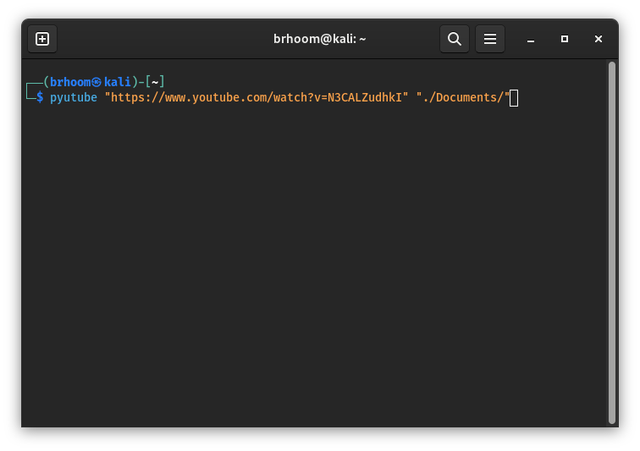
Download a video to a specific location
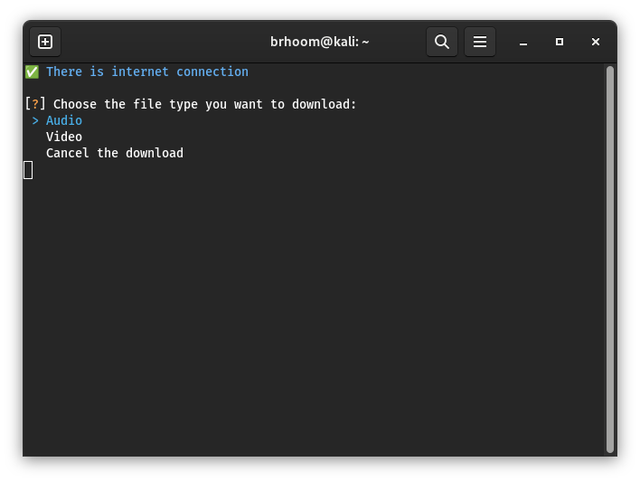
Choose what type to download
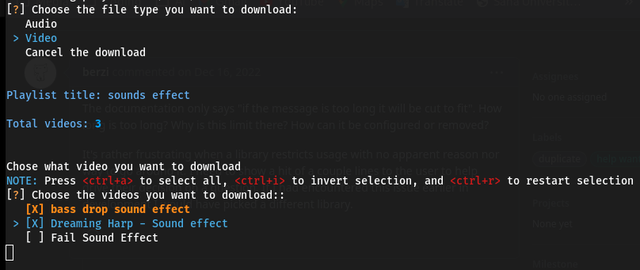
Choose a resolution when downloading video

Select playlist items to download
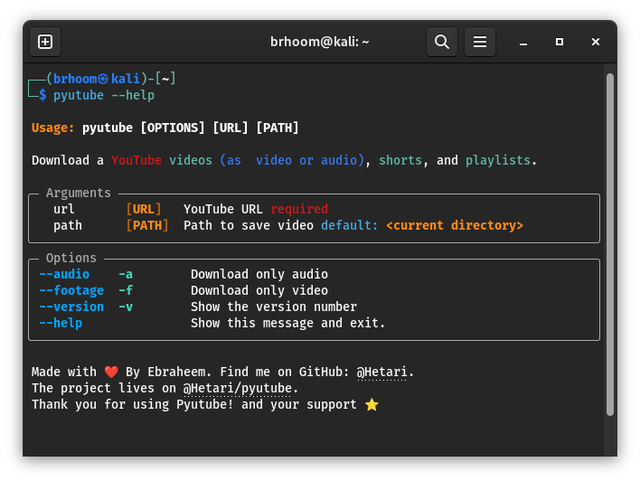
Need help? Run pyutube --help
⏳ Todo List
- Notification System
- Auto Update package if new version available
- Support Optional Numbering for Downloaded Playlist Videos
- Improve code health
- Support downloading sounds (WAV by default, MP3 optional)
- Support Subtitles Download
- Support setting for downloading folder
- Download Thumbnails with Videos and Audio
Release history Release notifications | RSS feed


Download files
Download the file for your platform. If you're not sure which to choose, learn more about installing packages.
Source Distribution
Built Distribution
Filter files by name, interpreter, ABI, and platform.
If you're not sure about the file name format, learn more about wheel file names.
Copy a direct link to the current filters
File details
Details for the file pyutube-1.6.0.tar.gz.
File metadata
- Download URL: pyutube-1.6.0.tar.gz
- Upload date:
- Size: 22.1 kB
- Tags: Source
- Uploaded using Trusted Publishing? No
- Uploaded via: twine/6.2.0 CPython/3.14.3
File hashes
| Algorithm | Hash digest | |
|---|---|---|
| SHA256 |
a1551346464b309fa99638d1809c3cab1378730e5706576b13c4bb7d238705de
|
|
| MD5 |
4bf8e96cd5e6616393fb51b43661848b
|
|
| BLAKE2b-256 |
79235ab445d5af6d5a846efeaf6bb0310af0d2699a6f49d8565e54da0ffca45c
|
File details
Details for the file pyutube-1.6.0-py3-none-any.whl.
File metadata
- Download URL: pyutube-1.6.0-py3-none-any.whl
- Upload date:
- Size: 26.1 kB
- Tags: Python 3
- Uploaded using Trusted Publishing? No
- Uploaded via: twine/6.2.0 CPython/3.14.3
File hashes
| Algorithm | Hash digest | |
|---|---|---|
| SHA256 |
74e3134c08b436b39b3b9a7cd69f5fdfd90b95e780ffcd949a0d3127e326db2b
|
|
| MD5 |
c49339f9fb84084b490b9cee31514f0e
|
|
| BLAKE2b-256 |
ec133e8dbcb5e5c83fdaac6532e34aa3b80a9ef8f25cc89c3ad1904cba080bc4
|






