

PyVista Gridder






Structured and unstructured mesh generation using PyVista for the Finite-Element (FEM), Finite-Difference (FDM), and Finite-Volume Methods (FVM).
Features
- Pre-Meshed Geometric Primitives: Create basic geometric objects with pre-configured meshes, using structured grids whenever possible.
- Line/Polyline Extrusion: Extrude lines or polylines into 2D structured quadrilateral grids.
- Surface Extrusion: Extrude surface meshes into 3D volumetric meshes while preserving cell types.
- 1.5D/2.5D Mesh Creation: Stack polylines or surfaces to build layered meshes, ideal for geological modeling and similar applications.
- 2D QuadTree Mesh Generation: Generate adaptive QuadTree meshes with fast 2:1 balancing, point/polyline refinement, and optional conformal/orthogonal polygonal export.
- 2D Delaunay Mesh Generation: Create constrained triangular or quad-recombined meshes via Gmsh, supporting embedded features, physical group tagging, and an API consistent with the QuadTree interface.
- 2D Voronoi Mesh Generation: Create 2D Voronoi meshes from a background mesh, with support for adding constraint points to define custom shapes.
- Mesh Merging: Combine multiple PyVista meshes into a single dataset and assign cell groups, leaving conformity checks to the user.
- Additional Grid Utility Functions: Includes tools to manipulate structured and unstructured grids.
Installation
The recommended way to install pyvista-gridder and all its dependencies is through the Python Package Index:
pip install pyvista-gridder
Otherwise, clone and extract the package, then run from the package location:
pip install .
To test the integrity of the installed package, check out this repository and run:
pytest
Examples
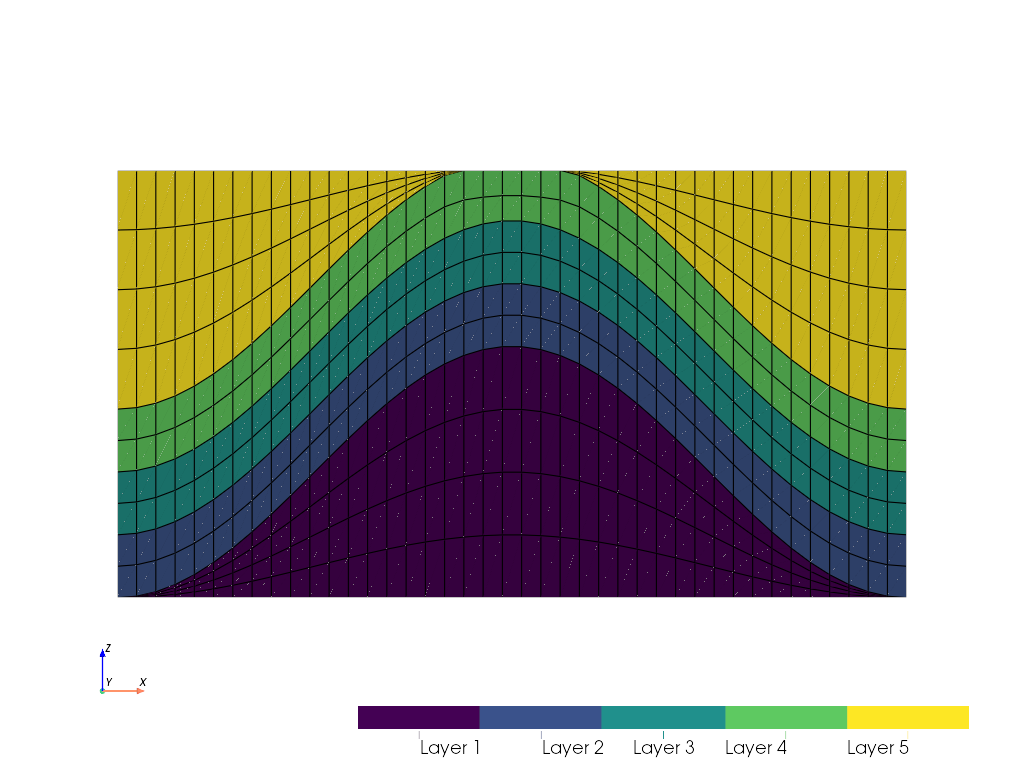
2D Structured Grid
import numpy as np
import pyvista as pv
import pvgridder as pvg

mesh = (
    pvg.MeshStack2D(pv.Line([-3.14, 0.0, 0.0], [3.14, 0.0, 0.0], resolution=41))
    .add(0.0)
    .add(lambda x, y, z: np.cos(x) + 1.0, 4, group="Layer 1")
    .add(0.5, 2, group="Layer 2")
    .add(0.5, 2, group="Layer 3")
    .add(0.5, 2, group="Layer 4")
    .add(lambda x, y, z: np.full_like(x, 3.4), 4, group="Layer 5")
    .generate_mesh()
)
mesh.plot(show_edges=True, scalars=pvg.get_cell_group(mesh))
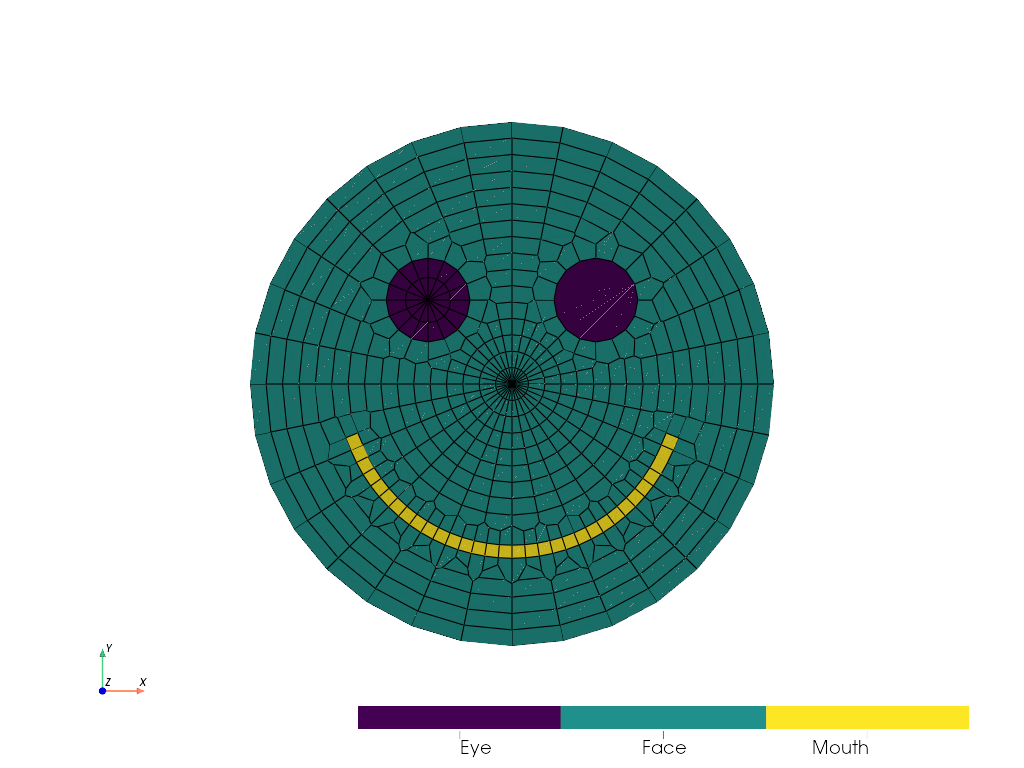
2D Voronoi Mesh
import numpy as np
import pyvista as pv
import pvgridder as pvg

smile_radius = 0.64
smile_points = [
    (smile_radius * np.cos(theta), smile_radius * np.sin(theta), 0.0)
    for theta in np.deg2rad(np.linspace(200.0, 340.0, 32))
]
mesh = (
    pvg.VoronoiMesh2D(pvg.Annulus(0.0, 1.0, 16, 32), default_group="Face")
    .add_circle(0.16, plain=False, resolution=16, center=(-0.32, 0.32, 0.0), group="Eye")
    .add_circle(0.16, plain=True, resolution=16, center=(0.32, 0.32, 0.0), group="Eye")
    .add_polyline(smile_points, width=0.05, group="Mouth")
    .generate_mesh()
)
mesh.plot(show_edges=True, scalars=pvg.get_cell_group(mesh))
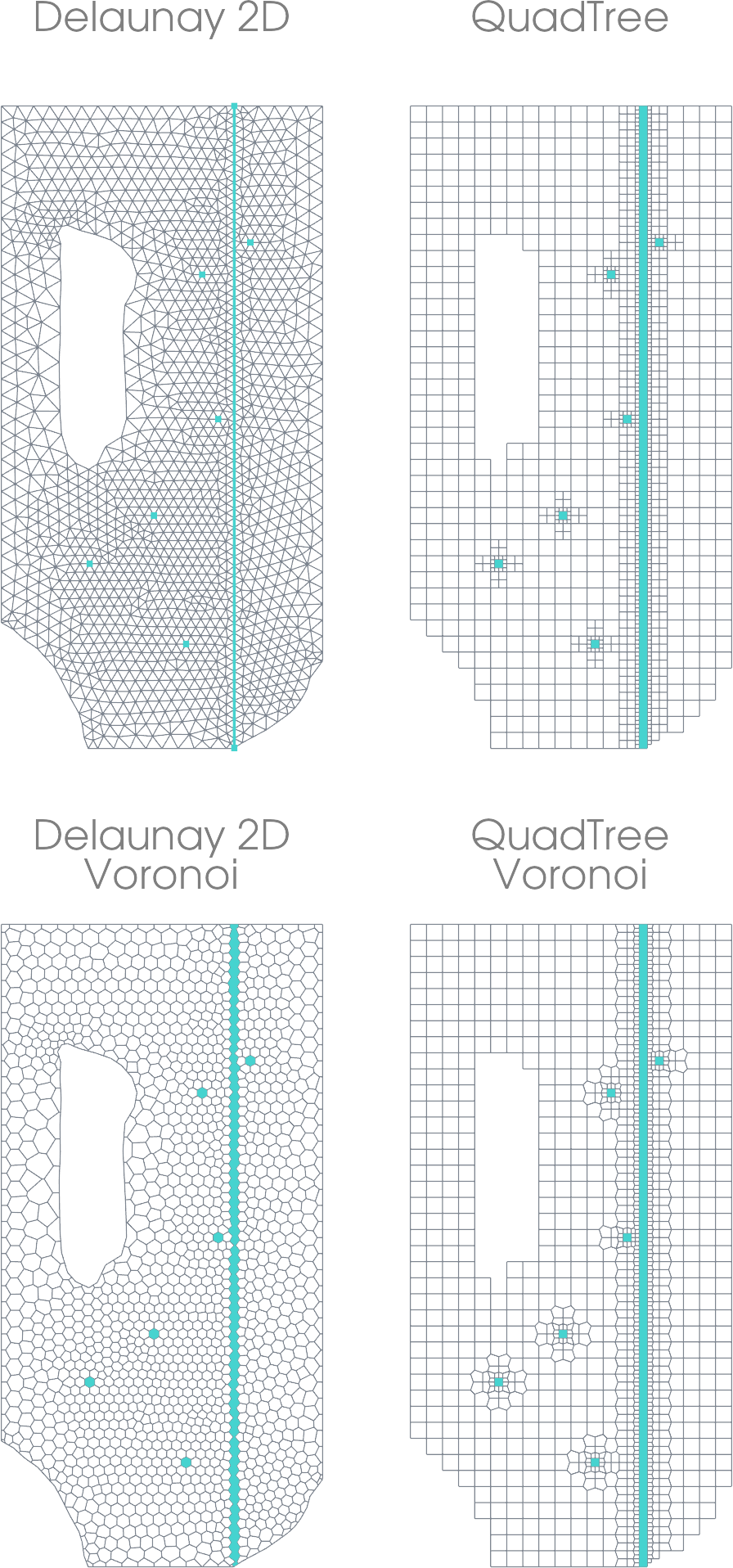
Freyberg Model
import pvgridder as pvg

outcrop = pvg.examples.freyberg.load_outcrop()  # shapely.Polygon
river = pvg.examples.freyberg.load_river()  # shapely.LineString
wells = pvg.examples.freyberg.load_wells()  # 2D array
tri = (
    pvg.DelaunayMesh2D(outcrop, cellsize=1000.0)
    .add_polyline(river, cellsize=150.0, growth=1.2, group="River")
    .add_points(wells, cellsize=150.0, constraint=6, group="Well")
    .generate_mesh()
)
quad = (
    pvg.QuadTree(pvg.Rectangle(5000.0, 10000.0, 20, 40), max_depth=2)
    .add_boundary_polygon(outcrop)
    .add_polyline(river, group="River")
    .add_points(wells, group="Well")
    .generate_mesh(balance=True, conformal=True)
)
tri_voro = pvg.VoronoiMesh2D(tri, preference="point").generate_mesh()
quad_voro = pvg.VoronoiMesh2D(quad, preference="cell").generate_mesh()
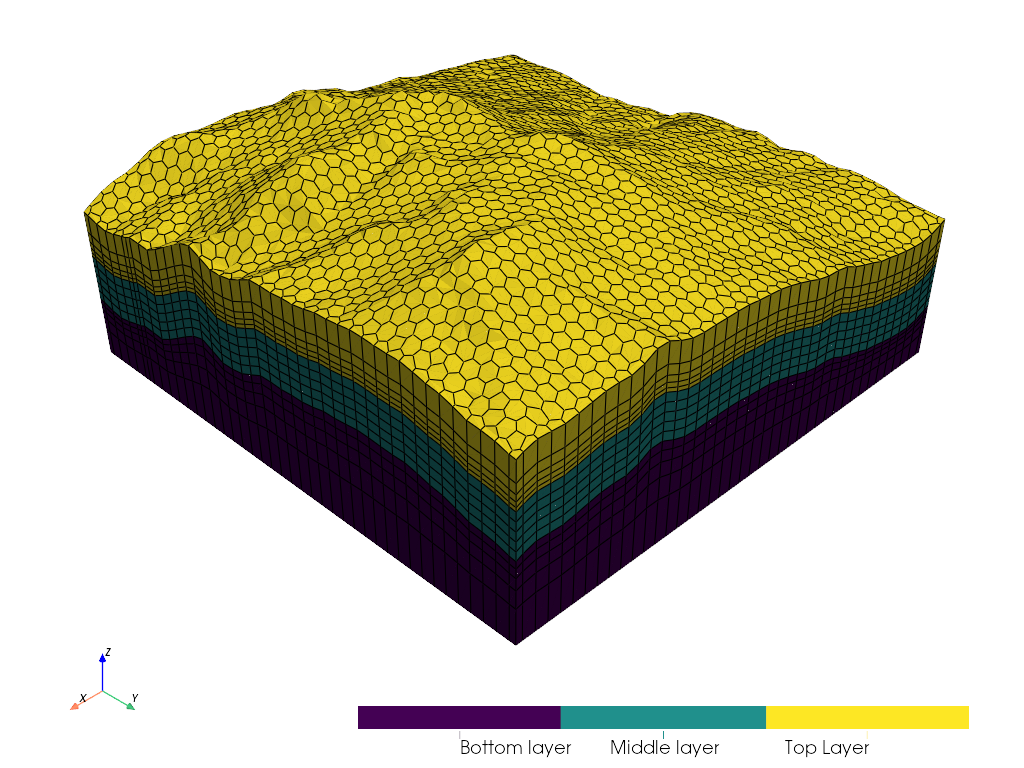
2.5D Geological Model
import pyvista as pv
import pvgridder as pvg

terrain = pv.examples.download_crater_topo().extract_subset(
    (500, 900, 400, 800, 0, 0), (10, 10, 1)
)
terrain_delaunay = pvg.Polygon(terrain, celltype="triangle")
terrain = terrain.cast_to_structured_grid().warp_by_scalar("scalar1of1")

mesh = (
    pvg.MeshStack3D(
        pvg.VoronoiMesh2D(terrain_delaunay, preference="point").generate_mesh()
    )
    .add(0.0)
    .add(terrain.translate((0.0, 0.0, -1000.0)), 5, method="log_r", group="Bottom layer")
    .add(500.0, 5, group="Middle layer")
    .add(terrain, 5, method="log", group="Top Layer")
    .generate_mesh()
)
mesh.plot(show_edges=True, scalars=pvg.get_cell_group(mesh))
Acknowledgements
This project is supported by Nagra (National Cooperative for the Disposal of Radioactive Waste), Switzerland.
1 maintainer

Metadata
1 maintainer
Release files for pyvista-gridder 0.7.1
For a detailed explanation of source distributions (sdists) and built distributions (wheels), please see the package formats documentation.
Source distribution (sdist)
| File | Size | Uploaded | Provenance | |
|---|---|---|---|---|
| pyvista_gridder-0.7.1.tar.gz | 87.2 kB | Without provenance | Details |
Built distribution (wheel)
| File | Interpreter | ABI | Platform | Reset |
|---|---|---|---|---|
| pyvista_gridder-0.7.1-py3-none-any.whl | Python 3 | none | any | Details |
Total release size: 161.1 kB
Release files / pyvista_gridder-0.7.1.tar.gz
| Download URL | pyvista_gridder-0.7.1.tar.gz |
|---|---|
| Size | 87.2 kB |
| Tags | Source |
|
SHA-256 checksum How to use checksums |
83edaaae8ffe7a4a3f197dfb2d54faf12b53c3299076d2175f57ef16d4e586f6
|
|
BLAKE2b-256 checksum How to use checksums |
8b874ab00245644225c9c1e01d5c77a19964fa62d2e34dfc8ecc45cb200553e5
|
| Upload date | |
|
Uploaded using Trusted Publishing? What is trusted publishing? |
No |
| Uploaded via |
twine/6.2.0 CPython/3.13.5
|
Release files / pyvista_gridder-0.7.1-py3-none-any.whl
| Download URL | pyvista_gridder-0.7.1-py3-none-any.whl |
|---|---|
| Size | 73.9 kB |
| Tags | Python 3 |
|
SHA-256 checksum How to use checksums |
847ba74bce086076ed19bdc44c88a3e8bd5f7a5cd7216c59d26c7f3a1193307c
|
|
BLAKE2b-256 checksum How to use checksums |
22a8a3ea9b73054bbaf108bd3a6ff9f8476126c88b7f23ef52d20cd8ac29a4ed
|
| Upload date | |
|
Uploaded using Trusted Publishing? What is trusted publishing? |
No |
| Uploaded via |
twine/6.2.0 CPython/3.13.5
|
Security for pyvista-gridder 0.7.1
Provenance
Provenance describes where a file came from. On PyPI, provenance is shared via attestations, which provide a verifiable record of the build or publishing details. View details, limitations and caveats.
No provenance found
None of the files in this release were uploaded with provenance metadata.
A note on package security
PyPI is a repository for distributing packages, not a service for auditing them. While third-party security researchers and our staff do their best to detect and remove malicious packages, PyPI cannot guarantee the quality, security or suitability of any given package.














