
Interactive 3D mesh visualization in the terminal using PyVista.
Project description
pyvista-tui
PyVista in the terminal.
Renders meshes directly in your terminal using off-screen VTK rendering, no GUI needed. Supports any file format PyVista can read (STL, VTK, PLY, OBJ, and dozens more). Works as a standalone CLI or directly in a standard Python or IPython interpreter.
[!NOTE] FYI, there is a legitimate feature request for this in PyVista, however this project is honestly one big April Fools joke that proved to have some actual utility.
Installation
pip install pyvista-tui
Requires Python 3.10+.
Quick Start
CLI
The CLI is exposed as both pyvista-tui and the shorter alias pvtui.
# Render a mesh inline
pvtui mesh.stl

# Interactive viewer with vim-style controls
pvtui mesh.vtk -i

# Color by a scalar array with a colormap
pvtui mesh.vtk --scalars temperature --cmap coolwarm

# Gallery view (6 axis-aligned views)
pvtui part.stl --gallery
Python API
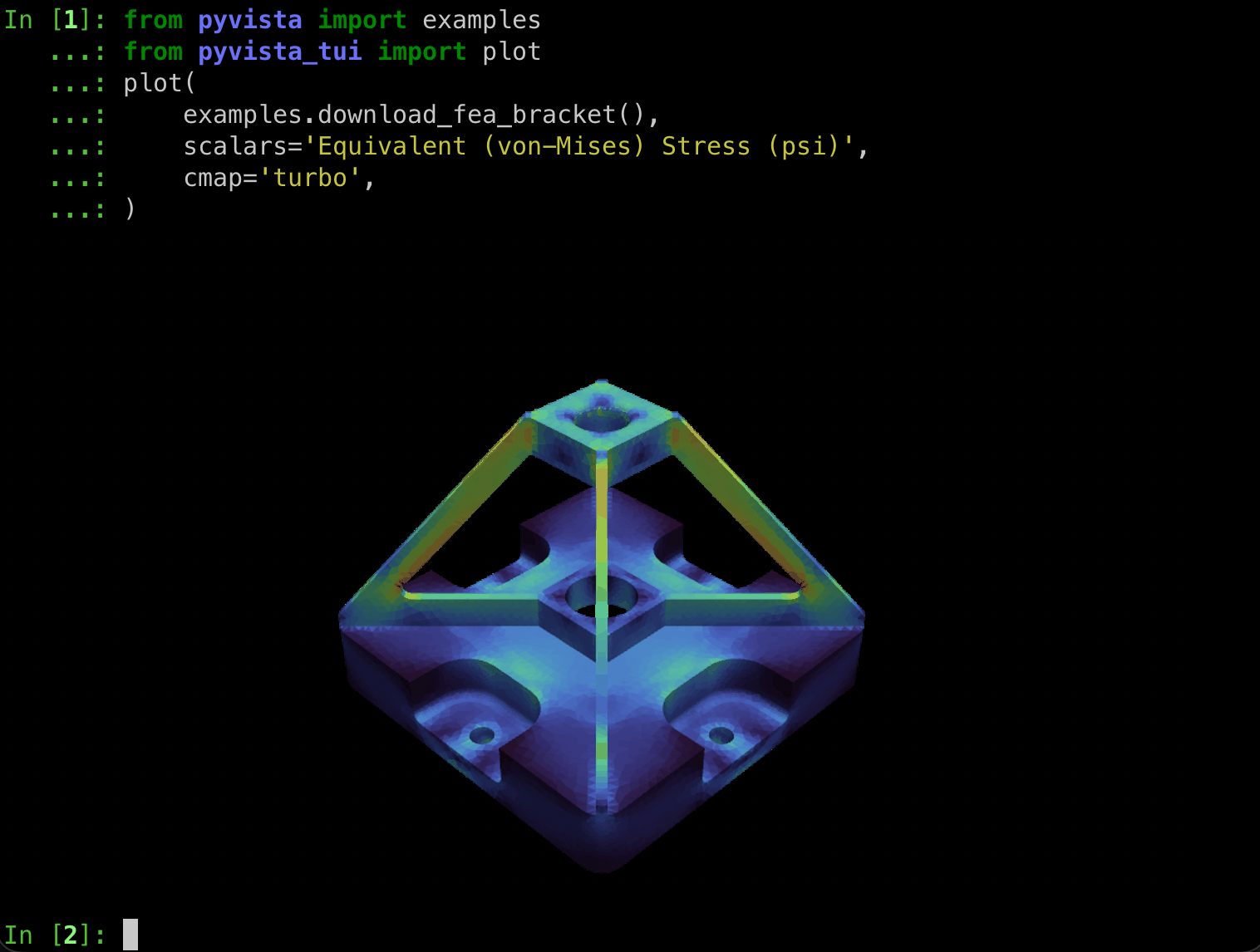
from pyvista import examples
from pyvista_tui import plot

plot(examples.download_fea_bracket(), scalars="Equivalent (von-Mises) Stress (psi)", cmap="turbo")
Themes
Text-based themes work in every terminal -- they use only Unicode and ANSI colors.
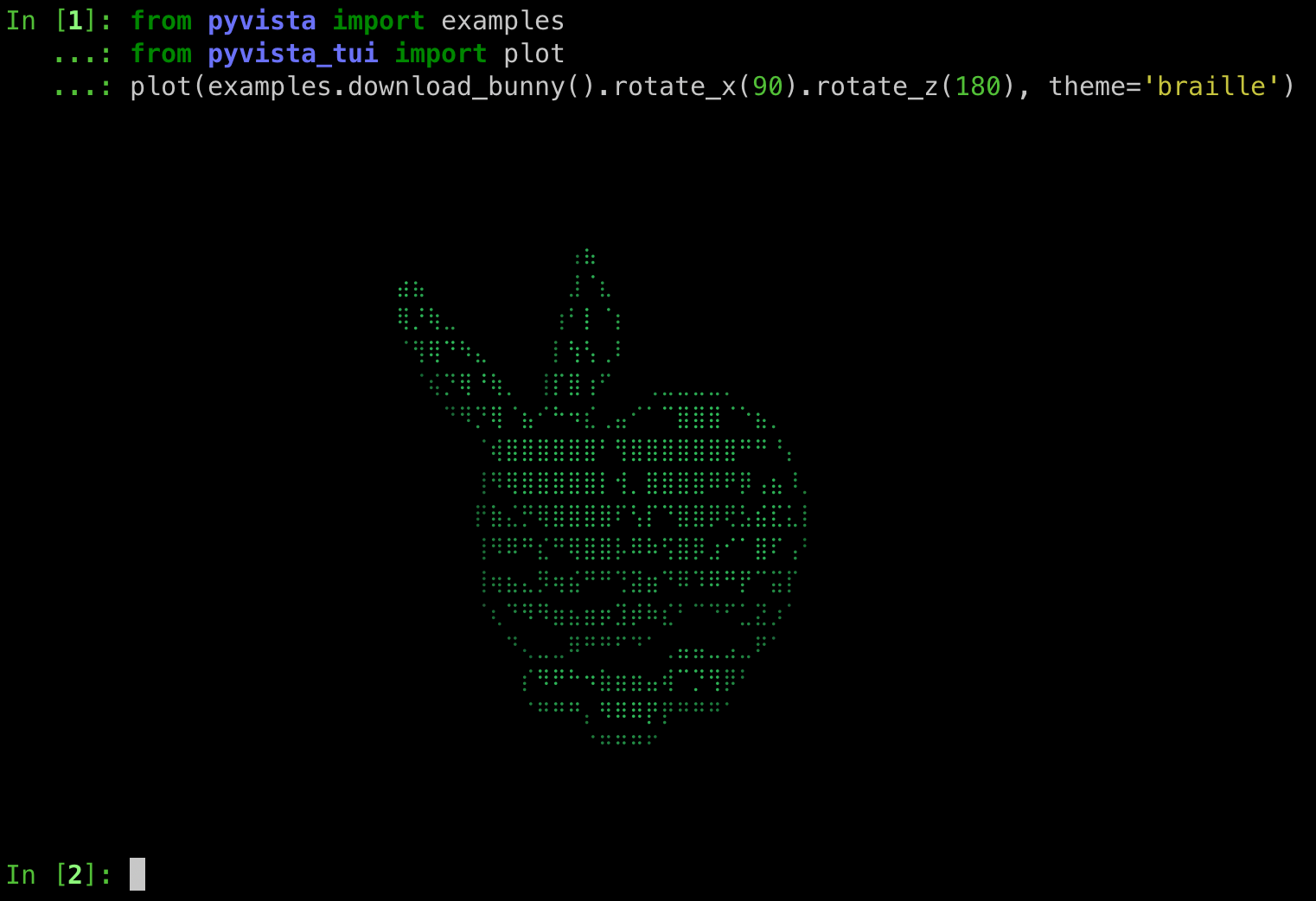
pyvista-tui mesh.vtk -t braille    # Unicode braille (8x density)
pyvista-tui mesh.vtk -t matrix     # Green katakana rain
pyvista-tui mesh.vtk -t blueprint  # Sobel edge detection on blue
All 9 themes are switchable at runtime with keys 1--9:
| Key | Theme | Description |
|---|---|---|
1 |
default |
Native terminal image (Sixel, iTerm2, or halfcell fallback) |
2 |
braille |
Unicode braille characters |
3 |
retro |
Colored ASCII art with neon green appearance |
4 |
matrix |
Matrix-style green katakana rain |
5 |
crt |
CRT scanlines with phosphor glow |
6 |
blueprint |
Sobel edge detection on deep blue |
7 |
phosphor |
Green monochrome P1 phosphor emulation |
8 |
amber |
Amber monochrome P3 phosphor emulation |
9 |
thermal |
False-color thermal camera heat map |
Interactive Mode
Launch with -i for full keyboard-driven 3D navigation.
Camera
| Key | Action |
|---|---|
h / l |
Rotate left / right |
j / k |
Rotate down / up |
H / L |
Pan left / right |
J / K |
Pan down / up |
i / o |
Zoom in / out |
r |
Reset camera |
x / y / z |
View along axis |
Display
| Key | Action |
|---|---|
w |
Toggle wireframe |
e |
Toggle edge visibility |
p |
Toggle parallel/perspective projection |
n |
Cycle scalars arrays |
d |
Toggle depth buffer visualization |
m |
Show mesh info |
s / S |
Toggle spin / reverse direction |
1--9 |
Switch theme |
q |
Quit |
Gallery View
Render 6 axis-aligned views in a single image:
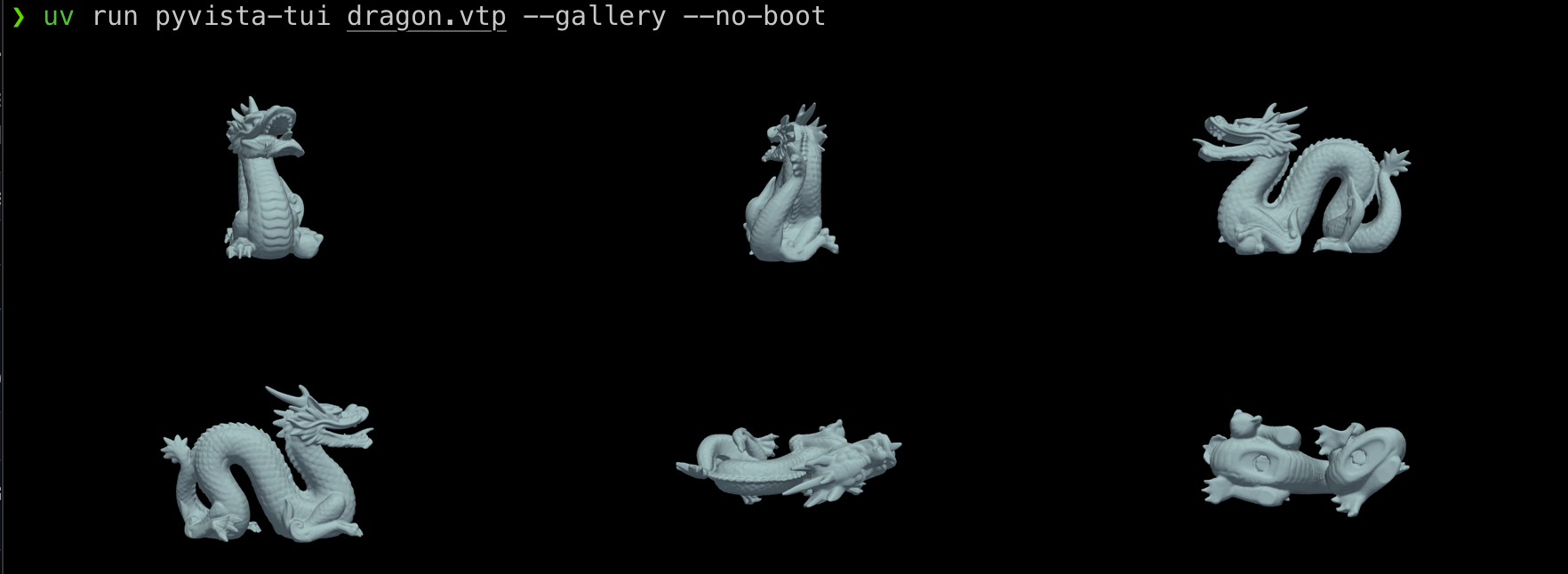
pyvista-tui mesh.vtk --gallery --center
All CLI Options
pyvista-tui [OPTIONS] MESH
pyvista-tui report
| Option | Short | Description |
|---|---|---|
--interactive |
-i |
Launch interactive TUI with camera controls |
--theme NAME |
-t |
Rendering theme (see above) |
--watch |
Auto-reload on file changes (static mode) | |
--wireframe |
Start in wireframe mode | |
--scalars NAME |
Scalars array to color by | |
--pick-scalars |
Choose a scalars array interactively | |
--color COLOR |
Solid mesh color (e.g. red, #00ff66) |
|
--cmap NAME |
Colormap for scalars (e.g. viridis) |
|
--clim MIN MAX |
Scalar range limits | |
--opacity FLOAT |
Mesh opacity (0.0--1.0) | |
--show-edges |
Show mesh edges | |
--edge-color |
Edge color | |
--smooth-shading |
Enable Phong shading | |
--center |
Center and normalize mesh in viewport | |
--background |
Background color (auto-detected by default) | |
--width PIXELS |
Render width | |
--height PIXELS |
Render height | |
--rainbow |
Rainbow wireframe (edges colored by Z) | |
--spin |
Auto-rotate turntable animation | |
--bounce |
DVD screensaver bounce animation | |
--save |
Save rendered image as PNG | |
--gallery |
Render 6 axis-aligned views as a grid | |
--rotate-gif PATH |
Save 360-degree turntable as animated GIF | |
--compare PATH |
Compare with a second mesh side-by-side | |
--export-ascii PATH |
Export ASCII art to text file | |
--boot |
Show retro boot sequence (always on in -i) |
Terminal Compatibility
[!CAUTION] I've only tested this in iTerm2 and VSCode's terminal on my Mac. Help me make it work in more terminals, contributions welcome!
pyvista-tui adapts rendering to your terminal's capabilities. For best results, use a terminal with native image protocol support.
[!TIP] Text-based themes (
-t braille,-t matrix, etc.) look good in any terminal including VS Code.
The terminal background color is auto-detected via OSC 11 so rendered images
blend with your color scheme. Override with --background.
[!CAUTION] VS Code's integrated terminal does not support any image protocol and falls back to low-resolution halfcell blocks.
Development
git clone https://github.com/pyvista/pyvista-tui.git
cd pyvista-tui
just sync       # Install dependencies into .venv via uv
just test       # Run tests with coverage
just lint       # Run pre-commit hooks (ruff, formatting)
just typecheck  # Run mypy
Project details


Download files
Download the file for your platform. If you're not sure which to choose, learn more about installing packages.
Source Distribution
Built Distribution
Filter files by name, interpreter, ABI, and platform.
If you're not sure about the file name format, learn more about wheel file names.
Copy a direct link to the current filters
File details
Details for the file pyvista_tui-0.1.4.tar.gz.
File metadata
- Download URL: pyvista_tui-0.1.4.tar.gz
- Upload date:
- Size: 54.1 kB
- Tags: Source
- Uploaded using Trusted Publishing? Yes
- Uploaded via: twine/6.1.0 CPython/3.13.12
File hashes
| Algorithm | Hash digest | |
|---|---|---|
| SHA256 |
b865f4261feef4d69d28c3a13cc553d6ced187b39cc73fc279fe529b29fce06b
|
|
| MD5 |
95e30556108dc1955257cfc9826ae9d4
|
|
| BLAKE2b-256 |
487cd529dde646d61efa6fd98218ea01910f96639872bca79feb1ee791cfeb9c
|
Provenance
The following attestation bundles were made for pyvista_tui-0.1.4.tar.gz:
Publisher:
ci.yml on pyvista/pyvista-tui
-
Statement:
-
Statement type:
https://in-toto.io/Statement/v1 -
Predicate type:
https://docs.pypi.org/attestations/publish/v1 -
Subject name:
pyvista_tui-0.1.4.tar.gz -
Subject digest:
b865f4261feef4d69d28c3a13cc553d6ced187b39cc73fc279fe529b29fce06b - Sigstore transparency entry: 1340454580
- Sigstore integration time:
-
Permalink:
pyvista/pyvista-tui@1824bd1391b934eca939faf7bb877ac534953fb2 -
Branch / Tag:
refs/tags/v0.1.4 - Owner: https://github.com/pyvista
-
Access:
public
-
Token Issuer:
https://token.actions.githubusercontent.com -
Runner Environment:
github-hosted -
Publication workflow:
ci.yml@1824bd1391b934eca939faf7bb877ac534953fb2 -
Trigger Event:
push
-
Statement type:
File details
Details for the file pyvista_tui-0.1.4-py3-none-any.whl.
File metadata
- Download URL: pyvista_tui-0.1.4-py3-none-any.whl
- Upload date:
- Size: 47.8 kB
- Tags: Python 3
- Uploaded using Trusted Publishing? Yes
- Uploaded via: twine/6.1.0 CPython/3.13.12
File hashes
| Algorithm | Hash digest | |
|---|---|---|
| SHA256 |
4a79038a8040ec68de116ccd5e3a331b53e6e592524177558f7f9b978ded0b9c
|
|
| MD5 |
109e91ced8a056739470ca631262a99c
|
|
| BLAKE2b-256 |
83783a2fd15baa77a4355d821bd808c6b516c436ae4802ce4e637a1f4a6df85c
|
Provenance
The following attestation bundles were made for pyvista_tui-0.1.4-py3-none-any.whl:
Publisher:
ci.yml on pyvista/pyvista-tui
-
Statement:
-
Statement type:
https://in-toto.io/Statement/v1 -
Predicate type:
https://docs.pypi.org/attestations/publish/v1 -
Subject name:
pyvista_tui-0.1.4-py3-none-any.whl -
Subject digest:
4a79038a8040ec68de116ccd5e3a331b53e6e592524177558f7f9b978ded0b9c - Sigstore transparency entry: 1340454582
- Sigstore integration time:
-
Permalink:
pyvista/pyvista-tui@1824bd1391b934eca939faf7bb877ac534953fb2 -
Branch / Tag:
refs/tags/v0.1.4 - Owner: https://github.com/pyvista
-
Access:
public
-
Token Issuer:
https://token.actions.githubusercontent.com -
Runner Environment:
github-hosted -
Publication workflow:
ci.yml@1824bd1391b934eca939faf7bb877ac534953fb2 -
Trigger Event:
push
-
Statement type:






