
VTK zstandard compression library.
Project description



Seamlessly compress VTK datasets using Zstandard.
Read in VTK datasets 37x faster, write 14x faster, all while using 28% less space versus VTK’s modern XML format.
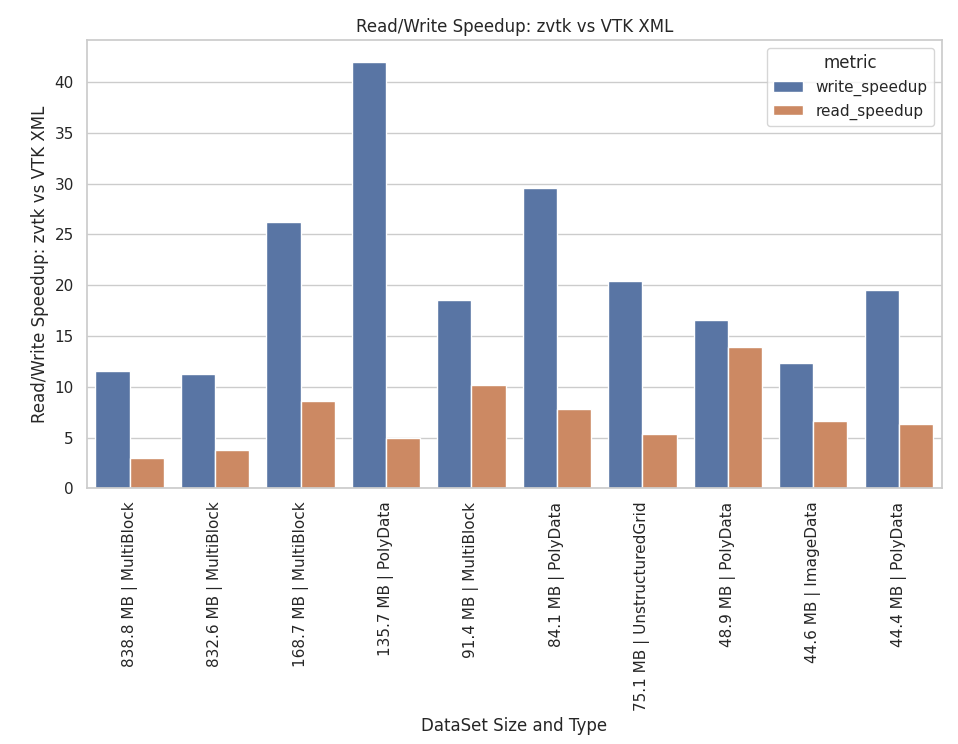
Read/Write Speedup and Compression Ratios
File Type / Method |
Write Speed |
Compression Ratio |
Notes |
|---|---|---|---|
Legacy VTK (.vtk) |
465 MB/s |
0.88 |
Significant overhead |
VTK XML, none |
256 MB/s |
0.70 |
Significant overhead |
VTK XML, zlib |
105 MB/s |
2.52 |
VTK Default |
VTK XML, lz4 |
401 MB/s |
1.47 |
|
VTK XML, lzma |
9.93 MB/s |
3.10 |
|
VTK HDF (.vtkhdf), lvl0 |
1733 MB/s |
0.93 |
No compression |
VTK HDF (.vtkhdf), lvl4 |
137 MB/s |
2.37 |
Default compression |
pyvista-zstd (.pv), lvl3 |
711 MB/s |
3.02 |
Threads = 0 |
pyvista-zstd (.pv), lvl3 |
1845 MB/s |
3.02 |
Threads = 4 |
pyvista-zstd (.pv), lvl22 |
15.8 MB/s |
3.79 |
All threads (-1) |
Usage
Install with:
pip install pyvista-zstdCompatible with all VTK dataset types. Uses PyVista under the hood.
import pyvista_zstd

# create and write out
ds = pv.Sphere()
pyvista_zstd.write(ds, "dataset.pv")

# read in and show these are identical
ds_in = pyvista_zstd.read("dataset.pv")
assert ds == ds_in
Alternative VTK example
import vtk
import pyvista_zstd

# create dataset using VTK source
sphere_source = vtk.vtkSphereSource()
sphere_source.SetRadius(1.0)
sphere_source.SetThetaResolution(32)
sphere_source.SetPhiResolution(32)
sphere_source.Update()

vtk_ds = sphere_source.GetOutput()

# read back
pyvista_zstd.write(vtk_ds, "sphere.pv")
ds_in = pyvista_zstd.read("sphere.pv")
PyVista Integration
When pyvista-zstd is installed, it automatically registers with PyVista’s reader registry. This means pv.read() handles .pv files directly:
import pyvista as pv

mesh = pv.read("dataset.pv")
No additional imports needed. This works via PyVista’s pyvista.readers entry point group, so the registration happens at install time.
Rational
VTK’s XML writer is flexible and supports most datasets, but its compression is limited to a single thread, has only a subset of compression algorithms, and the XML format adds significant overhead.
To demonstrate this, the following example writes out a single file without compression. This example requires pyvista>=0.47.0 for the compression parameter.
>>> import numpy as np
>>> import pyvista as pv
>>> ugrid = pv.ImageData(dimensions=(200, 200, 200)).to_tetrahedra()
>>> ugrid["pdata"] = np.random.random(ugrid.n_points)
>>> ugrid["cdata"] = np.random.random(ugrid.n_cells)
>>> nbytes = (
...     ugrid.points.nbytes
...     + ugrid.cell_connectivity.nbytes
...     + ugrid.offset.nbytes
...     + ugrid.celltypes.nbytes
...     + ugrid["pdata"].nbytes
...     + ugrid["cdata"].nbytes
... )
>>> print(f"Size in memory: {nbytes / 1024**2:.2f} MB")

Size in memory: 1993.89 MB
Save using VTK XML format
>>> from pathlib import Path
>>> import time
>>> tmp_path = Path("/tmp/ds.vtu")
>>> tstart = time.time()
>>> ugrid.save(tmp_path, compression=None)
>>> print(f"Written without compression in {time.time() - tstart:.2f} seconds")
>>> nbytes_disk = tmp_path.stat().st_size
>>> print(f" File size: {nbytes_disk / 1024**2:.2f} MB")
>>> print(f" Compression Ratio: {nbytes / nbytes_disk}")
>>> print()
Written without compression in 7.93 seconds
File size: 2858.94 MB
Compression Ratio: 0.6974239255525742This amounts to around a 43% overhead using VTK’s XML writer. Using the default compression we can get the file size down to 791 MB, but it takes 19 seconds to compress.
>>> tstart = time.time()
>>> ugrid.save(tmp_path, compression='zlib')  # default
>>> print(f"Compressed in {time.time() - tstart:.2f} seconds")
>>> nbytes_disk = tmp_path.stat().st_size
>>> print(f"  File size:            {nbytes_disk / 1024**2:.2f} MB")
>>> print(f"  Compression Ratio:    {nbytes / nbytes_disk}")
>>> print()

Compressed in 18.83 seconds
File size:            791.05 MB
Compression Ratio:    2.5205590295735663
Clearly there’s room for improvement here as this amounts to a compression rate of 105.89 MB/s.
VTK Compression with Zstandard: pyvista-zstd
This library, pyvista-zstd, writes out VTK datasets with minimal overhead and uses Zstandard for compression. Moreover, it’s been implemented with multi-threading support for both read and write operations.
Let’s compress that file again but this time using pyvista-zstd:
>>> import pyvista_zstd
>>> tmp_path = Path("/tmp/ds.pv")
>>> tstart = time.time()
>>> pyvista_zstd.write(ugrid, tmp_path)
>>> print(f"Compressed pyvista_zstd in {time.time() - tstart:.2f} seconds")
>>> nbytes_disk = tmp_path.stat().st_size
>>> print(f"  File size:            {nbytes_disk / 1024**2:.2f} MB")
>>> print(f"  Compression Ratio:    {nbytes / nbytes_disk}")

Compressed pyvista_zstd in 0.92 seconds
Threads:              -1
File size:            660.41 MB
Compression Ratio:    3.019175309922273
This gives us a write performance of 2167 MB/s using the default number of threads and compression level, resulting in a 20x speedup in write performance versus VTK’s XML writer. This speedup is most noticeable for larger files:
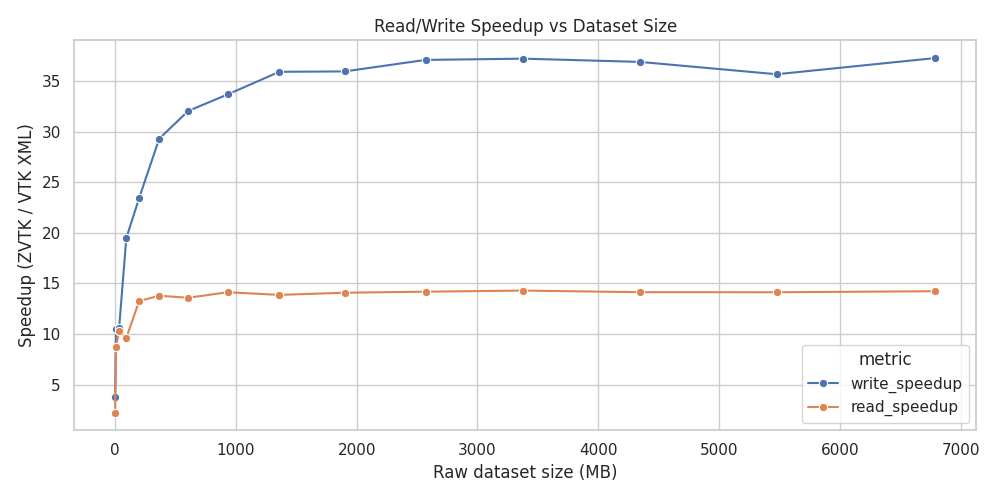
Speedup versus VTK’s XML
Even when disabling multi-threading we can still achieve excellent performance:
>>> tstart = time.time()
>>> pyvista_zstd.write(ugrid, tmp_path, n_threads=0)
>>> print(f"Compressed pyvista_zstd in {time.time() - tstart:.2f} seconds")
>>> nbytes_disk = tmp_path.stat().st_size
>>> print(f"  File size:            {nbytes_disk / 1024**2:.2f} MB")
>>> print(f"  Compression Ratio:    {nbytes / nbytes_disk}")

Compressed pyvista_zstd in 2.91 seconds
Threads:              0
File size:            660.47 MB
Compression Ratio:    3.0188911592355683
This amounts to a single-core compression rate of 685.18 MB/s, which is in agreement with Zstandard’s benchmarks.
Note that the benefit of threading drops off rapidly past 8 threads, though part of this is due to the performance versus efficiency cores of the CPU used for benchmarking (see below).
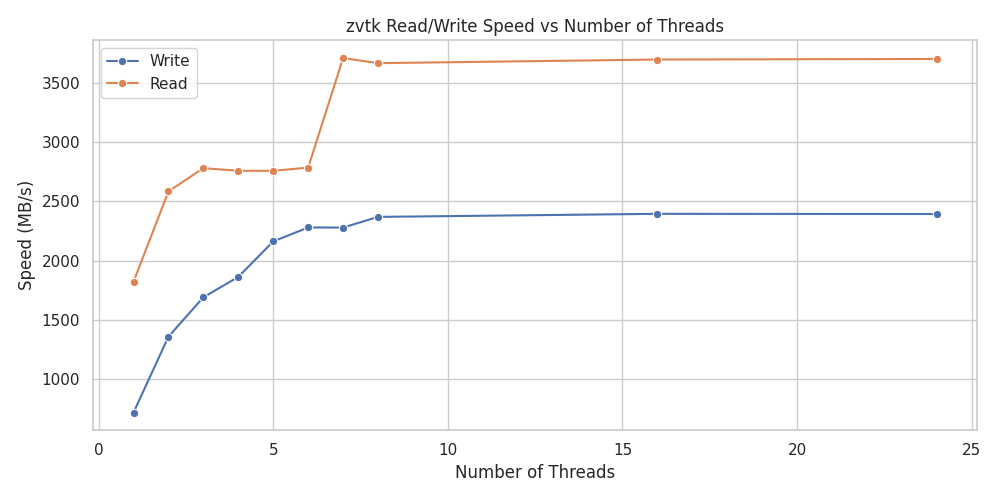
Read/Write Speed versus Number of Threads
Reading in the dataset is also fast. Comparing with VTK’s XML reader using defaults:
Read VTK XML

>>> print(f"Read VTK XML:")
>>> timeit pv.read("/tmp/ds.vtu")
6.22 s ± 9.21 ms per loop (mean ± std. dev. of 7 runs, 1 loop each)

Read zstd

>>> print(f"Read zstd:")
>>> timeit pyvista_zstd.read("/tmp/ds.pv")
563 ms ± 7.96 ms per loop (mean ± std. dev. of 7 runs, 1 loop each)
This is an 11x speedup for this dataset versus VTK’s XML, and it’s still fast even with multi-threading disabled:
>>> timeit pyvista_zstd.read("/tmp/ds.pv", n_threads=0)
1.11 s ± 4.51 ms per loop (mean ± std. dev. of 7 runs, 1 loop each)
This amounts to 1796 MB/s for a single core, which is also in agreement with Zstandard’s benchmarks.
Additionally, you can control Zstandard’s compression level by setting level=. A quick benchmark for this dataset indicates the defaults give a reasonable performance versus size tradeoff:
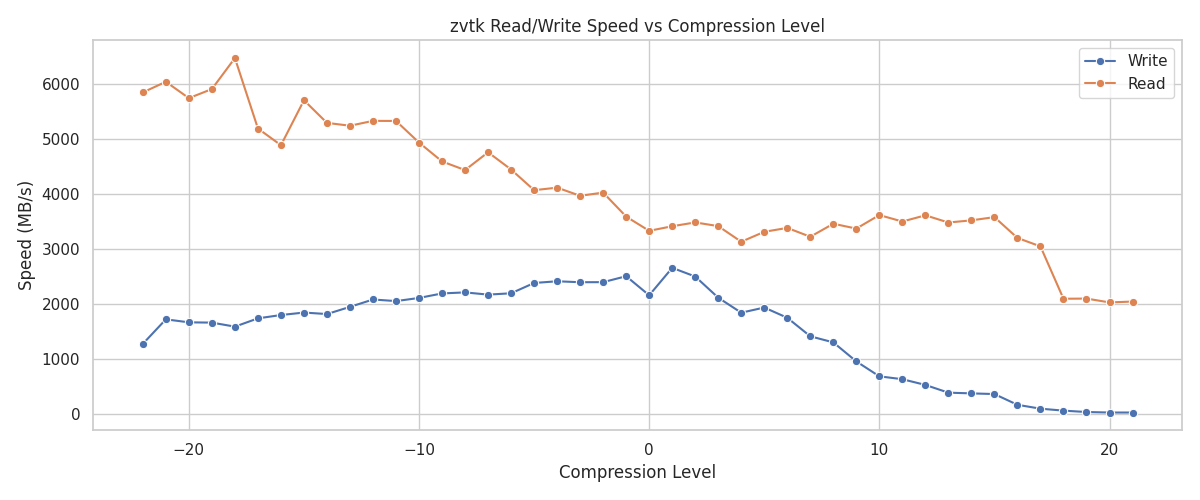
Read/Write Speed versus Compression Level
Note that both pyvista-zstd and VTK’s XML default compression give relatively constant compression ratios for this dataset across varying file sizes:
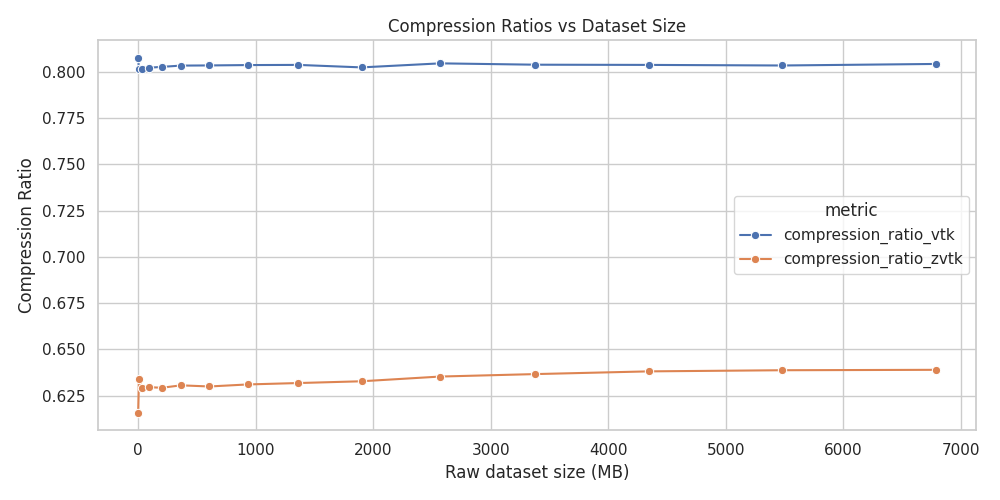
Compression Ratio versus VTK’s XML
These benchmarks were performed on an i9-14900KF running the Linux kernel 6.12.41 using zstandard==0.24.0 from PyPI. Storage was a 2TB Samsung 990 Pro without LUKS mounted at /tmp.
Additional Information
The benchmarks/ directory contains additional benchmarks using many datasets, including all applicable datasets in pyvista.examples (see PyVista Dataset Gallery).
Project details


Download files
Download the file for your platform. If you're not sure which to choose, learn more about installing packages.
Source Distribution
Built Distribution
Filter files by name, interpreter, ABI, and platform.
If you're not sure about the file name format, learn more about wheel file names.
Copy a direct link to the current filters
File details
Details for the file pyvista_zstd-0.2.3.tar.gz.
File metadata
- Download URL: pyvista_zstd-0.2.3.tar.gz
- Upload date:
- Size: 23.1 kB
- Tags: Source
- Uploaded using Trusted Publishing? Yes
- Uploaded via: twine/6.1.0 CPython/3.13.12
File hashes
| Algorithm | Hash digest | |
|---|---|---|
| SHA256 |
3f787c77090d127eeb031908cfeb6f0e45194281ddf478c76928938a5085530b
|
|
| MD5 |
cc617143dc50595395b294b156bcd59d
|
|
| BLAKE2b-256 |
be1f9083a2a71c41074266ca5f75c8733c6a0abb169396ede40d06285668b9fd
|
Provenance
The following attestation bundles were made for pyvista_zstd-0.2.3.tar.gz:
Publisher:
ci_cd.yml on pyvista/pyvista-zstd
-
Statement:
-
Statement type:
https://in-toto.io/Statement/v1 -
Predicate type:
https://docs.pypi.org/attestations/publish/v1 -
Subject name:
pyvista_zstd-0.2.3.tar.gz -
Subject digest:
3f787c77090d127eeb031908cfeb6f0e45194281ddf478c76928938a5085530b - Sigstore transparency entry: 1487000787
- Sigstore integration time:
-
Permalink:
pyvista/pyvista-zstd@2f8f6054ba62b324ad7f01c8bd01ca31c8c83378 -
Branch / Tag:
refs/tags/v0.2.3 - Owner: https://github.com/pyvista
-
Access:
public
-
Token Issuer:
https://token.actions.githubusercontent.com -
Runner Environment:
github-hosted -
Publication workflow:
ci_cd.yml@2f8f6054ba62b324ad7f01c8bd01ca31c8c83378 -
Trigger Event:
push
-
Statement type:
File details
Details for the file pyvista_zstd-0.2.3-py2.py3-none-any.whl.
File metadata
- Download URL: pyvista_zstd-0.2.3-py2.py3-none-any.whl
- Upload date:
- Size: 20.6 kB
- Tags: Python 2, Python 3
- Uploaded using Trusted Publishing? Yes
- Uploaded via: twine/6.1.0 CPython/3.13.12
File hashes
| Algorithm | Hash digest | |
|---|---|---|
| SHA256 |
9a578b6529b98f5327bf0bd2ab2c7dd171f13880b41e4f28d4ff143a97cec150
|
|
| MD5 |
70f4da4b1a5ad8c96705777293aa4d68
|
|
| BLAKE2b-256 |
855cc45d49ba0c930923e98a849a4a7cdeb7a5104d8c447cdd80caa8c1e0f0a1
|
Provenance
The following attestation bundles were made for pyvista_zstd-0.2.3-py2.py3-none-any.whl:
Publisher:
ci_cd.yml on pyvista/pyvista-zstd
-
Statement:
-
Statement type:
https://in-toto.io/Statement/v1 -
Predicate type:
https://docs.pypi.org/attestations/publish/v1 -
Subject name:
pyvista_zstd-0.2.3-py2.py3-none-any.whl -
Subject digest:
9a578b6529b98f5327bf0bd2ab2c7dd171f13880b41e4f28d4ff143a97cec150 - Sigstore transparency entry: 1487000835
- Sigstore integration time:
-
Permalink:
pyvista/pyvista-zstd@2f8f6054ba62b324ad7f01c8bd01ca31c8c83378 -
Branch / Tag:
refs/tags/v0.2.3 - Owner: https://github.com/pyvista
-
Access:
public
-
Token Issuer:
https://token.actions.githubusercontent.com -
Runner Environment:
github-hosted -
Publication workflow:
ci_cd.yml@2f8f6054ba62b324ad7f01c8bd01ca31c8c83378 -
Trigger Event:
push
-
Statement type:






