
PyWBT: Python Wrapper for WhiteboxTools








Overview
PyWBT is a Python wrapper for the WhiteboxTools (WBT) geospatial analysis library. It simplifies geospatial workflows by providing an easy-to-use Pythonic interface while maintaining a minimal dependency footprint—relying only on Python's built-in modules.
You can try PyWBT directly in your browser by clicking the Binder badge above.
Key Features
- Lightweight Python interface for WBT’s command-line tools.
- Seamless integration with WBT for custom geospatial workflows.
- Minimal dependencies for ease of installation.
- Optional
dem_utilsmodule for obtaining and preprocessing DEM data from 3DEP (US only at any resolutions) and NASADEM (global coverage at 30 m resolution).
Installation
Install PyWBT via pip or micromamba:
Using pip:
pip install pywbt
Using micromamba (or conda/mamba):
micromamba install -c conda-forge pywbt
Quick Start
PyWBT enables the execution of WBT tools with the whitebox_tools function, which
manages the environment setup, including downloading the WBT executable for your
operating system.
Basic Usage
The whitebox_tools function requires two key arguments:
src_dir: Directory containing the input files.arg_dict: Dictionary where tool names are keys and argument lists are values.
Example usage:
import pywbt
from pathlib import Path

src_dir = Path("path/to/input_files/")
wbt_args = {
    "BreachDepressions": ["-i=dem.tif", "--fill_pits", "-o=dem_corr.tif"],
    # Additional tools...
}

pywbt.whitebox_tools(src_dir, wbt_args)
For more detailed workflows and usage patterns, refer to the documentation.
Managing Output Files
To manage the output, specify which intermediate files to keep using the files_to_save
argument. Only those files listed will be saved, and the rest will be deleted. By
default, all files are stored in save_dir (the current working directory, by default).
Tool Lookup
Use list_tools and tool_parameters to explore available tools and their arguments.
Here's an example using pandas for querying tools:
import pandas as pd

tools = pd.Series(pywbt.list_tools())
tools[tools.str.contains("depression", case=False)]
Get parameters for a specific tool:
pd.DataFrame(pywbt.tool_parameters("BreachDepressions"))
DEM Utilities
The dem_utils module supports downloading and reading DEM data from 3DEP and NASADEM.
Install optional dependencies for DEM utilities:
pip install pywbt[dem]
Or using micromamba:
micromamba install -c conda-forge pywbt geopandas seamless-3dep planetary-computer pystac-client rioxarray
Example Workflow
We can delineate the stream network and calculate the Strahler stream order for a region in London using PyWBT, as shown below:
import pywbt
from pathlib import Path

bbox = (0.0337, 51.5477, 0.1154, 51.6155)
src_dir = Path("path/to/input_files/")
pywbt.dem_utils.get_nasadem(bbox, src_dir / "dem.tif", to_utm=True)
wbt_args = {
    "BreachDepressions": ["-i=dem.tif", "--fill_pits", "-o=dem_corr.tif"],
    "D8Pointer": ["-i=dem_corr.tif", "-o=fdir.tif"],
    "D8FlowAccumulation": ["-i=fdir.tif", "--pntr", "-o=d8accum.tif"],
    "ExtractStreams": [
        "--flow_accum=d8accum.tif",
        "--threshold=600.0",
        "-o=streams.tif",
    ],
    "StrahlerStreamOrder": [
        "--d8_pntr=fdir.tif",
        "--streams=streams.tif",
        "--zero_background",
        "-o=strahler.tif",
    ],
}
pywbt.whitebox_tools(src_dir, wbt_args)
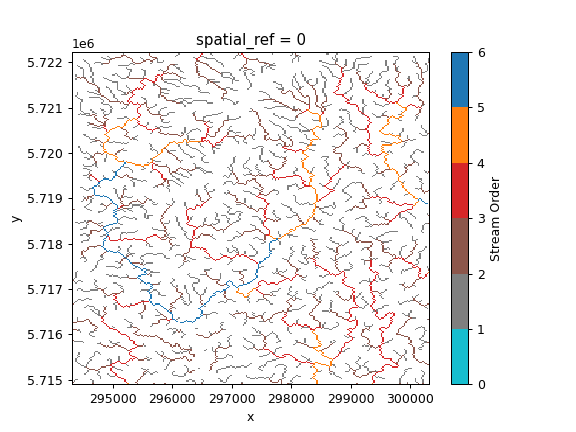
For more examples, visit the documentation.
Contributing
We welcome contributions! For guidelines, please refer to the CONTRIBUTING.md and CODE_OF_CONDUCT.md.
License
PyWBT is licensed under the MIT License. See the LICENSE file for details.
1 maintainer

Metadata
1 maintainer
Release files for pywbt 0.3.0
For a detailed explanation of source distributions (sdists) and built distributions (wheels), please see the package formats documentation.
Source distribution (sdist)
| File | Size | Uploaded | |
|---|---|---|---|
| pywbt-0.3.0.tar.gz | 3.4 MB | Details |
Built distribution (wheel)
| File | Interpreter | ABI | Platform | Reset |
|---|---|---|---|---|
| pywbt-0.3.0-py3-none-any.whl | Python 3 | none | any | Details |
Total release size: 3.4 MB
Release files / pywbt-0.3.0.tar.gz
| Download URL | pywbt-0.3.0.tar.gz |
|---|---|
| Size | 3.4 MB |
| Tags | Source |
|
SHA-256 checksum How to use checksums |
4b84dccd24cd5fda7d7812421cdb42ffd5ba9f38cfd013f31ff60d843be03cc0
|
|
BLAKE2b-256 checksum How to use checksums |
60f40298e963cc369e8d38c71cb9cfaa09f440220b01427f261e4446a1b005d2
|
| Upload date | |
|
Uploaded using Trusted Publishing? What is trusted publishing? |
Yes |
| Uploaded via |
twine/6.1.0 CPython/3.13.7
|
Provenance
Provenance describes where a file came from. On PyPI, provenance is shared via attestations, which provide a verifiable record of the build or publishing details. View details, limitations and caveats.


PyPI Publish Attestation
PyPI verified that this artifact, at this checksum, originated from the publisher listed below.
Signed by GitHub Actions, verified by PyPI on Sep 5, 2025.
Transparency logRelease files / pywbt-0.3.0-py3-none-any.whl
| Download URL | pywbt-0.3.0-py3-none-any.whl |
|---|---|
| Size | 16.5 kB |
| Tags | Python 3 |
|
SHA-256 checksum How to use checksums |
52de7af2661e94ad5b22a451f1b1c06eaf4b8b6722e8bf7bae27415c387dab40
|
|
BLAKE2b-256 checksum How to use checksums |
ec352315fcf9192096f034a90e37609051f5c7fa2cffc3a705091be5fa8485cc
|
| Upload date | |
|
Uploaded using Trusted Publishing? What is trusted publishing? |
Yes |
| Uploaded via |
twine/6.1.0 CPython/3.13.7
|
Provenance
Provenance describes where a file came from. On PyPI, provenance is shared via attestations, which provide a verifiable record of the build or publishing details. View details, limitations and caveats.
PyPI Publish Attestation
PyPI verified that this artifact, at this checksum, originated from the publisher listed below.
Signed by GitHub Actions, verified by PyPI on Sep 5, 2025.
Transparency log













