
PyWeb
Full-stack web apps in one Python file.
Server-rendered pages, a reactive UI compiled from Python, typed calls to your server, live data and streaming AI, with no JavaScript toolchain.





Documentation · Try it in your browser · Examples · Changelog
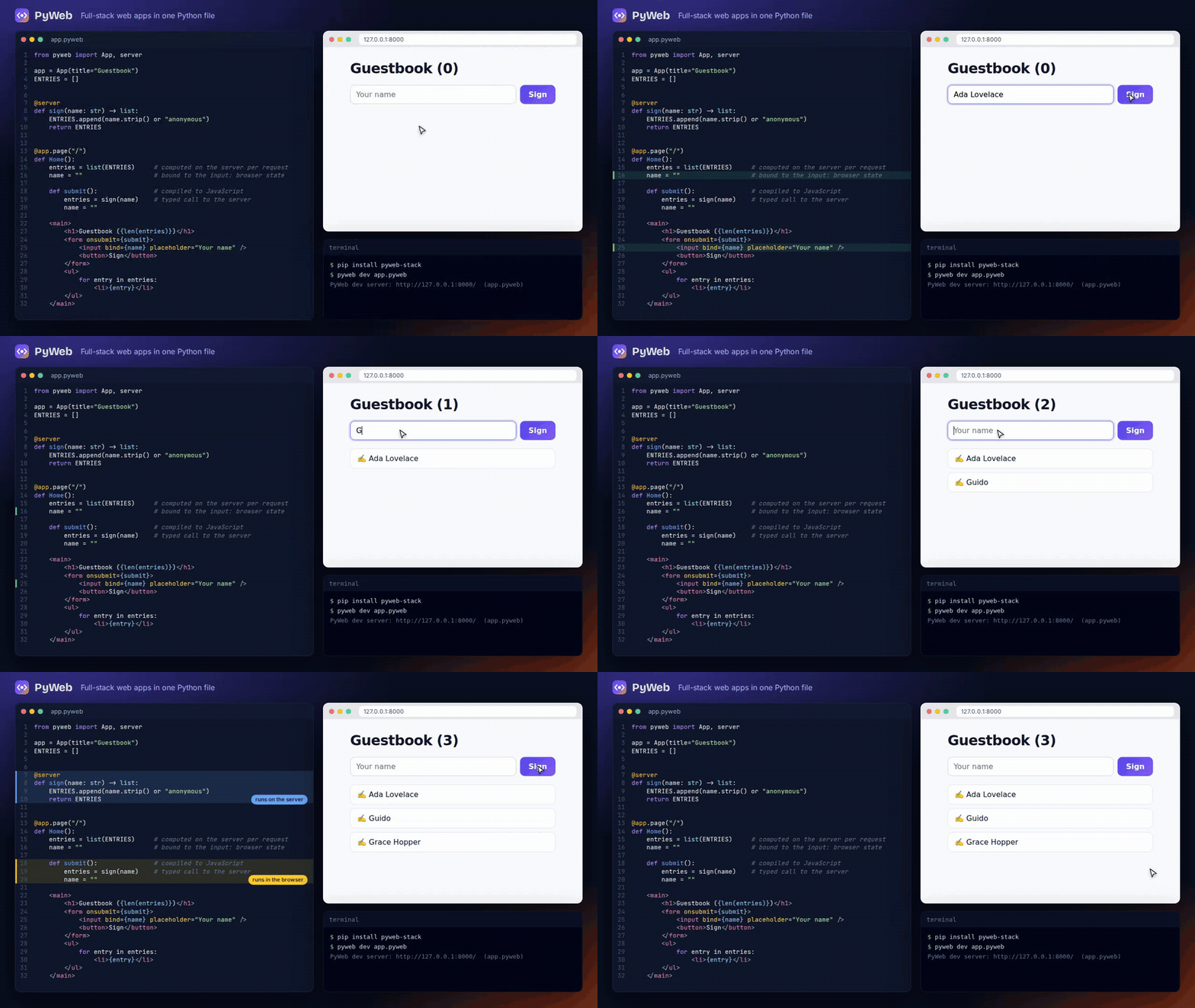
from pyweb import App, server

app = App(title="Guestbook")
ENTRIES = []


@server
def sign(name: str) -> list:
    ENTRIES.append(name.strip() or "anonymous")
    return ENTRIES


@app.page("/")
def Home():
    entries = list(ENTRIES)     # computed on the server per request
    name = ""                   # bound to the input: browser state

    def submit():               # compiled to JavaScript
        entries = sign(name)    # typed RPC to the server
        name = ""

    <main>
        <h1>Guestbook ({len(entries)})</h1>
        <form onsubmit={submit}>
            <input bind={name} placeholder="Your name" />
            <button>Sign</button>
        </form>
        <ul>
            for entry in entries:
                <li>{entry}</li>
        </ul>
    </main>
pip install pyweb-stack      # imported as `pyweb`
pyweb dev app.pyweb          # http://localhost:8000, with live reload
That's the whole app. The page is rendered on the server with real data,
the handler becomes a few hundred bytes of JavaScript, and sign() becomes
a validated JSON endpoint the browser calls for you.
What you get
Python on both sides, split by the compiler
You write one file. The compiler decides, line by line, what runs in the
browser and what stays on the server, and tells you why
(pyweb inspect). Variables your handlers change become reactive state;
everything else is computed on the server. Database handles, imports and
secrets can't leak into browser code: that's a compile error with a line
number, not a production incident.
Pages that follow the database
from pyweb import App, live
from pyweb.db import connect

app = App()
db = connect("sqlite:///shop.db")


@app.page("/orders")
def Orders():
    orders = live(db, "select item, status from orders order by id desc limit 20")

    <ul>
        for o in orders:
            <li>{o["item"]}: {o["status"]}</li>
    </ul>
Any write through pyweb.db updates every open window. Identical queries
run once for all viewers, and it works across processes with Redis.
Live data →
AI features that stream
from pyweb import App, Markdown, server

app = App()


@server
def answer(question: str):
    for piece in ("**Streaming**", " from", " the", " server."):   # your model's tokens
        yield piece


@app.page("/")
def Ask():
    question = ""
    reply = ""
    stream = None

    async def ask():
        reply = ""
        stream = answer(question)
        async for piece in stream:
            reply += piece

    def stop():
        if stream:
            stream.cancel()

    <input bind={question} />
    <button onclick={ask}>Ask</button>
    <button onclick={stop}>Stop</button>
    <Markdown text={reply} />
yield on the server, async for in the browser. Stop really stops:
the generator on the server is closed, so the model call ends too.
<Markdown> is safe on model output. Start from
pyweb new mychat --template ai-chat (Anthropic, any OpenAI-compatible
server, or a built-in demo model). Building AI apps →
Real multi-page apps
from pyweb import App

app = App(title="Plant shop")


@app.layout
def Shell(children):
    cart = 0

    def add():
        cart += 1

    <nav><a href="/">Home</a> <a href="/plants">Plants</a> <button onclick={add}>Cart {cart}</button></nav>
    {children}


@app.page("/plants", description="Every plant we sell")
def Plants(light: str = "", max_price: int = 0):    # typed query parameters
    <h1>Plants</h1>
Layouts keep their state while links load without a full page reload
(with prefetching and scroll restore). Links to the current page are
marked automatically, every page gets its own title, description and
social tags, and 404/500 pages are written in .pyweb too.
Layouts & navigation →
npm packages, without Node.js
pyweb add chart.js/auto
Chart = npm("chart.js/auto")
PyWeb downloads the package from the npm registry, checks its checksum,
keeps only the files the browser loads and pins them in pyweb.lock.
There's no node_modules and no bundler, and pages that don't use a
package don't load it. npm packages →
Small, fast and boring to run
- Every page is server-rendered: complete HTML on first paint, then hydrated in place. Pages without interactivity ship no JavaScript.
- Small: a typical interactive page is under 1 KB of code plus a ~15 KB (gzip) runtime that's cached across pages.
- Stateless servers: signed-cookie sessions and plain JSON over HTTP
scale behind any load balancer. Run
pyweb serve, uvicorn/gunicorn (ASGI) or the generated Dockerfile. - Secure defaults: escaped output, a strict Content Security Policy, CSRF and origin checks on RPC, rate limits and request size limits.
See it
| Live dashboard | Streaming AI chat | Multi-page site |
|---|---|---|
 |
 |
 |
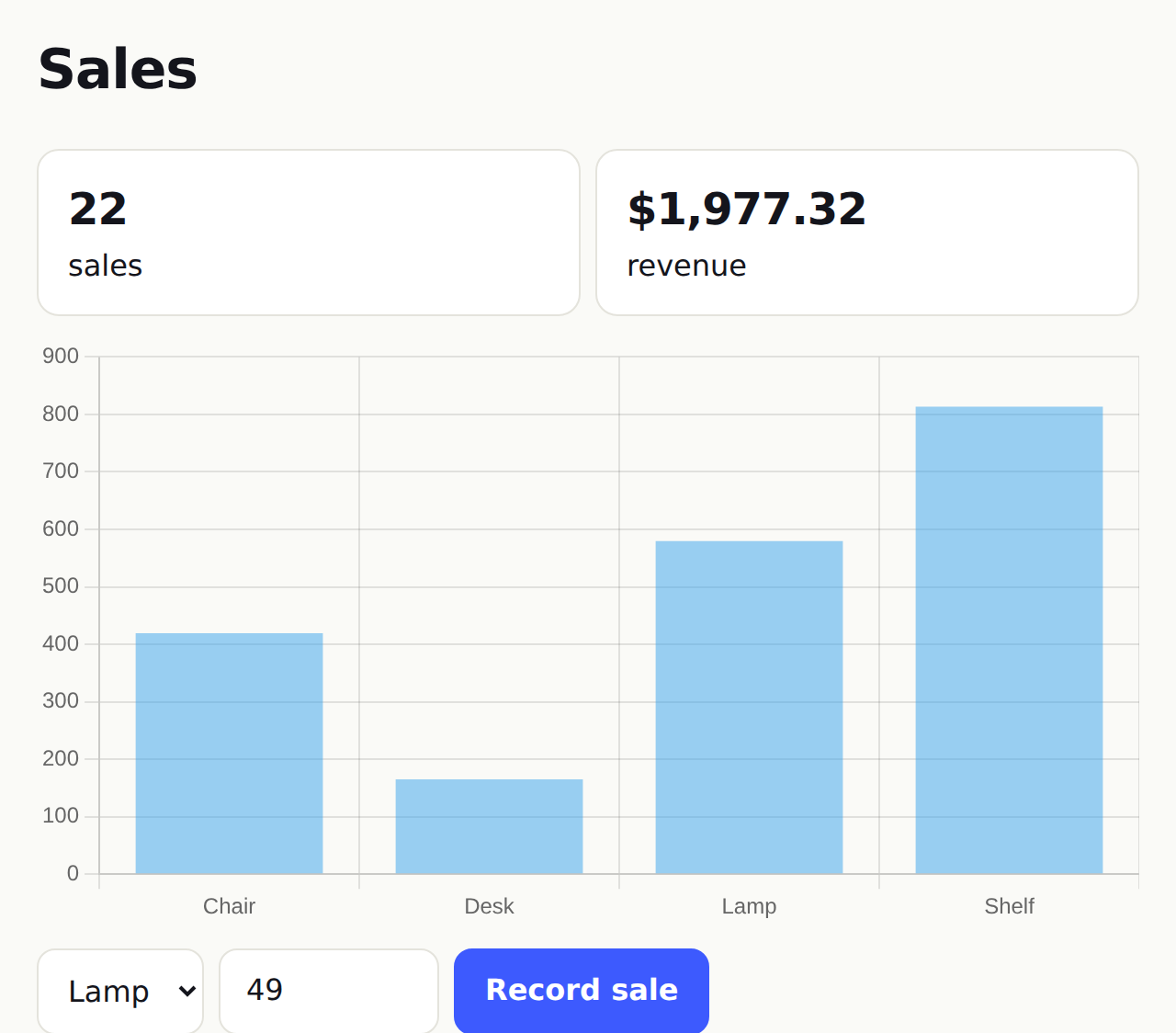
live() queries + Chart.js from npm |
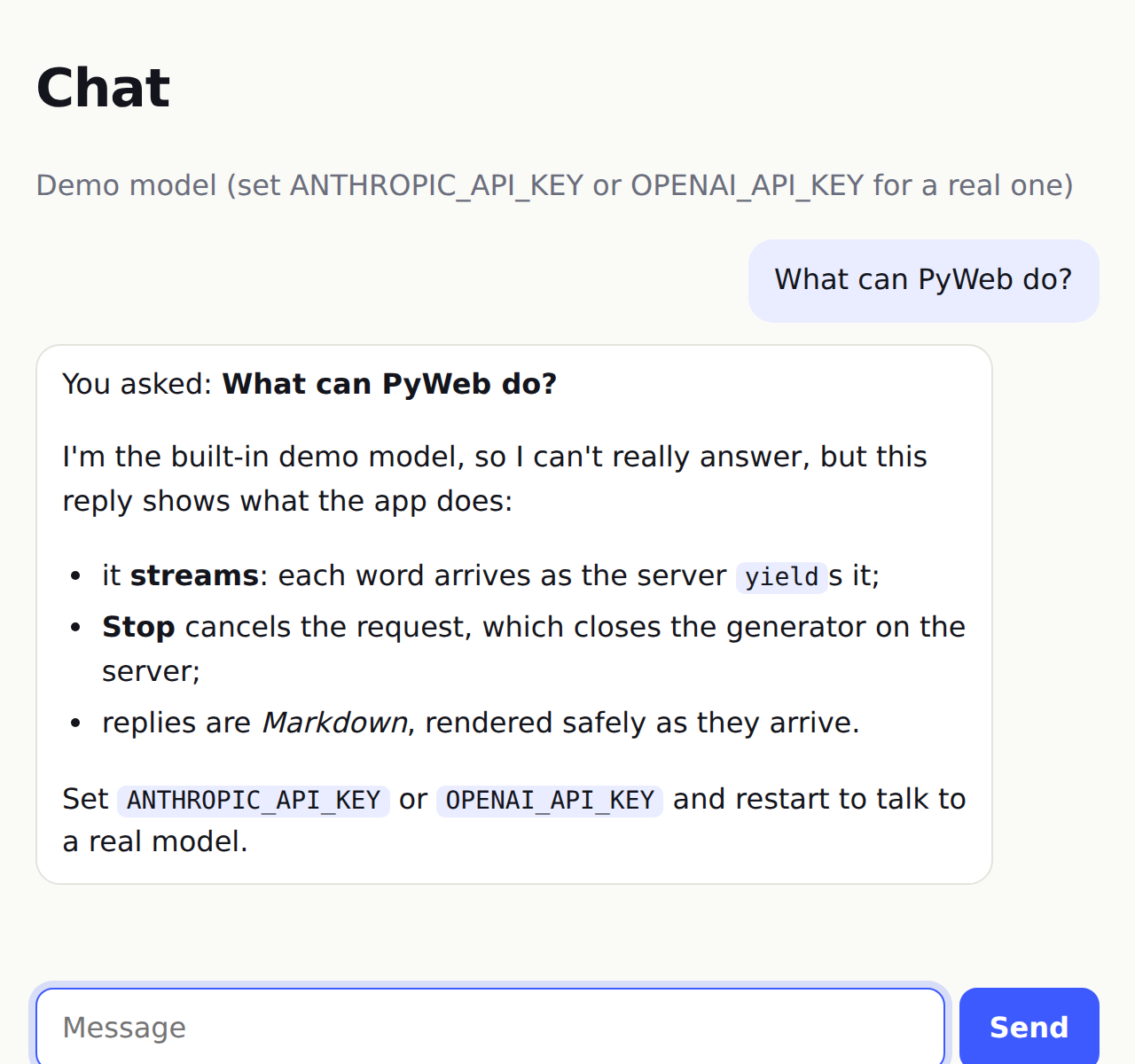
yield + Stop + <Markdown> |
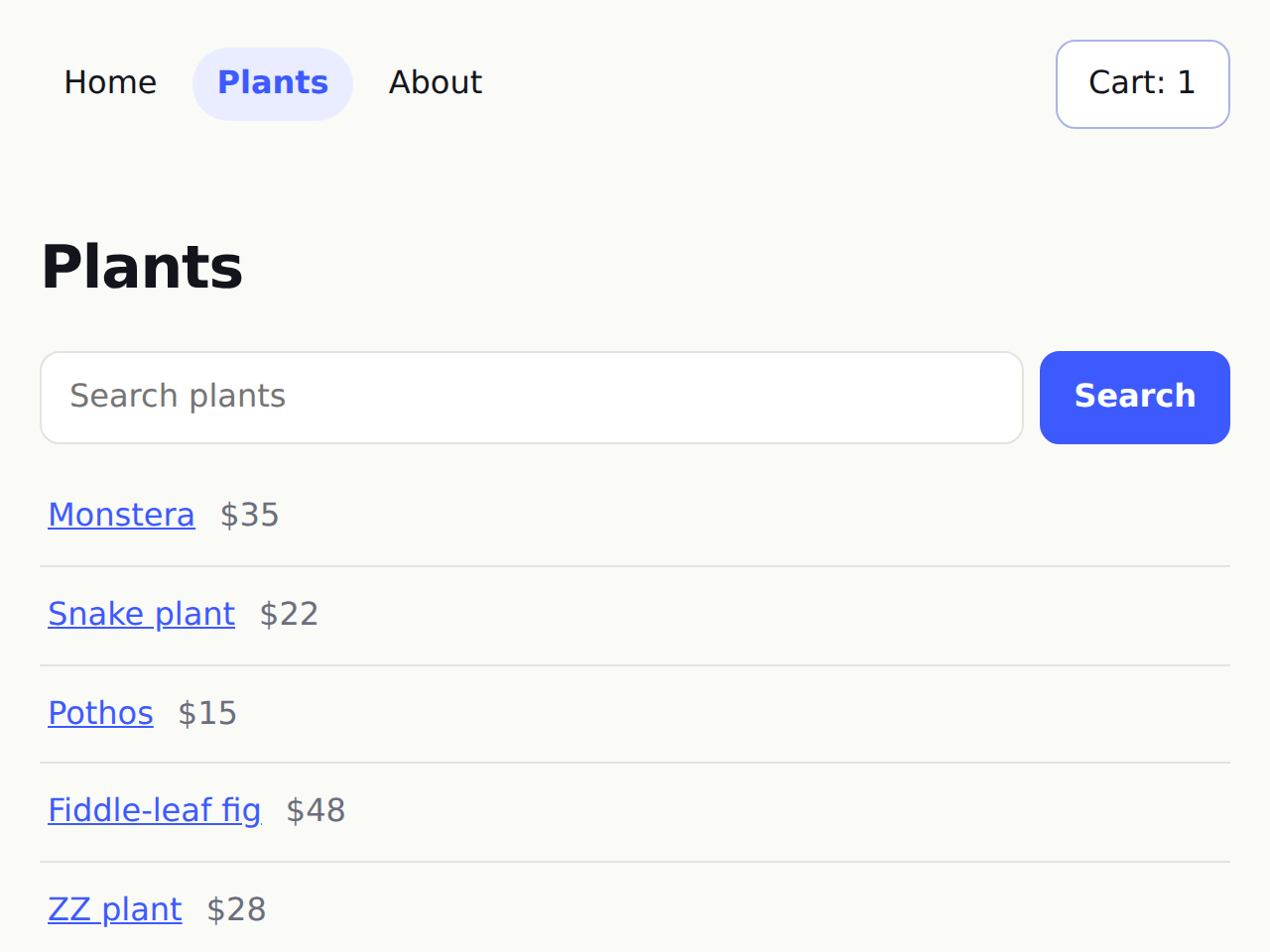
layout, query parameters, 404 page |
Or open the playground: it runs the real PyWeb, server functions included, in your browser.
Quick start
pip install pyweb-stack
pyweb new myapp --template todo      # blank | counter | todo | blog | auth | chat | ai-chat
cd myapp
pyweb dev app.pyweb                  # edit app.pyweb; the page reloads on save
Then:
pyweb check app.pyweb                # compile + security checks (CI-friendly exit codes)
pytest                               # new apps come with test_app.py
pyweb build app.pyweb --production   # hashed, minified, self-contained dist/
pyweb serve dist                     # production server
The quickstart and tutorial take it from there.
How it works
                      app.pyweb
                          │
                  ┌───────┴────────┐  compiler: parses Python + markup, decides
                  ▼                ▼  where each name runs, checks the boundary
       ┌─────────────────┐  ┌─────────────────────────┐
       │  browser module │  │  server                 │
       │  signals, DOM   │  │  page bodies, @server   │
       │  updates, your  │  │  functions, database,   │
       │  handlers in JS │  │  sessions, secrets      │
       └────────┬────────┘  └────────────┬────────────┘
                └──── typed JSON RPC ────┘
                     (streams and live updates over the same HTTP)
The architecture overview goes through each stage.
Build it with AI
PyWeb ships an MCP server so AI assistants can scaffold, check, inspect, render, screenshot and test your app, add npm packages, and map its routes. Errors come back as line numbers with fix hints:
claude mcp add pyweb -- pyweb mcp # Claude Code
{ "mcpServers": { "pyweb": { "command": "pyweb", "args": ["mcp"] } } }
(the JSON is for Cursor, Claude Desktop, VS Code, Windsurf and other MCP
clients). New projects include AGENTS.md and CLAUDE.md, and the docs
site publishes llms-full.txt.
AI assistants & MCP →
Editor support
The VS Code extension adds highlighting, errors as
you type, hover that shows where code runs (and the signatures of npm
packages), completion and go to definition. Any other LSP editor can run
pyweb lsp (setup).
Examples
Each runs with pyweb dev examples/<name>/app.pyweb and is tested in a
real browser by the test suite.
| Example | Shows |
|---|---|
counter |
signals, computed values, binding a number input |
todo |
components, list mutation, filters, keyed lists |
blog |
SQL database, server functions, route parameters, 404s, validation errors |
auth |
registration, password hashing, sessions, protected pages |
chat |
route parameters, shared server state, live updates with publish/subscribe |
showcase |
everything on one page, with a stylesheet |
site |
a layout, client-side navigation, query parameters, page titles, a 404 page |
dashboard |
live queries and a Chart.js chart from npm, in every open window |
ai-chat |
streaming AI replies with Stop and Markdown (Anthropic, OpenAI-compatible or a demo model) |
Documentation
| Start | Introduction · Quickstart · Tutorial · AI assistants & MCP |
| Language | .pyweb files · State & reactivity · Python in the browser · npm packages |
| Server | Server functions & RPC · Pages & routing · Layouts & navigation · Data · Live data · Building AI apps · Auth |
| Ship | Testing · Deployment · Security · CLI |
| Reference | Recipe: wallets & web3 · Toolkit & stability · Limitations & roadmap · Architecture · Changelog |
The same docs are published at maanavkrishna.github.io/PyWeb, with compiler output shown next to each example.
Is it for you?
Good fit: internal tools, admin panels, dashboards, CRUD apps, AI features, small SaaS products and content sites with interactive parts, built by people who'd rather stay in Python.
Not a fit: large client-heavy single-page apps built around a JavaScript component framework (use React, Svelte or Vue), or running scientific Python in the browser (use Pyodide or PyScript). See the introduction and the current limitations.
Status
PyWeb is in beta (0.x). The language, server API, RPC protocol and CLI
are documented and tested, and changes to them are announced in the
changelog (see stability).
Upgrade with pip install -U pyweb-stack.
| Version | Highlights |
|---|---|
| 0.4 | npm packages without Node, layouts and client-side navigation, streaming server functions and <Markdown> for AI apps, live queries, page head tags, .pyweb error pages; 0.4.1: richer MCP tools; 0.4.2: VS Code run, new-app and MCP commands; 0.4.3: fixes, security hardening, gzip and caching |
| 0.3 | Hydration, live updates (SSE), multi-file apps, language server + VS Code extension, browser playground, faster rendering, screenshot/test MCP tools |
| 0.2 | MCP server for AI assistants, AI guide, project templates, AGENTS.md/CLAUDE.md, llms.txt |
| 0.1 | First public release: compiler, reactive runtime, server rendering, typed RPC, sessions, databases, CLI |
The test suite covers the parser, the Python→JavaScript translation (differentially, against CPython), the reactive runtime, server rendering, RPC, streaming, live queries, client-side navigation, every example app in Chromium, the playground on Pyodide, and the database/Redis layers against real Postgres, MySQL and Redis servers, on Python 3.10–3.13.
Contributing
Issues and pull requests are welcome: see CONTRIBUTING.md. Security reports: SECURITY.md.
Built by MaanavKrishna. MIT licensed.
1 maintainer

Metadata
1 maintainer
Release files for pyweb-stack 0.4.3
For a detailed explanation of source distributions (sdists) and built distributions (wheels), please see the package formats documentation.
Source distribution (sdist)
| File | Size | Uploaded | |
|---|---|---|---|
| pyweb_stack-0.4.3.tar.gz | 285.0 kB | Details |
Built distribution (wheel)
| File | Interpreter | ABI | Platform | Reset |
|---|---|---|---|---|
| pyweb_stack-0.4.3-py3-none-any.whl | Python 3 | none | any | Details |
Total release size: 515.5 kB
Release files / pyweb_stack-0.4.3.tar.gz
| Download URL | pyweb_stack-0.4.3.tar.gz |
|---|---|
| Size | 285.0 kB |
| Tags | Source |
|
SHA-256 checksum How to use checksums |
250744dfbf7f806192f054d9322aa406cca740280df81f5879b552bcb3b84003
|
|
BLAKE2b-256 checksum How to use checksums |
f1f32a8ed77cc069331ec83c4b3adcfd257345e07f9ffc5753fb7b4ed9fd7d16
|
| Upload date | |
|
Uploaded using Trusted Publishing? What is trusted publishing? |
Yes |
| Uploaded via |
twine/7.0.0 CPython/3.13.14
|
Provenance
Provenance describes where a file came from. On PyPI, provenance is shared via attestations, which provide a verifiable record of the build or publishing details. View details, limitations and caveats.


PyPI Publish Attestation
PyPI verified that this artifact, at this checksum, originated from the publisher listed below.
Signed by GitHub Actions, verified by PyPI on Oct 4, 2026.
Transparency logRelease files / pyweb_stack-0.4.3-py3-none-any.whl
| Download URL | pyweb_stack-0.4.3-py3-none-any.whl |
|---|---|
| Size | 230.5 kB |
| Tags | Python 3 |
|
SHA-256 checksum How to use checksums |
45e9073e549cb69b91a7f22ddc6fe6aa8ca6e22c499eeafbb28a4cce030edc20
|
|
BLAKE2b-256 checksum How to use checksums |
7e6bce97257f6a28e56dd4f57a3181487db2a007a4474f118ceeca89109fdaa0
|
| Upload date | |
|
Uploaded using Trusted Publishing? What is trusted publishing? |
Yes |
| Uploaded via |
twine/7.0.0 CPython/3.13.14
|
Provenance
Provenance describes where a file came from. On PyPI, provenance is shared via attestations, which provide a verifiable record of the build or publishing details. View details, limitations and caveats.
PyPI Publish Attestation
PyPI verified that this artifact, at this checksum, originated from the publisher listed below.
Signed by GitHub Actions, verified by PyPI on Oct 4, 2026.
Transparency log













