
LLM-based agent for general purpose tasks

Project description
Pywen


中文版 | English

Pywen is a Python CLI tool based on Qwen3-Coder, designed specifically for intelligent software engineering tasks. It provides a conversational interface that can understand natural language instructions and execute complex development workflows through an advanced agent system.
🧬 Recent Updates
- Latest: Refactored core agent naming from QwenAgent to PywenAgent for better clarity and consistency
- 2025.08.26: Updated the
/agentmodule by adding the Claude Code agent, with execution logic aligned to Claude Code, and introducing dedicated tools such as the task tool and todowrite tool. You can switch to the Claude Code agent using/agent claude. - 2025.08.08: Updated the
/agentswitch agent module, added DeepResearch agent, with execution logic aligned with Google's open-source DeepResearch LangGraph version. You can use/agent researchto switch GeminiResearchDemo agent. Before you use it, please make sure you have the serper api key. - 2025.08.06: Released the first version of Pywen, with execution logic aligned with Gemini CLI/Qwen Code
🎯 Project Background
Pywen is built on the Qwen3-Coder large language model, aiming to provide developers with an efficient and intelligent code assistant. The project is primarily adapted from Qwen-Code, with deep optimizations for Python developers and the Qwen3-Coder model.
Why Choose Qwen3-Coder?
- 🚀 Code Specialization: Qwen3-Coder excels in code generation, understanding, and debugging
- ⚡ Efficient Inference: Optimized model architecture providing fast responses
- 🔧 Engineering Practicality: Specifically trained for real-world software development scenarios
Project Status: The project is still under active development. We welcome your help in improving Pywen.
Differences from Other Code Agent CLIs
Pywen is a Python-based CLI tool with excellent Python ecosystem compatibility and developer-friendliness. It provides a transparent, modular architecture that allows researchers and developers to easily modify, extend, and analyze, making it an ideal platform for researching AI Agent architectures, conducting ablation studies, and developing new Agent capabilities. This research-friendly design enables academia and the open-source community to more easily contribute to foundational Agent frameworks and build innovative applications, facilitating continuous breakthroughs in the rapidly evolving AI Agent field.
✨ Features
- 🤖 Multi-Agent Support: Pywen Agent (Qwen3-Coder based), Claude Code Agent, Codex Agent, and Research Agent
- 🚀 Qwen3-Coder-Plus Powered: Based on Alibaba Cloud's latest code-specialized large model
- 📦 Modular: Built on modular architecture, extensible and customizable
- 🛠️ Rich Tool Ecosystem: File editing, bash execution, web search, memory management, and more
- 📊 Trajectory Recording: Detailed logging of all Agent operations for debugging and analysis
- ⚙️ Smart Configuration: YAML-based configuration with environment variable support
- 📈 Session Statistics: Real-time tracking of API calls, tool usage, and token consumption
- 🔄 Agent Switching: Seamlessly switch between different agents using
/agentcommand
🚀 Quick Start
Installation
pip install pywen
Build from source with uv (recommended)
git clone https://github.com/PAMPAS-Lab/Pywen.git
cd Pywen
uv venv
uv sync --all-extras

# linux/macos
source .venv/bin/activate

# windows
.venv\Scripts\activate
First Use
Simply run the pywen command to start:
# Interactive mode (default)
pywen

# Single prompt mode
pywen "Create a Python hello world script"

# Specify agent type
pywen --agent pywen
pywen --agent claude
pywen --agent codex

# Specify model and API key via command line
pywen --model "Qwen/Qwen3-Coder-Plus" --api_key "your-key"
If it's your first run and there's no configuration file:
- Pywen will first try to locate a config file:
- Default path:
~/.pywen/pywen_config.yaml - A
pywen_config.yamlin the current working directory or any parent directory
- Default path:
- If none is found, it will try to locate an example config
pywen_config.example.yamland copy it to the default path:
# built-in example configuration located at `pywen/config/pywen_config.example.yaml`
cp pywen/config/pywen_config.example.yaml ~/.pywen/pywen_config.yaml
- If there is neither a real config file nor an example file, Pywen will exit with an error message and suggest two options:
- Manually copy an example file to
pywen_config.yamland edit fields likeapi_key/model - Or provide configuration via environment variables (e.g.
PYWEN_API_KEY,PYWEN_MODEL,PYWEN_BASE_URL)
- Manually copy an example file to
Therefore, the recommended workflow is to prepare pywen_config.yaml (or the relevant environment variables) according to the example configuration before running pywen.
Basic Usage
Once you enter the Pywen command-line interface, you can:
# File operations
> Create a Python script to calculate Fibonacci sequence
> Refactor functions in main.py to make them more efficient

# Code analysis and debugging
> Fix bugs in this project and add unit tests
> Analyze performance bottlenecks in my code

# Project management
> Create a new Flask web application with proper structure
> Add comprehensive documentation to this codebase
📖 User Guide
Command Line Interface
Available Commands
# System commands
/about       show version info
/agent       switch between different agents (pywen/claude/codex/research)
/clear       clear the screen and conversation history
/help        for help on pywen code
/model       view and manage model configurations
/stats       check session stats
/tools       list available Pywen tools
/bug         submit a bug report
/quit        exit the cli

# Special commands
!<command>   - Execute shell command

# Keyboard shortcuts
Ctrl+Y       - Toggle YOLO mode (auto-approve all operations - use with caution!)

# Direct input of task descriptions to execute agent
Agent Switching
Pywen supports multiple specialized agents:
# List available agents
/agent

# Switch to Pywen Agent (default, Qwen3-Coder based)
/agent pywen

# Switch to Claude Code Agent
/agent claude

# Switch to Codex Agent (OpenAI GPT-5 Codex)
/agent codex

# Switch to Research Agent (Gemini-based)
/agent research
Available Agents:
- Pywen Agent (
pywen): General-purpose coding assistant based on Qwen3-Coder - Claude Code Agent (
claude): Advanced file operations and project understanding - Codex Agent (
codex): OpenAI Codex-based coding assistant - Research Agent (
research): Multi-step research agent for comprehensive information gathering
YOLO Mode
Use with caution:
- Press
Ctrl+Yto toggle YOLO mode - Default behavior: All tool calls require user confirmation for safety
- In YOLO mode, all tool calls are automatically approved without user confirmation
- This speeds up execution but removes safety checks
- Mode status is displayed in the interface
- You can also type 'a' (always) when prompted for tool confirmation to enable YOLO mode
Configuration Management
Pywen uses YAML configuration files. The default configuration file is located at ~/.pywen/pywen_config.yaml.
Example Configuration:
# Default agent to use
default_agent: pywen

# Model configurations
agents:
  # Pywen Agent (Qwen3-Coder)
  - agent_name: pywen
    model: "Qwen/Qwen3-Coder-Plus"
    api_key: "your-api-key"
    base_url: "https://api-inference.modelscope.cn/v1"
    provider: openai
    wire_api: chat

  # Claude Code Agent
  - agent_name: claude
    provider: anthropic
    model: "claude-3.5-sonnet"
    api_key: "your-anthropic-key"
    base_url: "https://api.anthropic.com/v1"
    wire_api: chat

  # Codex Agent
  - agent_name: codex
    provider: openai
    model: "gpt-5.1"
    api_key: "your-openai-key"
    base_url: "https://api.openai.com/v1/"
    wire_api: responses

# Permission level: locked / edit_only / planning / yolo
permission_level: locked

# Maximum conversation turns
max_turns: 10

# Memory monitor settings
memory_monitor:
  check_interval: 3
  maximum_capacity: 100000
  model: "Qwen/Qwen3-235B-A22B-Instruct-2507"
Configuration Priority:
- Command line arguments (highest)
- Configuration file values
- Environment variables
- Default values (lowest)
Configuration File Location: Pywen ships an embedded example configuration; on first run it will copy it to the default config path.
- Default:
~/.pywen/pywen_config.yaml - You can specify a custom path with
--configflag
Environment Variables
You can set API keys through environment variables. Pywen supports agent-specific environment variables:
# Pywen Agent (Qwen3-Coder)
export PYWEN_PYWEN_API_KEY="your-api-key"
export PYWEN_PYWEN_BASE_URL="https://api-inference.modelscope.cn/v1"
export PYWEN_PYWEN_MODEL="Qwen/Qwen3-Coder-Plus"

# Claude Agent
export PYWEN_CLAUDE_API_KEY="your-anthropic-key"
export PYWEN_CLAUDE_BASE_URL="https://api.anthropic.com/v1"
export PYWEN_CLAUDE_MODEL="claude-3.5-sonnet"

# Codex Agent
export PYWEN_CODEX_API_KEY="your-openai-key"
export PYWEN_CODEX_BASE_URL="https://api.openai.com/v1/"
export PYWEN_CODEX_MODEL="gpt-5.1"

# Generic fallback (if agent-specific not set)
export PYWEN_API_KEY="your-api-key"
export PYWEN_BASE_URL="https://api-inference.modelscope.cn/v1"

# Tool API Keys (optional but recommended)
export SERPER_API_KEY="your-serper-api-key"  # For web search
export JINA_API_KEY="your-jina-api-key"      # For content reading
Environment Variable Format:
- Agent-specific:
PYWEN_<AGENT_NAME>_<FIELD>(e.g.,PYWEN_PYWEN_API_KEY) - Generic:
PYWEN_<FIELD>(fallback if agent-specific not set)
Getting API Keys
Serper API (Web Search):
- Visit serper.dev
- Sign up for a free account
- Get your API key from the dashboard
Jina API (Content Reading):
- Visit jina.ai
- Sign up for a free account
- Get your API key from the dashboard
🛠️ Available Tools
Pywen provides a comprehensive toolkit for software development. Different agents may have access to different tools:
Common Tools (Available to most agents):
- File Operations:
read_file,write_file,edit,read_many_files - File System:
ls,glob,grep - Bash Execution:
bash- Run shell commands and scripts - Web Operations:
web_search,web_fetch - Memory Management:
memory- Store and retrieve information
Agent-Specific Tools:
- Claude Agent:
task,todo- Task planning and management - Codex Agent:
update_plan,apply_patch- Codex-specific operations - Research Agent: Specialized research workflow tools
For detailed information about all available tools and their capabilities, see docs/tools.md.
🔌 MCP (Model Context Protocol) Integration
Pywen also supports MCP (Model Context Protocol) to connect external tools and services such as playwright.
Enabling MCP
- Open your configuration file:
~/.pywen/pywen_config.yaml
- Locate the
mcpsection and enable it:mcp: enabled: true isolated: false servers: - name: "playwright" command: "npx" args: - "@playwright/mcp@latest" enabled: true include: - "browser_*" save_images_dir: "./outputs/playwright"
Node.js
Ensure that you have Node.js installed. You can verify it with the following command:
node -v
If you don’t have it installed, please follow the Node.js installation guide.
Browser Dependency
If your device does not have a browser installed, install browser for Playwright with:
npx playwright install --with-deps
After enabling MCP and installing the required browser, Pywen will be able to call the playwright MCP server for tasks like browser automation, screenshot capture, and web interaction.
📊 Trajectory Recording
Pywen automatically records detailed execution trajectories for debugging and analysis:
# Trajectory files are automatically saved to trajectories/ directory
trajectories/trajectory_xxxxxx.json
Trajectory files contain:
- LLM Interactions: All messages, responses, and tool calls
- Agent Steps: State transitions and decision points
- Tool Usage: Which tools were called and their results
- Metadata: Timestamps, token usage, and execution metrics
📈 Session Statistics
Monitor your usage with real-time statistics:
> /stats
Tracks:
- API calls and token consumption
- Tool usage patterns
- Session duration
- Model performance metrics
🤝 Contributing
We welcome contributions to Pywen! Here's how to get started:
- Fork the repository
- Set up the development environment:
git clone https://github.com/your-username/Pywen.git
cd Pywen
uv venv
uv sync --all-extras

# linux/macos
source .venv/bin/activate

# windows
.venv\Scripts\activate
- Create a feature branch
- Make your changes and add tests
- Submit a pull request
Development Guidelines
- Follow PEP 8 style guidelines
- Add tests for new features
- Update documentation as needed
- Use type hints appropriately
- Ensure all tests pass before submitting
📋 Requirements
- Python 3.10+,<3.13
- API key for your chosen agent:
- Pywen Agent: ModelScope API key or Qwen API key
- Claude Agent: Anthropic API key
- Codex Agent: OpenAI API key
- Research Agent: Google API key (and Serper API key for web search)
- Internet connection for API access
- (Optional) Node.js for MCP server support
🔧 Troubleshooting
Common Issues
Configuration Issues:
# re-create config from the built-in example template
rm ~/.pywen/pywen_config.yaml
pywen
API Key Issues:
# Verify your API key is set (for Pywen agent)
echo $PYWEN_PYWEN_API_KEY

# Or check generic fallback
echo $PYWEN_API_KEY

# Check configuration in Pywen
> /model
Agent Switching Issues:
# List available agents
> /agent

# Check current agent type
> /stats
🙏 Acknowledgments
We thank:
- Google for the Gemini CLI project, which provided agent execution logic and rich tool ecosystem libraries for this project
- Alibaba Cloud Qwen Team for providing the powerful Qwen3-Coder model and Qwen-Code reference implementation
- ByteDance for the trae-agent project, which provided valuable foundational architecture for this project
- Yuyz0112 for the claude-code-reverse project, and shareAI-lab for the Kode project, both of which provided inspiration for the Claude code agent development in this project
📄 License
This project is licensed under the MIT License - see the LICENSE file for details.
Pywen - Making the power of Qwen3-Coder accessible for intelligent software development! 🚀
PAMPAS-Lab - Dedicated to breakthroughs in large model agent frameworks, bridging AI research and applications! 🚀
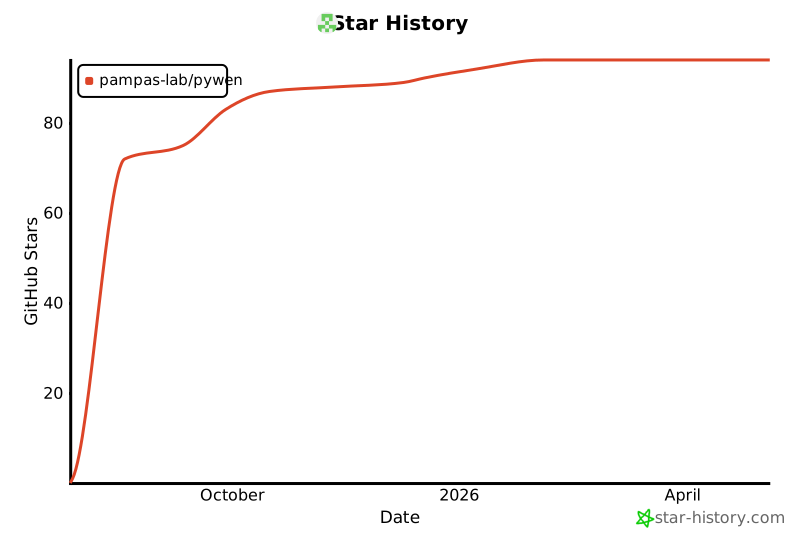
🌟Star History
Release history Release notifications | RSS feed


Download files
Download the file for your platform. If you're not sure which to choose, learn more about installing packages.
Source Distribution
Built Distribution
Filter files by name, interpreter, ABI, and platform.
If you're not sure about the file name format, learn more about wheel file names.
Copy a direct link to the current filters
File details
Details for the file pywen-2.0.0.tar.gz.
File metadata
- Download URL: pywen-2.0.0.tar.gz
- Upload date:
- Size: 419.5 kB
- Tags: Source
- Uploaded using Trusted Publishing? No
- Uploaded via: twine/6.1.0 CPython/3.12.7
File hashes
| Algorithm | Hash digest | |
|---|---|---|
| SHA256 |
4b257f76f31c810756a0ac07d4cc7beb5b3f9080fca50fd21e22433211a1f9dd
|
|
| MD5 |
04669adf62269c0291718598b4b81ead
|
|
| BLAKE2b-256 |
0296853d57c5395ecce83d15861b4d7c13a3d9e1ab0b7eb2ec6b27903ab472d2
|
File details
Details for the file pywen-2.0.0-py3-none-any.whl.
File metadata
- Download URL: pywen-2.0.0-py3-none-any.whl
- Upload date:
- Size: 211.3 kB
- Tags: Python 3
- Uploaded using Trusted Publishing? No
- Uploaded via: twine/6.1.0 CPython/3.12.7
File hashes
| Algorithm | Hash digest | |
|---|---|---|
| SHA256 |
80aedb68f768d19a7bfad2419823f4d07f3a7c7d5d0cb774001a18257c0605d5
|
|
| MD5 |
8087de1d952d620ede433561ccabbe79
|
|
| BLAKE2b-256 |
fad138b106693674b8b6da1d89f92bc57cf20a0711e22c3b665a09d783b9e702
|






