
基于Pywin32,封装了系统托盘,右键菜单,win10通知栏等功能

Project description
Welcome to pywin10
简介
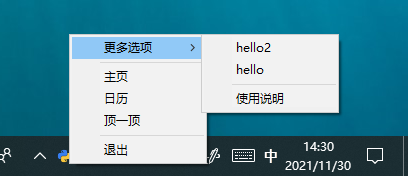
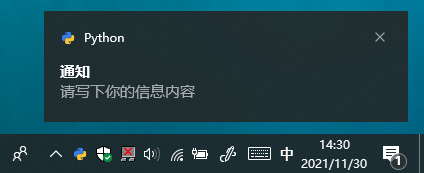
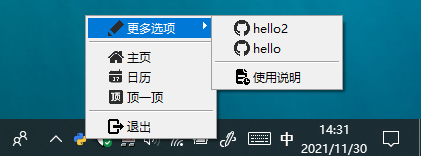
pywin10基于pywin32,封装了菜单,通知功能.可以搭配tkinter,方便使用.
安装
pip install pywin10
效果
开始
import threading
import tkinter
import win32gui
from pywin10 import TaskBarIcon


class MainWindow:
    def __init__(self):
        self.root = tkinter.Tk()

        # 开启常驻后台线程
        backend_thread = threading.Thread(target=self.backend)
        backend_thread.setDaemon(True)
        backend_thread.start()

        # 设置当点击窗体时弹出通知
        self.root.bind('<ButtonPress-1>', self._on_tap)
        # 自定义关闭按钮
        self.root.protocol("WM_DELETE_WINDOW", self._close)

        self.root.mainloop()

    def _on_tap(self, event):
        self.t.ShowToast()

    def _close(self):
        self.t.ShowToast(title="最小化", msg="窗口已经最小化到图标")
        self.root.withdraw()

    def _show(self):
        self.root.deiconify()

    def ding(self, *args):
        print("ding 接收参数:", args)

    def _left_click(self, *args):
        print("_left_click 接收参数:", args)

    def exit(self):
        # 退出 TaskBarIcon
        win32gui.DestroyWindow(self.t.hwnd)
        # 退出 Tkinter
        self.root.destroy()

    def backend(self):
        # TaskBarIcon 里面的参数全部都不是必须的,即便self.t = TaskBarIcon(),你一样可以发送通知等.
        self.t = TaskBarIcon(
            left_click=(self._left_click, (1, 2)),  # 左键单击回调函数,可以不设置(如果想要传参,这样写(func,(arg1,arg2)))
            double_click=self._show,  # 左键双击回调函数,可以不设置(如果不想传参,直接写函数名称)
            icon="python.ico",  # 设置图标,可以不设置
            hover_text="TaskBarIcon",  # 设置悬浮在小图标显示的文字,可以不设置
            menu_options=[  # 可以不设置
                ['退出', "退出.ico", self.exit, 1],  # 菜单项格式:["菜单项名称","菜单项图标路径或None",回调函数或者子菜单列表,id数字(随便写不要重复即可)]
                ["分隔符", None, None, 111],
                ['顶一顶', "ding.ico", (self.ding, (1, 2, 3)), 44],
                ['日历', "日历.ico", None, 3],
                ['主页', "主页.ico", self._show, 2],
                ["分隔符", None, None, 7],
                ["更多选项", "编辑.ico", [
                    ['使用说明', "等待文件.ico", None, 25],
                    ["分隔符", None, None, 17],
                    ['hello', "github.ico", None, 16],
                    ['hello2', "github.ico", None, 1116],
                ], 4],
            ],
            menu_style="iconic",  # 设置右键菜单的模式,可以不设置:normal(不展示图标),iconic(展示图标)
            icon_x_pad=12,  # 设置图标左边距
        )
        # 注意这是死循环,类似与tkinter中的mainloop,
        # 因为都是死循环,所以与mainloop会冲突,放到线程里面执行.
        win32gui.PumpMessages()


if __name__ == '__main__':
    MainWindow()
Release history Release notifications | RSS feed


Download files
Download the file for your platform. If you're not sure which to choose, learn more about installing packages.
Source Distribution
pywin10-0.0.3.tar.gz
(9.3 kB
view details)
Built Distribution
Filter files by name, interpreter, ABI, and platform.
If you're not sure about the file name format, learn more about wheel file names.
Copy a direct link to the current filters
File details
Details for the file pywin10-0.0.3.tar.gz.
File metadata
- Download URL: pywin10-0.0.3.tar.gz
- Upload date:
- Size: 9.3 kB
- Tags: Source
- Uploaded using Trusted Publishing? No
- Uploaded via: twine/3.6.0 importlib_metadata/4.8.2 pkginfo/1.8.1 requests/2.26.0 requests-toolbelt/0.9.1 tqdm/4.62.3 CPython/3.8.7
File hashes
| Algorithm | Hash digest | |
|---|---|---|
| SHA256 |
118f6997b0735aca9e18cd47981b766d8e0e6c96c45200eb790fac3c0a6355e5
|
|
| MD5 |
a722705f1bf2cf74daa2a6c7e1e6a485
|
|
| BLAKE2b-256 |
320c319376058f2ea5d4b15fc1c2fc5711cf62d1db7f8f189ea30449f46b6321
|
File details
Details for the file pywin10-0.0.3-py3-none-any.whl.
File metadata
- Download URL: pywin10-0.0.3-py3-none-any.whl
- Upload date:
- Size: 9.5 kB
- Tags: Python 3
- Uploaded using Trusted Publishing? No
- Uploaded via: twine/3.6.0 importlib_metadata/4.8.2 pkginfo/1.8.1 requests/2.26.0 requests-toolbelt/0.9.1 tqdm/4.62.3 CPython/3.8.7
File hashes
| Algorithm | Hash digest | |
|---|---|---|
| SHA256 |
c092d15ac85b583f291f4afa56e24681274223e060a900951b4fcad9daa8bad9
|
|
| MD5 |
de46b2951f012ed67b0e3e75732a4df9
|
|
| BLAKE2b-256 |
9cf05a76d1f99ba3cb056b6f8bf013238d0f6b4a4f99054afd7227d9848bcaa7
|






