
Analyze TCX GPS data for water sports (windsurfing, sailing, etc.) with NiceGUI dashboard

Project description
PyWindsurf
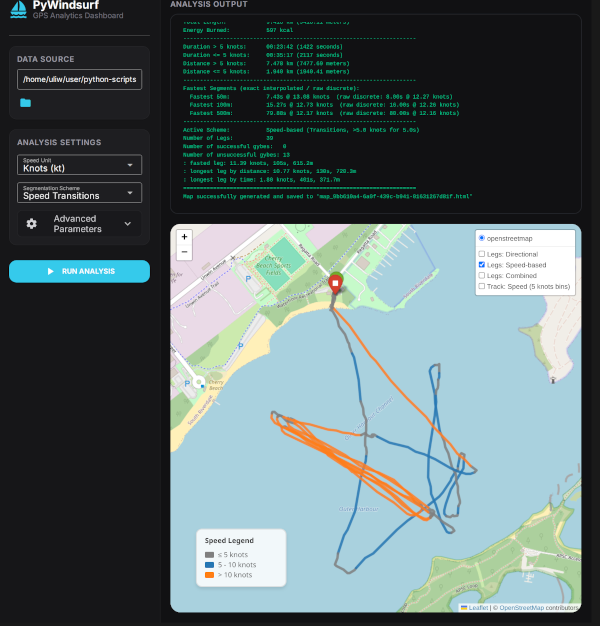
PyWindsurf is a Python-based GPS data analysis tool specifically designed for
windsurfing and other water sports. It parses Garmin/Fit/Strava .tcx track
files, automatically segments your session into active legs and turns,
calculates key statistics (e.g., number of gybes, number of gybes on foil/plane,
fastest 50m, 100m, 500m runs), and generates interactive Leaflet maps with
speed-binned color track lines.
It includes both a command-line interface (CLI) and an elegant, desktop-friendly graphical dashboard (GUI) built with NiceGUI.
Note: To export track files from your Apple Watch, you need third party software, like https://www.rungap.com/ or https://apps.apple.com/ca/app/healthfit/
Key Features
-
Detailed GPS Session Analysis:
- Computes total duration, distance, and energy burned (calories).
- Generates speed statistics below/above customizable active speed cutoffs.
- Measures fastest exact segments: Fastest 50m, 100m, and 500m runs using high-accuracy mathematical interpolation.
-
Automated Turn & Leg Segmentation:
- Speed-based transitions: Detects when you drop off plane (e.g. slow down below threshold for gybes or tacks).
- Direction-based turns: Pinpoints curvature peaks and heading changes.
- Identifies individual run legs and calculates stats for each leg.
-
Interactive Maps (Folium / Leaflet):
- Visualizes your complete route on an interactive OpenStreetMap.
- Color-codes track lines based on speed bins (e.g. knots or km/h).
- Places markers at detected turn/transition points with hover tooltip metadata.
- Displays a dynamic, toggleable speed legend in the viewport.
-
Multi-User Isolated GUI Dashboard:
- A dark-theme dashboard with side-by-side controls, map viewer, and scrollable terminal log output.
- Session-specific map files are generated and automatically cleaned up when client tabs are closed.
- Built-in local file explorer for easy navigation of your folders.
Installation
Method 1: Install from PyPI (when published)
If you have a working python installation simply use pip:
pip install pywindsurf
Method 2: Download Standalone Executables (No Python Required)
You can download pre-compiled standalone executables for your operating system directly from the Releases page on GitHub:
| Platform | Processor Architecture | Executables (CLI / GUI) |
|---|---|---|
| Windows | Intel/AMD (x86_64) | pywindsurf-windows-x86_64.exe / pywindsurf-gui-windows-x86_64.exe |
| Linux | Intel/AMD (x86_64) | pywindsurf-linux-x86_64 / pywindsurf-gui-linux-x86_64 |
| macOS | Apple Silicon (M1/M2/M3/M4) | pywindsurf-macos-silicon / pywindsurf-gui-macos-silicon |
Platform Run Instructions
📂 Linux
- Download the appropriate binary from the Releases page.
- Open a terminal and navigate to the directory where you downloaded the file.
- Grant executable permissions to the binary:
chmod +x pywindsurf-gui-linux-x86_64
- Start the application:
./pywindsurf-gui-linux-x86_64
🪟 Windows
- Download the
.exebinary from the Releases page. - Double-click the file to run it, or launch the CLI version from Command Prompt/PowerShell.
- Note: Windows Defender SmartScreen might block execution with a warning since the binary is unsigned. To bypass this, click More info and then Run anyway.
🍏 macOS (Apple Silicon)
- Download the binary from the Releases page.
- Open a terminal and navigate to the download directory.
- Grant executable permissions:
chmod +x pywindsurf-gui-macos-silicon
- Clear the macOS Gatekeeper quarantine flag so you can run the unsigned binary:
xattr -d com.apple.quarantine pywindsurf-gui-macos-silicon
- Run the binary from the terminal:
./pywindsurf-gui-macos-silicon
Alternative Bypass: You can also go to System Settings > Privacy & Security, scroll down to the security section, and click Open Anyway next to the warning indicating the app was blocked.
How to Use
1. Graphical Desktop Interface (GUI)
To start the dashboard locally:
python3 pywindsurf_gui.py
This will start the local server and automatically open a tab in your default browser at http://localhost:8080.
- Select File: Click the folder icon next to Data Source to browse your local directory and select a
.tcxfile. - Adjust Settings: Configure your speed units (Knots vs. km/h), segmentation scheme, and parameters.
- Run: Click Run Analysis to render the interactive map and populate the analysis output console on the right side of the screen.
2. Command Line Interface (CLI)
You can run the analyzer directly in your terminal:
python3 pywindsurf.py [path_to_tcx_file]
If the file path is omitted, the script will automatically process the first .tcx file it finds in the current directory.
CLI Arguments:
-u/--unit: Select speed unit (knotsorkmh, default:knots).-c/--scheme: Choose segmentation scheme (speed,direction, orboth, default:speed).--cutoff-speed: Threshold speed for summary statistics in selected unit (default:5.0).-m/--map: Save path for the folium HTML map (default:map.html). Usenoneto disable mapping.
For all CLI parameters, run:
python3 pywindsurf.py --help
Configuration Parameters
- Segment Length (m): Length used to calculate general headings along the track (default:
100.0m). - Angle Threshold (°): Heading change angle needed to trigger turn detection (default:
90.0°). - Curvature Window (m): Lookahead/lookback distance window to pinpoint the center/apex of a turn (default:
10.0m). - Merge Distance (m): Minimun distance threshold required between separate gybes to prevent double-marking (default:
30.0m). - Speed Threshold: Critical speed value separating active planning vs. taxi (default:
5.0). - Speed Duration (s): Minimum consecutive time required to confirm a state transition (default:
5.0s). - Bin Interval: Speed gap width used for map color segment divisions (default:
5.0).
Credits & Acknowledgements
- Co-authored and packaged with the assistance of Antigravity, an agentic AI coding assistant designed by the Google DeepMind team.
Release history Release notifications | RSS feed


Download files
Download the file for your platform. If you're not sure which to choose, learn more about installing packages.
Source Distribution
Built Distribution
Filter files by name, interpreter, ABI, and platform.
If you're not sure about the file name format, learn more about wheel file names.
Copy a direct link to the current filters
File details
Details for the file pywindsurf-0.0.6.tar.gz.
File metadata
- Download URL: pywindsurf-0.0.6.tar.gz
- Upload date:
- Size: 32.9 kB
- Tags: Source
- Uploaded using Trusted Publishing? Yes
- Uploaded via: twine/6.1.0 CPython/3.13.12
File hashes
| Algorithm | Hash digest | |
|---|---|---|
| SHA256 |
df16320bd6374c34a7d47e973a8c0d02c8b7f704e2f2fb21ad6b28d22da91d5f
|
|
| MD5 |
e357867e3aca13889ebefe96acef8528
|
|
| BLAKE2b-256 |
bbc4ad1bf27e3dbdcbfae1f0ae05789045d987e3911b6d8182692475521db546
|
Provenance
The following attestation bundles were made for pywindsurf-0.0.6.tar.gz:
Publisher:
build-binaries.yml on uliw/pywindsurf
-
Statement:
-
Statement type:
https://in-toto.io/Statement/v1 -
Predicate type:
https://docs.pypi.org/attestations/publish/v1 -
Subject name:
pywindsurf-0.0.6.tar.gz -
Subject digest:
df16320bd6374c34a7d47e973a8c0d02c8b7f704e2f2fb21ad6b28d22da91d5f - Sigstore transparency entry: 2085374690
- Sigstore integration time:
-
Permalink:
uliw/pywindsurf@f57c44ca37c15b6fcfa62373f7606cd29b76d696 -
Branch / Tag:
refs/tags/v0.0.6 - Owner: https://github.com/uliw
-
Access:
public
-
Token Issuer:
https://token.actions.githubusercontent.com -
Runner Environment:
github-hosted -
Publication workflow:
build-binaries.yml@f57c44ca37c15b6fcfa62373f7606cd29b76d696 -
Trigger Event:
push
-
Statement type:
File details
Details for the file pywindsurf-0.0.6-py3-none-any.whl.
File metadata
- Download URL: pywindsurf-0.0.6-py3-none-any.whl
- Upload date:
- Size: 31.1 kB
- Tags: Python 3
- Uploaded using Trusted Publishing? Yes
- Uploaded via: twine/6.1.0 CPython/3.13.12
File hashes
| Algorithm | Hash digest | |
|---|---|---|
| SHA256 |
19131e72f822f91a04319f5e207be357e36ffae09f13f1b165ed573c21e40757
|
|
| MD5 |
d9c6414c5d7be0bac8b16fc97dde3976
|
|
| BLAKE2b-256 |
7f9c40d28c235870a94eaa709945ffc69d44cf3f2baa3d6a72808c28baa0e948
|
Provenance
The following attestation bundles were made for pywindsurf-0.0.6-py3-none-any.whl:
Publisher:
build-binaries.yml on uliw/pywindsurf
-
Statement:
-
Statement type:
https://in-toto.io/Statement/v1 -
Predicate type:
https://docs.pypi.org/attestations/publish/v1 -
Subject name:
pywindsurf-0.0.6-py3-none-any.whl -
Subject digest:
19131e72f822f91a04319f5e207be357e36ffae09f13f1b165ed573c21e40757 - Sigstore transparency entry: 2085374812
- Sigstore integration time:
-
Permalink:
uliw/pywindsurf@f57c44ca37c15b6fcfa62373f7606cd29b76d696 -
Branch / Tag:
refs/tags/v0.0.6 - Owner: https://github.com/uliw
-
Access:
public
-
Token Issuer:
https://token.actions.githubusercontent.com -
Runner Environment:
github-hosted -
Publication workflow:
build-binaries.yml@f57c44ca37c15b6fcfa62373f7606cd29b76d696 -
Trigger Event:
push
-
Statement type:






