
This release is a pre-release and may not be stable for production use.
PyWPDoc
Automate Microsoft Word DOCX and Hancom Hangul HWPX with one Python API.
Create editable reports, fill document templates, update tables and compare supported revisions in both file formats—without maintaining two document automation codebases.
English / 한국어 API manual · 한국어 README · API reference · AI agent guide · Tested examples
Python 3.10+ · DOCX + HWPX · MIT License
One script. Two editable Office documents.
If your workflow needs a Word report and a Korean Hangul document, the same Python code can create both:
from pywpdoc import Document

for fmt in ("docx", "hwpx"):
    doc = Document.new(fmt)
    doc.add_paragraph("Monthly report / 월간 보고서")
    doc.save(f"report.{fmt}")
Output: report.docx + report.hwpx—editable files, not PDF screenshots or renamed extensions. Desktop Word or Hancom is not required for ordinary creation and editing; native rendering/COM validation requires those applications.
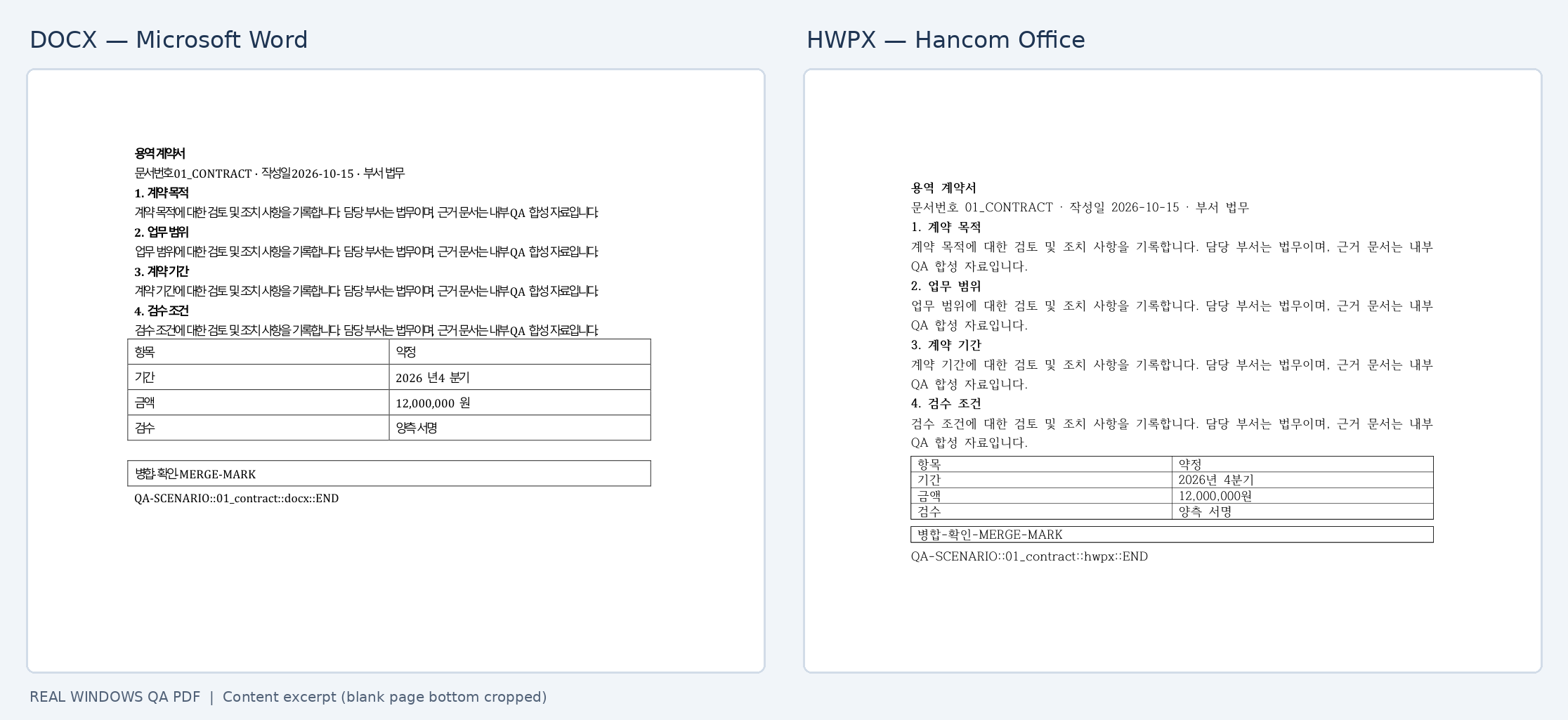
Real native Windows PDF rendering of a historical synthetic test case. This is not a fresh 0.44.0rc1 visual-QA screenshot and does not imply identical Word/Hancom pagination. Image provenance · Current candidate QA evidence.
Why use PyWPDoc?
| Your real-world task | PyWPDoc approach |
|---|---|
| Produce reports and forms for Word and Korean Hangul users | Document.new("docx") / Document.new("hwpx") |
| Fill contracts, certificates, applications or purchase orders | check_template() before render_template() |
| Replace names, dates, or amounts in existing documents | Document.open() → preview_replace() → replace_text() |
| Build paragraphs, tables, images and sections | A portable common subset plus format-specific expert APIs |
| Review supported edits with tracked changes | before.compare(after) without mutating the originals |
What makes it different? python-docx is a mature DOCX-specific library. PyWPDoc focuses on workflows that must handle both DOCX and HWPX; it does not replace every editor-specific feature.
Install
Until the first PyPI publication, use the public source checkout:
git clone https://github.com/rydolabs/PyWPDoc.git
cd PyWPDoc
python -m pip install -e ".[unified]"
After 0.44.0rc1 has actually been published to PyPI:
python -m pip install "pywpdoc[unified]==0.44.0rc1"
The [unified] extra installs python-docx for DOCX; pywpdoc alone suffices for HWPX-only work. Installation details.
Quickstart: a report with a table
from pywpdoc import Document

for fmt in ("docx", "hwpx"):
    doc = Document.new(fmt)
    doc.add_paragraph("Purchase request / 구매 요청서")
    table = doc.add_table(2, 2)
    table.cell(0, 0).text = "Item"
    table.cell(0, 1).text = "Quantity"
    table.cell(1, 0).text = "Notebook"
    table.cell(1, 1).text = "12"
    doc.save(f"purchase-request.{fmt}")
The runnable quickstart is exercised for both formats by API-contract CI tests.
Safer template filling
from pywpdoc import Document

doc = Document.open("template.hwpx")  # .docx works too
data = {"customer": {"name": "Example Ltd"}}
report = doc.check_template(data)       # read-only
if not report.ok:
    raise ValueError(f"Unresolved variables: {report.missing_keys}")
doc.render_template(data)
doc.save("filled.hwpx")
Template example · Preview and replace · Tracked comparison · Agent workflow example
Supported features and boundaries
| Feature | DOCX | HWPX |
|---|---|---|
| Create, open, edit and save | Yes | Yes |
| Paragraphs, tables, pictures and sections | Common supported subset | Common supported subset |
| Literal/regex search, replacements and templates | Supported cases | Supported cases |
| Tracked text comparisons | Supported structures | Supported structures |
| Table-row insertion/deletion tracking | Supported cases | Unsupported |
| Pixel-identical Word/Hancom layout | Not guaranteed | Not guaranteed |
save() does not convert file formats; rebuild() is not a universal lossless DOCX↔HWPX converter, and binary legacy .hwp input is not supported by Document.open(). Native expert APIs differ by backend. Compatibility · Known limitations.
Verified, with clearly stated limits
- Hosted CI: 10/10 jobs passed across Ubuntu/Windows Python 3.10–3.13, wheel/sdist and MkDocs checks. CI run.
- 0.44.0rc1 Windows native validation: 11/11 focused Word/Hancom cases, 7/7 extended QA stages, including long/stress documents. Evidence and exact scope.
- Historical visual outputs: a previous build passed 48/48 native PDF exports. The 0.44.0rc1 results archive has no new PDF/pixel-layout comparison.
- Public test suite: fixtures, omissions and skips are documented in tests/README.md. Hosted CI does not run desktop COM validation.
For AI coding assistants and agents
Use from pywpdoc import Document for portable operations. Pick the document format, preflight edits, and save in the same format. Treat doc.backend, doc.docx, doc.hwpx as expert-only APIs.
Task → API selection guide · Exact signatures · Machine-readable document index
PyWPDoc is a Python library—not a built-in MCP server or a native model tool. Publication does not guarantee ranking or selection by AI assistants.
한국어 · Documentation · Changelog · Security · Contributing · MIT License
Version: 0.44.0rc1 release candidate (GitHub Release and PyPI publication pending).
1 maintainer

Metadata
1 maintainer
Release files for pywpdoc 0.44.0rc1
For a detailed explanation of source distributions (sdists) and built distributions (wheels), please see the package formats documentation.
Source distribution (sdist)
| File | Size | Uploaded | Provenance | Actions |
|---|---|---|---|---|
| pywpdoc-0.44.0rc1.tar.gz | 193.5 kB | With provenance | Details for pywpdoc-0.44.0rc1.tar.gz |
Built distribution (wheel)
| File | Interpreter | ABI | Platform | Actions Reset |
|---|---|---|---|---|
| pywpdoc-0.44.0rc1-py3-none-any.whl | Python 3 | none | any | Details for pywpdoc-0.44.0rc1-py3-none-any.whl |
Total release size: 404.4 kB
Release files / pywpdoc-0.44.0rc1.tar.gz
| Download URL | pywpdoc-0.44.0rc1.tar.gz |
|---|---|
| Size | 193.5 kB |
| Tags | Source |
|
SHA-256 checksum How to use checksums |
f20e06b6303136a3e1286421d251859ee6b5e9b850a48e508584374d973ea6a0
|
|
BLAKE2b-256 checksum How to use checksums |
558ac19523785cf066ae56c47a328e6a7c050152589bf7f7b2b2d7c6cc06d3f2
|
| Upload date | |
|
Uploaded using Trusted Publishing? What is trusted publishing? |
Yes |
| Uploaded via |
twine/7.0.0 CPython/3.13.14
|
Provenance
Provenance describes where a file came from. On PyPI, provenance is shared via attestations, which provide a verifiable record of the build or publishing details. View details, limitations and caveats.


PyPI Publish Attestation
PyPI verified that this artifact, at this checksum, originated from the publisher listed below.
Signed by GitHub Actions, verified by PyPI on Oct 19, 2026.
Transparency logRelease files / pywpdoc-0.44.0rc1-py3-none-any.whl
| Download URL | pywpdoc-0.44.0rc1-py3-none-any.whl |
|---|---|
| Size | 210.9 kB |
| Tags | Python 3 |
|
SHA-256 checksum How to use checksums |
c751671d1e8946adcd3c1c9c07409fd03d78965a9736c164f2a75e8a0d897869
|
|
BLAKE2b-256 checksum How to use checksums |
04394b859026cb49d650018368e87426f7bf7edc8195e29aac656df1f41481b1
|
| Upload date | |
|
Uploaded using Trusted Publishing? What is trusted publishing? |
Yes |
| Uploaded via |
twine/7.0.0 CPython/3.13.14
|
Provenance
Provenance describes where a file came from. On PyPI, provenance is shared via attestations, which provide a verifiable record of the build or publishing details. View details, limitations and caveats.
PyPI Publish Attestation
PyPI verified that this artifact, at this checksum, originated from the publisher listed below.
Signed by GitHub Actions, verified by PyPI on Oct 19, 2026.
Transparency logSecurity for pywpdoc 0.44.0rc1
Provenance
Provenance describes where a file came from. On PyPI, provenance is shared via attestations, which provide a verifiable record of the build or publishing details. View details, limitations and caveats.
Full provenance
Both files in this release have been uploaded with provenance metadata.
Attestation for pywpdoc-0.44.0rc1.tar.gz
PyPI Publish Attestation
PyPI verified that this artifact, at this checksum, originated from the publisher listed below.
Signed by GitHub Actions, verified by PyPI on Oct 19, 2026.
Transparency logA note on package security
PyPI is a repository for distributing packages, not a service for auditing them. While third-party security researchers and our staff do their best to detect and remove malicious packages, PyPI cannot guarantee the quality, security or suitability of any given package.
To learn more about protecting yourself from malicious actors, visit our package security documentation.













