






Pywssocks
Pywssocks is a SOCKS proxy implementation over WebSocket protocol.
Overview
This tool allows you to securely expose SOCKS proxy services under Web Application Firewall (WAF) protection (forward socks), or enable clients to connect and serve as SOCKS proxy servers when they don't have public network access (reverse socks).
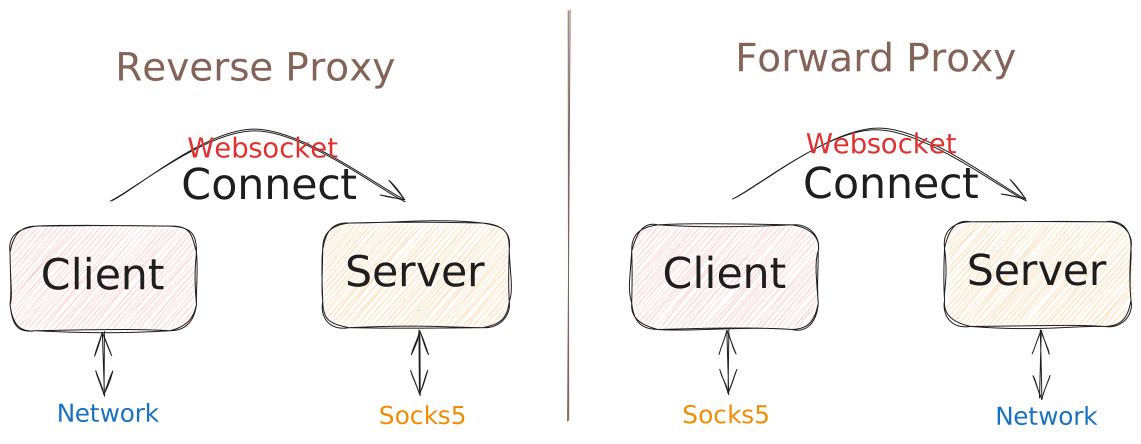
For golang version, please check linksocks/linksocks.
Note: LinkSocks is implemented in Go and also ships with a thin Python binding. Pywssocks, however, is written entirely in pure Python (no C extensions) and remains minimally compatible with the latest linksocks protocol and feature set.
Features
- Both client and server modes, supporting command-line usage or library integration.
- Forward and reverse proxy capabilities.
- Round-robin load balancing for reverse proxy.
- SOCKS proxy authentication support.
- IPv6 over SOCKS5 support.
- UDP over SOCKS5 support.
Potential Applications
- Distributed HTTP backend.
- Bypassing CAPTCHA using client-side proxies.
- Secure intranet penetration, using CDN network.
Usage
As a tool
Forward Proxy:
# Server (WebSockets at port 8765, as network connector)
pywssocks server -t example_token

# Client (SOCKS5 at port 1080)
pywssocks client -t example_token -u ws://localhost:8765 -p 1080
Reverse Proxy:
# Server (WebSockets at port 8765, SOCKS at port 1080)
pywssocks server -t example_token -p 1080 -r

# Client (as network connector)
pywssocks client -t example_token -u ws://localhost:8765 -r
As a library
Forward Proxy:
import asyncio
from pywssocks import WSSocksServer, WSSocksClient

# Server
server = WSSocksServer(
    ws_host="0.0.0.0",
    ws_port=8765,
)
token = server.add_forward_token()
print(f"Token: {token}")
asyncio.run(server.start())

# Client
client = WSSocksClient(
    token="<token>",
    ws_url="ws://localhost:8765",
    socks_host="127.0.0.1",
    socks_port=1080,
)
asyncio.run(client.start())
Reverse Proxy:
import asyncio
from pywssocks import WSSocksServer, WSSocksClient

# Server
server = WSSocksServer(
    ws_host="0.0.0.0",
    ws_port=8765,
    socks_host="127.0.0.1",
    socks_port_pool=range(1024, 10240),
)
token, port = server.add_reverse_token()
print(f"Token: {token}\nPort: {port}")
asyncio.run(server.start())

# Client
client = WSSocksClient(
    token="<token>",
    ws_url="ws://localhost:8765",
    reverse=True,
)
asyncio.run(client.start())
Installation
Pywssocks requires python >= 3.8, and can be installed by:
pip install pywssocks
Pywssocks is also available via docker:
docker run --rm -it jackzzs/pywssocks --help
Documentation
Visit the documentation: https://pywssocks.zetx.tech
License
Pywssocks is open source under the MIT license.
1 maintainer

Metadata
1 maintainer
Release files for pywssocks 1.5.1
For a detailed explanation of source distributions (sdists) and built distributions (wheels), please see the package formats documentation.
Source distribution (sdist)
| File | Size | Uploaded | |
|---|---|---|---|
| pywssocks-1.5.1.tar.gz | 50.6 kB | Details |
Built distribution (wheel)
| File | Interpreter | ABI | Platform | Reset |
|---|---|---|---|---|
| pywssocks-1.5.1-py3-none-any.whl | Python 3 | none | any | Details |
Total release size: 105.5 kB
Release files / pywssocks-1.5.1.tar.gz
| Download URL | pywssocks-1.5.1.tar.gz |
|---|---|
| Size | 50.6 kB |
| Tags | Source |
|
SHA-256 checksum How to use checksums |
0cc47bdc9f33ada5ca24ee8fbfb73a0ac23c150b99c79fc97f0060b3513a6be1
|
|
BLAKE2b-256 checksum How to use checksums |
d011c5a02c5091b27c7552e6b1e1bab3b5429782d60ebc689c4e1323bd3fb344
|
| Upload date | |
|
Uploaded using Trusted Publishing? What is trusted publishing? |
Yes |
| Uploaded via |
twine/6.1.0 CPython/3.13.7
|
Provenance
Provenance describes where a file came from. On PyPI, provenance is shared via attestations, which provide a verifiable record of the build or publishing details. View details, limitations and caveats.


PyPI Publish Attestation
PyPI verified that this artifact, at this checksum, originated from the publisher listed below.
Signed by GitHub Actions, verified by PyPI on Jan 15, 2026.
Transparency logRelease files / pywssocks-1.5.1-py3-none-any.whl
| Download URL | pywssocks-1.5.1-py3-none-any.whl |
|---|---|
| Size | 54.9 kB |
| Tags | Python 3 |
|
SHA-256 checksum How to use checksums |
c8b85d65e1a554a817f160275116fa2937ff28bceca9aee41db524a287893302
|
|
BLAKE2b-256 checksum How to use checksums |
d2bf485843b31d90148cef3a8990bbf68b762a8b33328c3e3f4b9535b658e2f3
|
| Upload date | |
|
Uploaded using Trusted Publishing? What is trusted publishing? |
Yes |
| Uploaded via |
twine/6.1.0 CPython/3.13.7
|
Provenance
Provenance describes where a file came from. On PyPI, provenance is shared via attestations, which provide a verifiable record of the build or publishing details. View details, limitations and caveats.
PyPI Publish Attestation
PyPI verified that this artifact, at this checksum, originated from the publisher listed below.
Signed by GitHub Actions, verified by PyPI on Jan 15, 2026.
Transparency log













