
pyxel-config-core 🪐🔭




Validation and knowledge core for ESA Pyxel configurations — callable as a plain Python library or as an MCP server that any LLM assistant can use as a tool.
It reuses the same source-of-truth artifacts as Pyxel Config Lab: the Pyxel JSON schema, the model-parameter catalogue, and the tutorial library. The browser GUI and this core stay in lockstep because they read the same bundled contract.
What it exposes
| Capability | Function | MCP tool | CLI |
|---|---|---|---|
Validate a config against the schema (deep=True also runs pyxel.load()) |
validate_config(config, deep=False) |
validate_pyxel_config |
pyxel-config validate [--deep] |
| Explain: a one-sentence summary and a next step per finding | explain_config(config, deep=False) |
explain_pyxel_config |
pyxel-config explain [--deep] |
| Auto-repair a config (rename / re-stage) | autofix(config) |
fix_pyxel_config |
pyxel-config fix |
| List valid models (optionally per stage) | list_models(stage=None) |
list_pyxel_models |
pyxel-config models |
| Fetch a tutorial | find_tutorial(group, model) |
get_pyxel_tutorial |
pyxel-config tutorial |
Search tutorials (the library uses the vector index once one is built and keywords otherwise; the MCP tool uses keywords unless semantic=true) |
search_tutorials(query, semantic=None) |
search_pyxel_tutorials |
pyxel-config search --keyword |
| Semantic (vector) tutorial search, with a degraded-mode flag | semantic_search_with_fallback(query) |
semantic_search_pyxel_tutorials |
pyxel-config search |
| Model parameters + defaults | model_parameters(model) |
get_pyxel_model_parameters |
pyxel-config params |
| Which Pyxel release the bundle tracks | schema_version() |
on every validate / explain result |
pyxel-config doctor |
Three front doors onto one implementation. Whatever the CLI says about a config, the MCP tool says too.
Every input and output is a Pydantic model, so results are structured and
schema-checked on both sides of the boundary. Every verdict carries
pyxel_version, the Pyxel release the bundled schema was generated from, so a
result is never separated from the contract that produced it.
validate_config, explain_config, and autofix all accept either a config
dict or a raw YAML string, so an assistant can pass a user's pasted
.yaml straight through without parsing it first.
Install
pip install pyxel-config-core              # library only
pip install "pyxel-config-core[mcp]"       # + MCP server
pip install "pyxel-config-core[rag]"       # + semantic search (Qdrant + fastembed)
pip install "pyxel-config-core[mcp,rag]"   # everything
Working on the package itself? Clone the repo and install it editable
instead — pip install -e ".[mcp,rag]" from pyxel-config-core/.
Requires Python 3.10+.
Command line
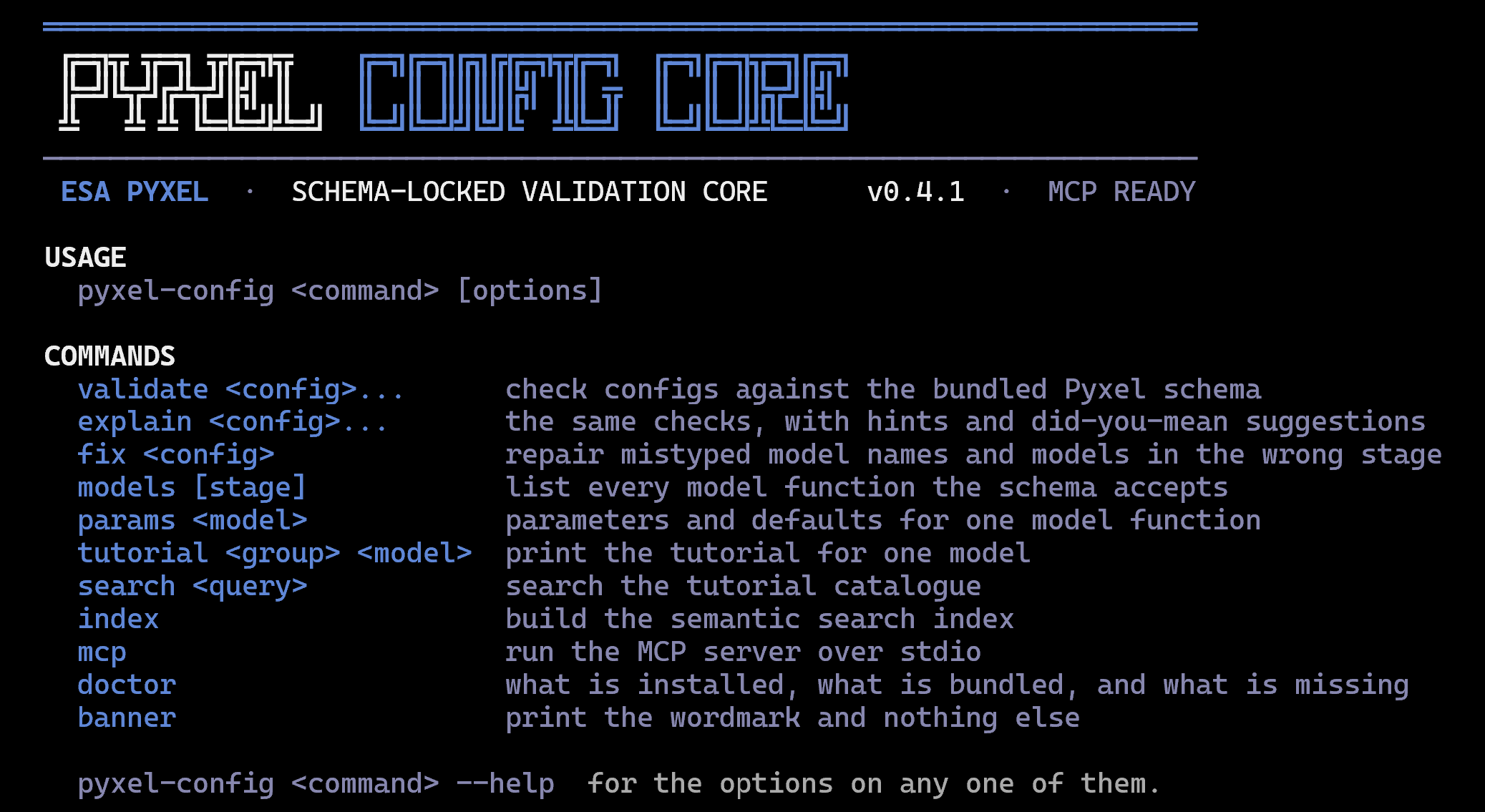
pyxel-config                     # the wordmark, and what it can be asked to do
pyxel-config validate my.yaml    # check it against the bundled schema
pyxel-config validate my.yaml --deep            # and hand it to pyxel.load() too
pyxel-config validate my.yaml --format sarif    # or json / codequality, for CI
pyxel-config explain  my.yaml    # the same checks, with a summary and a next step each
pyxel-config fix      my.yaml -w # repair mistyped and misplaced model names
pyxel-config models charge_generation
pyxel-config params  load_image
pyxel-config search  "dark current"
pyxel-config doctor              # what is installed, bundled, and missing
pyxel-config mcp runs the same server as pyxel-config-mcp, so an assistant
and a person are reaching identical code.
The exit code is the verdict, which is what makes this usable in CI without parsing any output:
| Code | Meaning |
|---|---|
0 |
valid, or nothing to complain about |
1 |
the config has errors, including text that is not valid YAML or not saved as UTF-8 |
2 |
the command line itself was wrong |
3 |
could not run: a file that cannot be opened, YAML that fix cannot read, a missing extra, or --deep that never reached Pyxel's loader |
4 |
no such tutorial, model or stage, or a search with no hits |
A config that cannot be read (a syntax error, a key written twice, a file
saved as UTF-16) is a finding in the report like any other, so one broken file
never hides the verdict on the rest. Pyxel reads a config file as UTF-8 only,
so a file Windows PowerShell 5.1 wrote with > (UTF-16) is an error; its
content is still checked.
# .gitlab-ci.yml
validate-configs:
  image: python:3.12-slim
  script:
    - pip install --quiet pyxel-config-core
    # The same verdict as a merge-request widget. The report is written first,
    # and `|| true` keeps a failing verdict from stopping the job before the
    # next line, so the report exists whatever the configs hold.
    - pyxel-config validate configs/*.yaml --format codequality > pyxel-config.json || true
    - pyxel-config validate configs/*.yaml
  artifacts:
    # Uploaded when the job fails too, which is when the widget matters.
    when: always
    reports:
      codequality: pyxel-config.json
Machine-readable reports
validate and explain take --format {text,json,sarif,codequality}; --json
is the short spelling of --format json.
json: one entry per config, always a list, withvalid,diagnostics,pyxel_version,deep_checkedand (forexplain)summary.sarif: a SARIF 2.1.0 log with one rule per diagnostic category (pyxel-config/schema,/func,/shape,/advisory,/pyxel-rule,/pyxel-load,/yaml), one result per diagnostic, and the line of the offending key found by walking the YAML. GitHub code scanning, Azure DevOps and most SAST dashboards read it.codequality: the GitLab Code Quality list, with a stablefingerprintper (path, message, file) so a finding is reported once and cleared when it goes away. Root-shape problems,pyxel.load()failures and text that cannot be read as a config areblocker; a bad field ismajor; a warning isminor.
Both reports name each file relative to the working directory, with forward
slashes on every system (SARIF percent-encodes it, and gives a file outside
the working directory as a file: URI), so run the check from the
repository root and the report points at the files the merge request shows.
The deep check
The schema is a description of Pyxel; Pyxel is the thing. --deep (or
validate_config(config, deep=True)) writes the config to a temporary file and
hands it to pyxel.load(), so anything the loader rejects is reported too: a
readout with times: [2.0, 1.0] satisfies the schema and the run rules, and
only Pyxel knows its times must be strictly increasing. The result names the
installed Pyxel whose loader ran (deep_pyxel_version, and "and loads in Pyxel
3.0.2" in the summary), which can differ from the release the bundled schema
came from. A warning Pyxel raises while loading is reported as a warning
finding; its own deprecation notices, which Python hides from a user too, are
left out.
Loading runs part of the config. Pyxel evaluates a readout's times and an
observation's values as Python when they are written as text, evaluates an APD
converter's function (and unpickles one written as binary data), and imports
the module each model's func names. It also opens a readout's
times_from_file, a custom observation's from_file and an APD converter's
filename, which can be URLs. So before it loads anything, the deep check reads
every such value and refuses to run the config unless each is plain data or a
known harmless call: a list of numbers,
numpy.linspace/arange/logspace/geomspace or range() with plain numbers
and at most a million values, a one-argument lambda of arithmetic and math
functions, and model functions under pyxel.. Binary data (YAML !!binary)
and files to open are always refused. A refusal is a warning that names the
value and why.
For a config you wrote yourself, --trust-config (or trusted=True) skips that
reading. Never use it on a config from someone else, such as a merge request
from a fork.
On the MCP server the deep check is off: an assistant can pass in a config from
an issue, an email or a web page. Whoever starts the server can allow it with
pyxel-config mcp --allow-deep, and the refusal rules above still apply.
When the loader cannot run (Pyxel not installed, or installed but failing to
import, which the warning names), deep_checked stays false and the command
line exits with 3, "could not run", rather than 0. A config the schema already
rejects still exits with 1.
As a pre-commit hook
The repository exposes a pyxel-config-validate hook, so staged YAML configs
are checked before the commit lands. By default it checks every YAML file
except the CI and tooling files that are never Pyxel configs (.gitlab-ci.yml,
GitHub workflows, pre-commit's own files, docker-compose, mkdocs, conda
environments, Read the Docs, codecov, yamllint); narrowing files to where the
configs live is still the surest choice:
# .pre-commit-config.yaml
repos:
  - repo: https://gitlab.com/dobybaxter127/pyxel-config-lab
    rev: core-v0.6.1
    hooks:
      - id: pyxel-config-validate
        files: ^configs/.*\.ya?ml$   # narrow it to where the configs live
stdout carries the answer, stderr carries the furniture. The banner and any progress note go to stderr, so a pipe stays clean with no flag at all:
pyxel-config models --json | jq -r '.models[].func'
pyxel-config fix my.yaml -o - > repaired.yaml     # config out, report on stderr
Colour follows ESA: institutional blue and white carry the frame and the labels,
and red and amber are kept for the things that are actually wrong. Palette
entries are named for the job they do, not the hue, so a repaint never reaches
a call site. It steps down on its own: truecolor to 256 to 16 to none,
Unicode glyphs to ASCII when the output encoding cannot carry them, and a
wordmark that shrinks through two smaller lockups rather than wrapping. --json,
--no-color, --ascii, --banner and -q override any of that;
NO_COLOR is honoured.
Library usage
from pyxel_config_core import (
    validate_config, autofix, list_models, find_tutorial, model_parameters,
)

result = validate_config(open("my_config.yaml").read())
print(result.valid, "judged by Pyxel", result.pyxel_version)
for d in result.diagnostics:
    print(d.severity, d.path, d.message)

# The same checks with a sentence on top and an instruction on each finding
from pyxel_config_core import explain_config

explanation = explain_config(open("my_config.yaml").read(), deep=True)
print(explanation.summary)   # "This CCD exposure config has 2 problems in the charge_generation stage."
for d in explanation.diagnostics:
    print(d.path, d.next_step)  # "/pipeline/charge_generation/0/func Rename func to '...dark_current'."

# Discover what models exist before building a config
for m in list_models("charge_generation").models:
    print(m.func)

# Repair typo'd names and misplaced models in one call
fix = autofix(open("my_config.yaml").read())
for change in fix.changes:
    print(change.action, change.path, change.before, "->", change.after)

tut = find_tutorial("charge_generation", "dark_current")
params = model_parameters("load_image")
A HoloViz/Panel assistant (or any Python app) can import this directly — no
server, no network, no access to anything private.
Semantic search (RAG)
The tutorial catalogue is split into ~850 heading-level passages, embedded with a local fastembed model (ONNX, CPU, no API keys), and stored in an embedded Qdrant index — a real vector database that runs in-process, with no server to operate.
Build the index once (downloads the embedding model on first run):
pip install "pyxel-config-core[rag]"
pyxel-config index
(pyxel-config-index, the older spelling, still works: it prints a deprecation
notice and forwards to the same command.)
Then query it:
from pyxel_config_core import semantic_search

for m in semantic_search("how do I add dark current to the detector", limit=5):
    print(f"{m.score:.3f}  {m.group}/{m.model}  §{m.section}")
Once the index is built, the library's search_tutorials(query) uses it by
default and falls back to keyword search if the index or the RAG extra is
absent; pass semantic=False to force keywords or semantic=True to insist on
the index. The MCP tool search_pyxel_tutorials is keyword search unless it is
called with semantic=true, so an assistant gets the same answer on every
machine regardless of what has been built there. Point the index elsewhere with
PYXEL_CONFIG_CORE_INDEX=/path/to/dir.
Scale note: at ~850 passages a brute-force index would also work; Qdrant is used because it is a standard vector store, scales cleanly, and here runs embedded — so the retrieval design is production-shaped without a production dependency.
MCP server usage
pyxel-config-mcp                  # runs over stdio
pyxel-config mcp                  # the same server, via the CLI
pyxel-config-mcp --allow-deep     # also let deep=true run pyxel.load()
The deep check is off unless the server is started with --allow-deep, because
loading a config runs part of it and an assistant can pass in a config from
anywhere; see
The deep check.
Point any MCP-compatible client at that command. The eight MCP tools listed under "What it exposes" become callable by the model, so an assistant can check a config against the real schema instead of guessing, repair it, discover the valid models, and retrieve the real tutorial passages to cite.
The server imports cleanly on both the 1.x (FastMCP) and 2.x (MCPServer)
line of the MCP SDK.
Building and fixing configs
Two tools turn the server from a read-only checker into an active assistant:
-
list_pyxel_models(stage=None)enumerates every valid model function, optionally filtered to one pipeline stage. It reads the same schema the validator does, so the list is always the real, current set — an assistant can discover then build instead of guessing a name and validating it. Each entry carries the fullfunc:path ready to drop into a config. -
fix_pyxel_config(config)applies the func diagnostics automatically. It renames a typo'd model to its nearest valid match, moves a valid-but-misplaced model into its owning stage, and returns the corrected config alongside a structured change log (changes), anything it could not fix (unresolved), and the diagnostics that remain after the repair (remaining_diagnostics). It fixesfuncnames only — it never invents required arguments, so a rename onto a model with required args will still surface those inremaining_diagnostics. The input is never mutated; a corrected copy is returned.
Graceful semantic search
semantic_search_pyxel_tutorials returns a TutorialSearchResult with a mode
("semantic" or "keyword"), a degraded flag, and the matches. If the
vector index has not been built or the [rag] extra is not installed, it does
not error — it falls back to keyword search and flags the result as degraded, so
a client always gets usable matches with a clear signal about which engine
answered.
The shared contract
Bundled under pyxel_config_core/data/:
pyxel_schema.json: the validation contractmodelParameters.json: model parameters and defaultstutorials/: the tutorial catalogueBUNDLE.json: the manifest, naming the Pyxel release the schema was generated from, its SHA-256, and when.schema_version()reads it, every validation result carries it, andpyxel-config doctorprints it along with whether the shipped schema still matches the digest.
These are copied from the Config Lab repo by one command, run from the repo
root: python scripts/refresh_bundle.py rewrites every artifact from the
installed Pyxel (both schema copies, the metadata snapshot, the precompiled
validator, the tutorial facts, the package's tutorial copies, and the
manifest), and python scripts/refresh_bundle.py --check fails in CI when any
of them is stale. Rebuild the vector index (pyxel-config index) whenever the
tutorials change.
Func diagnostics
Model-function names in the pipeline are checked against the schema itself
(the single source of truth), not a separate list, so every stage is covered.
When a func is wrong, validate_config now:
- collapses the schema's downstream argument explosion (one bad func could otherwise surface hundreds of misleading "X is a required property" errors from the branches the validator tried) down to a single diagnostic;
- distinguishes a typo from a valid model in the wrong stage, and points the latter at the stage it belongs to;
- offers a "did you mean" suggestion (Levenshtein over the leaf name) and a
short list of valid models for that stage, carried as structured
suggestionandvalid_optionsfields on theDiagnostic.
This is the Python port of the browser GUI's modelDiscriminator.js, so both
consumers reason about func values the same way.
What validation covers
The core validates what the schema encodes, plus a short list of run rules for what Pyxel refuses beyond it; both are shared with the GUI, so the two reach the same verdict. The schema already includes a fair amount of value checking, not just structure:
- types and required arguments per model;
- enums — a bad choice string is rejected against the allowed set
(e.g.
single/exponential/binomial/sbx); - numeric bounds (
minimum/maximum/exclusiveMinimum) and array-length bounds (minItems/maxItems) wherever the schema declares them; - func discriminators, with the friendly typo / wrong-stage diagnostics described above;
- the root shape: which running mode and which detector the config uses.
The schema's root is an anyOf over twelve (mode, detector) branches, and a
bare validator answers a missing or misspelled detector with the same
"required property" line four times over. The core reads the branch
structure out of the schema (the Python port of the browser app's
configShape.js) and reports one sentence instead: which section is missing, which two conflict, or thatccd_detecorshould beccd_detector. - run rules (
run_rules.py, mirrored by the browser'srunRules.js): what Pyxel 3.0.2 refuses at load or stops on at run time although the schema accepts it. A readout with bothtimesandtimes_from_file, a calibration with bothweightsandweights_from_file, an observation with no parameters,simple_measurementwith neither againnor a detectorcharge_to_volt,simple_amplifierwithoutpre_amplification, andsimple_adcwithout its ADC settings, a whole number written as a decimal where Pyxel refuses one (a detector'srow: 128.0), a number in exponent notation that Pyxel's YAML reader takes as text (1e-6), and a model whose own code refuses the config's detector class (cdmon a CMOS detector). They report under thepyxel-rulecategory, and CI runs a fixture for each one through the real Pyxel so a rule cannot drift from what Pyxel does. - duplicate keys: Pyxel keeps the last of two equal keys in a mapping without a word, so the core refuses a key written twice and names both lines.
- focal plane arrays (
fpa.py): the schema has nofocal_plane_arraybranch, so a plane is checked against what Pyxel's focal-plane loader requires (one running mode, exposure only; the physical geometry and one scale; tile IDs 1..N; positions; a plane-wide scene; nothing beside the plane), and each tile is validated with the schema and the run rules as the flat config Pyxel builds it from: the plane's running mode, the tile's detector and the tile's pipeline. Findings name the tile and keep their path inside the plane, so the line in a SARIF or Code Quality report is the line in the file.
Reports are grouped by path: one field's alternatives collapse into one line
naming every accepted type, at most eight paths are listed, and a closing line
counts what was left out so nothing is dropped silently. A pipeline step whose
func is known is checked against that model's own definition, so a mistyped
argument reports as itself and not as the required arguments of every other
model in the stage.
Deliberately out of scope
Beyond the run rules above, checks that live above the schema are not attempted here, so there is never a second rulebook that could drift from the GUI or from Pyxel:
- Other super-schema constraints. Cross-field consistency (e.g. one argument
that must stay
<=another), physical plausibility, and any other bound Pyxel enforces in code but that isn't written into the JSON schema. These pass the schema check. The--deepswitch exists for exactly this gap: it hands the config topyxel.load(), which applies every rule Pyxel has at load time.
1 maintainer

Metadata
1 maintainer
Release files for pyxel-config-core 0.6.1
For a detailed explanation of source distributions (sdists) and built distributions (wheels), please see the package formats documentation.
Source distribution (sdist)
| File | Size | Uploaded | Provenance | Actions |
|---|---|---|---|---|
| pyxel_config_core-0.6.1.tar.gz | 217.2 kB | Without provenance | Details for pyxel_config_core-0.6.1.tar.gz |
Built distribution (wheel)
| File | Interpreter | ABI | Platform | Actions Reset |
|---|---|---|---|---|
| pyxel_config_core-0.6.1-py3-none-any.whl | Python 3 | none | any | Details for pyxel_config_core-0.6.1-py3-none-any.whl |
Total release size: 486.6 kB
Release files / pyxel_config_core-0.6.1.tar.gz
| Download URL | pyxel_config_core-0.6.1.tar.gz |
|---|---|
| Size | 217.2 kB |
| Tags | Source |
|
SHA-256 checksum How to use checksums |
0d81565d62106cb5c7244196c345280a71f7af3aadc757a15a9dfaa86cfd9aa9
|
|
BLAKE2b-256 checksum How to use checksums |
88669fd94306a966ec93098faf902233ea946acf889c1a35dc6d6ea99359091f
|
| Upload date | |
|
Uploaded using Trusted Publishing? What is trusted publishing? |
No |
| Uploaded via |
twine/7.0.0 CPython/3.14.8
|
Release files / pyxel_config_core-0.6.1-py3-none-any.whl
| Download URL | pyxel_config_core-0.6.1-py3-none-any.whl |
|---|---|
| Size | 269.4 kB |
| Tags | Python 3 |
|
SHA-256 checksum How to use checksums |
5a5ec155b81fbc5ef9c52462464bcc46f070f448b4a4bbf473cdbc9b35fa95be
|
|
BLAKE2b-256 checksum How to use checksums |
b82e273c30b80b5cad2c3dcf48b95c63c90eeb8c90ea134c05a61a758a3d724a
|
| Upload date | |
|
Uploaded using Trusted Publishing? What is trusted publishing? |
No |
| Uploaded via |
twine/7.0.0 CPython/3.14.8
|
Security for pyxel-config-core 0.6.1
Provenance
Provenance describes where a file came from. On PyPI, provenance is shared via attestations, which provide a verifiable record of the build or publishing details. View details, limitations and caveats.
No provenance found
None of the files in this release were uploaded with provenance metadata.
A note on package security
PyPI is a repository for distributing packages, not a service for auditing them. While third-party security researchers and our staff do their best to detect and remove malicious packages, PyPI cannot guarantee the quality, security or suitability of any given package.
To learn more about protecting yourself from malicious actors, visit our package security documentation.














