
Python implementation of Vaadin Flow

Project description

PyXFlow
Build full-stack web apps in pure Python. No JavaScript. No HTML templates.
Write your code and business logic in Python. It runs on the server. The browser is just a thin client rendering standard web components: you never touch the frontend.
Under the hood, PyXFlow uses the same server-driven architecture as Vaadin Flow but entirely written in Python, and ships with 50+ Vaadin web components: enterprise-grade, accessible, and battle-tested over years.

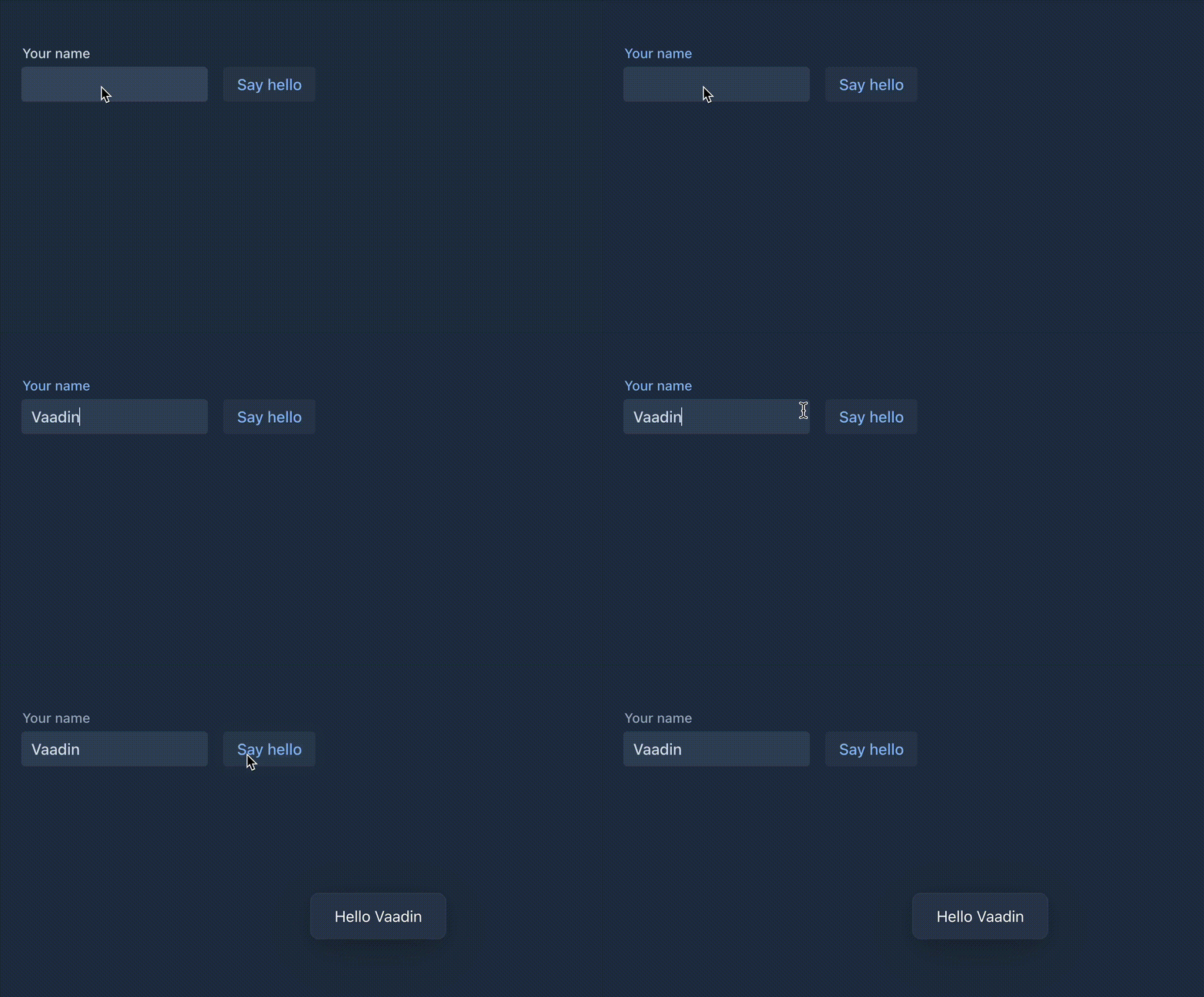
from pyxflow import Route
from pyxflow.components import *

@Route("hello")
class HelloView(HorizontalLayout):
    def __init__(self):
        name = TextField("Your name")
        button = Button("Say hello", lambda e: Notification.show(f"Hello {name.value}"))
        self.add(name, button)
Features
- Server-side only -- all logic runs in Python, no JavaScript to write
- Real-time push -- update the UI from background tasks via WebSocket
- Lazy data loading -- Grid with virtual scrolling and server-side sorting
- Form validation -- Binder with validators and converters
- Theming -- Lumo and Aura themes with dark mode support
- Hot reload --
--devmode watches for file changes
Demo
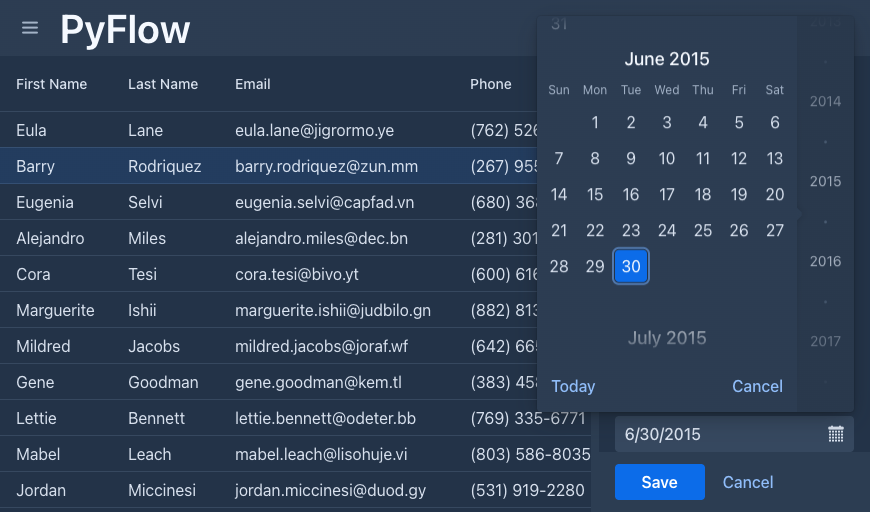
The included demo app showcases real-world patterns across 8 views:
| View | Route | What it shows |
|---|---|---|
| About | / |
Landing page with logo and architecture diagram |
| Hello | /hello |
Simplest view -- TextField + Button + Notification |
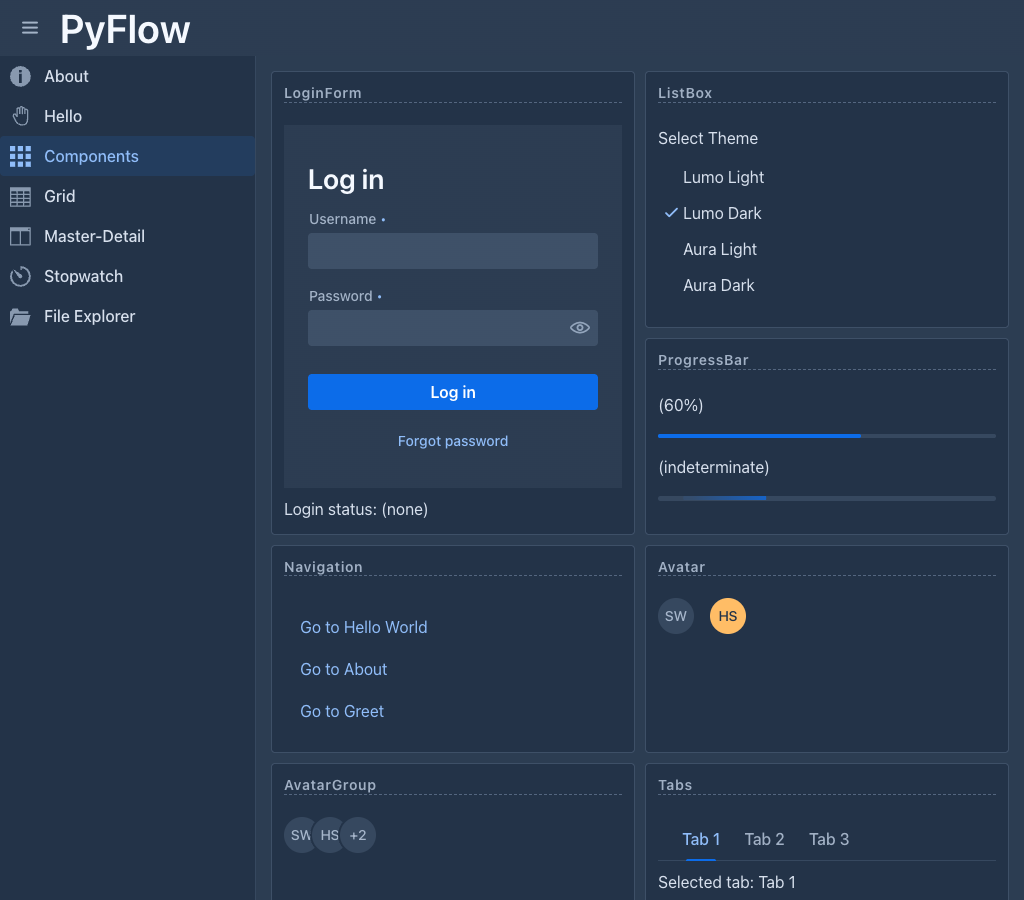
| Components | /components |
20+ components in a responsive CSS grid |
| Grid | /grid |
Lazy data provider with sorting and selection (200 rows) |
| Master-Detail | /master-detail |
Grid + side form with Binder validation |
| Responsive CRUD | /crud |
Full CRUD with route parameters and FAB |
| Stopwatch | /push-demo |
WebSocket push -- server updates UI every second |
| File Explorer | /file-explorer |
TreeGrid + @ClientCallable for server method calls |
Run the demo
git clone https://github.com/manolo/pyxflow.git
cd pyxflow
python -m venv .venv && source .venv/bin/activate
pip install -e .
python -m demo          # http://localhost:8088
Installation
pip install pyxflow
Quick start
mkdir my-app && cd my-app
python -m venv .venv
source .venv/bin/activate   # Windows: .venv\Scripts\activate
pip install pyxflow
pyxflow --setup
pyxflow
# http://localhost:8080
This scaffolds a project with views/, static/, and VSCode config:
my-app/
  views/
    main_layout.py    # AppLayout with SideNav
    hello_world.py    # Sample view with TextField + Button
  static/
    favicon.ico
    styles/
      styles.css
    images/
  .vscode/            # VSCode settings, snippets, extensions
Running
pyxflow [app_module] [options]

  app_module               Python module with views/ (auto-detected if omitted)
  --setup [app_name]       Scaffold a new project (views, static, .vscode/)
  --vscode                 Generate .vscode/ config and install recommended extensions
  --dev                    Auto-reload on source changes
  --debug                  Verbose UIDL protocol logging
  --port PORT              Server port (default: 8080)
  --host HOST              Server host (default: localhost)
  --bundle                 Generate frontend bundle
Routing
Each view is a Python class with a @Route decorator that defines the URL path. Add @Menu to include it in the navigation. PyXFlow handles client-side URL routing automatically.
from pyxflow import Route, Menu

@Route("dashboard", page_title="Dashboard", layout=MainLayout)
@Menu(title="Dashboard", order=1, icon="vaadin:dashboard")
class DashboardView(VerticalLayout):
    ...
@Route(path)-- register a view at a URL path@Route(path, layout=MainLayout)-- wrap in a layout@Menu(title, order, icon)-- add to the navigation menu- Route parameters:
@Route("greet/:name")withon_parameter_changed(self, params)
Application shell
@AppShell marks the global app configuration: push, theme, stylesheets. Only one per app. In practice, you put it on your main layout class (AppLayout) which provides the navbar, drawer, and content area.
from pyxflow import AppShell, Push, ColorScheme, StyleSheet
from pyxflow.components import AppLayout, DrawerToggle, H1, SideNav, SideNavItem
from pyxflow.menu import get_menu_entries

@AppShell
@Push
@ColorScheme("dark")
@StyleSheet("lumo/lumo.css", "styles/styles.css")
class MainLayout(AppLayout):
    def __init__(self):
        self.add_to_navbar(DrawerToggle(), H1("My App"))
        nav = SideNav()
        for entry in get_menu_entries():
            nav.add_item(SideNavItem(entry.title, entry.path))
        self.add_to_drawer(nav)
Grid with lazy data
Grid fetches only the rows visible in the viewport. Provide a callback that returns a slice of your data and the total count -- Grid handles virtual scrolling, sorting, and pagination.
grid = Grid()
grid.add_column("name", header="Name").set_sortable(True).set_auto_width(True)
grid.add_column("email", header="Email").set_auto_width(True)
grid.set_data_provider(my_fetch)

def my_fetch(offset, limit, sort_orders):
    return items[offset:offset+limit], len(items)
Real-time push
Update the UI from business background tasks running in the server. The server pushes changes to the browser via WebSocket. Just call ui.access() from any async task.
import asyncio

@Route("live")
class LiveView(VerticalLayout):
    def __init__(self):
        self.label = Span("0")
        self.add(self.label)
        asyncio.get_event_loop().create_task(self._tick())

    async def _tick(self):
        n = 0
        while True:
            await asyncio.sleep(1)
            n += 1
            ui = self.get_ui()
            if ui:
                ui.access(lambda: self.label.set_text(str(n)))
Requires @Push on the @AppShell class.
Components
| Type | Component | Description |
|---|---|---|
| Input | TextField |
Single-line text input |
| Input | TextArea |
Multi-line text input |
| Input | PasswordField |
Masked password input |
| Input | EmailField |
Email input with RFC 5322 validation |
| Input | NumberField |
Numeric input with min/max/step |
| Input | IntegerField |
Integer-only variant |
| Input | Checkbox / CheckboxGroup |
Toggle and multiple selection |
| Input | RadioButtonGroup |
Single selection from options |
| Input | Select |
Dropdown single selection |
| Input | ComboBox / MultiSelectComboBox |
Filterable dropdown (multi-select) |
| Input | DatePicker / TimePicker / DateTimePicker |
Date and time selection |
| Input | Upload |
File upload |
| Input | CustomField |
Composite custom field |
| Data | Grid |
Data table with sorting, selection, lazy loading, renderers |
| Data | TreeGrid |
Hierarchical data table with expand/collapse |
| Layout | VerticalLayout / HorizontalLayout |
Stack children vertically or horizontally |
| Layout | FlexLayout |
CSS Flexbox layout |
| Layout | FormLayout |
Responsive form with labels and colspan |
| Layout | SplitLayout |
Resizable two-panel split |
| Layout | AppLayout |
Application shell with navbar and drawer |
| Layout | Scroller |
Scrollable container |
| Layout | Card |
Styled card container |
| Layout | Details / Accordion |
Collapsible sections |
| Layout | Dialog / ConfirmDialog |
Modal dialogs |
| Layout | MasterDetailLayout |
Master-detail pattern |
| Navigation | Tabs / TabSheet |
Tab navigation with content panels |
| Navigation | SideNav |
Side navigation with items |
| Navigation | MenuBar / ContextMenu |
Hierarchical and right-click menus |
| Navigation | RouterLink |
Client-side navigation link |
| Display | Button |
Click listener, icon support, keyboard shortcuts |
| Display | Icon |
Vaadin and Lumo icon sets |
| Display | Notification |
Toast notifications with position and duration |
| Display | ProgressBar |
Determinate and indeterminate progress |
| Display | Avatar / AvatarGroup |
User avatars |
| Display | Span, H1-H6, Paragraph, Pre |
Text elements |
| Display | Image, Anchor, IFrame |
Media and links |
Development
See README-DEV.md for setup, tests, project structure, and architecture.
License
Apache License 2.0
Release history Release notifications | RSS feed


Download files
Download the file for your platform. If you're not sure which to choose, learn more about installing packages.
Source Distribution
Built Distribution
Filter files by name, interpreter, ABI, and platform.
If you're not sure about the file name format, learn more about wheel file names.
Copy a direct link to the current filters
File details
Details for the file pyxflow-0.4.3.tar.gz.
File metadata
- Download URL: pyxflow-0.4.3.tar.gz
- Upload date:
- Size: 6.9 MB
- Tags: Source
- Uploaded using Trusted Publishing? No
- Uploaded via: twine/6.2.0 CPython/3.14.0
File hashes
| Algorithm | Hash digest | |
|---|---|---|
| SHA256 |
c1ffe4e1a7512ad7a428d9cbf14ba1bbcaf869008d0fbeb9ac6f26ef537c5e20
|
|
| MD5 |
87c3f7d33716e79bb06397c16802d429
|
|
| BLAKE2b-256 |
ccf61da99ab0a1110c77313de85875a030a101cdf74ca11a6e74e650a124d75d
|
File details
Details for the file pyxflow-0.4.3-py3-none-any.whl.
File metadata
- Download URL: pyxflow-0.4.3-py3-none-any.whl
- Upload date:
- Size: 6.9 MB
- Tags: Python 3
- Uploaded using Trusted Publishing? No
- Uploaded via: twine/6.2.0 CPython/3.14.0
File hashes
| Algorithm | Hash digest | |
|---|---|---|
| SHA256 |
423687eac301f7d205b37d6d7f6fc02cd4bce92895a35df6c2b7e8f8865400f1
|
|
| MD5 |
ef588a366d567bd43d2825c218c45eea
|
|
| BLAKE2b-256 |
f7739589dcfec4dfbe663f4e4665f0f08ffb960baaa6654c8c3d781ef9cae1ea
|






