
This release is a pre-release and may not be stable for production use.
pyxpo-audio
Sound playback for pyxpo apps, written in Python: play, pause, loop, seek and set the volume of a local file or a URL. It follows the player part of expo-audio, in Python style.
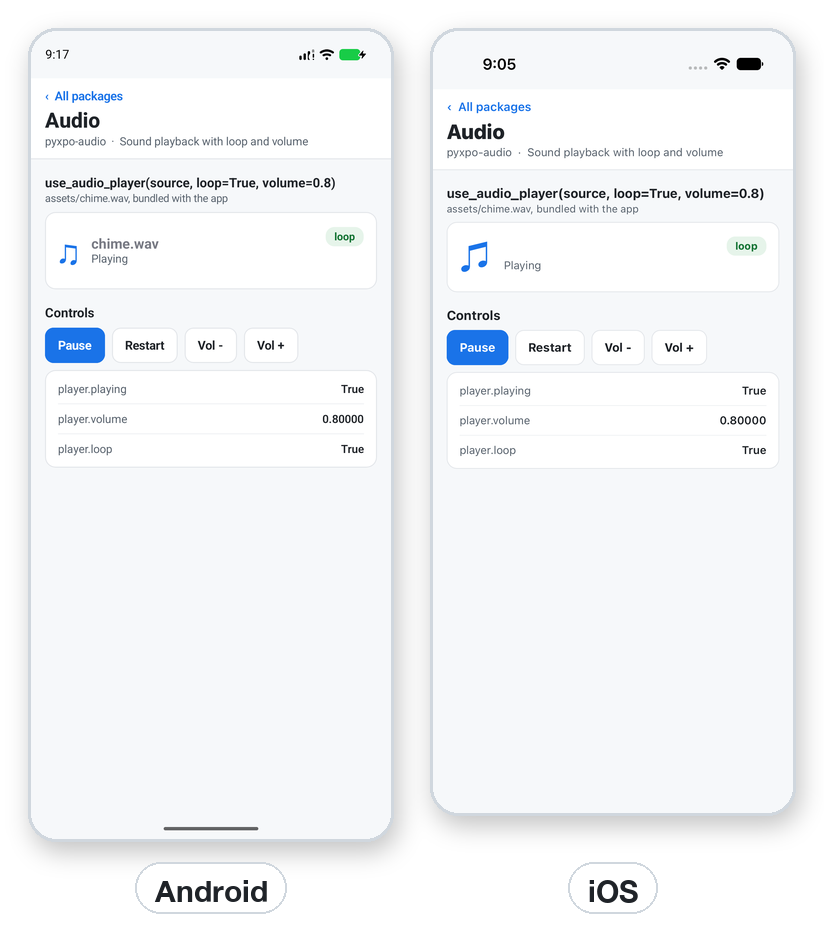
import pyxpo_audio as Audio

player = Audio.create_audio_player("https://example.com/beep.mp3", volume=0.8)
player.play()
player.pause()
player.remove()                      # frees the native player
Features
- Files and URLs: a path, a
file://URI, anhttp(s)://URL or{"uri": ...}. - Controls:
play(),pause(),seek_to(seconds), andloopandvolume(0 to 1) that you can change at any time. - A hook for components:
use_audio_player(source, loop, volume)makes the player, follows your arguments on every render and frees it when the component goes away. - Cheap: the native player is made on the first
play()orseek_to(), so a player that never plays costs nothing. - Gapless loops for files on iOS (
AVAudioPlayer). - Plays well with the phone: sound pauses while the app is in the background and plays on when it returns. iOS plays with the silent switch on and mixes with other apps' sound.
- Works in the browser: the web page and the desktop window use an HTML audio element.
- Typed: ships
py.typed. Every name also has its expo spelling (Audio.useAudioPlayer,player.seekTo).
Contents
| If you are... | Start here |
|---|---|
| Playing a sound on a button | Quick start |
| Playing a file from the web | Sources |
| Looping music or changing the volume | Controls |
| Playing outside a component | Players you own |
| Hearing nothing in the browser | Web and desktop |
| Looking for exact signatures | API reference · Errors |
| Seeing it in a real app | Recipe: a sound effect and background music |
| Stuck | Testing · Troubleshooting · FAQ |
Platform support
| Target | What works |
|---|---|
| Android, API 24+ | MediaPlayer. A play() asked while the file is still preparing starts when it is ready. Adds the INTERNET permission (granted at install) for URLs. |
| iOS 15+ | AVAudioPlayer for files (gapless loops), AVPlayer for URLs. Plays with the silent switch on. |
Web page and desktop window (pyxpo run web / pyxpo run desktop) |
An HTML audio element. Browsers play sound only after the first tap on the page. |
Requires Python 3.9+ and pyxpo>=0.1.0a2.
Install
pip install pyxpo-audio
Add the module to your app's pyproject.toml:
[tool.pyxpo]
modules = ["audio"]
The module has native code, so rebuild the app after adding it (pyxpo run android or pyxpo run ios). It needs no
runtime permission and no prompt.
Quick start
import os

import pyxpo_audio as Audio
from pyxpo import Button, Text, View, component

CHIME = os.path.join(os.path.dirname(os.path.abspath(__file__)), "assets", "chime.wav")


@component
def Chime():
    player = Audio.use_audio_player(CHIME, loop=True, volume=0.8)
    return View(
        Text("Playing" if player.playing else "Paused"),
        Button("Pause" if player.playing else "Play",
               lambda: player.pause() if player.playing else player.play()),
        Button("Restart", lambda: player.seek_to(0)),
    )
Tip:
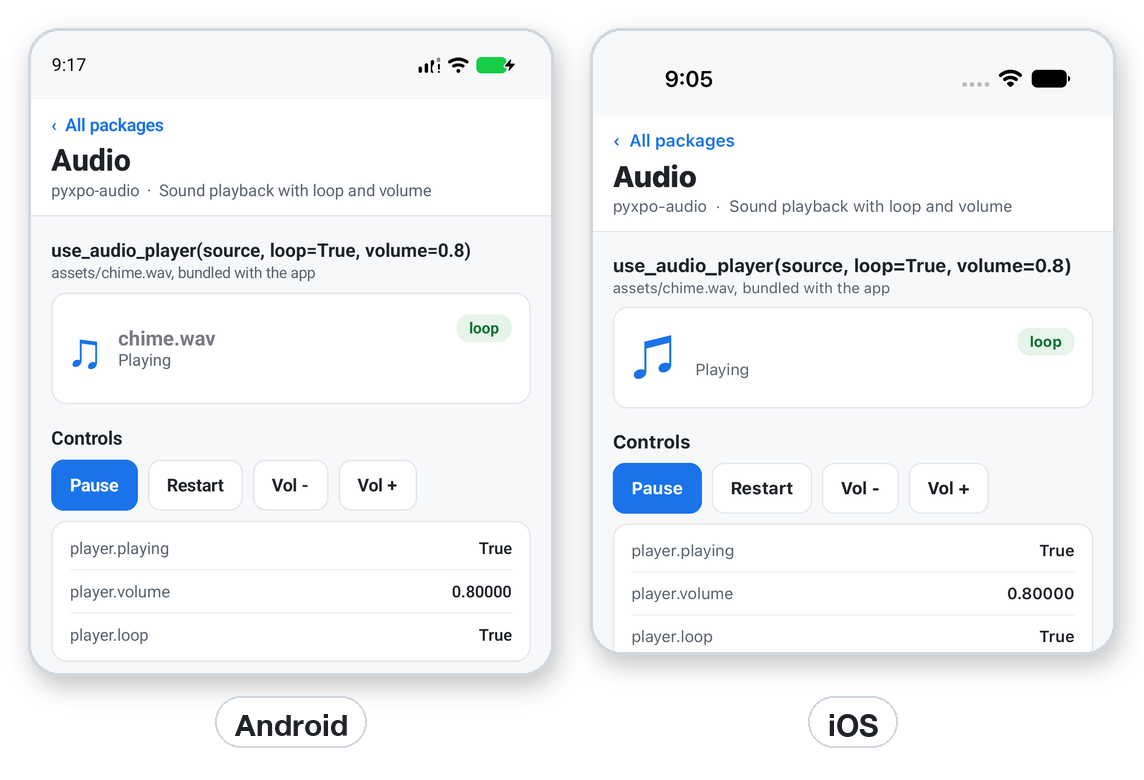
player.playingis what you last asked for, not a live status from the speaker. It changes when you callplay()orpause(), but a sound that does not loop stops by itself at its end whileplayingstaysTrue. The nextplay()starts it over. Also note that settingplayingdoes not re-render, so keep your ownuse_stateflag when the label must change (the screenshots do this).
Sources
Audio.use_audio_player("/data/user/0/com.example/files/song.wav")
Audio.use_audio_player("file:///path/song.wav")
Audio.use_audio_player("https://example.com/beep.mp3")
Audio.use_audio_player({"uri": "https://example.com/beep.mp3"})
Audio.use_audio_player(pathlib.Path("song.wav"))
Audio.use_audio_player(None)                      # plays nothing
| Source | Notes |
|---|---|
A path, a file:// URI or a Path |
A Path is resolved to an absolute path. Put files you ship in your app next to your Python code, as above. |
An http(s):// URL |
Streams on iOS with AVPlayer. Needs a network. |
{"uri": ...} |
The expo shape. |
None |
A player with no sound. All calls do nothing. |
A source of any other type, or an empty string, raises ValueError.
Controls
player.play()                 # from where it paused, or from the start
player.pause()
player.seek_to(12.5)          # seconds, a number >= 0
player.loop = True
player.volume = 0.4           # 0 to 1
| Member | Meaning |
|---|---|
play() |
Starts or resumes. After a non-looping sound ended, starts it over. |
pause() |
Pauses where it is. |
seek_to(seconds) (seekTo) |
Jumps to a time. Makes the native player if there is none yet. |
loop |
True repeats forever. Settable. |
volume |
A number from 0 to 1. Settable. Anything else raises ValueError. |
playing |
What you last asked for. Read only. |
uri, id |
The resolved source and the player's number. |
remove() |
Stops the sound and frees the native player. The player does nothing afterwards. |
In use_audio_player, loop and volume follow the arguments on every render. A new source makes a new player and
removes the old one.
Players you own
Outside a component, make and free the player yourself:
player = Audio.create_audio_player("https://example.com/beep.mp3", loop=False, volume=1.0)
player.play()
...
player.remove()
Forgetting remove() leaves the native player alive until the app ends.
Errors
| Error | When | What to do |
|---|---|---|
ValueError |
A bad source, a volume outside 0 to 1, or a negative or non-number seek_to. |
Fix the argument. The message names it. |
ModuleNotLinkedError (from pyxpo.module_api) |
The app was built without "audio" in modules, and play() was called. |
Add it and rebuild. |
A file that cannot be found or decoded does not raise in Python. The native player cannot start, so you hear nothing.
Check the path first, for example with os.path.exists.
Config
There are no module options and no config plugin. The only setup is the modules entry. On Android the module adds
INTERNET to the manifest for you.
Web and desktop
pyxpo run web and pyxpo run desktop play through an HTML audio element in the page:
- Browsers refuse sound before the first tap on the page. A
play()before that is refused by the browser, and the nextplay()after a tap works. - A hidden tab pauses the sound and plays it on when it shows again, as the phone apps do.
Recipe: a sound effect and background music
Looping music that follows a "music on" switch, and a one-shot effect on a button.
import os

import pyxpo_audio as Audio
from pyxpo import Button, Text, View, component, use_state

HERE = os.path.dirname(os.path.abspath(__file__))
MUSIC = os.path.join(HERE, "assets", "music.mp3")
POP = os.path.join(HERE, "assets", "pop.wav")


@component
def Game():
    music_on, set_music = use_state(True)
    music = Audio.use_audio_player(MUSIC, loop=True, volume=0.4)
    pop = Audio.use_audio_player(POP)

    if music_on and not music.playing:
        music.play()
    if not music_on and music.playing:
        music.pause()

    def hit():
        pop.seek_to(0)
        pop.play()

    return View(
        Text("Music is %s" % ("on" if music_on else "off")),
        Button("Toggle music", lambda: set_music(not music_on)),
        Button("Pop", hit),
    )
pop.seek_to(0) before play() lets the effect play again when pressed fast.
Production checklist
- The sound files exist on every platform and are small enough to load quickly.
- A one-shot effect rewinds with
seek_to(0)beforeplay(). - A player made with
create_audio_playeris removed withremove(). - Music has an off switch, and starts only after a user action on the web.
- A URL source has a network check or a fallback.
- You tested with the silent switch on (iOS) and with the volume down.
Testing
Unit tests run on the desktop host. Calls go to a native bridge that is not there, so replace the bridge call with a fake and check what the player sent:
import pyxpo_audio as Audio


def test_play_creates_then_plays(monkeypatch):
    sent = []
    monkeypatch.setattr(Audio, "call", lambda *a, **k: sent.append(a))
    monkeypatch.setattr(Audio, "require_linked", lambda *a, **k: None)

    player = Audio.create_audio_player("song.wav", loop=True, volume=0.5)
    player.play()

    assert sent[0][:2] == ("Audio", "create") and sent[0][3:] == ("song.wav", True, 0.5)
    assert sent[1][:2] == ("Audio", "play")
    assert player.playing
Value checks need no fake: Audio.create_audio_player("x", volume=2) raises ValueError.
Troubleshooting
| Symptom | Cause and fix |
|---|---|
| No sound in the browser | Browsers need a tap on the page first. Play after a button press. |
| No sound on a phone, no error | The path is wrong, the format is not supported, or the volume or the phone is muted. Check os.path.exists(path) and the file type. |
The label does not change when I call play() |
player.playing is a plain value and does not re-render. Keep a use_state flag. |
| A sound does not repeat | loop is False. Set loop=True, or call seek_to(0) and play(). |
| A short effect does not replay while still playing | Call seek_to(0) before play(). |
ValueError: volume must be a number from 0 to 1 |
Pass a float in range. A bool is rejected too. |
| Sound stops when the app goes to the background | By design. It plays on when the app comes back. |
ModuleNotLinkedError |
Add "audio" to modules and rebuild. |
FAQ
Can I play several sounds at once? Yes. Each player is independent.
Can I record sound? No. This module only plays.
Does it keep playing in the background or on the lock screen? No. It pauses in the background.
Which formats work? Whatever the platform's player supports, such as WAV, MP3 and AAC on both phones.
Is useAudioPlayer the same as use_audio_player? Yes. Every function has both spellings.
API reference
Functions
| Function (expo name) | Returns |
|---|---|
use_audio_player(source, *, loop=False, volume=1.0) (useAudioPlayer) |
AudioPlayer, freed on unmount |
create_audio_player(source, *, loop=False, volume=1.0) (createAudioPlayer) |
AudioPlayer, you call remove() |
AudioPlayer
| Member | Description |
|---|---|
play(), pause() |
Start or resume, and pause. |
seek_to(seconds) (seekTo) |
Jump to a time in seconds. |
loop, volume |
Settable properties. |
playing |
What was last asked for. |
uri, id |
The resolved source and the player number. |
remove() |
Stop and free the native player. |
Types
| Name | Description |
|---|---|
Source |
str, Path, {"uri": ...} or None. |
License
MIT
1 maintainer

Metadata
1 maintainer
Release files for pyxpo-audio 0.1.0a1
For a detailed explanation of source distributions (sdists) and built distributions (wheels), please see the package formats documentation.
Source distribution (sdist)
| File | Size | Uploaded | Provenance | |
|---|---|---|---|---|
| pyxpo_audio-0.1.0a1.tar.gz | 17.6 kB | With provenance | Details |
Built distribution (wheel)
| File | Interpreter | ABI | Platform | Reset |
|---|---|---|---|---|
| pyxpo_audio-0.1.0a1-py3-none-any.whl | Python 3 | none | any | Details |
Total release size: 32.3 kB
Release files / pyxpo_audio-0.1.0a1.tar.gz
| Download URL | pyxpo_audio-0.1.0a1.tar.gz |
|---|---|
| Size | 17.6 kB |
| Tags | Source |
|
SHA-256 checksum How to use checksums |
d1b250053f928c3173779c333078376d92677ce5a72891b7eeb8f61faa86ab54
|
|
BLAKE2b-256 checksum How to use checksums |
5ec15fa0385231d0a097138229ff2469d8fb073f296e3be38c186aef6477d39a
|
| Upload date | |
|
Uploaded using Trusted Publishing? What is trusted publishing? |
Yes |
| Uploaded via |
twine/7.0.0 CPython/3.13.14
|
Provenance
Provenance describes where a file came from. On PyPI, provenance is shared via attestations, which provide a verifiable record of the build or publishing details. View details, limitations and caveats.


PyPI Publish Attestation
PyPI verified that this artifact, at this checksum, originated from the publisher listed below.
Signed by GitHub Actions, verified by PyPI on Oct 18, 2026.
Transparency logRelease files / pyxpo_audio-0.1.0a1-py3-none-any.whl
| Download URL | pyxpo_audio-0.1.0a1-py3-none-any.whl |
|---|---|
| Size | 14.7 kB |
| Tags | Python 3 |
|
SHA-256 checksum How to use checksums |
d31085b0fef17ae1e4fe779be6a78e9291795ed699ef83b3051ef044add376b0
|
|
BLAKE2b-256 checksum How to use checksums |
f6fd0e905c4a6df303fa2f9406cfd8b72873bd0ae6fb568210e617750cfc5311
|
| Upload date | |
|
Uploaded using Trusted Publishing? What is trusted publishing? |
Yes |
| Uploaded via |
twine/7.0.0 CPython/3.13.14
|
Provenance
Provenance describes where a file came from. On PyPI, provenance is shared via attestations, which provide a verifiable record of the build or publishing details. View details, limitations and caveats.
PyPI Publish Attestation
PyPI verified that this artifact, at this checksum, originated from the publisher listed below.
Signed by GitHub Actions, verified by PyPI on Oct 18, 2026.
Transparency logSecurity for pyxpo-audio 0.1.0a1
Provenance
Provenance describes where a file came from. On PyPI, provenance is shared via attestations, which provide a verifiable record of the build or publishing details. View details, limitations and caveats.
Full provenance
All 2 files in this release have been uploaded with provenance metadata.
Attestation for pyxpo_audio-0.1.0a1.tar.gz
PyPI Publish Attestation
PyPI verified that this artifact, at this checksum, originated from the publisher listed below.
Signed by GitHub Actions, verified by PyPI on Oct 18, 2026.
Transparency logA note on package security
PyPI is a repository for distributing packages, not a service for auditing them. While third-party security researchers and our staff do their best to detect and remove malicious packages, PyPI cannot guarantee the quality, security or suitability of any given package.













