
This release is a pre-release and may not be stable for production use.
pyxpo-dot-env
Environment variables for pyxpo apps. Put settings such as API URLs, feature
flags and keys in .env files, one set per build mode (development, staging, production). Read them in the app
with typed getters. The build stops when something that looks like a server secret would ship inside the app.
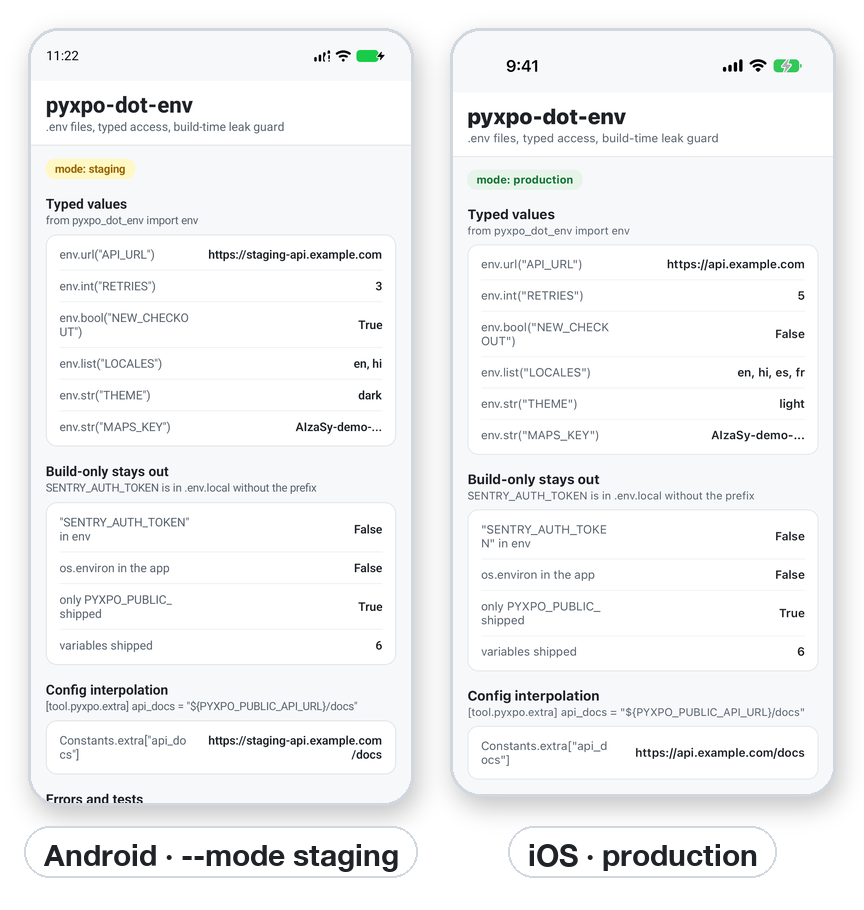
# .env
PYXPO_PUBLIC_API_URL=https://api.example.com   # PYXPO_PUBLIC_ variables ship inside the app
SENTRY_AUTH_TOKEN=...                          # everything else stays on the build machine
from pyxpo_dot_env import env

env.url("API_URL")          # "https://api.example.com" (the PYXPO_PUBLIC_ prefix is optional)
env.int("RETRIES", 3)       # typed getters with defaults
env.mode                    # "development", "production", "staging", ...
Features
- The
.envfiles you already know:.env,.env.<mode>,.env.localand.env.<mode>.local, in the same order of priority as Expo, Vite and Next.js. Variables set in the environment (CI) win over every file. - Build modes:
pyxpo runbuildsdevelopment,pyxpo build --releasebuildsproduction, and--mode staging(orPYXPO_MODE=staging) picks any other mode. - Public and build-only variables: only
PYXPO_PUBLIC_variables ship inside the app. Everything else is put intoos.environon the build machine (forapp_config.py, plugins and build tools) and never reaches the app. - Typed access:
env.str,env.int,env.float,env.bool,env.url,env.list,env.json, with defaults and clear errors. - An optional schema in
pyproject.toml: types, required variables, defaults, allowed values, patterns and descriptions. Every mistake is listed at build time, not found by a user at run time. - A leak guard: the build fails when a public variable holds an AWS key, a Stripe secret key, an OpenAI or
Anthropic key, a private key, a GitHub or Slack token, a Supabase
service_rolekey, a password in a URL, or has a name like..._SECRET/..._PASSWORD. - Git checks: warnings when
.env*.localis not git-ignored, or when a committed.envholds a secret. ${VAR}in[tool.pyxpo]: use variables in the app config (for example a per-mode bundle ID or anextravalue), with a guard that keeps build-only values out ofextra, which ships.- A command line tool:
python -m pyxpo_dot_env check | show | example | init. - dotenvx friendly: encrypted values are detected, and
dotenvx run -- pyxpo build ...decrypts them for the build. - Pure Python, no native code: the same on Android, iOS, the web, Mac and Windows. Typed (
py.typed).
Contents
| If you are... | Start here |
|---|---|
New to .env files |
Quick start → Files and modes → Reading values |
| Keeping API keys safe | What is safe to ship → The leak guard → Recipe: a backend proxy |
| Adding checks and types | Schema · Options |
| Using variables in the app config | ${VAR} in [tool.pyxpo] |
| Setting up CI | CI and the environment · Encrypted files (dotenvx) |
| Shipping to the stores | Production checklist |
| Looking for exact signatures | API reference · Command line · Errors |
| Stuck | Testing · Troubleshooting · FAQ |
Platform support
| Target | Support |
|---|---|
| Android | Full. Public values are bundled in the app's config file. .env files are never copied into the app. |
| iOS | Full, the same as Android. |
Web page (pyxpo run web / pyxpo build web) |
Full. The dev server rebuilds when a .env file is added, edited or removed. |
Desktop: Mac and Windows apps, pyxpo run desktop --preview |
Full. The preview window gets the values from the build process directly. |
Requires Python 3.9+ and pyxpo>=0.1.0a4 (module build hooks).
Install
pip install pyxpo-dot-env
Add the module to your app's pyproject.toml:
[tool.pyxpo]
modules = ["dot-env"]
Then create the starter files and the .gitignore entries in the project folder:
python -m pyxpo_dot_env init
init creates .env and .env.example, and adds .env*.local and .env.keys to .gitignore. It never
overwrites a file that already exists.
The module has no native code, so there is nothing to link. Values are read at build time: after you edit a
.env file, run pyxpo run android or pyxpo run ios again. The web dev server rebuilds by itself.
Quick start
1. Write the files. Shared values go in .env, per-mode values in .env.<mode>, and secrets for this machine
in .env.local (git-ignored):
# .env
PYXPO_PUBLIC_API_URL=http://10.0.2.2:8000        # the host machine, seen from the Android emulator
PYXPO_PUBLIC_RETRIES=3
PYXPO_PUBLIC_LOCALES=en,hi

# .env.production
PYXPO_PUBLIC_API_URL=https://api.example.com
PYXPO_PUBLIC_RETRIES=5

# .env.local (git-ignored, build-only: no PYXPO_PUBLIC_ prefix)
SENTRY_AUTH_TOKEN=...
2. Read them in the app:
from pyxpo import Text, View, component, use_async
from pyxpo_dot_env import env

import app.api as api


@component
def App():
    async def load():
        await api.connect(env.url("API_URL"), retries=env.int("RETRIES", 3))

    use_async(load, [])
    return View(
        Text("Server: %s" % env.url("API_URL")),
        Text("Languages: %s" % ", ".join(env.list("LOCALES", ["en"]))),
        Text("Production build" if env.is_production else "Mode: %s" % env.mode),
        style={"flex": 1, "padding": 16},
    )
3. Build for a mode:
pyxpo run android                       # development: .env (+ .env.development, .env.local)
pyxpo run android --mode staging        # staging: .env.staging wins over .env
pyxpo build android --release           # production: .env.production wins over .env
4. Check before you ship:
python -m pyxpo_dot_env check --mode production
check runs the same checks as the build and prints what would ship. Add it to CI so a missing or leaked value
fails the pipeline, not the release.
What is safe to ship
An app package is a file on the user's phone. Anyone can unzip an APK or IPA and read every string in it, and tools that do this are free and fast. Hiding a key with obfuscation, encryption or native code only slows this down: the app must be able to read the key, so whoever has the app can read it too. OWASP lists hardcoded keys in apps as a known weakness (MASWE-0005), and Android's security guide says not to put secrets in the app at all (Insecure API usage).
So pyxpo-dot-env sorts variables by name:
| Kind | Name | Where it goes | Examples |
|---|---|---|---|
| Public | PYXPO_PUBLIC_... |
Into the app. Treat it as visible to everyone. | API base URL, feature flags, Sentry DSN, Stripe publishable key (pk_...), Google Maps / Firebase key restricted to your app, Supabase anon key, OAuth client ID |
| Build-only | anything else | os.environ of the build only. Never in the app. |
SENTRY_AUTH_TOKEN for symbol upload, signing passwords, store API keys, deploy tokens |
| Server-only | (not in the app project) | Your backend. | Stripe secret key, OpenAI / Anthropic keys, database passwords, Supabase service_role key, any key that costs money or reads other users' data |
Keys made to be public still need protection in their own console. Restrict a Google API key to your app's package name and signing certificate (Android) or bundle ID (iOS), and to the APIs it needs. Use Supabase row level security. Set spending limits.
For values that belong to one user (login tokens, refresh tokens), use
pyxpo-secure-store, which keeps them in the iOS
Keychain and the Android Keystore. .env files are for the app's own settings, which are the same for every user.
Tip: to make sure only your real app can call your backend, add Play Integrity (Android) and App Attest (iOS) checks on the server. They prove the request comes from your unmodified app on a real device, which a key in the app can never prove.
Files and modes
pyxpo-dot-env reads these files from the project folder (next to pyproject.toml), lowest priority first:
| File | For | Commit it? |
|---|---|---|
.env |
defaults for every mode | Yes, if it holds no secrets |
.env.<mode> |
one mode: .env.development, .env.staging, .env.production |
Yes, if it holds no secrets |
.env.local |
this machine, every mode | No (git-ignored) |
.env.<mode>.local |
this machine, one mode | No (git-ignored) |
| the process environment | CI, a one-off shell | not a file |
A variable in a later file replaces the same variable in an earlier one, and a variable that is already set in the environment wins over every file. This is the same order Expo (environment variables) and Vite (env and modes) use.
The build mode decides which .env.<mode> files are read:
| Command | Mode |
|---|---|
pyxpo run android / ios / web / desktop |
development |
pyxpo build android (no --release) |
development |
pyxpo build android --release |
production |
pyxpo build android --release --mode staging |
staging (a release build with staging values) |
PYXPO_MODE=preview pyxpo build ios |
preview |
--mode is accepted by pyxpo run, pyxpo build and pyxpo stage, and wins over PYXPO_MODE. A mode is
lowercase letters, digits and dashes (staging, qa-2). It cannot be local, because .env.local is the
machine file of every mode.
File format
The format is the one python-dotenv and the dotenv family use. Mistakes are errors with the file and line, not silently guessed values.
# a comment
API_HOST=api.example.com
export PYXPO_PUBLIC_API_URL=https://${API_HOST}/v1   # `export` is optional; ` #` starts a comment
PYXPO_PUBLIC_GREETING="Hello\nworld"                 # double quotes: \n \t \r \" \\ \$ escapes, ${VAR}
PYXPO_PUBLIC_PATTERN='no ${expansion} here'          # single quotes: the text exactly as written
PYXPO_PUBLIC_EMPTY=                                  # an empty string
PYXPO_PUBLIC_PRICE=$${PRICE}                         # $${ writes a literal ${
CERT="-----BEGIN CERTIFICATE-----
MIIB...
-----END CERTIFICATE-----"                           # quoted values can span lines
| Reference | Value |
|---|---|
${NAME} |
the value of NAME; an error when NAME is not set |
${NAME:-fallback} |
fallback when NAME is not set or is empty |
${NAME-fallback} |
fallback when NAME is not set |
${A:-${B}} |
fallbacks can hold references |
References can use variables from any file and from the environment, in any order. A loop
(A=${B}, B=${A}) is an error that names the loop.
Reading values in the app
from pyxpo_dot_env import EnvError, env

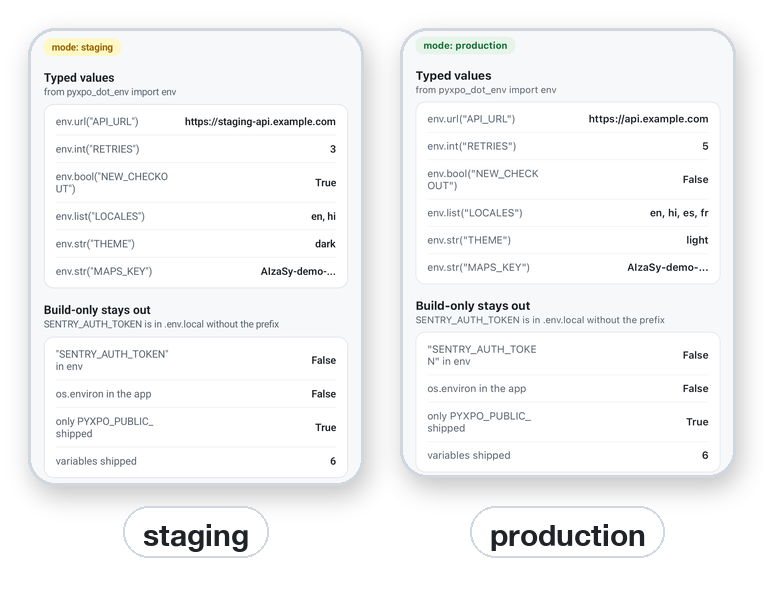
env.str("THEME")                  # "dark"
env.int("RETRIES", 3)             # 3 when not set; EnvError when set to "three"
env.float("SAMPLE_RATE", 0.1)
env.bool("NEW_CHECKOUT", False)   # true/false, 1/0, yes/no, on/off
env.url("API_URL")                # a full URL, checked
env.list("LOCALES", ["en"])       # "en,hi,es" -> ["en", "hi", "es"]
env.json("LIMITS", {})            # '{"free": 3}' -> {"free": 3}

env.get("THEME", "light")         # the value as shipped, or the default
env["API_URL"]                    # EnvError when not set
"MAPS_KEY" in env                 # True / False
env.require("API_URL", "SUPPORT_EMAIL")   # one EnvError that lists every missing name

env.mode                          # "development", "production", "staging", ...
env.is_production, env.is_development
env.to_dict()                     # {"PYXPO_PUBLIC_API_URL": "...", ...}
- Names can be written with or without the
PYXPO_PUBLIC_prefix:env.url("API_URL")andenv.url("PYXPO_PUBLIC_API_URL")are the same. - A getter without a default raises
EnvErrorwhen the variable is not set, so a missing setting fails loudly and early. With a default, it returns the default. - A value that does not fit the type raises
EnvErrorwith the name and the value, for examplePYXPO_PUBLIC_RETRIES must be a whole number, got 'three'. - Build-only variables are not there:
"SENTRY_AUTH_TOKEN" in envis False, and they are not in the app'sos.environeither.
Schema
The schema is optional. Without it, every PYXPO_PUBLIC_ variable ships as a string and the getters convert it
when you read it. With it, the build checks each value, fills in defaults and ships typed values.
[tool.pyxpo.module_options.dot-env.vars]
PYXPO_PUBLIC_API_URL      = { type = "url", required = true, description = "Backend base URL", example = "https://api.example.com" }
PYXPO_PUBLIC_RETRIES      = { type = "int", default = 3 }
PYXPO_PUBLIC_NEW_CHECKOUT = { type = "bool", default = false, description = "Feature flag" }
PYXPO_PUBLIC_LOCALES      = { type = "list", default = ["en"] }
PYXPO_PUBLIC_THEME        = { choices = ["light", "dark"], default = "light" }
PYXPO_PUBLIC_APP_ID       = { pattern = "[a-z]+\\.[a-z.]+" }
PYXPO_PUBLIC_FLAGS        = "json"                      # short form: just the type
SENTRY_AUTH_TOKEN         = { required = true }         # build-only: checked, never shipped
PYXPO_PUBLIC_ADMOB_APP_ID = { required = ["production"], pattern = "ca-app-pub-\\d{16}~\\d{10}" }  # only release builds need it
| Field | Meaning |
|---|---|
type |
str (default), int, float, bool, url, list (comma separated), json |
required |
true: the build fails when the variable is missing or empty. A list of modes, like ["production"], requires it only in those builds (development can fall back to test values) |
default |
used when the variable is not set (public variables only ship it) |
choices |
the allowed values |
pattern |
a regular expression the whole value must match |
description |
shown in errors and in .env.example |
example |
shown in the "required but not set" error and written to .env.example |
Schema entries without the prefix are build-only: they are checked (for example, a release build needs
SENTRY_AUTH_TOKEN) and never shipped.
All schema problems are collected and reported together, so one build shows every mistake:
error: dot-env: 3 problems with the environment for mode 'production' (.env, .env.production in /path/to/app):
  - PYXPO_PUBLIC_API_URL must be a full URL such as https://api.example.com, got 'api.example.com' (from .env.production)
  - PYXPO_PUBLIC_THEME must be one of light, dark, got 'blue' (from .env)
  - SENTRY_AUTH_TOKEN is required but not set (Uploads debug symbols at build time)
Options
[tool.pyxpo.module_options.dot-env]
strict = true                          # every PYXPO_PUBLIC_ variable must be in vars
allow = ["PYXPO_PUBLIC_DEMO_TOKEN"]    # skip the leak guard for these names
dir = "config"                         # read the .env files from ./config instead of the project folder
git_check = true                       # warn about env files git would commit (default true)
| Option | Default | Meaning |
|---|---|---|
vars |
none | the schema |
strict |
false |
true: a PYXPO_PUBLIC_ variable that is not in vars stops the build, so a typo such as PYXPO_PUBLIC_API_ULR cannot ship by accident |
allow |
[] |
public variable names the leak guard accepts (a false alarm, or a key that is public on purpose) |
dir |
the project folder | the folder that holds the .env files, relative to the project |
git_check |
true |
false turns off the git warnings |
An unknown option is an error, so a misspelled option does not get ignored without a word.
The leak guard
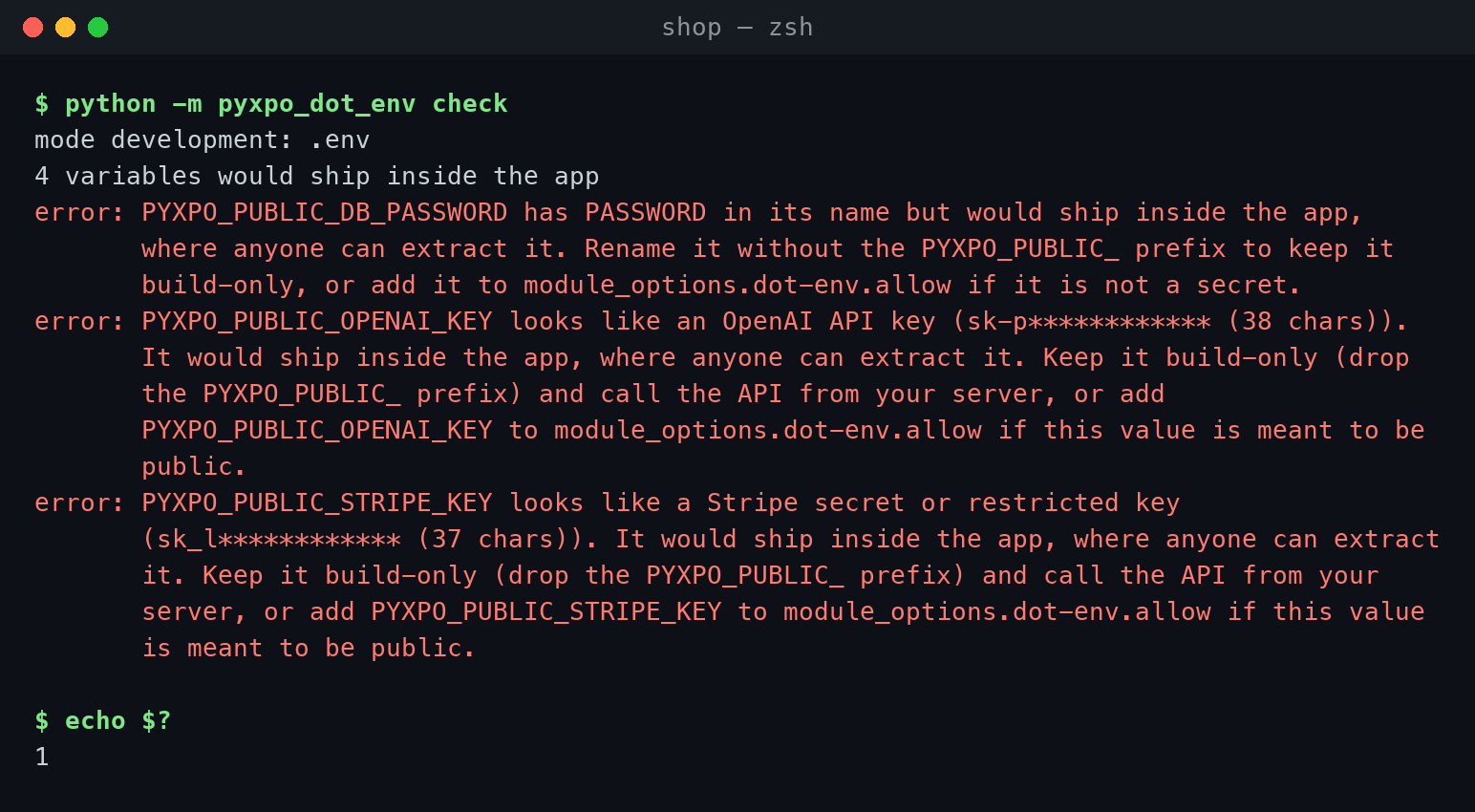
Every build checks each public value and name before anything is shipped. A hit stops the build:
| It stops on | Looks like |
|---|---|
| AWS access keys | AKIA..., ASIA... |
| Stripe secret and restricted keys | sk_live_..., sk_test_..., rk_... |
| OpenAI and Anthropic API keys | sk-..., sk-proj-..., sk-ant-... |
| Private keys | -----BEGIN ... PRIVATE KEY----- |
| GitHub and Slack tokens | ghp_..., github_pat_..., xoxb-... |
| Google OAuth client secrets and service accounts | GOCSPX-..., "type": "service_account" |
| SendGrid and Twilio keys | SG.xxx.yyy, SK + 32 hex digits |
Supabase service_role keys |
a JWT whose role is service_role |
| Passwords inside URLs | postgres://user:password@host/db |
| Secret-sounding names | a public name containing SECRET, PASSWORD, PASSWD, PRIVATE, SERVICE_ROLE or CREDENTIAL |
Keys that are made to be public do not stop the build: Google and Firebase browser keys (AIza...), Stripe
publishable keys (pk_...), Supabase anon keys, Sentry DSNs and OAuth client IDs.
Values are masked in every message (sk_l************ (32 chars)), so build logs do not leak them either.
What to do when it stops:
- If the value is a real secret, drop the
PYXPO_PUBLIC_prefix so it stays on the build machine, and call the API from your server instead (recipe). If the key was ever in a shipped build or a public repository, rotate it in the provider's console. - If it is a false alarm, or a key that is public by design, add the name to
allow:
[tool.pyxpo.module_options.dot-env]
allow = ["PYXPO_PUBLIC_DEMO_TOKEN"]
The guard also warns (without stopping the build) about:
- a plain
http://URL to another machine in a production build (local addresses such aslocalhostand the emulator's10.0.2.2are fine), - variables with another framework's prefix (
EXPO_PUBLIC_,VITE_,NEXT_PUBLIC_,REACT_APP_), which do not reach a pyxpo app, .env*.localfiles that are not git-ignored, and committed.env/.env.<mode>files that hold build-only secrets (turn off withgit_check = false),.envfiles insideapp/orassets/, which belong in the project root.
Tip: the guard is a safety net, not a proof. It cannot recognize every kind of secret. The rule that keeps you safe is the prefix: only put a value behind
PYXPO_PUBLIC_when you would be fine with it on a public web page.
${VAR} in [tool.pyxpo]
Any string in [tool.pyxpo] can use the loaded variables, with the same ${VAR}, ${VAR:-fallback} and $${
rules as the .env files:
[tool.pyxpo]
name = "${APP_NAME:-My App}"

[tool.pyxpo.ios]
bundle_identifier = "com.example.app${BUNDLE_SUFFIX:-}"    # .env.staging: BUNDLE_SUFFIX=.staging

[tool.pyxpo.extra]
api_docs = "${PYXPO_PUBLIC_API_URL}/docs"                  # read with Constants.extra["api_docs"]
extraships inside the app, so it may only usePYXPO_PUBLIC_variables. A build-only variable there is an error.- A setting elsewhere that uses a value that looks like a secret gets a warning, so you can check that setting does not end up in the app.
module_options.dot-envitself is not expanded, so patterns and examples can hold${as written.
In app_config.py, build-only and public variables are plain os.environ values:
import os


def config(cfg):
    if os.environ.get("SENTRY_AUTH_TOKEN"):
        cfg.setdefault("extra", {})["symbols_uploaded"] = True
    return cfg
Command line
Run these in the project folder (or pass --dir path/to/app). Each one takes --mode (default development).
| Command | What it does |
|---|---|
python -m pyxpo_dot_env check --mode production |
Runs every build check. Prints the files read, the number of variables that ship, warnings and errors. Exits 1 on an error, so it fits in CI. |
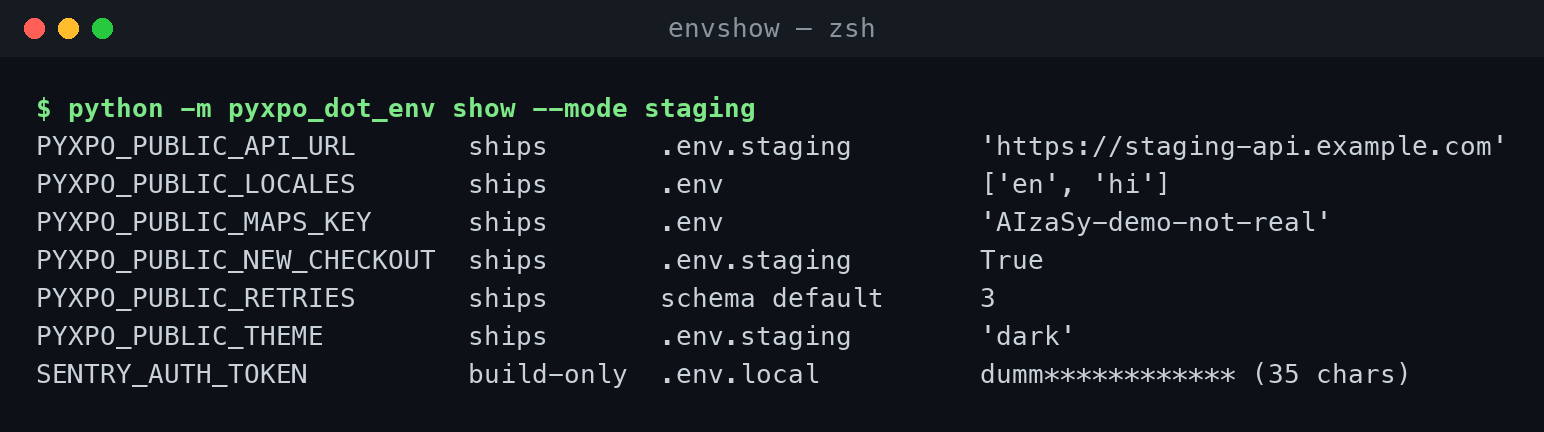
python -m pyxpo_dot_env show --mode staging |
Lists every variable: whether it ships, the file it came from, and its value. Build-only values are masked. |
python -m pyxpo_dot_env example |
Prints a .env.example: each name with its type, whether it is required and whether it ships, and only safe example values. --write saves it. |
python -m pyxpo_dot_env init |
Creates .env and .env.example, and adds .env*.local and .env.keys to .gitignore. |
CI and the environment
Variables already set in the environment win over every file, so CI can give the build its values without a file on disk:
# GitHub Actions
- run: pip install pyxpo pyxpo-dot-env
- run: python -m pyxpo_dot_env check --mode production
  env:
    PYXPO_PUBLIC_API_URL: https://api.example.com
    SENTRY_AUTH_TOKEN: ${{ secrets.SENTRY_AUTH_TOKEN }}
- run: pyxpo build android --release
  env:
    PYXPO_PUBLIC_API_URL: https://api.example.com
    SENTRY_AUTH_TOKEN: ${{ secrets.SENTRY_AUTH_TOKEN }}
- A
PYXPO_PUBLIC_variable set in the environment ships even when no.envfile mentions it. - Set
PYXPO_NO_DOTENV=1to ignore the files and use only the environment. - Keep build-only secrets in the CI secret store, never in a committed
.env.
Encrypted files (dotenvx)
dotenvx can encrypt the values in a .env file, so the file can be committed. The private
key stays in .env.keys (git-ignored by init) or in the DOTENV_PRIVATE_KEY CI secret.
pyxpo-dot-env does not decrypt files itself. When it finds an encrypted:... value, the build stops and tells you to
run the build through dotenvx, which decrypts the values into the environment:
dotenvx run -f .env.production -- pyxpo build android --release
Remember that encryption protects the file in your repository, not the app: a decrypted PYXPO_PUBLIC_ value
still ships as plain text, and the leak guard still checks it.
Errors
Build problems stop the build with one message that lists them all (error: dot-env: N problems with the environment for mode ...). At run time, the getters raise EnvError, a subclass of LookupError.
| Error | What to do |
|---|---|
X is required but not set |
Add X to .env, .env.<mode> or the environment. The message shows the description and example from the schema. |
X must be a whole number, got 'three' (and other types) |
Fix the value; the message names the file it came from. |
X must be one of light, dark, got 'blue' |
Use one of the choices. |
X looks like a Stripe secret or restricted key (...) |
See What to do when it stops. |
X has SECRET in its name but would ship inside the app |
Drop the prefix, or add X to allow if it is not a secret. |
X is not declared in module_options.dot-env.vars (strict = true) |
Add it to the schema, or fix the typo in the name. |
[tool.pyxpo] extra.x uses ${Y}, but extra ships inside the app |
Only use PYXPO_PUBLIC_ variables in extra. |
.env:4: ${NAME} is not set |
Set NAME, or give a fallback: ${NAME:-}. |
.env:7: ... has a ${ that is never closed with } |
Close the reference, write $${ for a literal ${, or single-quote the value. |
A, B are encrypted (dotenvx) |
Build through dotenvx run -- pyxpo build .... |
build mode 'Staging' must be lowercase letters, digits and dashes |
Use --mode staging. |
EnvError: PYXPO_PUBLIC_X is not set (at run time) |
Add the variable and rebuild. Only PYXPO_PUBLIC_ variables reach the app. |
Web and desktop
pyxpo-dot-env works the same on every target, because it runs on the build machine and ships plain data.
pyxpo run webrebuilds the page when you add, edit or delete a.envfile.pyxpo run desktop --previewhands the values to the preview window directly..envfiles are never bundled. Only the public values reach the app's config file.
Recipe: keep a paid API key on your server
You want an AI feature. The OpenAI key must not ship in the app: anyone could pull it out and run up your bill. So the app calls your server, and your server calls OpenAI.
# app/.env.production (the pyxpo app)
PYXPO_PUBLIC_API_URL=https://api.example.com
# server/main.py (your backend, for example FastAPI; the key lives in the server's environment)
import os

import httpx
from fastapi import Depends, FastAPI, HTTPException

app = FastAPI()
OPENAI_KEY = os.environ["OPENAI_API_KEY"]


def current_user(authorization: str = ""):
    ...  # check the user's session token; raise HTTPException(401) when it is not valid


@app.post("/summarize")
async def summarize(body: dict, user=Depends(current_user)):
    if len(body.get("text", "")) > 20000:
        raise HTTPException(413, "text too long")
    async with httpx.AsyncClient(timeout=30) as client:
        r = await client.post("https://api.openai.com/v1/responses",
                              headers={"Authorization": "Bearer " + OPENAI_KEY},
                              json={"model": "gpt-5-mini", "input": "Summarize:\n" + body["text"]})
    r.raise_for_status()
    return {"summary": r.json()["output_text"]}
# app/api.py (the pyxpo app; the user's session token is in pyxpo-secure-store)
import pyxpo_fetch as fetch
import pyxpo_secure_store as SecureStore
from pyxpo_dot_env import env


async def summarize(text):
    token = await SecureStore.get_item_async("session_token")
    response = await fetch.fetch(env.url("API_URL") + "/summarize", method="POST",
                                 headers={"Authorization": "Bearer %s" % token}, json={"text": text})
    return (await response.json())["summary"]
What this gets you:
- The OpenAI key exists only on the server. Rotating it needs no app update.
- The server decides who may call it (logged-in users), how much (rate limits, size limits) and what (a fixed prompt), so a copied app cannot turn your key into a free API.
- The app ships only the server's URL, which is public anyway.
For extra trust, check Play Integrity / App Attest tokens on the server as well.
Production checklist
Before you publish:
- Run the check for the release mode:
python -m pyxpo_dot_env check --mode productionpasses, and the list of shipped variables is what you expect (showprints them). - No server secrets in the app. Every
PYXPO_PUBLIC_value is one you would put on a public web page. Paid API keys, database passwords and service keys live on your server. - Public keys are restricted in their console: Google / Firebase keys to your package name, signing certificate and bundle ID; Supabase with row level security; spending caps set.
-
.env*.localand.env.keysare git-ignored (python -m pyxpo_dot_env initadds them), and no committed.envholds a secret (checkwarns about both). -
strict = truewith a schema, so a typo in a variable name cannot ship. - HTTPS only in production: no
http://URLs except local development addresses. - CI secrets come from the CI secret store, not from files in the repository.
- If a secret ever shipped in a build or was pushed to git, rotate it. Deleting it later does not help: old builds and git history keep it.
Testing
In unit tests, set values with env.override, a context manager. None removes a variable:
from pyxpo_dot_env import EnvError, env

import app.api as api


def test_uses_local_server():
    with env.override(API_URL="http://localhost:8000", RETRIES="1"):
        assert api.base_url() == "http://localhost:8000"


def test_missing_url_fails_loudly():
    with env.override(API_URL=None):
        try:
            api.base_url()
        except EnvError as e:
            assert "PYXPO_PUBLIC_API_URL is not set" in str(e)
        else:
            raise AssertionError("expected EnvError")
Outside a pyxpo build (plain pytest), nothing has been shipped, so env is empty until you override it.
For the build checks, pyxpo_dot_env.build.analyze runs them without a build and returns a report:
from pathlib import Path

from pyxpo_dot_env.build import analyze


def test_production_env_is_clean():
    report = analyze(Path("."), "production", {"module_options": {"dot-env": {"strict": True}}}, environ={})
    assert report.errors == []
    assert "PYXPO_PUBLIC_API_URL" in report.public
environ={} keeps your shell's variables out of the test.
Troubleshooting
| Problem | Cause and fix |
|---|---|
EnvError: PYXPO_PUBLIC_X is not set but .env has X=... |
Only PYXPO_PUBLIC_ variables ship. Rename it to PYXPO_PUBLIC_X. |
| A changed value does not show up on Android or iOS | Values are read at build time. Run pyxpo run android / ios again. |
| The staging value is not used | Build with --mode staging (or PYXPO_MODE=staging). Check with python -m pyxpo_dot_env show --mode staging. |
A value from .env is ignored |
The same variable is set in your shell or CI environment, which wins. show prints environment as its source. Unset it, or set PYXPO_NO_DOTENV=1 on purpose. |
EXPO_PUBLIC_X / VITE_X does not reach the app |
pyxpo uses its own prefix: rename it to PYXPO_PUBLIC_X. |
| The leak guard stops on a key that is meant to be public | Add its name to module_options.dot-env.allow. |
${PRICE} is replaced in a value |
Write $${PRICE}, or single-quote the value. |
.env files in app/ |
Move them next to pyproject.toml, or point dir at their folder. |
X is a plain http:// URL in a production build |
Use https:// for the production server. |
ConfigError: module_options.dot-env: unknown key ... |
An option is misspelled. The message lists the known ones. |
FAQ
Why not obfuscate or encrypt the keys inside the app? Because the app has to decrypt them to use them, and anything the app can do, someone with the app can do too. Obfuscation slows a person down by minutes. A server-side proxy makes the key unreachable. This is also why react-native-config and Expo do not offer it.
Is it safe to ship a Google Maps or Firebase API key? Yes, those keys are made to be in apps. Restrict them in the Google Cloud console (to your app and to the APIs it needs) so a copied key is useless elsewhere.
Where do I keep a user's login token?
In pyxpo-secure-store, not in .env. .env
values are the same for every user and are set when you build.
Can I change a value without a new build?
No. Values are part of the build, like Expo's EXPO_PUBLIC_ variables. For values you change often, fetch them
from your server or a remote config service at run time.
Do I need a schema?
No. Without one, every public variable ships as a string and the getters convert it. A schema adds checks,
defaults and typed values, and with strict = true it catches typos.
Can I use python-dotenv instead?
python-dotenv reads .env files at run time, which would mean shipping the files inside the app, secrets included.
pyxpo-dot-env reads them at build time and ships only the public values. The file format is the same, so existing
files keep working.
API reference
from pyxpo_dot_env import env, Env, EnvError, PREFIX
env is the shared Env instance. Every name may be given with or without the PYXPO_PUBLIC_ prefix.
| Name | Description |
|---|---|
env.str(name, default=...) |
The value as text. |
env.int(name, default=...) |
A whole number (1_000 and +5 work). |
env.float(name, default=...) |
A finite number. |
env.bool(name, default=...) |
true/false, 1/0, yes/no, on/off (any case). |
env.url(name, default=...) |
A full URL with a scheme and host. |
env.list(name, default=...) |
Comma-separated items, trimmed, empty items dropped. |
env.json(name, default=...) |
Parsed JSON. |
env.get(name, default=None) |
The value as shipped (typed when the schema declares it, else text). |
env[name] |
The value as shipped; EnvError when not set. |
name in env, len(env), iter(env) |
Membership, count and sorted full names of the shipped variables. |
env.require(*names) |
Raises one EnvError listing every name that is not set. |
env.to_dict() -> dict |
A copy of all shipped variables. |
env.mode -> str |
The build mode. |
env.is_production, env.is_development |
mode == "production" / mode == "development". |
env.override(**values) |
Context manager for tests; None removes a variable. Nests. |
env.reload() |
Reads the shipped data again. |
The typed getters raise EnvError when the variable is missing and no default was given, or when the value does
not fit the type.
| Other names | Description |
|---|---|
EnvError |
Subclass of LookupError, raised by the getters. |
PREFIX |
"PYXPO_PUBLIC_" |
pyxpo_dot_env.build.analyze(project, mode, config, environ=None) |
Runs the build checks. Returns a report with public (what ships), errors, warnings, schema and loaded (values, sources, files). |
pyxpo_dot_env.guard.secret_kind(value) |
The kind of secret a value looks like, or None. |
pyxpo_dot_env.guard.mask(value) |
The value with all but a short prefix hidden. |
Environment variables
| Name | Effect |
|---|---|
PYXPO_MODE |
The build mode when --mode is not given. |
PYXPO_NO_DOTENV=1 |
Ignore the .env files; use only the environment. |
[tool.pyxpo.module_options.dot-env]: vars, strict, allow, dir, git_check (see Options).
License
MIT.
1 maintainer

Metadata
1 maintainer
Release files for pyxpo-dot-env 0.1.0a1
For a detailed explanation of source distributions (sdists) and built distributions (wheels), please see the package formats documentation.
Source distribution (sdist)
| File | Size | Uploaded | Provenance | |
|---|---|---|---|---|
| pyxpo_dot_env-0.1.0a1.tar.gz | 54.0 kB | With provenance | Details |
Built distribution (wheel)
| File | Interpreter | ABI | Platform | Reset |
|---|---|---|---|---|
| pyxpo_dot_env-0.1.0a1-py3-none-any.whl | Python 3 | none | any | Details |
Total release size: 88.9 kB
Release files / pyxpo_dot_env-0.1.0a1.tar.gz
| Download URL | pyxpo_dot_env-0.1.0a1.tar.gz |
|---|---|
| Size | 54.0 kB |
| Tags | Source |
|
SHA-256 checksum How to use checksums |
cbae82536a8ba6bc5762cf5faa42d381ff71c95b976f3772b81d4c06ca1d50f7
|
|
BLAKE2b-256 checksum How to use checksums |
f8b1cef3b33130a1ea159bff1b5b102de88d134977cd25c9fba4c7e2db5e9ef0
|
| Upload date | |
|
Uploaded using Trusted Publishing? What is trusted publishing? |
Yes |
| Uploaded via |
twine/7.0.0 CPython/3.13.14
|
Provenance
Provenance describes where a file came from. On PyPI, provenance is shared via attestations, which provide a verifiable record of the build or publishing details. View details, limitations and caveats.


PyPI Publish Attestation
PyPI verified that this artifact, at this checksum, originated from the publisher listed below.
Signed by GitHub Actions, verified by PyPI on Oct 18, 2026.
Transparency logRelease files / pyxpo_dot_env-0.1.0a1-py3-none-any.whl
| Download URL | pyxpo_dot_env-0.1.0a1-py3-none-any.whl |
|---|---|
| Size | 34.9 kB |
| Tags | Python 3 |
|
SHA-256 checksum How to use checksums |
b1e722287a3477649d0015f03f03ecc66a7fdf760fe8ec3f1e335ac4196594e3
|
|
BLAKE2b-256 checksum How to use checksums |
09451cead0aeba5ccb07fe568cd539cd28cbd1d838ab20080974ddee08d35e83
|
| Upload date | |
|
Uploaded using Trusted Publishing? What is trusted publishing? |
Yes |
| Uploaded via |
twine/7.0.0 CPython/3.13.14
|
Provenance
Provenance describes where a file came from. On PyPI, provenance is shared via attestations, which provide a verifiable record of the build or publishing details. View details, limitations and caveats.
PyPI Publish Attestation
PyPI verified that this artifact, at this checksum, originated from the publisher listed below.
Signed by GitHub Actions, verified by PyPI on Oct 18, 2026.
Transparency logSecurity for pyxpo-dot-env 0.1.0a1
Provenance
Provenance describes where a file came from. On PyPI, provenance is shared via attestations, which provide a verifiable record of the build or publishing details. View details, limitations and caveats.
Full provenance
All 2 files in this release have been uploaded with provenance metadata.
Attestation for pyxpo_dot_env-0.1.0a1.tar.gz
PyPI Publish Attestation
PyPI verified that this artifact, at this checksum, originated from the publisher listed below.
Signed by GitHub Actions, verified by PyPI on Oct 18, 2026.
Transparency logA note on package security
PyPI is a repository for distributing packages, not a service for auditing them. While third-party security researchers and our staff do their best to detect and remove malicious packages, PyPI cannot guarantee the quality, security or suitability of any given package.
To learn more about protecting yourself from malicious actors, visit our package security documentation.













