
This release is a pre-release and may not be stable for production use.
pyxpo-google-mobile-ads
Google AdMob ads for pyxpo apps, written in Python. It covers banner, native, interstitial, rewarded, rewarded interstitial and app open ads on Android and iOS. It also handles consent through Google's User Messaging Platform, the request settings for apps for children, and simulated test ads in the browser.
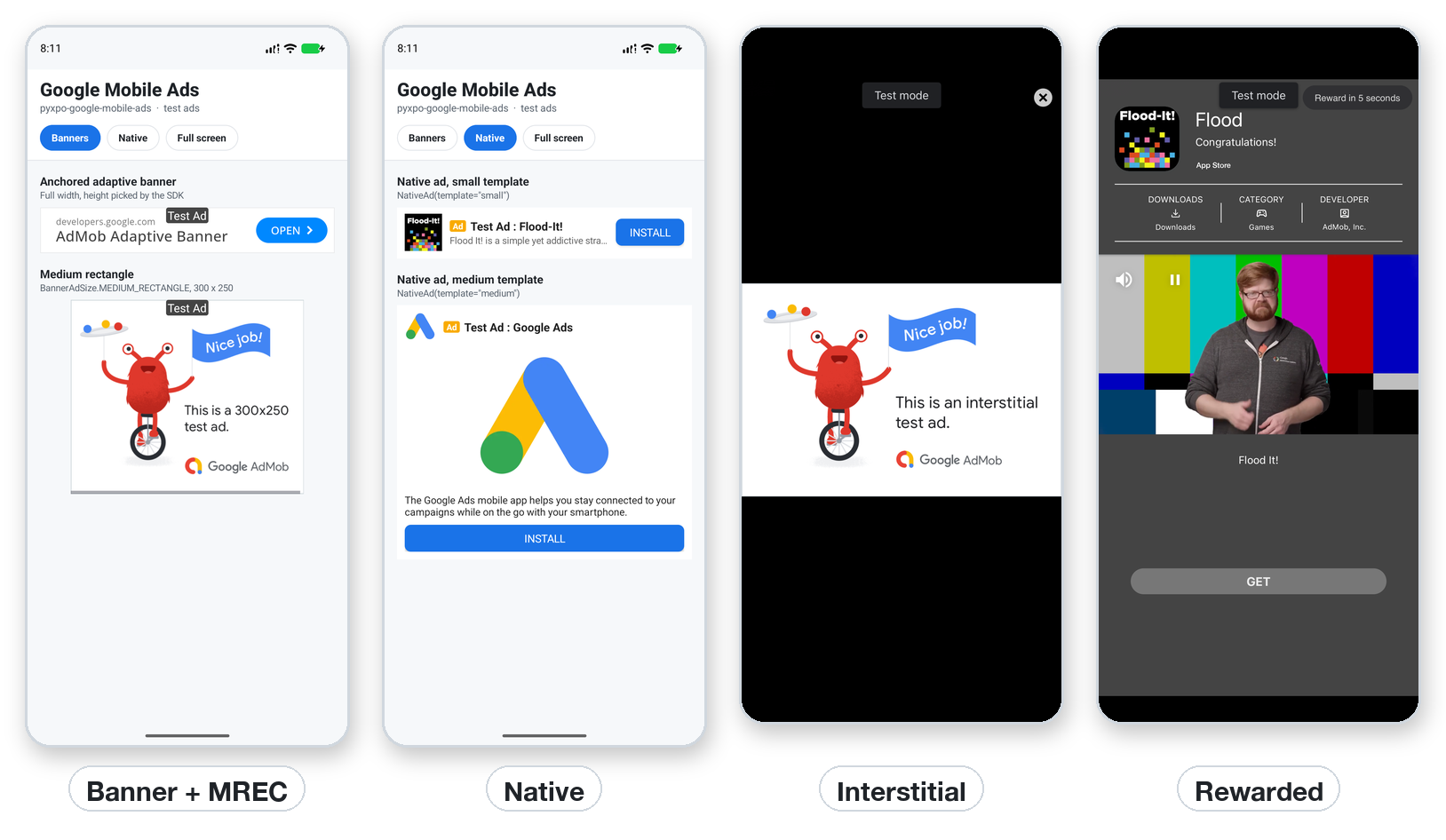
import pyxpo_google_mobile_ads as Ads

Ads.BannerAd(Ads.TestIds.ADAPTIVE_BANNER)                  # a banner is a component

ad = Ads.InterstitialAd(Ads.TestIds.INTERSTITIAL)
await ad.load_async()                                      # load ahead of time
result = await ad.show_async()                             # returns when the user closes it
Features
- All AdMob formats:
- banner (adaptive and fixed sizes)
- native (small and medium templates, drawn natively)
- interstitial, rewarded, rewarded interstitial and app open
- Two ways to use full-screen ads:
- Plain objects with
load_async()/show_async(). - React-style hooks (
use_rewarded_ad(...)) that preload, re-render on state changes and load the next ad after each show.
- Plain objects with
- Easy to get right:
show_async()never raises; it returns aShowResult.- No ad request goes out before
initialize_async(), so the first request already carries your settings. - A loaded ad that has expired is never shown.
- Two full-screen ads never stack.
- Consent built in: Google's UMP consent form for the EEA, the UK, Switzerland and US states.
- Settings for apps for children:
- child-directed and under-age-of-consent tags (COPPA, GDPR)
- a maximum content rating
- forced non-personalized requests
- removal of the advertising ID permission
- Works everywhere:
- Android and iOS show real AdMob ads.
- The web page and the desktop window show simulated test ads, so you can build ad flows without a phone.
- Platforms without an ads SDK fall back quietly, and the app keeps going.
- Config plugin: writes the AdMob app ID, SKAdNetwork IDs and the tracking prompt into the native projects.
- Typed: ships
py.typed. The names follow react-native-google-mobile-ads in Python style, and the camelCase hook names work too.
Contents
| If you are... | Start here |
|---|---|
| New to ads | Quick start → AdMob basics → Banner |
| Adding a specific format | Banner · Native · Full-screen ads · Rewarded · App open |
| Building an app for children | Apps for children |
| Shipping to the stores | Consent → iOS tracking → Production checklist |
| Looking for exact signatures | API reference · Config plugin · Errors |
| Seeing it in a real app | Recipe: an interstitial with a frequency cap |
| Stuck | Testing · Troubleshooting · FAQ |
Platform support
| Target | Ads |
|---|---|
| Android, API 24+ | All formats. Google Mobile Ads SDK (play-services-ads) and UMP. |
| iOS 13+ | All formats. Google Mobile Ads SDK (Swift package) and UMP. |
Web page and desktop window (pyxpo run web / pyxpo run desktop) |
Simulated test ads for Google's test unit IDs (TestIds), with the same events and results. Other unit IDs do not fill there. |
| Mac Catalyst, Windows | None, because Google has no SDK for them. is_available() is False, loads raise AdError("unavailable"), banners render nothing and show_async() returns shown=False. |
Requires Python 3.9+ and pyxpo>=0.1.0a4.
Install
pip install pyxpo-google-mobile-ads
Add the module and its config plugin to your app's pyproject.toml:
[tool.pyxpo]
modules = ["google-mobile-ads"]
plugins = [
  ["pyxpo_google_mobile_ads.plugin", {
    # Your AdMob app IDs (AdMob > Apps > App settings). Leave them out while developing:
    # Google's test app IDs are used then.
    androidAppId = "ca-app-pub-XXXXXXXXXXXXXXXX~YYYYYYYYYY",
    iosAppId = "ca-app-pub-XXXXXXXXXXXXXXXX~ZZZZZZZZZZ",
  }],
]
The module has native code, so rebuild the app after adding it (pyxpo run android or pyxpo run ios). The first
build downloads the Google Mobile Ads SDK through Gradle on Android and Swift Package Manager on iOS.
Quick start
Ads run in three steps:
- Settings. Set the request configuration once (content rating, apps for children, test devices).
- Consent and start. On every app start, ask Google whether a consent form is needed, show it if so, then start the SDK.
- Ads. Place banners and native ads as components. Load full-screen ads ahead of time and show them at a natural break.
import pyxpo_google_mobile_ads as Ads
from pyxpo import Pressable, Text, View, component, use_async


async def start_ads():
    Ads.set_request_configuration(max_ad_content_rating=Ads.MaxAdContentRating.PG)
    try:
        await Ads.consent.request_info_async()           # every start; fast when nothing changed
        await Ads.consent.show_form_if_required_async()  # shows only where the law asks for it
    except Ads.AdError as e:
        print("consent:", e)                             # e.g. no network: try again on the next start
    if Ads.consent.can_request_ads():
        await Ads.initialize_async()                     # ads wait for this, then load


@component
def App():
    use_async(start_ads, [])                             # once, when the app mounts
    bonus = Ads.use_rewarded_ad(Ads.TestIds.REWARDED)    # preloads; re-renders when it is ready

    async def watch():
        result = await bonus.show_async()
        if result.reward:
            print("earned", result.reward.amount, result.reward.type)

    return View(
        Text("My app", style={"font_size": 24}),
        Pressable(Text("Watch an ad for 10 coins"), on_press=watch, disabled=not bonus.loaded),
        View(style={"flex": 1}),
        Ads.BannerAd(Ads.TestIds.ADAPTIVE_BANNER),      # anchored adaptive banner at the bottom
        style={"flex": 1},
    )
Tip: run setup from an async effect:
use_async(start_ads, []). Writinguse_effect(lambda: start_ads(), [])creates a coroutine that never runs, and Python warnscoroutine ... was never awaited.
You can create banners, native ads and hooks before initialize_async() finishes. They wait for it and then send
one request with the final settings.
AdMob basics
AdMob uses two kinds of ID. Mixing them up is the most common setup mistake.
| ID | Looks like | Where it goes | How many |
|---|---|---|---|
| App ID | ca-app-pub-1234567890123456~1234567890 (with ~) |
pyproject.toml, plugin options androidAppId / iosAppId |
one per app per platform |
| Ad unit ID | ca-app-pub-1234567890123456/1234567890 (with /) |
your Python code: BannerAd(unit_id), InterstitialAd(unit_id), ... |
one per placement (e.g. "gallery banner", "level end interstitial") |
While developing, always use Google's test IDs. Ads.TestIds gives the right ones for the running platform:
BANNER, ADAPTIVE_BANNER, INTERSTITIAL, REWARDED, REWARDED_INTERSTITIAL, APP_OPEN, NATIVE and APP_ID.
Test ads always fill, are marked "Test Ad" and are safe to click. Clicking real ads from your own account breaks
AdMob policy and can get the account suspended. To try your real unit IDs safely, add your phone as a
test device.
A good pattern keeps the test units until release and switches them in one place:
import pyxpo_google_mobile_ads as Ads
from pyxpo import Platform

RELEASE = False   # flip for the store build

UNITS = {
    "banner": "ca-app-pub-1234567890123456/1111111111" if Platform.OS == "android" else "ca-app-pub-1234567890123456/2222222222",
    "interstitial": "ca-app-pub-1234567890123456/3333333333" if Platform.OS == "android" else "ca-app-pub-1234567890123456/4444444444",
}
if not RELEASE:
    UNITS = {"banner": Ads.TestIds.ADAPTIVE_BANNER, "interstitial": Ads.TestIds.INTERSTITIAL}
App IDs and unit IDs are not secrets, since they ship inside every app. Still, keep them in pyproject.toml and
one module rather than spread through your code.
Banner ads
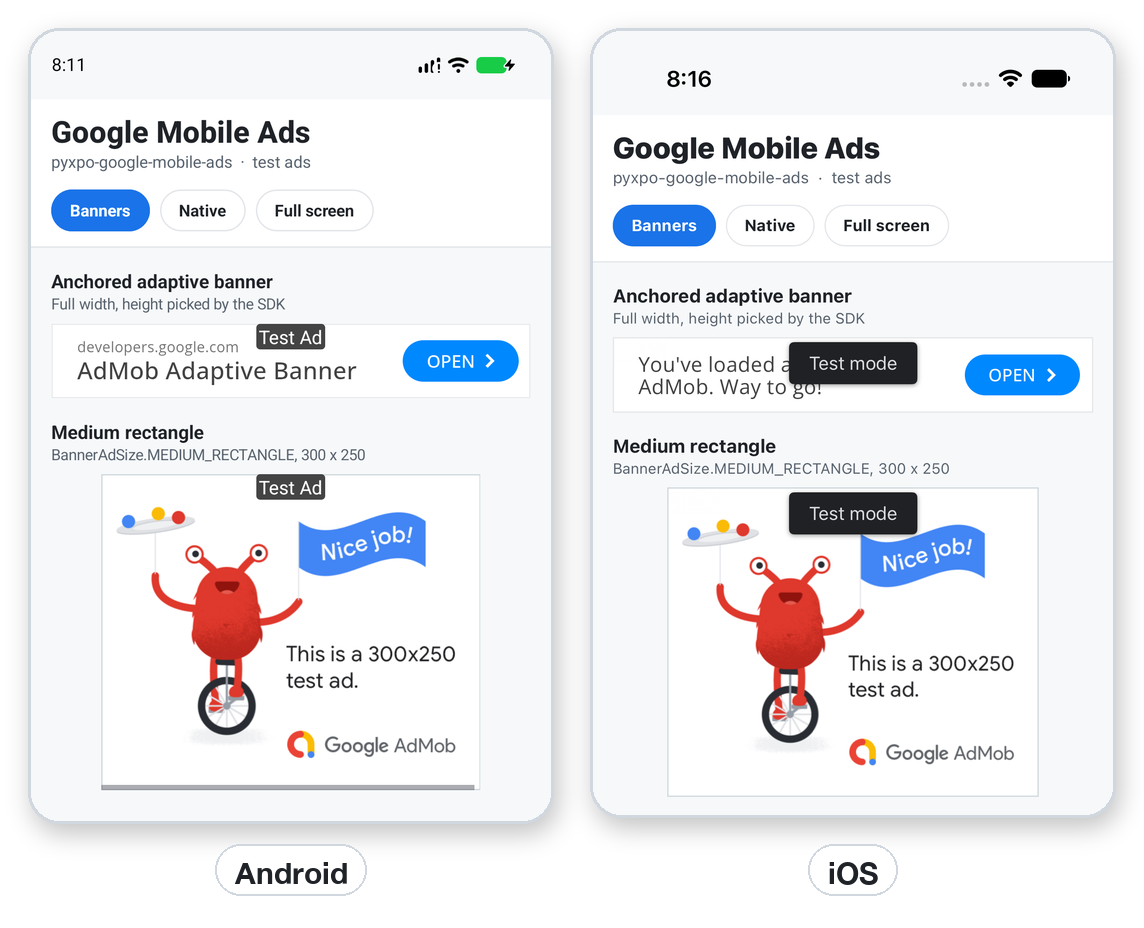
Ads.BannerAd(Ads.TestIds.ADAPTIVE_BANNER)                                          # anchored adaptive (default)
Ads.BannerAd(Ads.TestIds.BANNER, size=Ads.BannerAdSize.MEDIUM_RECTANGLE)           # 300 x 250
Ads.BannerAd(Ads.TestIds.ADAPTIVE_BANNER, size=Ads.BannerAdSize.INLINE_ADAPTIVE_BANNER, max_height=120)
Ads.BannerAd(Ads.TestIds.BANNER, size="320x60")                                    # custom WIDTHxHEIGHT
size |
Box | Use it for |
|---|---|---|
ANCHORED_ADAPTIVE_BANNER (default) |
full width, height chosen by Google (about 50-90) | a bar at the top or bottom of a screen |
INLINE_ADAPTIVE_BANNER |
full width, taller; cap it with max_height |
inside scrolling content |
BANNER |
320 x 50 | |
LARGE_BANNER |
320 x 100 | |
MEDIUM_RECTANGLE |
300 x 250 | between paragraphs or list items |
FULL_BANNER |
468 x 60 | tablets |
LEADERBOARD |
728 x 90 | tablets |
"WxH" |
any size from 32 to 2048 | when you need an exact box |
How sizing works:
- Adaptive sizes take the width of their container. Their height is 0 until an ad loads, so a no-fill leaves no empty gap.
- Fixed sizes keep their box from the start, so the layout does not jump.
- Center a fixed size with
View(Ads.BannerAd(...), style={"align_items": "center"}).
Props (all optional):
| Prop | Called with / type |
|---|---|
request_options |
dict, see request options |
max_height |
int, caps an inline adaptive banner |
on_load |
{"width", "height"} of the loaded ad |
on_error |
AdError (e.g. no_fill) |
on_open, on_close |
the user opened / left the ad's overlay |
on_click, on_impression |
the user clicked / an impression was counted |
on_paid |
{"value_micros", "currency_code", "precision"} (ad revenue) |
style, key |
as for any component |
Ads.BannerAd(
    UNITS["banner"],
    on_load=lambda size: print("banner", size),
    on_error=lambda e: print("no banner:", e.code),
)
Where ads are not available (Mac Catalyst, Windows), BannerAd renders nothing.
Native ads
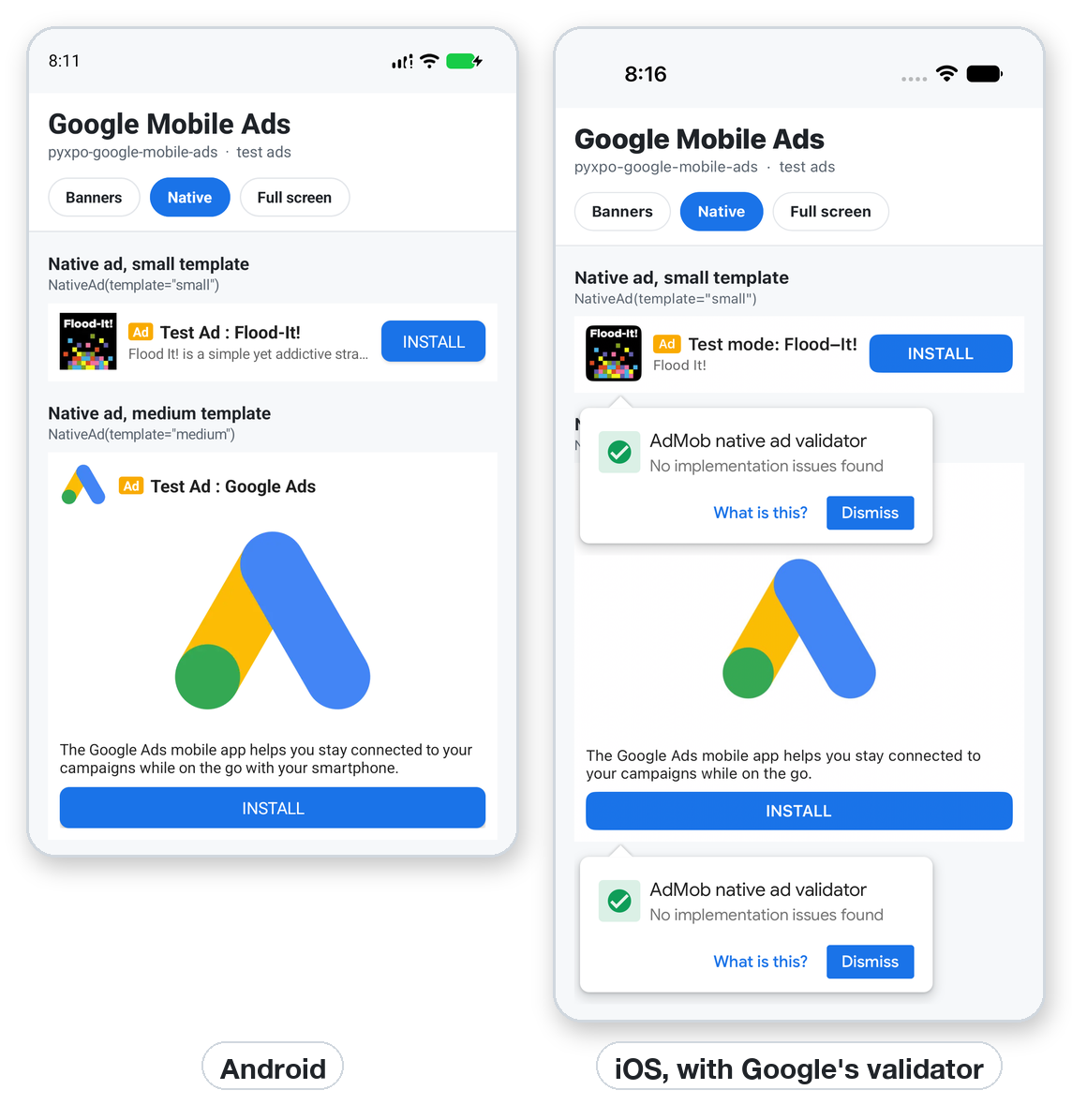
Native ads match the look of your app. This package draws them with native views from Google's template layouts:
"small"(about 96 high): icon, headline, rating and call-to-action button. Fits in a list."medium"(about 330 high, the default): adds the media view (image or video) and the body text.
Ads.NativeAd(Ads.TestIds.NATIVE, template="small")
Ads.NativeAd(
    Ads.TestIds.NATIVE,
    template="medium",
    background_color="#ffffff",
    text_color="#1f2328",
    button_color="#1a73e8",
    button_text_color="#ffffff",
)
Things to know:
- The "Ad" badge and the AdChoices icon always show, as AdMob policy requires.
- The view has height 0 until an ad loads.
- Events:
on_load,on_error(AdError),on_click,on_impressionandon_paid. - With a test native unit, Google's native ad validator may pop up over the ad. It checks the layout, and "No implementation issues found" is the result to look for. The templates here pass it.
Full-screen ads
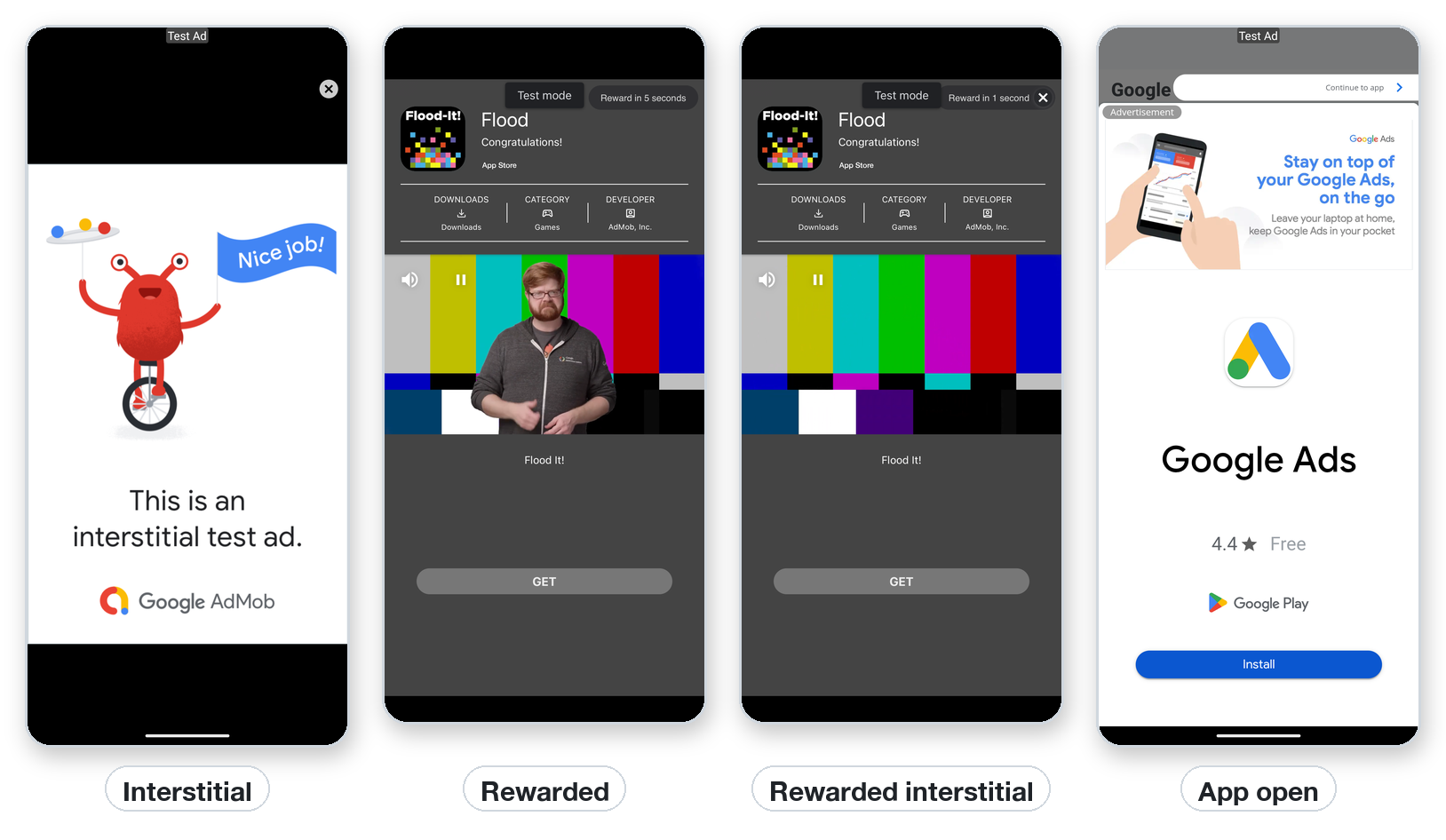
| Class | Hook | What it is |
|---|---|---|
InterstitialAd |
use_interstitial_ad |
A full-screen ad the user closes. Video ads can be skipped after a few seconds. |
RewardedAd |
use_rewarded_ad |
The user chooses to watch it, for a reward. |
RewardedInterstitialAd |
use_rewarded_interstitial_ad |
A rewarded ad shown at a natural break without an opt-in button. Tell the user about the reward first and let them skip. |
AppOpenAd |
use_app_open_ad |
Shown when the app comes to the front. |
Every full-screen ad follows the same lifecycle:
 new ──load_async()──▶ loading ──▶ loaded ──show_async()──▶ showing ──user closes──▶ (load again)
                          │                                     │
                          └── raises AdError                    └── returns ShowResult(shown, error, reward)
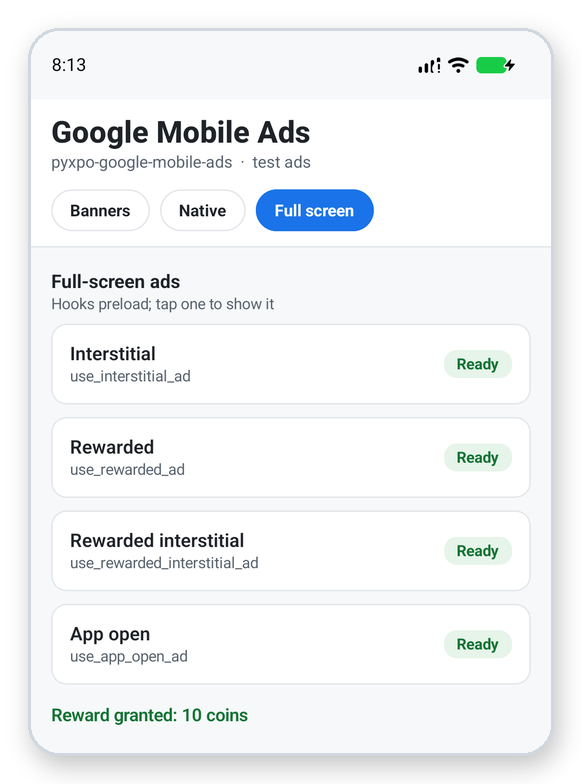
With hooks (in components)
The hooks are the easiest way to use full-screen ads. Each hook:
- loads an ad when the component mounts (
preload=True) - re-renders the component when
loaded/loading/errorchange - loads the next ad after each show (
reload=True) - releases the ad when the component unmounts
@component
def LevelEnd():
    ad = Ads.use_interstitial_ad(UNITS["interstitial"])

    async def next_level():
        if ad.loaded:
            await ad.show_async()          # returns when the ad is closed
        go_to_next_level()

    return Pressable(Text("Next level"), on_press=next_level)
AdHandle (what a hook returns) has these fields:
loaded,loading: boolserror: theAdErrorof the last failed load, else Nonereward: theRewardof the last show, else Noneload(): start a load yourself, e.g. withpreload=Falseshow_async(): show the adad: the underlying ad object
With ad objects (anywhere)
Outside components, for example in a module that decides when an ad is due, use the classes directly:
ad = Ads.InterstitialAd(UNITS["interstitial"], {"non_personalized": True})

async def preload():
    try:
        await ad.load_async()            # returns at once if already loaded; joins a load in progress
    except Ads.AdError as e:
        print("no ad this time:", e.code)

async def at_a_break():
    if not ad.loaded:
        return                           # never make the user wait for an ad
    result = await ad.show_async()       # never raises
    if result.error:
        print("not shown:", result.error.code)
    await preload()                      # one SDK ad shows once; load the next
How the objects behave:
- Reuse: one object can be loaded and shown again and again.
- Expiry: a loaded ad is good for 1 hour (app open ads: 4 hours). After that,
loadedturns False andshow_async()returnserror.code == "expired". Load again. - One at a time: only one full-screen ad shows at once. A second
show_async()returnsalready_showing. - Clean up: call
ad.destroy()when you no longer need an object, to release the SDK ad and its listeners. - Immersive mode:
immersive=Trueshows the ad in Android immersive mode, with the system bars hidden.
Listeners, if you want every event:
sub = ad.add_listener(Ads.AdEventType.CLICKED, lambda _: print("clicked"))
ad.add_listener(Ads.AdEventType.PAID, lambda v: print(v["value_micros"], v["currency_code"]))
sub.remove()
Rewarded ads
@component
def Shop():
    ad = Ads.use_rewarded_ad(UNITS["rewarded"])
    coins, set_coins = use_state(0)

    async def watch():
        result = await ad.show_async()
        if result.reward:                     # None when the user closed it early
            set_coins(lambda c: c + result.reward.amount)

    return View(
        Text("Coins: %d" % coins),
        Pressable(Text("Watch a video: +10 coins" if ad.loaded else "Loading..."),
                  on_press=watch, disabled=not ad.loaded),
    )
You set the reward's type and amount on the ad unit in AdMob. The rewarded test units give
Reward("coins", 10) on Android; the Android rewarded interstitial test unit gives Reward("Coins", 10).
Server-side verification. When rewards are worth something (currency, paid content), do not trust the app alone:
-
Set an SSV callback URL on the ad unit in AdMob.
-
Pass your user's ID with the ad:
Ads.use_rewarded_ad(UNITS["rewarded"], user_id=current_user.id, custom_data="level-12")
# or Ads.RewardedAd(unit_id, user_id=..., custom_data=...)
-
Google calls your server, signed, with that
user_idandcustom_data. Grant the reward there.
Both values are strings of up to 1024 characters.
App open ads
Show an app open ad when the app returns from the background. Follow these rules:
- at most once per return to the app
- not on the very first launch
- never on top of another ad
import asyncio

from pyxpo import AppState, component, use_effect


@component
def Root():
    ad = Ads.use_app_open_ad(UNITS["app_open"])

    def watch():
        def on_change(state):
            if state == "active" and ad.ad.loaded:
                asyncio.ensure_future(ad.show_async())
        sub = AppState.addEventListener("change", on_change)
        return sub.remove

    use_effect(watch, [ad.ad])
    ...
The listener reads ad.ad.loaded on purpose. That is the ad object's live state, not the handle from an old
render.
Events and errors
Ads.AdEventType lists the events:
| Event | Fired when | Data |
|---|---|---|
loaded |
a load finished | None |
failed |
a load failed | AdError |
opened |
the ad covers the screen (banner: opened an overlay) | None |
impression |
Google counted an impression | None |
clicked |
the user clicked | None |
closed |
the user closed the ad | None |
show_failed |
the ad could not show | AdError |
earned_reward |
rewarded types only: the reward was earned | Reward(type, amount) |
paid |
the ad earned money | {"value_micros", "currency_code", "precision"} |
AdError(code, message, sdk_code, domain) is an Exception. Compare its code:
code |
Meaning | What to do |
|---|---|---|
no_fill |
Google had no ad for this request | Normal, especially for new units. Carry on and try later. |
network |
no connection, or the request failed | Carry on; retry later. |
timeout |
the request took too long | Same as network. |
invalid_request |
bad unit ID, unit/app mismatch, or the SDK is not set up yet | Check that the unit ID belongs to the app ID in the plugin. |
app_id_missing |
no AdMob app ID in the native app | Add the plugin, then rebuild. |
unavailable |
no ads SDK on this platform, or a real unit ID on the web/desktop | Expected on Mac Catalyst / Windows. |
not_loaded, expired |
show_async() without a fresh loaded ad |
Load first; check ad.loaded. |
already_showing |
another full-screen ad is on screen | Wait for it to close. |
busy |
load_async() while this ad is on screen |
Load after the show. |
already_used, not_ready, app_not_foreground |
the SDK refused to show it | Load a new ad; show only while the app is in front. |
internal |
anything else | Look at message and sdk_code. |
Rule of thumb: an ad must never block your app. Catch AdError around load_async(), check
result.shown after show_async(), and keep going either way.
Ad revenue
When impression-level ad revenue is on in AdMob, paid reports each impression's value. value_micros is in
millionths of currency_code, and precision is "estimated", "publisher_provided", "precise" or
"unknown". Send it to your analytics:
ad.add_listener("paid", lambda v: analytics.log("ad_revenue", value=v["value_micros"] / 1e6,
                                                currency=v["currency_code"]))
Request configuration
These settings apply to every request, so set them before initialize_async():
Ads.set_request_configuration(
    max_ad_content_rating=Ads.MaxAdContentRating.T,      # G, PG, T or MA
    tag_for_child_directed_treatment=None,                # True: the app is for children (COPPA)
    tag_for_under_age_of_consent=None,                    # True: treat users as under the age of consent (GDPR)
    test_device_ids=["33BE2250B43518CCDA7DE426D04EE231"], # devices that get test ads for real units
)
Ads.get_request_configuration()   # {"max_ad_content_rating": "T", ...}
How the settings behave:
- An argument left at
Nonekeeps its current value. - A change after the SDK has started applies right away.
- Setting either child tag makes every request non-personalized.
Request options
Each ad also takes per-request options: the second argument of the classes and hooks, or request_options= on
views.
REQUEST = {
    "keywords": ["games", "puzzles"],                     # hints for targeting
    "content_url": "https://example.com/levels/12",       # the page the ad sits next to
    "neighboring_content_urls": ["https://example.com/levels/13"],
    "non_personalized": True,                             # contextual ads only
}
Ads.InterstitialAd(UNITS["interstitial"], REQUEST)
Ads.BannerAd(UNITS["banner"], request_options=REQUEST)
Unknown keys raise ValueError right away, so a typo does not silently drop a setting.
Consent (GDPR and US states)
Users in the EEA, the UK and Switzerland must agree before you show them personalized ads. Several US states have similar rules. Google's User Messaging Platform (UMP) shows the consent form, and this package wraps it.
-
In AdMob, open Privacy & messaging and create a GDPR message (and a US states message if you want one). Without a message, no form is shown.
-
On every app start:
info = await Ads.consent.request_info_async()
# {"status": "required" | "not_required" | "obtained" | "unknown",
#  "can_request_ads": bool, "privacy_options_required": bool, "form_available": bool}
await Ads.consent.show_form_if_required_async()   # no-op when not needed
if Ads.consent.can_request_ads():
    await Ads.initialize_async()
-
Let users change their choice. When
Ads.consent.info()["privacy_options_required"]is True, add a Privacy settings button in your settings screen:Pressable(Text("Privacy settings"), on_press=Ads.consent.show_privacy_options_form_async)
To test the form outside Europe, use a test device:
await Ads.consent.request_info_async(debug_geography="eea", test_device_ids=["YOUR-HASHED-ID"])
await Ads.consent.reset_async()      # forget the stored answer and start over (testing only)
On the web, the desktop window and platforms without ads, consent reports not_required.
Apps for children
If children are part of your audience, Google Play's Families policy, Apple's Kids Category and laws like COPPA apply. Do all of these:
Ads.set_request_configuration(
    tag_for_child_directed_treatment=True,       # COPPA: no personalized ads, no remarketing
    tag_for_under_age_of_consent=True,           # GDPR: treat users as children
    max_ad_content_rating=Ads.MaxAdContentRating.G,
)
await Ads.consent.request_info_async(tag_for_under_age_of_consent=True)
await Ads.initialize_async()
plugins = [["pyxpo_google_mobile_ads.plugin", { removeAdIdPermission = true }]] # Play Families policy
- With either tag, every request is non-personalized automatically.
- Do not call
request_tracking_async()or setuserTrackingUsageDescription. Apple's Kids Category does not allow tracking. - In AdMob and the Play Console, declare that the app is directed to children. Use only ad sources certified for Google Play's Families program.
- For a "mixed audience" app (children and adults), ask the user's age with a neutral age screen. Set the tags only for children.
iOS tracking and SKAdNetwork
App Tracking Transparency (iOS 14+). Personalized ads on iOS need the user's permission to track. Add the prompt text, then ask once, at a moment that makes sense:
plugins = [["pyxpo_google_mobile_ads.plugin", {
  userTrackingUsageDescription = "This lets us show you ads that are more relevant to you.",
}]]
status = await Ads.request_tracking_async()   # "authorized", "denied", "restricted", "not_determined"
# "unavailable" on Android, the web and desktop
await Ads.get_tracking_status_async()         # the current answer, without a prompt
Ads work whatever the answer is. Without permission, they are not personalized. Ask after the consent step. Google's UMP can also show an explainer message before the ATT prompt (set it up in Privacy & messaging).
SKAdNetwork. iOS install attribution needs a list of ad network IDs in Info.plist. The plugin adds Google's
own, cstr6suwn9.skadnetwork. Before an App Store release, add
Google's full list of third-party buyers and the IDs of
any mediation partners:
plugins = [["pyxpo_google_mobile_ads.plugin", {
  skAdNetworkItems = ["cstr6suwn9.skadnetwork", "4fzdc2evr5.skadnetwork", "..."],
}]]
The SDK logs any missing IDs on launch.
Config plugin
pyxpo_google_mobile_ads.plugin writes into the native projects at build time:
| Option | Type | Default | What it does |
|---|---|---|---|
androidAppId |
string | Google's Android test app ID | com.google.android.gms.ads.APPLICATION_ID in AndroidManifest.xml |
iosAppId |
string | Google's iOS test app ID | GADApplicationIdentifier in Info.plist |
userTrackingUsageDescription |
string | none | NSUserTrackingUsageDescription, needed for request_tracking_async() |
skAdNetworkItems |
list of strings | ["cstr6suwn9.skadnetwork"] |
SKAdNetworkItems in Info.plist |
delayAppMeasurementInit |
bool | false |
keeps Google's app measurement off until initialize_async() |
removeAdIdPermission |
bool | false |
removes the com.google.android.gms.permission.AD_ID permission (Families policy) |
Mistakes fail the build with a clear message:
- an app ID with
/instead of~ - an unknown option name
- a badly formed SKAdNetwork ID
Without a valid app ID, the Google SDK stops the app at launch. That is why the test app IDs are the default.
Web and desktop: simulated test ads
pyxpo run web and pyxpo run desktop have no AdMob SDK. Instead, they show simulated test ads for
Ads.TestIds units:
- banners and native ads
- full-screen ads with a close button
- rewards
- the same events and
ShowResultvalues as on a phone
So you can build and test ad flows (frequency caps, rewards, error paths) in the browser, with hot reload.
Real unit IDs do not fill there and raise AdError("unavailable"). The real ad network is on Android and iOS only.
Recipe: an interstitial with a frequency cap
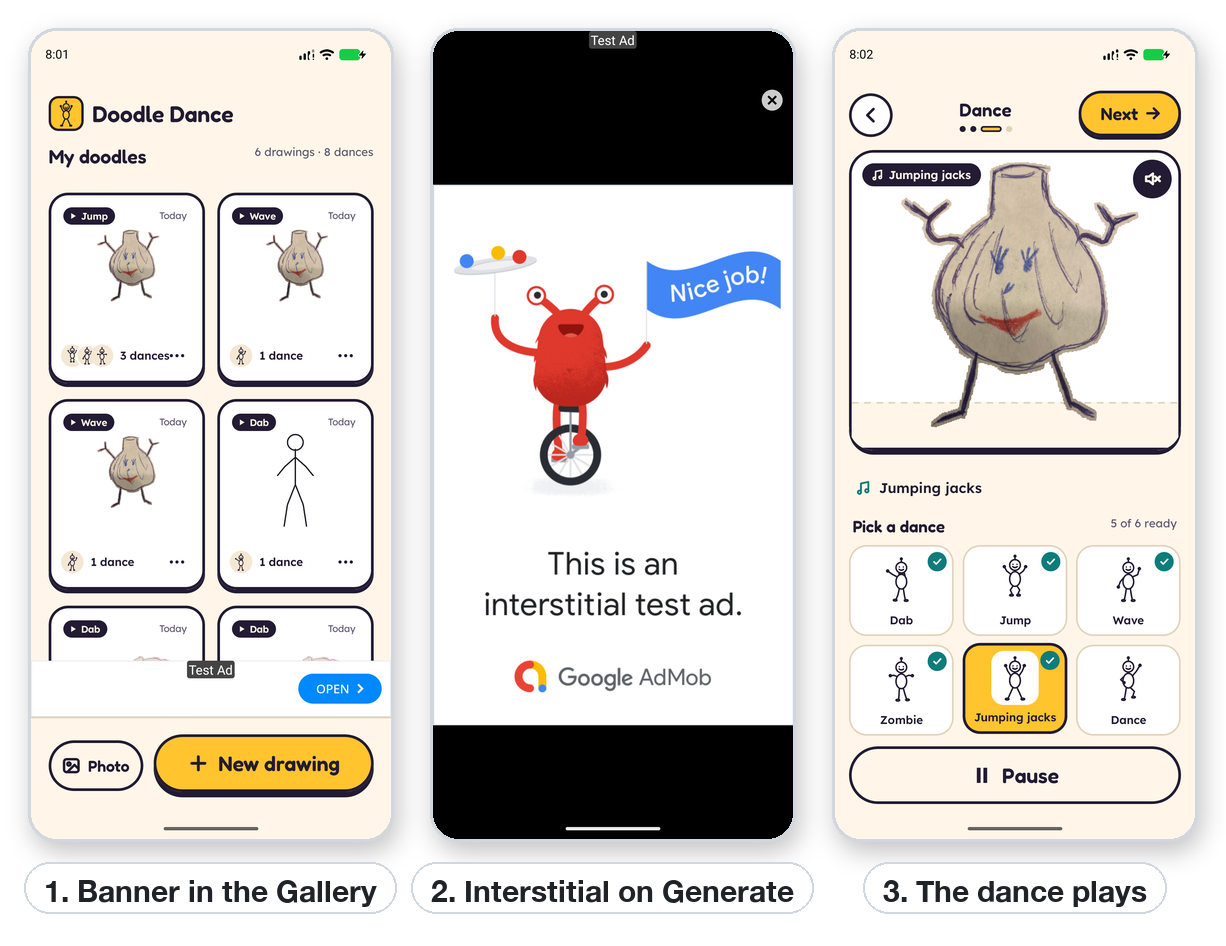
Doodle Dance, built with pyxpo, is an app for children that brings drawings to life. It shows a banner under the gallery and an interstitial now and then when the user taps Generate. The ad never delays a dance.
import asyncio
import time

import pyxpo_google_mobile_ads as Ads

REQUEST = {"non_personalized": True}
WAIT = 1.5   # seconds to wait for an ad that is still loading; after that, skip it


class Cap:
    """No ad on the first tap of a session, then every `every`-th tap, never within `gap` seconds."""

    def __init__(self, first=2, every=3, gap=120.0, clock=time.monotonic):
        self.first, self.every, self.gap, self.clock = first, every, gap, clock
        self.taps, self.last = 0, None

    def tap(self):
        self.taps += 1
        if self.taps < (self.first if self.last is None else self.every):
            return False
        return self.last is None or self.clock() - self.last >= self.gap

    def shown(self):
        self.taps, self.last = 0, self.clock()


cap = Cap()
ad = Ads.InterstitialAd(Ads.TestIds.INTERSTITIAL, REQUEST)


async def preload():
    try:
        await ad.load_async()
    except Ads.AdError:
        pass                                   # no fill is normal; the next tap tries again


async def on_generate():
    """Called on each Generate tap while the dance renders. Never raises."""
    if not Ads.is_available() or not cap.tap():
        return
    if not ad.loaded:
        try:
            await asyncio.wait_for(asyncio.shield(ad.load_async()), WAIT)
        except (asyncio.TimeoutError, Ads.AdError):
            return                             # still due: the next tap tries again
    if (await ad.show_async()).shown:
        cap.shown()
    asyncio.ensure_future(preload())
Why it is built this way:
- The cap lives in plain Python. You can unit test it with a fake clock, with no device.
asyncio.shieldstops the timeout from cancelling the shared load, so the ad can still be ready next time.- The ad counts only when
shown. After a no-fill, the next tap is still due. - The banner is one line:
Ads.BannerAd(Ads.TestIds.ADAPTIVE_BANNER, request_options=REQUEST)under the gallery list.
Production checklist
Before you publish:
- Real IDs. Put your app IDs in the plugin options (
androidAppId,iosAppId). Switch every unit fromTestIdsto your own units, and check that each unit belongs to the same AdMob app as the app ID. - Test with real units on test devices. Add your phones to
test_device_ids(or in AdMob > Settings > Test devices). Never click your own live ads. -
app-ads.txt. Host it at the root of the developer website listed in your store listing. AdMob shows the exact line to use. - Consent. Publish the GDPR (and US states) message in AdMob > Privacy & messaging. Call
consent.request_info_async()on every start, and offer the privacy options button when it is required. - iOS. Add the full SKAdNetwork list. Add
userTrackingUsageDescriptiononly if you callrequest_tracking_async(). Fill in App Store privacy details ("Data used to track you" if you track). - Android. Fill in the Play Console Data safety form (advertising ID, device identifiers) and declare "Contains ads".
- Children. If children are in your audience, follow every point in Apps for children and the Families / Kids Category policies.
- Placement policy.
- Interstitials only at natural breaks, never right after a tap that expects something else.
- Banners do not overlap content or buttons.
- Rewarded ads only when the user opts in.
- Failure paths. With airplane mode on, the app still works: no spinner waits on an ad, and no crash on
AdError. - New ad units can take up to an hour to start filling, and fill can be low for the first days.
no_fillat launch is normal.
Testing
On a phone or emulator with real unit IDs, find your device's hashed ID in the log on the first ad request:
- Android:
adb logcat | grep setTestDeviceIdsshows a line withsetTestDeviceIds(Arrays.asList("33BE2250B43518CCDA7DE426D04EE231")). - iOS: the Xcode console shows a line with
GADMobileAds.sharedInstance.requestConfiguration.testDeviceIdentifiers = @[ @"..." ].
Pass it to Ads.set_request_configuration(test_device_ids=[...]). Then use await Ads.open_ad_inspector_async(),
on test devices only, to see each unit's requests and mediation results.
Unit tests run without a device. The ad objects are plain Python, so you can swap in a fake with the same small surface:
class FakeAd:
    loaded, loading = True, False
    async def load_async(self): self.loaded = True
    async def show_async(self):
        self.loaded = False
        return Ads.ShowResult(True)

def test_shows_when_due(monkeypatch):
    monkeypatch.setattr(my_ads, "ad", FakeAd())
    monkeypatch.setattr(Ads, "is_available", lambda: True)
    ...
Ads.ShowResult(shown, error=None, reward=None), Ads.Reward(type, amount) and Ads.AdError(code) can all be
built directly in tests.
Troubleshooting
| Problem | Cause and fix |
|---|---|
| The app closes at launch on Android with "The Google Mobile Ads SDK was initialized incorrectly" | No AdMob app ID in the manifest. Add the plugin to [tool.pyxpo] plugins and rebuild. |
invalid_request for every ad |
The unit ID belongs to another AdMob app, or you used an app ID (~) as a unit ID (/). |
invalid_request once, right after the first install on the iOS simulator |
The SDK is still setting up; the next load works. |
no_fill with real units |
Normal for new units (up to an hour), low-traffic regions, or child-directed requests with few buyers. Test with TestIds. |
network on the Android emulator while its browser works |
The emulator's network setup can fail for the ads SDK even when the browser works. Use a host HTTP proxy (adb shell settings put global http_proxy 10.0.2.2:PORT), and remove it afterwards (adb shell settings delete global http_proxy), or test on a real phone. |
| Nothing shows and no error | initialize_async() was never called, or consent.can_request_ads() was False. Ads wait for initialization. |
| A banner has height 0 | It has not loaded yet, or had no fill: add on_error to see why. Adaptive banners take their container's width, so make sure the container has one. |
unavailable on the web or desktop |
Only TestIds units fill there. |
RuntimeWarning: coroutine ... was never awaited |
Setup was started with use_effect(lambda: coro()). Use use_async(setup, []). |
| A white "native ad validator" box over native test ads | Google's layout checker; it only appears with test units. "No implementation issues found" means all is well. |
ConfigError: pyxpo_google_mobile_ads.plugin: ... |
A plugin option is misspelled or has the wrong type. The message names it. |
FAQ
Do I need consent if my users are not in Europe?
Call consent.request_info_async() anyway. Google decides by location and returns not_required where no form is
needed. That also covers the US state rules.
Can I show real ads on the web? Not with this package. AdMob is for mobile apps. The web build shows simulated test ads only, so flows can be tested.
How many interstitials is too many? Google suggests natural breaks only and a frequency cap. Start with one every few actions and at least a minute or two apart (see the recipe). You can also set a cap on the ad unit in AdMob.
Does mediation work? Not yet. No third-party mediation adapters are bundled, so ads come from Google's demand through AdMob.
Can I build my own native ad layout?
Not yet. The small and medium templates are drawn natively and can be themed with colors.
Why do the hooks have camelCase names too?
useInterstitialAd, useRewardedAd, useRewardedInterstitialAd and useAppOpenAd match
react-native-google-mobile-ads, so code ported from React Native reads the same.
API reference
import pyxpo_google_mobile_ads as Ads
Setup
| Name | Description |
|---|---|
is_available() -> bool |
True on Android/iOS with the module linked, and on the web/desktop (simulated). False on Mac Catalyst and Windows. |
set_request_configuration(*, test_device_ids=None, tag_for_child_directed_treatment=None, tag_for_under_age_of_consent=None, max_ad_content_rating=None) |
Settings for every request. |
get_request_configuration() -> dict |
The current settings. |
await initialize_async() -> dict |
Starts the SDK. Returns {adapter: {"state", "description", "latency"}}. Safe to call again. |
await request_tracking_async() -> str |
iOS ATT prompt: "authorized", "denied", "restricted" or "not_determined"; "unavailable" elsewhere. |
await get_tracking_status_async() -> str |
The ATT status, without a prompt. |
await open_ad_inspector_async() |
Google's Ad Inspector (test devices). |
is_test_id(unit_id) -> bool |
True for Google's test unit IDs. |
Consent: Ads.consent
| Name | Description |
|---|---|
await request_info_async(*, debug_geography=None, test_device_ids=None, tag_for_under_age_of_consent=None) -> dict |
Refresh from Google. debug_geography: "eea", "regulated_us_state", "other" or "disabled". |
await show_form_if_required_async() -> dict |
Shows the form when needed. |
await show_privacy_options_form_async() -> dict |
Lets the user change their choice. |
info() -> dict |
{"status", "can_request_ads", "privacy_options_required", "form_available"} |
can_request_ads() -> bool |
|
await reset_async() |
Forget the stored consent (testing). |
Full-screen ads: InterstitialAd, RewardedAd, RewardedInterstitialAd, AppOpenAd
| Name | Description |
|---|---|
Cls(unit_id, request_options=None, *, immersive=False) |
Rewarded types also take user_id= and custom_data=. |
await load_async() |
Loads; raises AdError. |
await show_async() -> ShowResult |
Shows; never raises. |
loaded, loading, showing, error |
State. |
add_listener(event, fn) -> sub |
sub.remove() stops it. |
remove_all_listeners(), destroy() |
Clean up. |
Hooks
| Name | Description |
|---|---|
use_interstitial_ad(unit_id, request_options=None, *, preload=True, reload=True, immersive=False) -> AdHandle |
|
use_rewarded_ad(..., user_id=None, custom_data=None), use_rewarded_interstitial_ad(...) |
|
use_app_open_ad(unit_id, request_options=None, *, preload=True, reload=True) |
|
AdHandle |
loaded, loading, error, reward, ad, load(), show_async() |
Views
| Name | Description |
|---|---|
BannerAd(unit_id, size=BannerAdSize.ANCHORED_ADAPTIVE_BANNER, *, request_options, max_height, on_load, on_error, on_open, on_close, on_click, on_impression, on_paid, style, key) |
|
NativeAd(unit_id, template="medium", *, request_options, background_color, text_color, button_color, button_text_color, on_load, on_error, on_click, on_impression, on_paid, style, key) |
Types and constants
| Name | Description |
|---|---|
AdError(code, message="", sdk_code=None, domain="") |
|
ShowResult(shown, error=None, reward=None) |
|
Reward(type, amount) |
|
TestIds |
APP_ID, BANNER, ADAPTIVE_BANNER, INTERSTITIAL, REWARDED, REWARDED_INTERSTITIAL, APP_OPEN, NATIVE (for the running platform) |
BannerAdSize |
ANCHORED_ADAPTIVE_BANNER, INLINE_ADAPTIVE_BANNER, BANNER, LARGE_BANNER, MEDIUM_RECTANGLE, FULL_BANNER, LEADERBOARD |
AdEventType |
LOADED, FAILED, OPENED, IMPRESSION, CLICKED, CLOSED, SHOW_FAILED, EARNED_REWARD, PAID |
MaxAdContentRating |
G, PG, T, MA |
ConsentStatus |
UNKNOWN, REQUIRED, NOT_REQUIRED, OBTAINED |
License
MIT. Google Mobile Ads and AdMob are trademarks of Google LLC. This package is not made or endorsed by Google, and using AdMob means agreeing to Google's AdMob terms and policies.
1 maintainer

Metadata
1 maintainer
Release files for pyxpo-google-mobile-ads 0.1.0a1
For a detailed explanation of source distributions (sdists) and built distributions (wheels), please see the package formats documentation.
Source distribution (sdist)
| File | Size | Uploaded | Provenance | |
|---|---|---|---|---|
| pyxpo_google_mobile_ads-0.1.0a1.tar.gz | 75.3 kB | With provenance | Details |
Built distribution (wheel)
| File | Interpreter | ABI | Platform | Reset |
|---|---|---|---|---|
| pyxpo_google_mobile_ads-0.1.0a1-py3-none-any.whl | Python 3 | none | any | Details |
Total release size: 128.6 kB
Release files / pyxpo_google_mobile_ads-0.1.0a1.tar.gz
| Download URL | pyxpo_google_mobile_ads-0.1.0a1.tar.gz |
|---|---|
| Size | 75.3 kB |
| Tags | Source |
|
SHA-256 checksum How to use checksums |
a5b2213d987d1f3dbdf7291b9e6b70a5bebaac0f08751666df2ff0ea2ccc1f34
|
|
BLAKE2b-256 checksum How to use checksums |
0b0c59fbce47c332e3de2ed52730004edc00381d3946b9b9e044416a04f3dab0
|
| Upload date | |
|
Uploaded using Trusted Publishing? What is trusted publishing? |
Yes |
| Uploaded via |
twine/7.0.0 CPython/3.13.14
|
Provenance
Provenance describes where a file came from. On PyPI, provenance is shared via attestations, which provide a verifiable record of the build or publishing details. View details, limitations and caveats.


PyPI Publish Attestation
PyPI verified that this artifact, at this checksum, originated from the publisher listed below.
Signed by GitHub Actions, verified by PyPI on Oct 18, 2026.
Transparency logRelease files / pyxpo_google_mobile_ads-0.1.0a1-py3-none-any.whl
| Download URL | pyxpo_google_mobile_ads-0.1.0a1-py3-none-any.whl |
|---|---|
| Size | 53.3 kB |
| Tags | Python 3 |
|
SHA-256 checksum How to use checksums |
3cf949c97464daf3a6e3b5242e2581ea251d910114a362d17807eb818d80a9b6
|
|
BLAKE2b-256 checksum How to use checksums |
d84987b4c35b031c7cd2ad5ceb0c101285d95ec26b89e7661fe9e1505eb6d76a
|
| Upload date | |
|
Uploaded using Trusted Publishing? What is trusted publishing? |
Yes |
| Uploaded via |
twine/7.0.0 CPython/3.13.14
|
Provenance
Provenance describes where a file came from. On PyPI, provenance is shared via attestations, which provide a verifiable record of the build or publishing details. View details, limitations and caveats.
PyPI Publish Attestation
PyPI verified that this artifact, at this checksum, originated from the publisher listed below.
Signed by GitHub Actions, verified by PyPI on Oct 18, 2026.
Transparency logSecurity for pyxpo-google-mobile-ads 0.1.0a1
Provenance
Provenance describes where a file came from. On PyPI, provenance is shared via attestations, which provide a verifiable record of the build or publishing details. View details, limitations and caveats.
Full provenance
All 2 files in this release have been uploaded with provenance metadata.
Attestation for pyxpo_google_mobile_ads-0.1.0a1.tar.gz
PyPI Publish Attestation
PyPI verified that this artifact, at this checksum, originated from the publisher listed below.
Signed by GitHub Actions, verified by PyPI on Oct 18, 2026.
Transparency logA note on package security
PyPI is a repository for distributing packages, not a service for auditing them. While third-party security researchers and our staff do their best to detect and remove malicious packages, PyPI cannot guarantee the quality, security or suitability of any given package.
To learn more about protecting yourself from malicious actors, visit our package security documentation.













