
This release is a pre-release and may not be stable for production use.
pyxpo-location




Where the phone is: position, live updates, compass heading and address lookup for
pyxpo apps, written in Python. The API follows
expo-location. iOS uses Core Location. Android uses the platform
LocationManager (no Google Play services), the accelerometer and magnetometer for the heading, and Geocoder for
addresses.
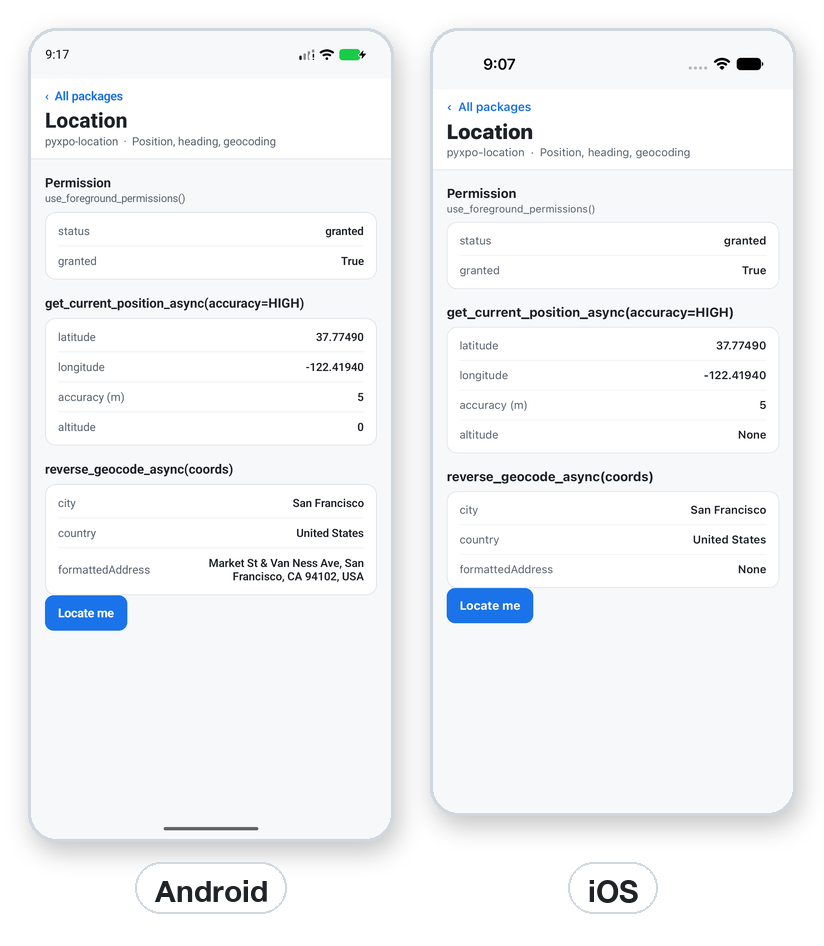
import pyxpo_location as Location

perm = await Location.request_foreground_permissions_async()
if perm["granted"]:
    loc = await Location.get_current_position_async(accuracy=Location.Accuracy.HIGH)
    print(loc["coords"]["latitude"], loc["coords"]["longitude"])
Features
- Permissions with expo's response shape, plus which accuracy the user granted (
"fine"or"coarse"on Android,"whenInUse"or"always"on iOS). A hook reads or asks on mount. - Current and last known position with six accuracy levels from about 3 km to the best the device can do.
- Live updates with
watch_position_async, tuned byaccuracy,time_intervalanddistance_interval. - Compass heading, once or as a stream.
- Geocoding both ways: an address to coordinates, and coordinates to a street address.
- Provider status: are location services on, is GPS or network location available.
- Honest limits: background updates and geofencing raise
NotSupportedError, because pyxpo has no task manager yet. - Typed: ships
py.typed. Every function has its expo spelling too (getCurrentPositionAsync,{"distanceInterval": 10}).
Contents
| If you are... | Start here |
|---|---|
| Showing "near me" once | Quick start |
| Asking for permission | Permissions |
| Following the user on a map | Live updates |
| Building a compass | Heading |
| Turning an address into a place (or back) | Geocoding |
| Needing tracking with the app closed | Not supported yet |
| Looking for exact signatures | API reference · Errors |
| Seeing it in a real app | Recipe: a "find stores near me" screen |
| Stuck | Testing · Troubleshooting · FAQ |
Platform support
| Target | What works |
|---|---|
| Android, API 24+ | Position, watching, heading (sensors), geocoding (Geocoder), provider status. Works on phones without Google Play services. |
| iOS 15+ | Position, watching, heading, geocoding, services check. The Simulator has a place you can set (Features > Location) but no compass. |
| Web page and desktop window | Not supported. Every function raises NotSupportedError, except has_services_enabled_async(), which returns False. |
Requires Python 3.9+ and pyxpo>=0.1.0a2.
Install
pip install pyxpo-location
[tool.pyxpo]
modules = ["location"]

# Optional: the text of the iOS permission prompts.
[tool.pyxpo.module_options.location]
locationWhenInUsePermission = "Show places near you."
Rebuild the app after adding the module (pyxpo run android or pyxpo run ios). On Android the module adds
ACCESS_COARSE_LOCATION and ACCESS_FINE_LOCATION and marks the location hardware as optional.
Quick start
import pyxpo_location as Location
from pyxpo import Button, Text, View, component, use_async, use_state


@component
def Here():
    wanted, set_wanted = use_state(0)
    place, set_place = use_state("Not yet")

    async def locate():
        if wanted == 0:
            return
        perm = await Location.request_foreground_permissions_async()
        if not perm["granted"]:
            set_place("Permission denied")
            return
        loc = await Location.get_current_position_async(accuracy=Location.Accuracy.HIGH)
        c = loc["coords"]
        set_place("%.4f, %.4f" % (c["latitude"], c["longitude"]))

    use_async(locate, [wanted])
    return View(Text(place), Button("Locate me", lambda: set_wanted(wanted + 1)))
Tip:
use_async(fn, deps)awaits a realasync defwhen the dependencies change. A button that must start async work bumps a counter in state, and the counter is a dependency, as above.
Permissions
perm = await Location.get_foreground_permissions_async()       # does not ask
perm = await Location.request_foreground_permissions_async()   # asks if undetermined
status, request, get = Location.use_foreground_permissions()    # a hook
The response is expo's, {"status", "granted", "canAskAgain", "expires"}, plus:
| Platform | Extra key | Values |
|---|---|---|
| iOS | ios: {"scope"} |
"whenInUse", "always", "none" |
| Android | android: {"accuracy"} |
"fine", "coarse", "none" |
An Android user can allow only approximate location, so granted can be true with "coarse". Positions are then
less precise.
| Hook | Meaning |
|---|---|
use_foreground_permissions(get=True, request=False) |
(response, request, get). response is None until read. get=True reads on mount, request=True asks on mount. request and get are coroutines that also update the component. |
use_background_permissions(...) |
The same for background location. Ask for the foreground permission first. Android needs ACCESS_BACKGROUND_LOCATION in [tool.pyxpo.android] permissions, and Android 11+ sends the user to Settings. |
Current position
loc = await Location.get_current_position_async(accuracy=Location.Accuracy.BALANCED)
last = await Location.get_last_known_position_async(max_age=60_000, required_accuracy=100)
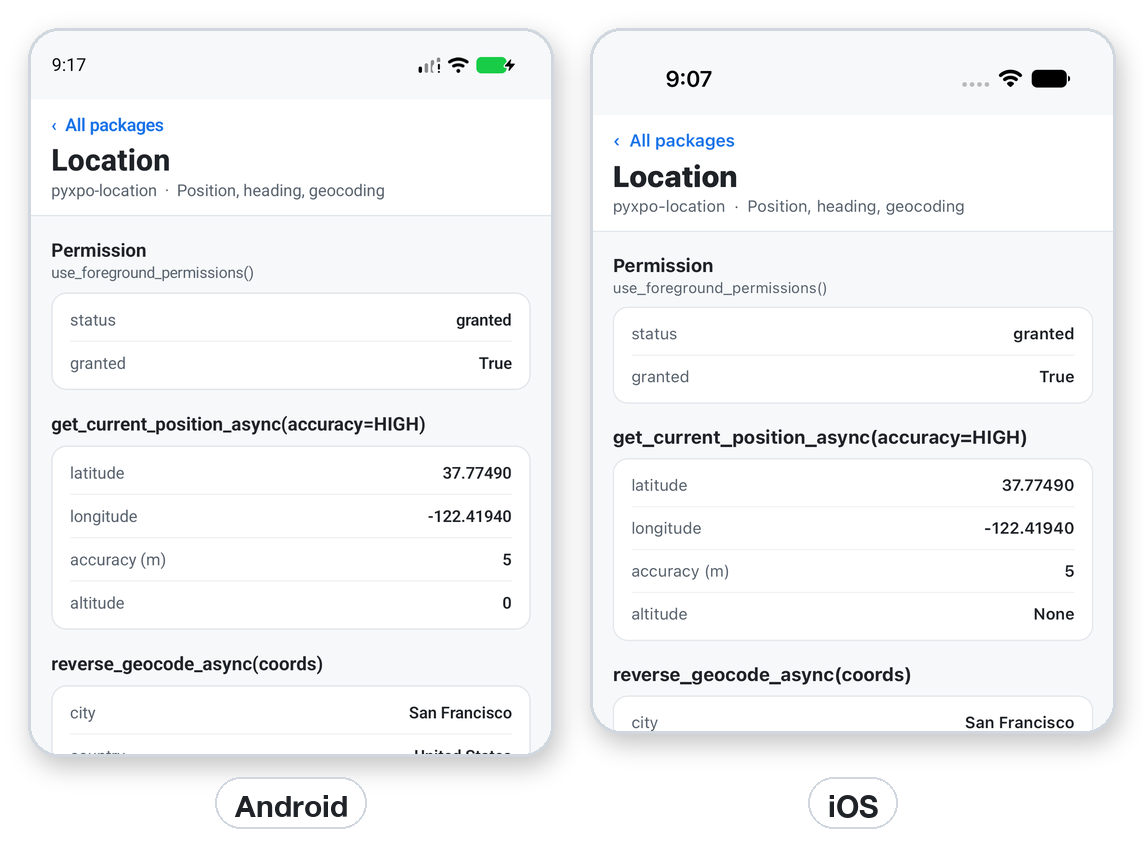
A location is {"coords": {"latitude", "longitude", "altitude", "accuracy", "altitudeAccuracy", "heading", "speed"}, "timestamp", "mocked"}. Values the device does not know are None. timestamp is milliseconds since 1970. mocked
is Android only.
Accuracy |
Meaning |
|---|---|
LOWEST (1) |
About 3 km |
LOW (2) |
About 1 km |
BALANCED (3) |
About 100 m. The default. |
HIGH (4) |
About 10 m |
HIGHEST (5) |
The best the device can do |
BEST_FOR_NAVIGATION (6) |
The best, plus sensor data on iOS |
Higher accuracy costs more battery. get_last_known_position_async returns None when there is no cached location, or
it is older than max_age ms, or less exact than required_accuracy metres.
Live updates
sub = await Location.watch_position_async(
    {"accuracy": Location.Accuracy.BALANCED, "distanceInterval": 10},
    lambda loc: print(loc["coords"]),
)
...
sub.remove()
| Option | Meaning |
|---|---|
accuracy |
An Accuracy. |
time_interval |
Android only, minimum milliseconds between updates. |
distance_interval |
Minimum metres moved between updates. |
Pass error_handler to hear about failures. sub.remove() stops the updates and is safe to call twice. Start the
watch from use_async (or a function that you stop in a cleanup) and remove it when the screen goes away, or it keeps
draining the battery.
Heading
h = await Location.get_heading_async()      # {"trueHeading", "magHeading", "accuracy"}
sub = await Location.watch_heading_async(lambda h: print(h["magHeading"]))
Values are degrees. trueHeading is -1 until the location is known. A device without a compass, and the iOS
Simulator, raise an error instead.
Geocoding
spots = await Location.geocode_async("1600 Amphitheatre Parkway, Mountain View")
places = await Location.reverse_geocode_async({"latitude": 48.8584, "longitude": 2.2945})
geocode_async returns [{"latitude", "longitude", "altitude", "accuracy"}]. reverse_geocode_async returns
addresses with name, street, streetNumber, district, city, subregion, region, postalCode, country,
isoCountryCode, timezone and formattedAddress. Both need a network. An empty address raises ValueError, and so
does a latitude or longitude that is not a number or out of range.
Provider status
| Function | Returns |
|---|---|
has_services_enabled_async() |
True when location services are on. |
get_provider_status_async() |
locationServicesEnabled, backgroundModeEnabled, and on Android gpsAvailable, networkAvailable, passiveAvailable. |
enable_network_provider_async() |
Android: opens the location settings when network location is off. |
Not supported yet
start_location_updates_async, stop_location_updates_async, has_started_location_updates_async and the matching
geofencing functions need a background task manager, which pyxpo does not have yet. They raise NotSupportedError, and
is_background_location_available_async() returns False. Use watch_position_async while the app is open.
Errors
| Error | When | What to do |
|---|---|---|
NotSupportedError |
On the web page or desktop, or a background or geofencing function. | Check platform() first, or catch it and show a manual place picker. |
ModuleNotLinkedError (from pyxpo.module_api) |
Built without "location" in modules. |
Add it and rebuild. |
ValueError |
Bad accuracy, negative max_age, empty address, or bad coordinates. |
Fix the argument. |
TypeError |
The watch callback is not callable. | Pass a function. |
| A native error (a plain exception with a message) | No permission, services off, or no fix in time. | Ask for permission, check has_services_enabled_async(), and offer a retry. |
Web and desktop
Nothing is available there. has_services_enabled_async() returns False, and the other functions raise
NotSupportedError. For a web build, let the user type an address and use your own geocoding service.
Recipe: a "find stores near me" screen
Ask once, show the place, and fall back to the last known position when a fresh fix is slow.
import pyxpo_location as Location
from pyxpo import Button, Text, View, component, use_async, use_state


@component
def NearMe():
    tries, set_tries = use_state(1)
    text, set_text = use_state("Looking...")

    async def find():
        perm = await Location.request_foreground_permissions_async()
        if not perm["granted"]:
            set_text("Allow location to see stores near you.")
            return
        try:
            loc = await Location.get_current_position_async(accuracy=Location.Accuracy.BALANCED)
        except Exception:
            loc = await Location.get_last_known_position_async(max_age=10 * 60_000)
        if loc is None:
            set_text("No position yet. Is location on?")
            return
        c = loc["coords"]
        where = await Location.reverse_geocode_async(
            {"latitude": c["latitude"], "longitude": c["longitude"]})
        city = where[0].get("city") if where else None
        set_text("Stores near %s" % (city or "you"))

    use_async(find, [tries])
    return View(Text(text), Button("Try again", lambda: set_tries(tries + 1)))
Production checklist
- Ask for location after the user picks a feature that needs it, not at launch, and explain why first.
-
locationWhenInUsePermissionsays why you need it, in the user's words. - You handle denied, approximate-only (Android
"coarse") and services-off cases. - Accuracy is no higher than you need.
BALANCEDis enough for "near me". - Every
watch_*subscription is removed when the screen goes away. - You do not promise tracking with the app closed.
- Your privacy policy says what you do with the position.
- You tested on a real phone, not only an emulator with a fixed point.
Testing
Run unit tests on the desktop host by replacing the native call:
import asyncio

import pyxpo_location as Location


def test_current_position(monkeypatch):
    async def fake_call(*args, **kwargs):
        return {"coords": {"latitude": 52.52, "longitude": 13.4, "accuracy": 5}, "timestamp": 0}

    monkeypatch.setattr(Location, "_native", lambda: None)
    monkeypatch.setattr(Location, "call", fake_call)

    loc = asyncio.run(Location.get_current_position_async(accuracy=Location.Accuracy.HIGH))
    assert loc["coords"]["latitude"] == 52.52
Argument checks need no fake: Location.get_current_position_async(accuracy=9) raises ValueError before any native
call.
Troubleshooting
| Symptom | Cause and fix |
|---|---|
NotSupportedError on desktop or web |
Location is phone only. |
| The Simulator or emulator shows a fixed place | Set it in the iOS Simulator (Features > Location) or the Android emulator (Extended controls > Location). |
| Position takes a long time indoors | Lower the accuracy, or fall back to get_last_known_position_async. |
granted is true but the place is rough |
An Android user chose approximate location. Check perm["android"]["accuracy"]. |
get_heading_async raises |
The device has no compass (and the iOS Simulator has none). |
| No prompt appears | The permission was denied before and canAskAgain is False. Send the user to Settings. |
trueHeading is -1 |
The location is not known yet. Use magHeading. |
ModuleNotLinkedError |
Add "location" to modules and rebuild. |
FAQ
Does it need Google Play services? No. Android uses the platform LocationManager.
Can it track in the background? Not yet. See Not supported yet.
Can I get the address of a place? Yes, with reverse_geocode_async.
Is the heading true north? trueHeading is, once the location is known. magHeading is magnetic north.
Why does watch_position_async take both a dict and keywords? The dict is expo's shape. Keywords are the Python
shape. Both work.
API reference
Permissions
| Function | Returns |
|---|---|
get_foreground_permissions_async() / request_foreground_permissions_async() |
The permission response. |
get_background_permissions_async() / request_background_permissions_async() |
The same, for background location. |
use_foreground_permissions(get=True, request=False) / use_background_permissions(...) |
(response, request, get). |
Position, heading and geocoding
| Function | Returns |
|---|---|
get_current_position_async(options=None, **kw) |
A location. |
get_last_known_position_async(options=None, **kw) |
A location or None. Options max_age, required_accuracy. |
watch_position_async(options=None, callback=None, error_handler=None, **kw) |
LocationSubscription. |
get_heading_async() / watch_heading_async(callback, error_handler=None) |
A heading, or LocationSubscription. |
geocode_async(address) |
A list of coordinates. |
reverse_geocode_async(location) |
A list of addresses. |
has_services_enabled_async() / get_provider_status_async() / enable_network_provider_async() |
Provider status. |
is_background_location_available_async() |
Always False. |
start_location_updates_async, start_geofencing_async and their stop and has-started functions |
Raise NotSupportedError. |
Types
| Name | Description |
|---|---|
Accuracy (also LocationAccuracy) |
LOWEST to BEST_FOR_NAVIGATION, 1 to 6. |
ActivityType |
iOS activity hint: OTHER, AUTOMOTIVE_NAVIGATION, FITNESS, OTHER_NAVIGATION, AIRBORNE. |
GeofencingEventType, GeofencingRegionState |
Defined for compatibility, unused while geofencing is unsupported. |
PermissionStatus |
GRANTED, DENIED, UNDETERMINED. |
LocationSubscription |
Has remove(). |
License
MIT
1 maintainer

Metadata
1 maintainer
Release files for pyxpo-location 0.1.0a2
For a detailed explanation of source distributions (sdists) and built distributions (wheels), please see the package formats documentation.
Source distribution (sdist)
| File | Size | Uploaded | Provenance | Actions |
|---|---|---|---|---|
| pyxpo_location-0.1.0a2.tar.gz | 29.6 kB | With provenance | Details for pyxpo_location-0.1.0a2.tar.gz |
Built distribution (wheel)
| File | Interpreter | ABI | Platform | Actions Reset |
|---|---|---|---|---|
| pyxpo_location-0.1.0a2-py3-none-any.whl | Python 3 | none | any | Details for pyxpo_location-0.1.0a2-py3-none-any.whl |
Total release size: 53.9 kB
Release files / pyxpo_location-0.1.0a2.tar.gz
| Download URL | pyxpo_location-0.1.0a2.tar.gz |
|---|---|
| Size | 29.6 kB |
| Tags | Source |
|
SHA-256 checksum How to use checksums |
3785a41af131d215b5437d6712de650a12357719fe885209481b6326da08447a
|
|
BLAKE2b-256 checksum How to use checksums |
a8d301ee15239876879abf5ca0a99507fbbf68135743f76a629886cc869cec5f
|
| Upload date | |
|
Uploaded using Trusted Publishing? What is trusted publishing? |
Yes |
| Uploaded via |
twine/7.0.0 CPython/3.13.16
|
Provenance
Provenance describes where a file came from. On PyPI, provenance is shared via attestations, which provide a verifiable record of the build or publishing details. View details, limitations and caveats.


PyPI Publish Attestation
PyPI verified that this artifact, at this checksum, originated from the publisher listed below.
Signed by GitHub Actions, verified by PyPI on Nov 1, 2026.
Transparency logRelease files / pyxpo_location-0.1.0a2-py3-none-any.whl
| Download URL | pyxpo_location-0.1.0a2-py3-none-any.whl |
|---|---|
| Size | 24.2 kB |
| Tags | Python 3 |
|
SHA-256 checksum How to use checksums |
2e292b16a20967b207801eeae401fd8b30d3acd6cd94c2d7715d5c8bf03000bc
|
|
BLAKE2b-256 checksum How to use checksums |
a89036eb7729c2b5996d1d33bde563b53f4ed31662df811e56af2ab6ceb19d07
|
| Upload date | |
|
Uploaded using Trusted Publishing? What is trusted publishing? |
Yes |
| Uploaded via |
twine/7.0.0 CPython/3.13.16
|
Provenance
Provenance describes where a file came from. On PyPI, provenance is shared via attestations, which provide a verifiable record of the build or publishing details. View details, limitations and caveats.
PyPI Publish Attestation
PyPI verified that this artifact, at this checksum, originated from the publisher listed below.
Signed by GitHub Actions, verified by PyPI on Nov 1, 2026.
Transparency logSecurity for pyxpo-location 0.1.0a2
Provenance
Provenance describes where a file came from. On PyPI, provenance is shared via attestations, which provide a verifiable record of the build or publishing details. View details, limitations and caveats.
Full provenance
All 2 files in this release have been uploaded with provenance metadata.
Attestation for pyxpo_location-0.1.0a2.tar.gz
PyPI Publish Attestation
PyPI verified that this artifact, at this checksum, originated from the publisher listed below.
Signed by GitHub Actions, verified by PyPI on Nov 1, 2026.
Transparency logA note on package security
PyPI is a repository for distributing packages, not a service for auditing them. While third-party security researchers and our staff do their best to detect and remove malicious packages, PyPI cannot guarantee the quality, security or suitability of any given package.
To learn more about protecting yourself from malicious actors, visit our package security documentation.














