
This release is a pre-release and may not be stable for production use.
pyxpo-mesh-view
Plays a textured 2D mesh animation in pyxpo apps written in Python: one image, a
triangle mesh over it, and the mesh's vertex positions for every frame. Use it for cut-out and skeletal 2D animation,
such as a drawing that comes to life. The GPU draws each frame, so the animation plays at the screen's rate while Python
does nothing. Android draws with Canvas.drawVertices, iOS with Metal, and the web and the desktop window with WebGL.
It can also render a clip to an MP4 or an animated GIF on the device.
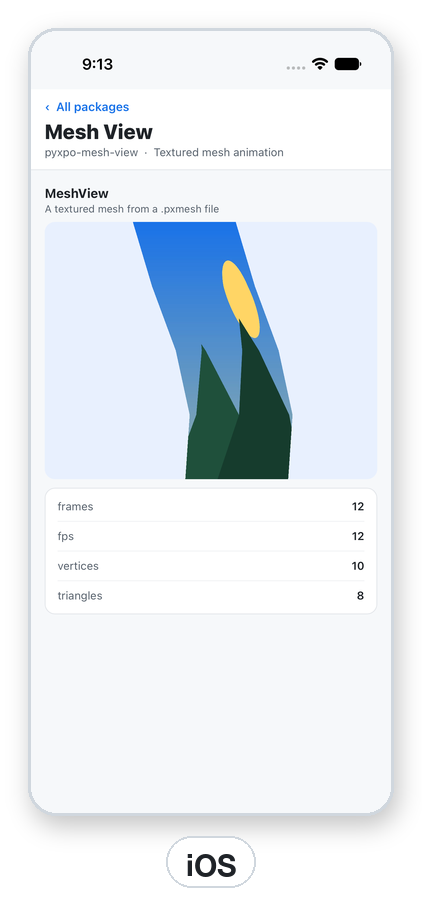
import pyxpo_mesh_view as MeshView

MeshView.MeshView(source="/path/sway.pxmesh", texture="file:///path/picture.png", style={"flex": 1})
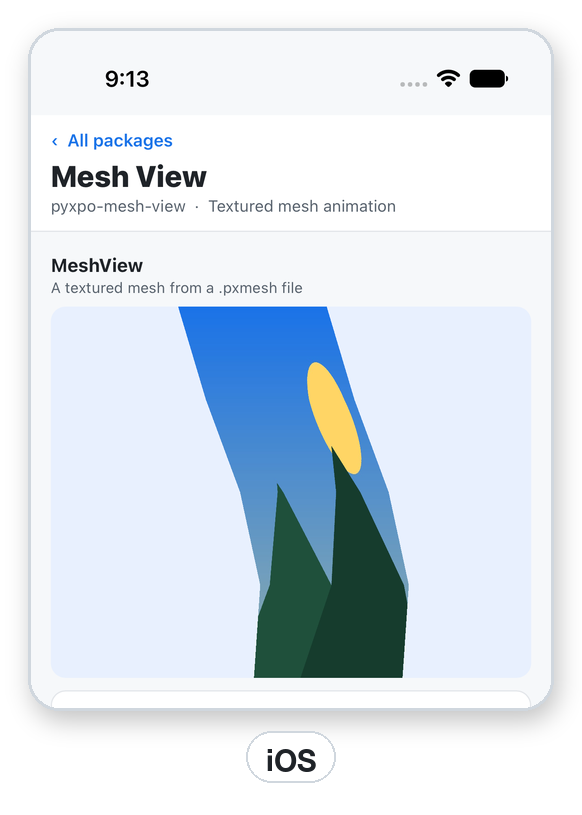
Note on the screenshot: it is from the iOS Simulator. On the Android emulator used for these pictures, the same demo reported
on_loadcorrectly (12 frames, 10 vertices, 8 triangles) but drew only the background color. The cause is not found yet and may be the emulator. If your Android build shows a blank view too, checkon_error, test on a device, and please open an issue with the device and API level.
Features
- GPU-drawn mesh playback at the file's frame rate times
speed, looping or once. - Pause, resume and seek to any frame.
- Draw order that changes per frame, so an arm can swing from behind the body to in front of it.
- Export to MP4 (H.264) or an animated GIF, with progress, on the device.
- A small binary format (PXMESH1) with
write_meshandread_headerhelpers. Numpy arrays work as input. - Same code on the web and the desktop window.
Contents
| If you are... | Start here |
|---|---|
| Playing an animation | Quick start |
Making a .pxmesh file |
Writing a mesh |
| Controlling playback | Props · Playback |
| Saving a clip as MP4 or GIF | Export |
| The file layout | PXMESH1 |
| Exact names | API reference · Errors |
| A real use | Recipe: a share button |
| Stuck | Testing · Troubleshooting · FAQ |
Platform support
| Target | What works |
|---|---|
| Android, API 24+ | Canvas.drawVertices. Export with MediaCodec (MP4) and a built-in GIF encoder. See the note above about the emulator. |
| iOS 15+ | Metal. Export with AVFoundation (MP4) and ImageIO (GIF). |
| Desktop window | WebGL. MP4 needs WebCodecs in the page; GIF always works. |
| Web page | The same as the desktop window. |
Requires Python 3.9+ and pyxpo>=0.1.0a2.
Install
pip install pyxpo-mesh-view
[tool.pyxpo]
modules = ["mesh-view"]
Rebuild the app. There are no permissions and no plugin options.
Quick start
First write a mesh file (see Writing a mesh):
import os
import tempfile

import pyxpo_mesh_view as MeshView

# A square of two triangles over the whole picture that leans over in one second.
UV = [(0, 0), (1, 0), (1, 1), (0, 1)]
FRAMES = [[(x + 0.2 * k / 30 * y, y) for x, y in UV] for k in range(30)]
SWAY = os.path.join(tempfile.gettempdir(), "sway.pxmesh")
with open(SWAY, "wb") as f:
    f.write(MeshView.write_mesh(UV, FRAMES, orders=[[0, 1, 2, 0, 2, 3]], fps=30))
Then play it:
from pyxpo import Button, Text, View, component, use_ref, use_state
import pyxpo_mesh_view as MeshView


@component
def Player(mesh_path, picture_path):
    player = use_ref(None)
    playing, set_playing = use_state(True)
    info, set_info = use_state(None)
    problem, set_problem = use_state("")

    return View(
        MeshView.MeshView(ref=player, source=mesh_path, texture=picture_path, playing=playing,
                          on_load=set_info, on_error=lambda e: set_problem(e["message"]),
                          style={"flex": 1}),
        Text(problem or ("%d frames at %g fps" % (info["frames"], info["fps"]) if info else "Loading")),
        Button(title="Pause" if playing else "Play", on_press=lambda: set_playing(not playing)),
        Button(title="Restart", on_press=lambda: player.current.seek(0)),
        style={"flex": 1},
    )
Tip: the files must exist on the device. Write them to the app cache or the documents folder (see pyxpo-file-system), or ship them as assets and copy them out.
sourceandtexturetake a plain path or afile://URI, nothing else.
MeshView props
| Prop | Default | |
|---|---|---|
source |
None |
A PXMESH1 file: a path or a file:// URI. |
texture |
None |
A PNG or JPEG: a path or a file:// URI. |
playing |
True |
False holds the current frame. |
loop |
True |
False stops on the last frame and calls on_end. |
speed |
1.0 |
0 to 16 times the file's frame rate. |
background_color |
"transparent" |
Any pyxpo color, drawn under the mesh. |
on_load |
None |
Called with {"frames", "fps", "vertices", "triangles"} when a file is ready. |
on_error |
None |
Called with {"message"} when a file cannot be read. |
on_end |
None |
Called when a clip with loop=False reaches its last frame. |
style |
Sizes the view. The animation is fitted inside it and centred (like resize_mode="contain"). |
A view reads a file once per path, and the web caches files by URL. To show a new animation, write it to a new file name.
Playback
ref.current.seek(frame)showsframe(0-based, wraps whenloopis on) and plays on from there ifplayingisTrue. It raisesValueErrorfor a negative or non-int frame.playing=Falseholds the current frame. Seek while paused to scrub.loop=Falseplays once, stops on the last frame and callson_end. Seek to 0 and setplaying=Trueto replay.speedscales the frame rate.0holds the frame like a pause.
Writing a mesh
import pyxpo_mesh_view as MeshView

uv = [(0, 0), (1, 0), (1, 1), (0, 1)]                      # where each vertex sits in the picture, 0 to 1, y down
frames = [[(x, y + 0.1 * k) for x, y in uv] for k in range(12)]   # where each vertex is in each frame, any units, y down
data = MeshView.write_mesh(uv, frames, orders=[[0, 1, 2, 0, 2, 3]], fps=12)
header = MeshView.read_header(data)   # {"vertices": 4, "frames": 12, "indices": 6, "orders": 1, "fps": 12.0, "aspect": ...}
| Argument | Meaning |
|---|---|
uv |
(V, 2), 0 to 1 in the texture, y down. |
frames |
(F, V, 2), positions per frame in any units, y down. They are scaled into the box around every frame, so the animation keeps its shape and the view fits it. |
orders |
A list of triangle lists (vertex ids, three per triangle), back to front. |
order_of_frame |
Which order each frame draws. Default: order 0 for every frame. |
fps |
Frames per second, above 0. |
Use more than one order when parts change which one is in front, for example an arm that swings from behind the body to in front of it. Shorter orders are padded with degenerate triangles. Plain lists and numpy arrays both work, up to 65536 vertices.
Export
info = await MeshView.export_async("/path/clip.pxmesh", "/path/drawing.png", "/path/clip.mp4",
                                   size=720, loops=3, on_progress=lambda p: print(round(p * 100)))
info["path"], info["width"], info["height"], info["frames"], info["fps"], info["duration"]
| Argument | Default | |
|---|---|---|
format |
from the extension of path |
"mp4" or "gif". |
size |
720 (MP4), 480 (GIF) | The longer side in pixels, 32 to 2048. |
aspect |
the clip's | Output width / height. The clip is fitted inside and centred. |
padding |
0.05 |
A fraction of the longer side on every edge, 0 to 0.45. |
background_color |
"#ffffff" |
Opaque; any alpha is ignored. |
fps |
the clip's rate up to 30 (MP4), half of it up to 15 (GIF) | 1 to 60. |
loops |
1 |
Repeats the clip in the file, 1 to 100. A GIF also loops forever when played. |
on_progress |
None |
Called with 0 to 1. |
MP4 side lengths are rounded to multiples of 16 (what H.264 encoders accept) and GIF's to multiples of 2. Android encodes with
MediaCodec, iOS with AVFoundation and ImageIO, and the web and the desktop window with WebCodecs (MP4) and a built-in GIF
encoder. The result is {"path", "format", "width", "height", "frames", "fps", "duration"}.
export_plan(header, format, ...) returns the output size, the clip rectangle and the clip frame of every output frame that
export_async will use. It does no drawing, so it is useful for checks and tests.
PXMESH1
A little-endian binary file:
| Field | Type | |
|---|---|---|
| magic | 8 bytes | PXMESH1\0 |
| V, F, I, O | u32 each | vertices, frames, indices per order (a multiple of 3), orders |
| fps, aspect | f32 each | frame rate, width / height of the box around every frame |
| uv | f32 [V][2] | 0 to 1 in the texture, y down |
| pos | f32 [F][V][2] | 0 to 1 in the box around every frame, y down |
| order_of_frame | u16 [F] | then zero bytes up to a multiple of 4 |
| indices | u16 [O][I] | triangles; pad shorter orders with degenerate triangles 0, 0, 0 |
At most 65536 vertices (u16 indices). A 770-vertex mesh at 30 fps takes about 185 KB per second of animation.
Errors
| Error | When | What to do |
|---|---|---|
ValueError |
A bad speed (not 0 to 16), a source that is not a local path, a bad seek frame, a bad write_mesh input, a PXMESH1 header with bad counts or a size that does not match. |
Fix the value. The message names it. |
FileNotFoundError |
export_async cannot find the texture or the output folder. |
Create the folder, check the path. |
RuntimeError |
You used the handle before the view mounted. export_async did not write the file. |
Seek from an event. Read the native error in the log. |
ModuleNotLinkedError |
The phone build lacks the module. | Add "mesh-view" to modules and rebuild. |
on_error({"message"}) |
A file cannot be read or decoded. | Show the message. Check both paths. |
Config
There is nothing to configure. The module has no permissions, no plugin options and no Info.plist texts.
Web and desktop
The mesh is drawn with WebGL and the page reads the files through a file:// URL. Export encodes in the page (MP4 needs
WebCodecs; GIF works everywhere) and sends the file back, and Python writes it to path, so export_async behaves the same on every platform.
Recipe: play, then share a GIF
import os
import tempfile

from pyxpo import Button, Text, View, component, use_async, use_state
import pyxpo_mesh_view as MeshView


@component
def Result(mesh_path, picture_path):
    exports, set_exports = use_state(0)
    status, set_status = use_state("")

    async def export():
        if exports > 0:
            out = os.path.join(tempfile.gettempdir(), "dance-%d.gif" % exports)
            set_status("Rendering")
            info = await MeshView.export_async(mesh_path, picture_path, out, size=480,
                                               on_progress=lambda p: set_status("Rendering %d%%" % round(p * 100)))
            set_status("%d frames, %.1f s" % (info["frames"], info["duration"]))

    use_async(export, [exports])

    return View(
        MeshView.MeshView(source=mesh_path, texture=picture_path, style={"flex": 1}),
        Text(status),
        Button(title="Make a GIF", on_press=lambda: set_exports(exports + 1)),
        style={"flex": 1},
    )
Hand the file to pyxpo-sharing to share it, or to pyxpo-media-library to save it to the gallery.
Production checklist
-
sourceandtextureare local files that exist before the view mounts. - A new animation goes to a new file name, because a path is read once.
-
on_errorshows the user something, andon_loadclears the loading state. - Meshes stay under 65536 vertices, and the file size fits your storage and memory budget.
- Export runs once at a time and shows progress. A long export holds the CPU and the encoder.
- Tested on a real Android device and on iOS, at the frame rate you ship.
Testing
Fake the native call, the link check and the view tag. The file helpers need no fakes at all:
import asyncio
import struct

import pytest

import pyxpo_mesh_view as mv

UV = [(0, 0), (1, 0), (1, 1), (0, 1)]
FRAMES = [[(x, y + 0.1 * k) for x, y in UV] for k in range(6)]
TRIANGLES = [[0, 1, 2, 0, 2, 3]]


def test_write_then_read_header():
    data = mv.write_mesh(UV, FRAMES, TRIANGLES, fps=12)
    head = mv.read_header(data)
    assert head["vertices"] == 4 and head["frames"] == 6 and head["orders"] == 1 and head["fps"] == 12.0


def test_a_cut_file_is_rejected():
    data = mv.write_mesh(UV, FRAMES, TRIANGLES)
    with pytest.raises(ValueError):
        mv.read_header(data[:-2])
    with pytest.raises(ValueError):
        mv.read_header(b"not a mesh")


def test_export_plan_sizes():
    head = mv.read_header(mv.write_mesh(UV, FRAMES, TRIANGLES, fps=12))
    plan = mv.export_plan(head, "mp4", size=720)
    assert plan["width"] % 16 == 0 and plan["height"] % 16 == 0
    assert plan["fps"] == 12.0 and len(plan["frames"]) == 6
    assert len(mv.export_plan(head, "gif", loops=3)["frames"]) == 3 * len(mv.export_plan(head, "gif")["frames"])


def test_seek_goes_to_the_native_side(monkeypatch):
    seen = []
    monkeypatch.setattr(mv, "call", lambda *a, **k: seen.append(a))
    monkeypatch.setattr(mv, "require_linked", lambda *a, **k: None)
    monkeypatch.setattr(mv, "view_tag", lambda ref: 3)
    handle = mv.MeshViewHandle(object())
    handle.seek(5)
    assert seen == [("MeshView", "seek", 3, 5)]
    with pytest.raises(ValueError):
        handle.seek(-1)


def test_export_asks_native_to_draw(tmp_path, monkeypatch):
    (tmp_path / "a.pxmesh").write_bytes(mv.write_mesh(UV, FRAMES, TRIANGLES, fps=12))
    (tmp_path / "a.png").write_bytes(b"png")
    asked = {}

    async def fake_call(module, method, opts, reply=False):
        asked.update(opts)
        (tmp_path / "out.gif").write_bytes(b"GIF89a")
        return {}

    monkeypatch.setattr(mv, "call", fake_call)
    monkeypatch.setattr(mv, "require_linked", lambda *a, **k: None)
    monkeypatch.setattr(mv, "on_event", lambda *a, **k: None)
    info = asyncio.run(mv.export_async(str(tmp_path / "a.pxmesh"), str(tmp_path / "a.png"), str(tmp_path / "out.gif")))
    assert asked["format"] == "gif" and info["format"] == "gif" and info["frames"] == len(asked["frames"])
Troubleshooting
| Symptom | Cause and fix |
|---|---|
| The view is blank | The view has no size (give it style={"flex": 1}), a path is wrong (watch on_error), or the texture is not a PNG or JPEG. On the Android emulator used for these screenshots it stayed blank although on_load fired: try a device. |
ValueError: ... must be a local file |
source and texture take paths or file:// URIs only, not http URLs. Download first. |
| The animation does not change after I write a new file | A path is read once. Use a new file name. |
| The mesh looks squashed | aspect comes from your frames. Draw the frames in true proportions. |
| Parts draw in the wrong order | Use several orders and set order_of_frame. Triangles draw back to front. |
ValueError: PXMESH1 is N bytes, the header says M |
The file was cut or edited. Write it again. |
| MP4 export fails on the web | The browser lacks WebCodecs. Export a GIF instead. |
ModuleNotLinkedError |
Add "mesh-view" to [tool.pyxpo] modules and rebuild. |
FAQ
Is this a video player? No. It draws a mesh over a picture each frame. For video files use a video component.
Can I animate with bones? The format holds vertex positions per frame, so compute them from your own skeleton in Python (for example with numpy) and write them with write_mesh.
Does Python run during playback? No. The native side advances frames. Python only sets props and seeks.
How big are files? About 8 bytes per vertex per frame, so a 770-vertex mesh at 30 fps takes about 185 KB per second.
Can the texture change? Write a new texture path. The view loads each path once.
API reference
| Name | Returns | Notes |
|---|---|---|
MeshView(...) |
component | Props above. ref gets a MeshViewHandle. |
MeshViewHandle.seek(frame) |
None |
Frame 0-based. |
write_mesh(uv, frames, orders, order_of_frame=None, fps=30) |
bytes |
PXMESH1. |
read_header(data) |
dict |
vertices, frames, indices, orders, fps, aspect. Raises ValueError. |
export_async(source, texture, path, *, format=None, size=None, aspect=None, padding=0.05, background_color="#ffffff", fps=None, loops=1, on_progress=None) |
dict |
path, format, width, height, frames, fps, duration. |
export_plan(header, format, size=None, aspect=None, padding=0.05, fps=None, loops=1) |
dict |
width, height, rect, fps, frames. |
MAGIC, HEADER_SIZE, FORMATS |
constants | b"PXMESH1\0", 32, ("mp4", "gif"). |
License
MIT
1 maintainer

Metadata
1 maintainer
Release files for pyxpo-mesh-view 0.1.0a1
For a detailed explanation of source distributions (sdists) and built distributions (wheels), please see the package formats documentation.
Source distribution (sdist)
| File | Size | Uploaded | Provenance | |
|---|---|---|---|---|
| pyxpo_mesh_view-0.1.0a1.tar.gz | 45.2 kB | With provenance | Details |
Built distribution (wheel)
| File | Interpreter | ABI | Platform | Reset |
|---|---|---|---|---|
| pyxpo_mesh_view-0.1.0a1-py3-none-any.whl | Python 3 | none | any | Details |
Total release size: 88.5 kB
Release files / pyxpo_mesh_view-0.1.0a1.tar.gz
| Download URL | pyxpo_mesh_view-0.1.0a1.tar.gz |
|---|---|
| Size | 45.2 kB |
| Tags | Source |
|
SHA-256 checksum How to use checksums |
1bd50e7ebe8077ec01139018fde5ea071bcabaeeee4a67c7e8890d648b3e9727
|
|
BLAKE2b-256 checksum How to use checksums |
fbb8dae4cac48993c20e9a2f9bccb28f5b6aaac5f8a3367f688b4f73a71dd7ae
|
| Upload date | |
|
Uploaded using Trusted Publishing? What is trusted publishing? |
Yes |
| Uploaded via |
twine/7.0.0 CPython/3.13.14
|
Provenance
Provenance describes where a file came from. On PyPI, provenance is shared via attestations, which provide a verifiable record of the build or publishing details. View details, limitations and caveats.


PyPI Publish Attestation
PyPI verified that this artifact, at this checksum, originated from the publisher listed below.
Signed by GitHub Actions, verified by PyPI on Oct 18, 2026.
Transparency logRelease files / pyxpo_mesh_view-0.1.0a1-py3-none-any.whl
| Download URL | pyxpo_mesh_view-0.1.0a1-py3-none-any.whl |
|---|---|
| Size | 43.4 kB |
| Tags | Python 3 |
|
SHA-256 checksum How to use checksums |
760459cd19af89c954153f743dde12e00c3e79f5643b845861688407e55b27a6
|
|
BLAKE2b-256 checksum How to use checksums |
7b7f1d976867429d39802b234c402ff1fea2cd9f4ec55be67071326f9c627e76
|
| Upload date | |
|
Uploaded using Trusted Publishing? What is trusted publishing? |
Yes |
| Uploaded via |
twine/7.0.0 CPython/3.13.14
|
Provenance
Provenance describes where a file came from. On PyPI, provenance is shared via attestations, which provide a verifiable record of the build or publishing details. View details, limitations and caveats.
PyPI Publish Attestation
PyPI verified that this artifact, at this checksum, originated from the publisher listed below.
Signed by GitHub Actions, verified by PyPI on Oct 18, 2026.
Transparency logSecurity for pyxpo-mesh-view 0.1.0a1
Provenance
Provenance describes where a file came from. On PyPI, provenance is shared via attestations, which provide a verifiable record of the build or publishing details. View details, limitations and caveats.
Full provenance
All 2 files in this release have been uploaded with provenance metadata.
Attestation for pyxpo_mesh_view-0.1.0a1.tar.gz
PyPI Publish Attestation
PyPI verified that this artifact, at this checksum, originated from the publisher listed below.
Signed by GitHub Actions, verified by PyPI on Oct 18, 2026.
Transparency logA note on package security
PyPI is a repository for distributing packages, not a service for auditing them. While third-party security researchers and our staff do their best to detect and remove malicious packages, PyPI cannot guarantee the quality, security or suitability of any given package.













