
This release is a pre-release and may not be stable for production use.
pyxpo-whiteboard
A whiteboard for pyxpo apps written in Python: pen, marker, eraser, fill bucket, color
picker and nine shapes, solid or dashed, on a plain, grid, dot or lined page, with undo, redo, clear and export to PNG or
JPEG. It comes with a ready toolbar and with the single toolbar pieces, so you can use it as is or lay the controls out
yourself. iOS draws with Core Graphics, Android with android.graphics.Canvas, and the web and the desktop window with an
HTML canvas.
import pyxpo_whiteboard as WB
from pyxpo import View, component


@component
def Sketch():
    board = WB.use_whiteboard(color="#222222", width=6)
    return View(WB.Whiteboard(board=board, style={"flex": 1}), WB.WhiteboardToolbar(board=board), style={"flex": 1})
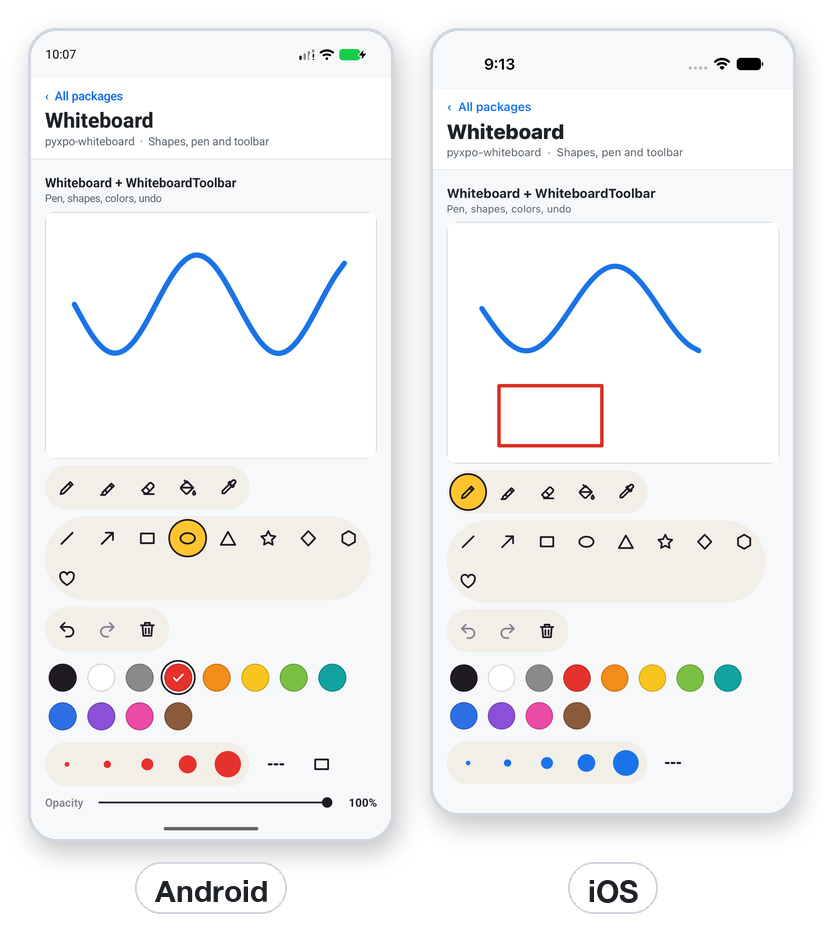
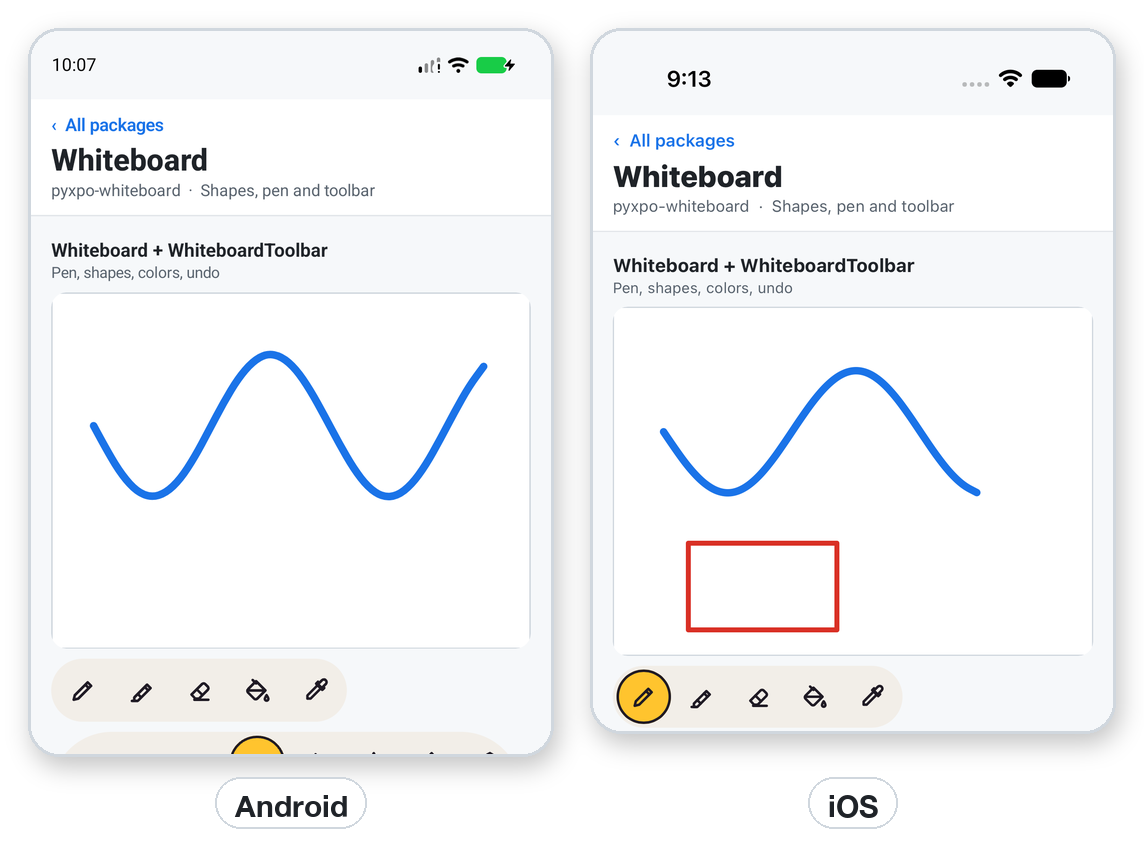
Note on the screenshots: the Android picture shows a curve drawn with a synthetic
adbswipe. The iOS picture has a curve and a rectangle that the demo seeded. On the Android emulator,adb-injected touches drew with the pen but did not draw the rectangle and ellipse tools, so no shape is shown on Android. It is not known whether that is the synthetic input or a bug, so test the shape tools with a real finger on your Android device.
Features
- Pen, marker, eraser, fill bucket and color picker. The marker is always see-through.
- Nine shapes: line, arrow, rectangle, ellipse, triangle, star, diamond, hexagon and heart, outlined or filled.
- Solid or dashed lines, width, color and opacity.
- Page patterns: plain, grid, dots or lined. They show on screen and are left out of exported images.
- Undo, redo and clear.
clear()can be undone. - A ready toolbar (
WhiteboardToolbar) and its pieces:ToolPicker,ShapePicker,ColorPalette,ColorGrid,WidthPicker,OpacitySlider,ShapeFillToggle,DashToggle,PatternPicker,HistoryButtons. - Save and restore the drawing as a list of plain elements.
- Export to PNG or JPEG, optionally trimmed to the ink, with a transparent background if you want.
- Geometry helpers (
shape_outline,to_strokes,transform,bounds) that work without a device. - camelCase too:
getElementsAsync,toImageAsync.
Contents
| If you are... | Start here |
|---|---|
| Adding a whiteboard with a toolbar | Quick start |
| Laying out the controls yourself | Toolbar pieces · Using props without a board |
| Choosing tools, colors and the page | Tools · Page pattern |
| Saving and loading a drawing | Elements |
| Making an image | Export |
| Exact names | API reference · Errors |
| A real use | Recipe: a lesson board |
| Stuck | Testing · Troubleshooting · FAQ |
Platform support
| Target | What works |
|---|---|
| Android, API 24+ | Finger and stylus. Drawn with Canvas. Shape tools are not verified yet with a real finger: see the note above. |
| iOS 15+ | Finger and Apple Pencil. Drawn with Core Graphics. Pen, shapes, fill and toolbar verified on the Simulator. |
| Desktop window | Mouse and pen through pointer events. Drawn on an HTML canvas. |
| Web page | The same as the desktop window. |
Requires Python 3.9+ and pyxpo>=0.1.0a2.
Install
pip install pyxpo-whiteboard
[tool.pyxpo]
modules = ["whiteboard"]
Rebuild the app. There are no permissions and no plugin options.
Quick start
from pyxpo import Button, Text, View, component, use_async, use_state
import pyxpo_whiteboard as WB


@component
def Sketch():
    board = WB.use_whiteboard(color="#1F1A24", width=6)
    saves, set_saves = use_state(0)
    note, set_note = use_state("")

    async def save():
        if saves > 0:
            image = await board.to_image_async(trim=True, padding=16)
            set_note("Nothing to save" if image is None else image["uri"])

    use_async(save, [saves])

    return View(
        WB.Whiteboard(board=board, style={"flex": 1, "minHeight": 240}),
        WB.WhiteboardToolbar(board=board),
        Text("%d elements. %s" % (board.element_count, note)),
        Button(title="Save", disabled=board.is_empty, on_press=lambda: set_saves(saves + 1)),
        style={"flex": 1},
    )
Tip:
use_async(fn, deps)awaits only a realasync def. Do not passlambda: some_coroutine(): nothing awaits it.
use_whiteboard() holds the tool, color, width, opacity, shape fill, dashes and page pattern, plus the board's state
(element_count, can_undo, can_redo, drawing). Give the same board to Whiteboard and to every toolbar piece, and they stay in step.
Tools and settings
use_whiteboard(tool="pen", color="#1F1A24", width=4, opacity=1, fill_shapes=False, dash=False, pattern="none", palette=PALETTE, widths=WIDTHS, theme=None)
sets the starting values. A Board has these fields and setters:
| Field | Setter | Meaning |
|---|---|---|
board.tool |
set_tool(tool) |
One of TOOLS: pen, marker, eraser, fill, picker and the nine shapes. The picker remembers the tool before it and returns to it after one pick. |
board.color |
set_color(color) |
Any pyxpo color. Picking one while the eraser is on switches back to the pen. |
board.width |
set_width(width) |
pt/dp, above 0 and at most 500. Eraser and shape outlines use it too. |
board.opacity |
set_opacity(opacity) |
Above 0 up to 1, for the pen, shapes and fill bucket. The marker is always at 40 %. |
board.fill_shapes |
set_fill_shapes(bool) |
Shapes filled with the current color, or outline only. |
board.dash |
set_dash(bool) |
Dashed pen, marker and shape outlines. The eraser is always solid. |
board.pattern |
set_pattern(name) |
"none", "grid", "dots" or "lines". |
board.element_count, can_undo, can_redo |
State from the board. | |
board.drawing, board.is_empty |
A touch is in progress. is_empty is true with no elements and no touch: the time for a "draw here" hint. |
board.undo(), board.redo(), board.clear(), await board.get_elements_async(), await board.set_elements_async(elements) and
await board.to_image_async(...) call the mounted board and raise RuntimeError if it is not mounted.
The fill bucket floods the region under your finger with the current color. It is stored as a small fill element
and redrawn each time, so it follows edits made before it. fill_tolerance (0 to 255, default 32, a Whiteboard prop)
sets how much a color may differ from the tapped one and still be filled. The picker draws nothing: a tap sets the board's color to the
color under the finger (ink over the background).
Toolbar pieces
WhiteboardToolbar(board, on_clear=None, shapes=True, opacity=True, history=True, patterns=True, spectrum=False, style=None)
shows everything in wrapping rows, so narrow screens get more rows. spectrum=True adds the full ColorGrid. Each
piece also works alone:
| Piece | Shows |
|---|---|
ToolPicker(board, tools=DRAW_TOOLS) |
Pen, marker, eraser, fill bucket, color picker. |
ShapePicker(board, shapes=SHAPES) |
The nine shape tools. |
ColorPalette(board, colors=None, size=None) |
Swatches (the board's palette). The picked one has a ring and a tick. |
ColorGrid(board, hues=12, shades=5, size=None) |
A full spectrum plus a row of grays. |
WidthPicker(board, widths=None) |
A dot per width in the current color. |
OpacitySlider(board, minimum=0.1, label=True) |
Opacity 10 to 100 %. |
ShapeFillToggle(board) |
Outline or filled shapes. |
DashToggle(board) |
Solid or dashed lines. |
PatternPicker(board, patterns=PATTERNS) |
Plain, grid, dots, lined page. |
HistoryButtons(board, on_clear=None, clear=True) |
Undo, redo, clear. on_clear replaces the clear, for example to ask first. |
A layout of your own:
from pyxpo import Row, View, component
import pyxpo_whiteboard as WB


@component
def Compact():
    board = WB.use_whiteboard(tool="pen", palette=["#1F1A24", "#E5322D", "#2F6FE4"], widths=[2, 6, 14],
                              theme={"accent": "#C7E3FF", "button": 40})
    return View(
        Row(WB.ToolPicker(board=board, tools=("pen", "marker", "eraser")), WB.HistoryButtons(board=board, clear=False)),
        WB.Whiteboard(board=board, style={"flex": 1}),
        Row(WB.ColorPalette(board=board), WB.WidthPicker(board=board)),
        style={"flex": 1},
    )
theme overrides keys of WB.THEME: ink, muted, surface, soft, border, accent, on_accent, track, button
(button size), swatch (swatch size) and gap. ToolIcon(name, size=24, color=..., weight=2.2, fill=None) draws any icon in ICONS.
Page pattern
board.set_pattern("grid") # "none", "grid", "dots" or "lines"
The lines or dots are 24 pt/dp apart in a faint gray (pattern_color on a bare Whiteboard changes it). They are drawn on screen only and
never appear in an exported image, so a grid page exports as a clean drawing.
Using props without a board
Whiteboard works alone with plain props and a ref:
from pyxpo import View, component, use_ref
import pyxpo_whiteboard as WB


@component
def Plain():
    ref = use_ref(None)
    return View(
        WB.Whiteboard(ref=ref, tool="marker", color="#E5322D", width=14, pattern="lines",
                      on_change=lambda s: print(s["element_count"], s["can_undo"]),
                      style={"flex": 1}),
    )
| Prop | Default | |
|---|---|---|
board |
None |
A use_whiteboard() board. It supplies the tool settings and its ref. |
tool |
"pen" |
Any of TOOLS. |
color |
"#000000" |
Pen, marker and shape outline color. |
width |
4 |
pt/dp, above 0 and at most 500. |
opacity |
1 |
Above 0 up to 1. |
fill_color |
None |
Fills shapes; None is outline only. |
background_color |
"#ffffff" |
The page, used when exporting with a background. |
enabled |
True |
False ignores touches. |
fill_tolerance |
32 |
0 to 255, for the fill bucket. |
dash |
False |
Dashed lines (never the eraser). |
pattern, pattern_color |
"none", faint gray |
The page pattern. |
on_change |
None |
{"element_count", "can_undo", "can_redo"} after each element, undo, redo, clear, set_elements_async and a touch that drew nothing. |
on_draw_start |
None |
{"tool"} when a touch starts drawing. |
on_pick |
None |
{"color"} (0xAARRGGBB) from the picker tool. |
style |
Sizes the board. |
Elements
The drawing is a list of elements, oldest first, in pt/dp from the view's top left:
{"type": "stroke", "tool": "pen" | "marker" | "eraser", "color": 0xFF1F1A24, "width": 6.0, "points": [x0, y0, x1, y1, ...]}
{"type": "shape", "shape": "rect", "color": 0xFFE5322D, "width": 4.0, "fill": 0, "x0": 40, "y0": 40, "x1": 200, "y1": 120}
{"type": "fill", "x": 100, "y": 80, "color": 0xFFF7C51E}
Strokes and shapes may also have "dash": True. A shape fill of 0 means outline only. A dict with no "type" is a stroke,
so strokes saved from pyxpo-drawing-canvas load as they are.
elements = await board.get_elements_async()
await board.set_elements_async(elements + [
    {"type": "shape", "shape": "star", "color": "#F7C51E", "fill": "#F7C51E", "width": 3,
     "x0": 60, "y0": 60, "x1": 160, "y1": 160},
])
set_elements_async accepts any pyxpo color, checks every element before it sends anything (so a bad one raises and leaves the
drawing as it was) and empties undo and redo.
Helpers (pure Python, no device needed):
| Function | Returns |
|---|---|
shape_outline(shape, x0, y0, x1, y1, width=0, segments=48) |
The polylines a shape draws: one closed loop, or a line plus two arrow-head lines. |
to_strokes(elements) |
Plain {"tool", "color", "width", "points"} strokes: shapes become outlines, the marker draws like the pen, fills are left out. |
transform(elements, scale, dx=0, dy=0) |
Every element moved to p * scale + (dx, dy), widths scaled too. Use it to fit a drawing to a bigger board. |
bounds(elements) |
(x0, y0, x1, y1) of lines and shapes (half a line width out) or None. Fills and the eraser do not count. |
color_grid(hues=12, shades=5) |
Rows of "#RRGGBB" colors. |
Export
image = await board.to_image_async(format="png", trim=True, padding=16, background=False)
image["uri"], image["width"], image["height"], image["x"], image["y"]
| Argument | Default | |
|---|---|---|
format |
"png" |
"png" or "jpg". |
trim |
False |
Crop to the ink plus padding. Returns None when there is none. |
padding |
0 |
pt/dp around the ink when trimming. |
scale |
the screen's | Pixels per pt/dp, above 0 and at most 8. |
background |
True |
False gives a transparent PNG. A JPEG gets white. |
quality |
1 |
0 to 1, for jpg. |
The file goes to the app cache and uri is a file:// path on every platform. The page pattern is never drawn into it.
Errors
| Error | When | What to do |
|---|---|---|
ValueError |
A bad tool, shape, pattern, format, width, opacity, scale or quality, a stroke with an odd number of coordinates, an element with an unknown type. |
Fix the value. The message names it. |
TypeError |
set_elements_async got a non-list, or an element that is not a dict. |
Pass a list of dicts. |
RuntimeError |
You used the board or handle before the Whiteboard mounted. |
Call it from an event, not during render. |
ModuleNotLinkedError |
The phone build lacks the module. | Add "whiteboard" to modules and rebuild. |
None from to_image_async |
trim=True and there is no ink. |
Check board.is_empty first. |
Config
There is nothing to configure. The module has no permissions, no plugin options and no Info.plist texts.
Web and desktop
The board is an HTML canvas driven by pointer events: a mouse, touch and pen all work. The page encodes the image and Python writes it to
~/.cache/pyxpo/whiteboard/ (or $XDG_CACHE_HOME/pyxpo/whiteboard/), so uri is a file:// path like on a phone.
Recipe: a lesson board
from pyxpo import Button, Row, Text, View, component, use_async, use_state
import pyxpo_whiteboard as WB

TEMPLATE = [{"type": "shape", "shape": "rect", "color": "#8A8A8A", "width": 2, "fill": 0,
             "x0": 20, "y0": 20, "x1": 220, "y1": 120, "dash": True}]


@component
def Lesson(on_done):
    board = WB.use_whiteboard(color="#2F6FE4", width=4, pattern="grid")
    loads, set_loads = use_state(0)
    sends, set_sends = use_state(0)

    async def load_template():
        if loads > 0:
            await board.set_elements_async(TEMPLATE)

    async def send():
        if sends > 0:
            image = await board.to_image_async(format="jpg", quality=0.85, padding=8, trim=True)
            if image is not None:
                on_done(image["uri"])

    use_async(load_template, [loads])
    use_async(send, [sends])

    return View(
        WB.Whiteboard(board=board, style={"flex": 1}),
        WB.WhiteboardToolbar(board=board, on_clear=lambda: board.clear()),
        Text("Draw your answer" if board.is_empty else "%d marks" % board.element_count),
        Row(Button(title="Start from template", on_press=lambda: set_loads(loads + 1)),
            Button(title="Send", disabled=board.is_empty, on_press=lambda: set_sends(sends + 1))),
        style={"flex": 1},
    )
Production checklist
- The
Whiteboardhas a size (style), because a drawing surface has no content to size itself from. - Undo and redo buttons follow
can_undoandcan_redo, and clear asks first when the work matters (on_clear). - You keep the elements (
get_elements_async()) if the drawing must outlive the screen. The board does not keep them. - A saved drawing records the board size. Use
transformto fit it to another screen. - You handle
Nonefromto_image_async(trim=True)for an empty board. - Exports are copied out of the cache (or shared) if you need them later.
- Shape tools are tested with a finger on a real Android device and on iOS.
Testing
The geometry helpers need no fakes. Fake call, require_linked and view_tag for the handle:
import asyncio

import pytest

import pyxpo_whiteboard as wb


def test_shapes_are_closed_loops():
    (loop,) = wb.shape_outline("rect", 0, 0, 10, 20)
    assert loop[:2] == loop[-2:] == [0, 0]
    lines = wb.shape_outline("arrow", 0, 0, 100, 0, width=4)
    assert len(lines) == 3 and lines[0] == [0, 0, 100, 0]


def test_bounds_and_transform():
    elements = [{"type": "shape", "shape": "rect", "color": 0xFF000000, "width": 2, "x0": 10, "y0": 10, "x1": 30, "y1": 20}]
    assert wb.bounds(elements) == (9.0, 9.0, 31.0, 21.0)
    moved = wb.transform(elements, 2, dx=5)
    assert (moved[0]["x0"], moved[0]["x1"], moved[0]["width"]) == (25, 65, 4.0)
    assert wb.bounds([]) is None


def test_to_strokes_leaves_fills_out():
    drawing = [{"type": "fill", "x": 1, "y": 1, "color": 1},
               {"type": "stroke", "tool": "marker", "color": 1, "width": 3, "points": [0, 0, 1, 1]}]
    assert [s["tool"] for s in wb.to_strokes(drawing)] == ["pen"]


def test_set_elements_checks_first(monkeypatch):
    calls = []

    async def fake_call(module, method, *args, **kwargs):
        calls.append((method, args))

    monkeypatch.setattr(wb, "call", fake_call)
    monkeypatch.setattr(wb, "require_linked", lambda *a, **k: None)
    monkeypatch.setattr(wb, "view_tag", lambda ref: 9)
    handle = wb.WhiteboardHandle(object())
    with pytest.raises(ValueError):
        asyncio.run(handle.set_elements_async([{"type": "shape", "shape": "cube", "x0": 0, "y0": 0, "x1": 1, "y1": 1}]))
    assert calls == []
    asyncio.run(handle.set_elements_async([{"points": [0, 0, 4, 4]}]))
    assert calls[0][0] == "setElements" and calls[0][1][1][0]["type"] == "stroke"
WB.Whiteboard(...) and the toolbar components only build view descriptions, and they validate their props while building
(for example a bad tool raises ValueError), so a test can call them directly.
Troubleshooting
| Symptom | Cause and fix |
|---|---|
| Nothing shows and nothing draws | The board has no height. Give it style={"flex": 1} or a height. |
| Toolbar buttons do nothing | The toolbar and the Whiteboard got different boards. Pass one board to both. |
| Shape tools draw nothing on Android | Not confirmed as a bug: it was seen with synthetic adb touches. Try a real finger, and tell us your result with the device and API level. |
| The marker looks too light | It is the color at 40 % by design. Use the pen with opacity for another strength. |
| The grid is missing in the exported image | By design: the page pattern is screen only. |
to_image_async returns None |
trim=True on an empty board. |
| The eraser leaves a white mark on a colored page | The eraser removes ink and shows background_color. Set it to the page color. |
RuntimeError: the Whiteboard is not mounted |
You used the board before mount or after unmount. |
| A restored drawing sits in the wrong place | Elements are in pt/dp of the board they were drawn on. Use transform for a different size. |
ModuleNotLinkedError |
Add "whiteboard" to [tool.pyxpo] modules and rebuild. |
FAQ
Is it the same format as pyxpo-drawing-canvas? Strokes are. A drawing-canvas stroke list loads here as it is, and to_strokes() gives one back from a whiteboard drawing.
Can I move or resize a shape after I draw it? No. Undo it and draw it again, or edit the elements and call set_elements_async.
Can I add text? No. Put a Text over the board.
Does it do pressure? No. Width is fixed per element.
Can two people draw together? There is no sync. Send the elements through your own server and apply them with set_elements_async.
Can I use my own toolbar? Yes. Skip WhiteboardToolbar and call board.set_tool(...), board.set_color(...) and the other setters from your own buttons.
API reference
| Name | Kind | Notes |
|---|---|---|
Whiteboard(...) |
component | Props above. ref gets a WhiteboardHandle. |
use_whiteboard(...) |
hook | Returns a Board. |
Board |
class | Settings, setters, state and the handle methods. |
WhiteboardHandle |
class | undo(), redo(), clear(), get_elements_async(), set_elements_async(elements), to_image_async(...). |
WhiteboardToolbar, ToolPicker, ShapePicker, ColorPalette, ColorGrid, WidthPicker, OpacitySlider, ShapeFillToggle, DashToggle, PatternPicker, HistoryButtons |
components | Take board= and an optional style. |
ToolIcon, ICONS, THEME, TOOL_LABELS, PATTERN_LABELS |
icons and theme | |
shape_outline, to_strokes, transform, bounds, color_grid |
functions | See Elements. |
Tool |
class | Tool.PEN, MARKER, ERASER, FILL, PICKER, LINE, ARROW, RECT, ELLIPSE, TRIANGLE, STAR, DIAMOND, HEXAGON, HEART. |
TOOLS, DRAW_TOOLS, SHAPES, PATTERNS, IMAGE_FORMATS |
tuples | The allowed values. |
PALETTE, WIDTHS, MARKER_ALPHA |
constants | 12 colors, (2, 4, 8, 14, 24), 0.4. |
to_image_async(format="png", trim=False, padding=0, scale=None, background=True, quality=1) returns
{"uri", "width", "height", "x", "y"} or None.
License
MIT
1 maintainer

Metadata
1 maintainer
Release files for pyxpo-whiteboard 0.1.0a1
For a detailed explanation of source distributions (sdists) and built distributions (wheels), please see the package formats documentation.
Source distribution (sdist)
| File | Size | Uploaded | Provenance | |
|---|---|---|---|---|
| pyxpo_whiteboard-0.1.0a1.tar.gz | 52.4 kB | With provenance | Details |
Built distribution (wheel)
| File | Interpreter | ABI | Platform | Reset |
|---|---|---|---|---|
| pyxpo_whiteboard-0.1.0a1-py3-none-any.whl | Python 3 | none | any | Details |
Total release size: 101.0 kB
Release files / pyxpo_whiteboard-0.1.0a1.tar.gz
| Download URL | pyxpo_whiteboard-0.1.0a1.tar.gz |
|---|---|
| Size | 52.4 kB |
| Tags | Source |
|
SHA-256 checksum How to use checksums |
8278f22f6ae0728f17eb12b1fb72e77662374bb0f6889300a66c3de758c2199d
|
|
BLAKE2b-256 checksum How to use checksums |
1d8a71f9490061c3e6dfd1ce13272dabe7a352ad4055f731c728093d6ebe7298
|
| Upload date | |
|
Uploaded using Trusted Publishing? What is trusted publishing? |
Yes |
| Uploaded via |
twine/7.0.0 CPython/3.13.14
|
Provenance
Provenance describes where a file came from. On PyPI, provenance is shared via attestations, which provide a verifiable record of the build or publishing details. View details, limitations and caveats.


PyPI Publish Attestation
PyPI verified that this artifact, at this checksum, originated from the publisher listed below.
Signed by GitHub Actions, verified by PyPI on Oct 18, 2026.
Transparency logRelease files / pyxpo_whiteboard-0.1.0a1-py3-none-any.whl
| Download URL | pyxpo_whiteboard-0.1.0a1-py3-none-any.whl |
|---|---|
| Size | 48.5 kB |
| Tags | Python 3 |
|
SHA-256 checksum How to use checksums |
500261ee32a9bb4402a1aa3070341a2d4ee09622741ca5e80b16018befd5b0f2
|
|
BLAKE2b-256 checksum How to use checksums |
215e47abd816d3c65b060e52f93edc347af9ca718f27cc5d3cedc052389855c1
|
| Upload date | |
|
Uploaded using Trusted Publishing? What is trusted publishing? |
Yes |
| Uploaded via |
twine/7.0.0 CPython/3.13.14
|
Provenance
Provenance describes where a file came from. On PyPI, provenance is shared via attestations, which provide a verifiable record of the build or publishing details. View details, limitations and caveats.
PyPI Publish Attestation
PyPI verified that this artifact, at this checksum, originated from the publisher listed below.
Signed by GitHub Actions, verified by PyPI on Oct 18, 2026.
Transparency logSecurity for pyxpo-whiteboard 0.1.0a1
Provenance
Provenance describes where a file came from. On PyPI, provenance is shared via attestations, which provide a verifiable record of the build or publishing details. View details, limitations and caveats.
Full provenance
All 2 files in this release have been uploaded with provenance metadata.
Attestation for pyxpo_whiteboard-0.1.0a1.tar.gz
PyPI Publish Attestation
PyPI verified that this artifact, at this checksum, originated from the publisher listed below.
Signed by GitHub Actions, verified by PyPI on Oct 18, 2026.
Transparency logA note on package security
PyPI is a repository for distributing packages, not a service for auditing them. While third-party security researchers and our staff do their best to detect and remove malicious packages, PyPI cannot guarantee the quality, security or suitability of any given package.













