
pyxterm.js
A fully functional terminal in your browser.
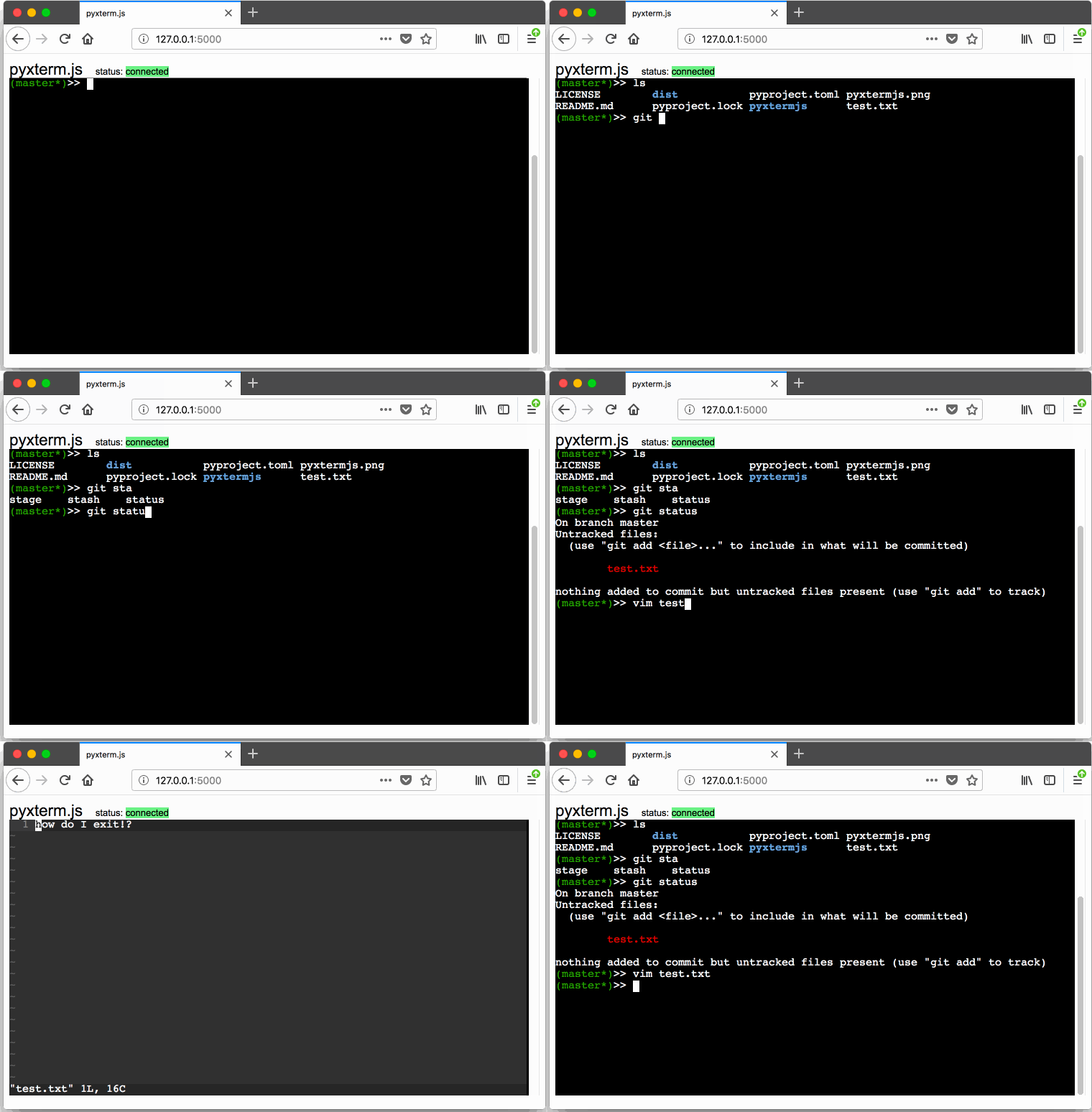
How does this work?
On the backend:
- A Flask server is running
- The Flask server uses flask-socketio, a websocket library for Flask and socketio
- A pty ("pseudo-terminal") is spawned that runs bash.
- You can think of a pty as a way to serialize/deserialize a terminal session. The Python docs describe it as "starting another process and being able to write to and read from its controlling terminal programmatically".
On the frontend:
- Xterm.js is used to render Xterm output data in the browser.
- This means escape codes used by terminals to control the cursor location, color, and other options can be passed directly to Xterm.js and Xterm.js will faithfully render them as a terminal would.
- Output from the pty process on the backend is fed into it.
- Input from the browser is passed via websocket to the pty's input
Why?
The real purpose of this is to show a basic proof of concept on how to bring Xterm.js, Python, Flask, and Websockets together to run a pty in the browser.
This is a
- starting point to build your own web app with a terminal
- learning tool to understand what a
ptyis, and how to use one in Python - way to see Flask and Flask-SocketIO in action
- way to play around with Xterm.js in a meaningful environment
Installation
There are a few ways to install and run.
Clone & Run Locally
Clone this repository, enter the pyxtermjs directory.
If you have nox you can run the following.
> nox -s run
Nox takes care of setting up a virtual environment and running the right command for you. You can pass arguments to the server like this
> nox -s run -- --debug
If you don't have nox, you can run the following from inside a virtual environment.
> pip install -r requirements.txt
> python -m pyxtermjs
> python -m pyxtermjs --debug
Install
You can install with pipx (recommended) or pip.
> pipx install pyxtermjs
> pyxtermjs
Or you can try run latest version on PyPI
> pipx run pyxtermjs
API
> pyxtermjs --help
usage: pyxtermjs [-h] [-p PORT] [--host HOST] [--debug] [--version]
                 [--command COMMAND] [--cmd-args CMD_ARGS]

A fully functional terminal in your browser.
https://github.com/cs01/pyxterm.js

optional arguments:
  -h, --help            show this help message and exit
  -p PORT, --port PORT  port to run server on (default: 5000)
  --host HOST           host to run server on (use 0.0.0.0 to allow access
                        from other hosts) (default: 127.0.0.1)
  --debug               debug the server (default: False)
  --version             print version and exit (default: False)
  --command COMMAND     Command to run in the terminal (default: bash)
  --cmd-args CMD_ARGS   arguments to pass to command (i.e. --cmd-args='arg1
                        arg2 --flag') (default: )
1 maintainer

Metadata
1 maintainer
Release files for pyxtermjs 0.5.0.2
For a detailed explanation of source distributions (sdists) and built distributions (wheels), please see the package formats documentation.
Source distribution (sdist)
| File | Size | Uploaded | Provenance | |
|---|---|---|---|---|
| pyxtermjs-0.5.0.2.tar.gz | 7.9 kB | Without provenance | Details |
Built distribution (wheel)
| File | Interpreter | ABI | Platform | Reset |
|---|---|---|---|---|
| pyxtermjs-0.5.0.2-py3-none-any.whl | Python 3 | none | any | Details |
Total release size: 16.0 kB
Release files / pyxtermjs-0.5.0.2.tar.gz
| Download URL | pyxtermjs-0.5.0.2.tar.gz |
|---|---|
| Size | 7.9 kB |
| Tags | Source |
|
SHA-256 checksum How to use checksums |
57941738adc6a927f062ae18421f84978e8d688dc66fde5fa7ab44776498624e
|
|
BLAKE2b-256 checksum How to use checksums |
a771b7a311659aebbd9bfc43acc901ecdbc5dfffee8ebc2b394137969ee6c387
|
| Upload date | |
|
Uploaded using Trusted Publishing? What is trusted publishing? |
No |
| Uploaded via |
twine/4.0.1 CPython/3.10.4
|
Release files / pyxtermjs-0.5.0.2-py3-none-any.whl
| Download URL | pyxtermjs-0.5.0.2-py3-none-any.whl |
|---|---|
| Size | 8.1 kB |
| Tags | Python 3 |
|
SHA-256 checksum How to use checksums |
3e925199bce50153516d1b197eceae02d5348559b5beb1cbe4e859612e57cef7
|
|
BLAKE2b-256 checksum How to use checksums |
695acd87d2fe606a4b057d9b7b44dfa1da972f0cfa5ecbb821fa7a448076968c
|
| Upload date | |
|
Uploaded using Trusted Publishing? What is trusted publishing? |
No |
| Uploaded via |
twine/4.0.1 CPython/3.10.4
|
Security for pyxtermjs 0.5.0.2
Provenance
Provenance describes where a file came from. On PyPI, provenance is shared via attestations, which provide a verifiable record of the build or publishing details. View details, limitations and caveats.
No provenance found
None of the files in this release were uploaded with provenance metadata.
A note on package security
PyPI is a repository for distributing packages, not a service for auditing them. While third-party security researchers and our staff do their best to detect and remove malicious packages, PyPI cannot guarantee the quality, security or suitability of any given package.
To learn more about protecting yourself from malicious actors, visit our package security documentation.














