




Read one-dimensional barcodes and QR codes from Python 2 and 3 using the zbar library.
Pure python
Works with PIL / Pillow images, OpenCV / imageio / numpy ndarrays, and raw bytes
Decodes locations of barcodes
No dependencies, other than the zbar library itself
Tested on Python 2.7, and Python 3.5 to 3.10
The older zbar package is stuck in Python 2.x-land. The zbarlight package does not provide support for Windows and depends upon Pillow.
Installation
The zbar DLLs are included with the Windows Python wheels. On other operating systems, you will need to install the zbar shared library.
Mac OS X:
brew install zbar
Linux:
sudo apt-get install libzbar0
Install this Python wrapper; use the second form to install dependencies of the command-line scripts:
pip install pyzbar
pip install pyzbar[scripts]
Example usage
The decode function accepts instances of PIL.Image.
>>> from pyzbar.pyzbar import decode
>>> from PIL import Image
>>> decode(Image.open('pyzbar/tests/code128.png'))
[
    Decoded(
        data=b'Foramenifera', type='CODE128',
        rect=Rect(left=37, top=550, width=324, height=76),
        polygon=[
            Point(x=37, y=551), Point(x=37, y=625), Point(x=361, y=626),
            Point(x=361, y=550)
        ],
        orientation="UP",
        quality=77
    )
    Decoded(
        data=b'Rana temporaria', type='CODE128',
        rect=Rect(left=4, top=0, width=390, height=76),
        polygon=[
            Point(x=4, y=1), Point(x=4, y=75), Point(x=394, y=76),
            Point(x=394, y=0)
        ],
        orientation="UP",
        quality=77
    )
]
It also accepts instances of numpy.ndarray, which might come from loading images using OpenCV.
>>> import cv2
>>> decode(cv2.imread('pyzbar/tests/code128.png'))
[
    Decoded(
        data=b'Foramenifera', type='CODE128',
        rect=Rect(left=37, top=550, width=324, height=76),
        polygon=[
            Point(x=37, y=551), Point(x=37, y=625), Point(x=361, y=626),
            Point(x=361, y=550)
        ],
        orientation="UP",
        quality=77
    )
    Decoded(
        data=b'Rana temporaria', type='CODE128',
        rect=Rect(left=4, top=0, width=390, height=76),
        polygon=[
            Point(x=4, y=1), Point(x=4, y=75), Point(x=394, y=76),
            Point(x=394, y=0)
        ],
        orientation="UP",
        quality=77
    )
]
You can also provide a tuple (pixels, width, height), where the image data is eight bits-per-pixel.
>>> image = cv2.imread('pyzbar/tests/code128.png')
>>> height, width = image.shape[:2]

>>> # 8 bpp by considering just the blue channel
>>> decode((image[:, :, 0].astype('uint8').tobytes(), width, height))
[
    Decoded(
        data=b'Foramenifera', type='CODE128',
        rect=Rect(left=37, top=550, width=324, height=76),
        polygon=[
            Point(x=37, y=551), Point(x=37, y=625), Point(x=361, y=626),
            Point(x=361, y=550)
        ],
        orientation="UP",
        quality=77
    )
    Decoded(
        data=b'Rana temporaria', type='CODE128',
        rect=Rect(left=4, top=0, width=390, height=76),
        polygon=[
            Point(x=4, y=1), Point(x=4, y=75), Point(x=394, y=76),
            Point(x=394, y=0)
        ],
        orientation="UP",
        quality=77
    )
]

>>> # 8 bpp by converting image to greyscale
>>> grey = cv2.cvtColor(image, cv2.COLOR_BGR2GRAY)
>>> decode((grey.tobytes(), width, height))
[
    Decoded(
        data=b'Foramenifera', type='CODE128',
        rect=Rect(left=37, top=550, width=324, height=76),
        polygon=[
            Point(x=37, y=551), Point(x=37, y=625), Point(x=361, y=626),
            Point(x=361, y=550)
        ],
        orientation="UP",
        quality=77
    )
    Decoded(
        data=b'Rana temporaria', type='CODE128',
        rect=Rect(left=4, top=0, width=390, height=76),
        polygon=[
            Point(x=4, y=1), Point(x=4, y=75), Point(x=394, y=76),
            Point(x=394, y=0)
        ],
        orientation="UP",
        quality=77
    )
]

>>> # If you don't provide 8 bpp
>>> decode((image.tobytes(), width, height))
Traceback (most recent call last):
  File "<stdin>", line 1, in <module>
  File "/Users/lawh/projects/pyzbar/pyzbar/pyzbar.py", line 102, in decode
    raise PyZbarError('Unsupported bits-per-pixel [{0}]'.format(bpp))
pyzbar.pyzbar_error.PyZbarError: Unsupported bits-per-pixel [24]
The default behaviour is to decode all symbol types. You can look for just your symbol types
>>> from pyzbar.pyzbar import ZBarSymbol
>>> # Look for just qrcode
>>> decode(Image.open('pyzbar/tests/qrcode.png'), symbols=[ZBarSymbol.QRCODE])
[
    Decoded(
        data=b'Thalassiodracon', type='QRCODE',
        rect=Rect(left=27, top=27, width=145, height=145),
        polygon=[
            Point(x=27, y=27), Point(x=27, y=172), Point(x=172, y=172),
            Point(x=172, y=27)
        ],
        orientation="UP",
        quality=1
    )
]


>>> # If we look for just code128, the qrcodes in the image will not be detected
>>> decode(Image.open('pyzbar/tests/qrcode.png'), symbols=[ZBarSymbol.CODE128])
[]
ZBar versions
Development of the original zbar stopped in 2012. Development was started again in 2019 under a new project that has added some new features, including support for decoding barcode orientation. At the time of writing this new project does not produce Windows DLLs. The zbar DLLs that are included with the Windows Python wheels are built from the original project and so do not include support for decoding barcode orientation. If you see orientation=None then your system has an older release of zbar that does not support orientation.
Quality field
From zbar.h, the quality field is
…an unscaled, relative quantity: larger values are better than smaller values, where “large” and “small” are application dependent. Expect the exact definition of this quantity to change as the metric is refined. currently, only the ordered relationship between two values is defined and will remain stable in the future
Bounding boxes and polygons
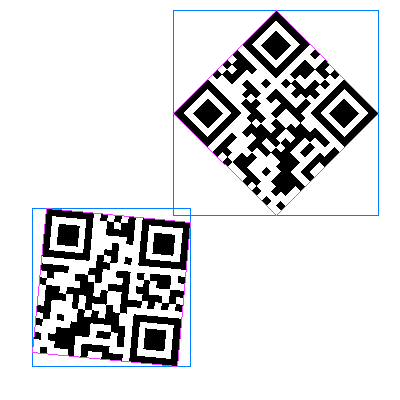
The blue and pink boxes show rect and polygon, respectively, for barcodes in pyzbar/tests/qrcode.png (see bounding_box_and_polygon.py).
Windows error message
If you see an ugly ImportError when importing pyzbar on Windows you will most likely need the Visual C++ Redistributable Packages for Visual Studio 2013. Install vcredist_x64.exe if using 64-bit Python, vcredist_x86.exe if using 32-bit Python.
Contributors
Alex (@globophobe) - first implementation of barcode locations
Dmytro Ferens (@dferens) - barcode orientation
Ismail Bento (@isman7) - support for images loaded using imageio
@jaant - read barcodes containing null characters
License
pyzbar is distributed under the MIT license (see LICENCE.txt). The zbar shared library is distributed under the GNU Lesser General Public License, version 2.1
1 maintainer

Release files for pyzbar 0.1.9
For a detailed explanation of source distributions (sdists) and built distributions (wheels), please see the package formats documentation.
Built distributions (wheels)
| File | Interpreter | ABI | Platform | Reset |
|---|---|---|---|---|
| pyzbar-0.1.9-py2.py3-none-win_amd64.whl | Python 2, Python 3 | none | Windows x86-64 | Details |
| pyzbar-0.1.9-py2.py3-none-win32.whl | Python 2, Python 3 | none | Windows x86-32 | Details |
| pyzbar-0.1.9-py2.py3-none-any.whl | Python 2, Python 3 | none | any | Details |
Total release size: 1.7 MB
Release files / pyzbar-0.1.9-py2.py3-none-win_amd64.whl
| Download URL | pyzbar-0.1.9-py2.py3-none-win_amd64.whl |
|---|---|
| Size | 817.4 kB |
| Tags | Python 2 Python 3 Windows x86-64 |
|
SHA-256 checksum How to use checksums |
13e3ee5a2f3a545204a285f41814d5c0db571967e8d4af8699a03afc55182a9c
|
|
BLAKE2b-256 checksum How to use checksums |
0ae21c6a8e94197612dbdfc51eab8dfb674168829885fac2c4f50ac8366c25ca
|
| Upload date | |
|
Uploaded using Trusted Publishing? What is trusted publishing? |
No |
| Uploaded via |
twine/3.4.2 importlib_metadata/4.8.1 pkginfo/1.7.1 requests/2.26.0 requests-toolbelt/0.9.1 tqdm/4.62.3 CPython/3.10.1
|
Release files / pyzbar-0.1.9-py2.py3-none-win32.whl
| Download URL | pyzbar-0.1.9-py2.py3-none-win32.whl |
|---|---|
| Size | 810.6 kB |
| Tags | Python 2 Python 3 Windows x86-32 |
|
SHA-256 checksum How to use checksums |
8f4c5264c9c7c6b9f20d01efc52a4eba1ded47d9ba857a94130afe33703eb518
|
|
BLAKE2b-256 checksum How to use checksums |
8e877b596730179ddf17857eea33ba820354dd4e1cf941e57f51ffccce26c409
|
| Upload date | |
|
Uploaded using Trusted Publishing? What is trusted publishing? |
No |
| Uploaded via |
twine/3.4.2 importlib_metadata/4.8.1 pkginfo/1.7.1 requests/2.26.0 requests-toolbelt/0.9.1 tqdm/4.62.3 CPython/3.10.1
|
Release files / pyzbar-0.1.9-py2.py3-none-any.whl
| Download URL | pyzbar-0.1.9-py2.py3-none-any.whl |
|---|---|
| Size | 32.6 kB |
| Tags | Python 2 Python 3 |
|
SHA-256 checksum How to use checksums |
4559628b8192feb25766d954b36a3753baaf5c97c03135aec7e4a026036b475d
|
|
BLAKE2b-256 checksum How to use checksums |
6d2481ebe6a1c00760471a3028a23cbe0b94e5fa2926e5ba47adc895920887bc
|
| Upload date | |
|
Uploaded using Trusted Publishing? What is trusted publishing? |
No |
| Uploaded via |
twine/3.4.2 importlib_metadata/4.8.1 pkginfo/1.7.1 requests/2.26.0 requests-toolbelt/0.9.1 tqdm/4.62.3 CPython/3.10.1
|














