
Python GUI toolkit

Project description
The light Python GUI builder (currently based on PyQt6)
Simplifying the creation of common GUI applications
Description
q2gui is a lightweight Python GUI builder designed to simplify the creation of desktop applications using PyQt6. It provides a high-level API for building forms, menus, toolbars, tabbed interfaces, and various widgets with minimal code. Features include:
- Dynamic menu and toolbar creation with shortcuts and icons
- Form builder supporting labels, inputs, combo boxes, radio buttons, checkboxes, date/time pickers, and more
- Tabbed and split layouts, frames, and groupings
- Sheet/grid controls with customizable headers, sizes, and actions
- Built-in support for color modes (light/dark)
- Status bar, tool buttons, and message dialogs
- Easy event handling and validation logic
- Demo applications showcasing usage patterns
How to start
With PyPI package:
poetry new project_01 && cd project_01 && poetry shell
poetry add q2gui
cd project_01
python -m q2gui > example_app.py && python example_app.py
Explore sources:
git clone https://github.com/AndreiPuchko/q2gui.git
cd q2gui
pip3 install poetry
poetry shell
poetry install
python3 demo/demo_00.py     # All demo launcher
python3 demo/demo_01.py     # basic: main menu, form & widgets
python3 demo/demo_02.py     # forms and forms in form
python3 demo/demo_03.py     # grid form (CSV data), automatic creation of forms based on data
python3 demo/demo_04.py     # progressbar, data loading, sorting and filtering
python3 demo/demo_05.py     # nonmodal form
python3 demo/demo_06.py     # code editor
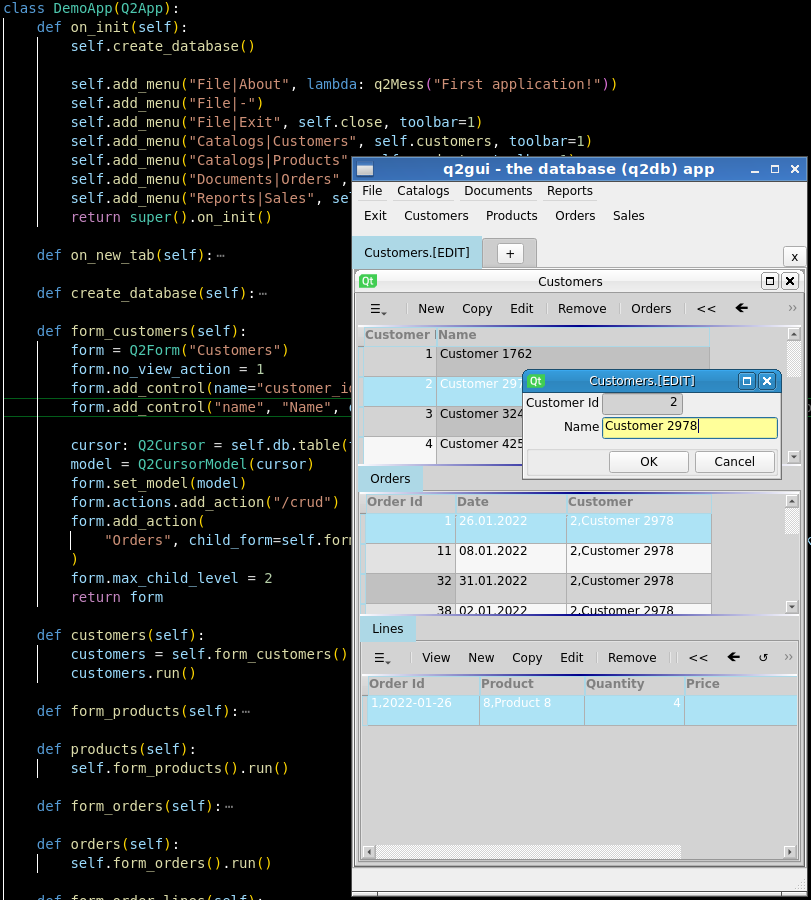
python3 demo/demo_07.py     # database app (4 tables, mock data loading) - requires a q2db package
python3 demo/demo_08.py     # database app, requires a q2db package, autoschema
demo/demo_07.py screenshot
=======
Build standalone executable
(The resulting executable file will appear in the folder dist/)
One file
pyinstaller -F demo/demo.py
One directory
pyinstaller -D demo/demo.py
Release history Release notifications | RSS feed


Download files
Download the file for your platform. If you're not sure which to choose, learn more about installing packages.
Source Distribution
Built Distribution
Filter files by name, interpreter, ABI, and platform.
If you're not sure about the file name format, learn more about wheel file names.
Copy a direct link to the current filters
File details
Details for the file q2gui-0.1.216.tar.gz.
File metadata
- Download URL: q2gui-0.1.216.tar.gz
- Upload date:
- Size: 95.9 kB
- Tags: Source
- Uploaded using Trusted Publishing? No
- Uploaded via: poetry/1.5.0 CPython/3.11.7 Windows/10
File hashes
| Algorithm | Hash digest | |
|---|---|---|
| SHA256 |
e8094ade8652739b13f3cc3706a31de7334182af357b0495abb1839684845b93
|
|
| MD5 |
7b6532f7f2682041b0879fea5b1fdfbf
|
|
| BLAKE2b-256 |
030a28fa213ef7664486e3b4dd799c913fc618525ea804f634dc99bf023e4a45
|
File details
Details for the file q2gui-0.1.216-py3-none-any.whl.
File metadata
- Download URL: q2gui-0.1.216-py3-none-any.whl
- Upload date:
- Size: 132.4 kB
- Tags: Python 3
- Uploaded using Trusted Publishing? No
- Uploaded via: poetry/1.5.0 CPython/3.11.7 Windows/10
File hashes
| Algorithm | Hash digest | |
|---|---|---|
| SHA256 |
a2108d0e6a63a86ba04ff0e3fab17295096db1a753fcdb0eefff575adfab6d2d
|
|
| MD5 |
59eb12db281b0d98af14f5e59d7f2139
|
|
| BLAKE2b-256 |
c195213c48ce1c6427fee6774b9147680a29614768092947a4ad23a816bacb8f
|






