






QAI AppBuilder
QAI AppBuilder (the "Quick AI Application Builder", this repository) is an open-source, on-device AI application platform built on top of the Qualcomm® AI Runtime SDK. Just describe the app you want in plain language — the AI Agent turns it into a complete, runnable application on the Snapdragon NPU, with no coding required.
From an idea to a running app — in one conversation
At the center of QAI AppBuilder is the App Builder: tell the Agent what you want to build ("a screenshot OCR tool", "a voice-memo transcriber", "a real-time speech translator") and it assembles a complete, self-contained local application for you — picking the right models, wiring up the pipeline, and generating the UI. The default output is a lightweight local web app; with a custom prompt the Agent can produce a CLI tool, a desktop utility, or a batch script just as easily.
To do this, the Agent draws on on-device Model Packs (Whisper, Zipformer-ZH, MeloTTS,
PP-OCR and more) and, whenever it needs a model that isn't packaged yet, resolves it
automatically — downloading a pre-built model straight from
Qualcomm AI Hub when one exists, or converting
your own PyTorch / ONNX model (export → quantization → context-binary generation → accuracy
validation via QAIRT SDK) when it doesn't. Either way, you never leave the conversation, and
every model ends up running on the same on-device NPU engine (QNNContext via
qai-appbuilder).
Why it matters
- Minutes, not days — get a working local AI app without hand-writing a UI or wiring up model I/O yourself.
- Truly on-device — every model runs on the Snapdragon NPU; your data never leaves the machine. No internet connection is needed at inference time.
- Private by design — a natural fit for privacy-sensitive scenarios (corporate documents, medical images, personal recordings), backed by a built-in security module that gates every file, command, and tool the Agent touches.
- Extensible — the Agent is driven by hot-reloadable Skills and Model Packs; add a new self-contained module and the Agent picks it up automatically.
Get Started with QAI AppBuilder
QAI AppBuilder is the natural-language Agent platform for the App Builder, Model Builder, and AI Hub Model Run capabilities described above all live here. Grab the pre-built package below and you'll have a running, on-device AI app builder in two commands.


🎁 Sign in and get 10 million free tokens
Just sign in with your Qualcomm account to unlock a free allocation of 10 million tokens and start using QAI AppBuilder. No separate API key is required to try the built-in cloud AI experience. 🚀
✨ One account. 10M tokens. Start building.
Just want to use it? Two steps:
Platform: Windows on Snapdragon (ARM64). No admin rights needed —
Setup.batautomatically downloads Python, Node.js, QAIRT SDK, and model weights for you.
-
Download & unzip
qaiappbuilder.zip, then opencmd.exein the extracted folder. -
Run two commands — the first installs the environment (one-time), the second launches the WebUI and opens your browser:
Setup.bat
Start.bat
On Linux (Ubuntu aarch64/x86_64), unzip/clone the project instead and run the equivalent shell scripts from a terminal:
bash setup.sh
bash start.sh
Your browser opens the QAI AppBuilder WebUI — start chatting to build an app, convert a model, or run one straight from AI Hub.
Want to read or modify the code? The complete QAI AppBuilder project lives at
tools/qaiappbuilder.
Clone the repo, then run Setup.bat → Build.bat → Start.bat to launch from source.
📖 Docs inside the QAI AppBuilder project:
Document Description README | 中文 Full project overview — architecture, features, configuration, skill system, FAQ Quick Start | 中文 1-page cheat-sheet — dev mode / desktop app (Tauri) / release build, and which .batto run when
☁️ Connect Cloud AI Models
About Route1
Route1 is the built-in default cloud provider — no need to apply for your own API key, works out of the box, and is a convenient way to quickly try out the system's features. Route1 allocates a fixed token quota per Qualcomm account: once the quota is exhausted, this provider becomes unavailable, and you can switch to a third-party cloud model you configure yourself (see the setup steps below). For long-term or heavy usage, we recommend connecting your own cloud model provider.
QAI AppBuilder can connect to any OpenAI-compatible third-party cloud AI model (e.g. OpenAI, Azure OpenAI, DeepSeek, Qwen, Kimi, etc.), for use in model conversion and to power the LLM Multi-Model Agent Pipeline that autonomously orchestrates your local App Builder Packs.
Setup Steps
- Open Settings — click Settings in the left-hand sidebar menu.
- Go to the Cloud Models tab — click Cloud Models at the top of the Settings page.
- Add a model — click Add Model and fill in the popup form:
- Base URL: the OpenAI-compatible API endpoint provided by the third-party service
- API Key: your key (stored encrypted via the OS keyring once saved — never written in plaintext)
- Model Name: the model identifier provided by the service (e.g.
gpt-4o,deepseek-chat,qwen-plus, etc.)
- Save — the change takes effect immediately, no restart required. The newly added cloud model appears in the model selector in the chat UI.
You can repeat these steps to add multiple third-party cloud model providers and switch between them freely in the chat UI. If your network requires a proxy to reach the cloud API, configure an outbound proxy under Settings → App Config (network section) — see Network Proxy.
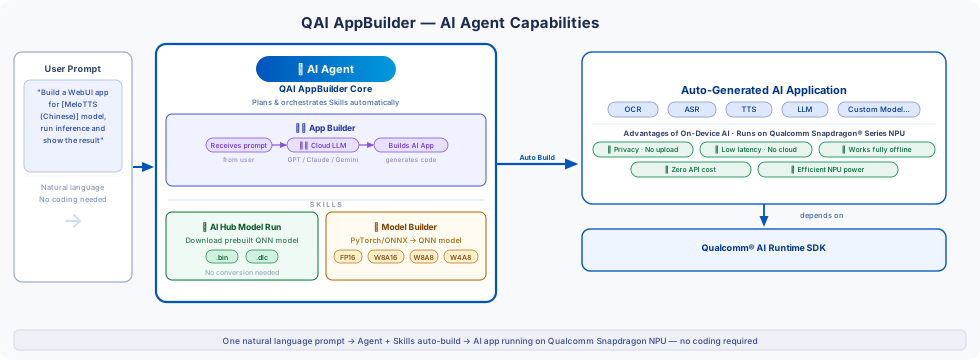
What can QAI AppBuilder do?
| Capability | Description |
|---|---|
| Run AI Models on NPU / GPU / CPU | Load QNN context binaries (.bin), model libraries (.dll), or SNPE DLC (.dlc) onto the Snapdragon NPU, GPU, or CPU and perform high-performance inference |
| C++ & Python APIs | Full-featured bindings for both C++ and Python, so you can integrate on-device AI into any project regardless of language |
| Cross-Platform Support | Runs on Windows on Snapdragon (WoS) ARM64 and Linux (e.g. QCS8550, QCM6490), with a unified API surface across both platforms |
| AI-Driven Model Conversion | Convert PyTorch / ONNX models to QNN format at multiple precisions (FP16 / W8A16 / W8A8 / W4A8) through natural language chat — the AI handles export, quantization, context binary generation, and accuracy validation end-to-end |
| Pre-built Models from AI Hub | Automatically download and run pre-exported QNN models from Qualcomm AI Hub with no conversion step required |
| On-Device Model Workbench | Run ready-to-use Model Packs (SR / OCR / ASR / TTS / CV…) on the local Snapdragon NPU with one click; supports multi-variant precision switching, benchmarking, and side-by-side comparison |
| LLM Agent Pipeline | Orchestrate multiple local NPU models in a single task via natural language — e.g. classify images then upscale matches, all driven by one prompt |
| Large Language Models (Genie) | Run Llama 3 / Qwen 3 / Gemma 2 and other quantized LLMs fully offline on the NPU via GenieAPIService (OpenAI-compatible API); switch between local and cloud models in the same chat UI |
| Multimodal & Speech & Vision | Supports multimodal LLMs (e.g. Qwen2.5-VL), ASR (Whisper, Zipformer), TTS (MeloTTS), OCR (PP-OCR), super-resolution, object detection, and more |
| WebUI Applications | Bundled WebUI apps (StableDiffusionApp, ImageRepairApp, GenieWebUI) and a streaming chat WebUI — all running on-device, no internet required |
| Skill Plugin System | Extend the AI with hot-reloadable Skill plugins; write your own in a single SKILL.md file |
| Native & Float I/O / Multi-Graph / LoRA | Native (quantized) and float I/O for maximum throughput; multiple model graphs in one session; LoRA adapter support |
Supports ARM64 Windows, Linux and Ubuntu (e.g. X Elite Windows, QCS8550 Linux, QCM6490 Ubuntu). Use "native" mode I/O to improve data throughput — see User Guide and Whisper sample for reference.
QAI Skills
QAI AppBuilder ships two built-in AI Agent Skills that together cover the full on-device model lifecycle — from sourcing a model all the way to running inference on the Snapdragon NPU.
Skill 1 — AI Hub Model Run
Use this skill when the model you need already exists on Qualcomm AI Hub.
The AI Hub Model Run skill downloads pre-exported QNN models directly from AI Hub and runs them on the Snapdragon NPU via qai_appbuilder (QNNContext) — no conversion, no Visual Studio, no QAIRT SDK required.
| What it does | Details |
|---|---|
| Supported formats | QNN_CONTEXT_BINARY (.bin), QNN_DLC (.dlc), ONNX (CPU baseline only), VOICE_AI, TFLITE |
| Inference engine | Always qai_appbuilder.QNNContext loading .bin / .dlc on the NPU/HTP; onnxruntime is used only for optional CPU accuracy comparison |
| Target devices | Snapdragon X Elite, Snapdragon X2 Elite, Snapdragon X Plus 8-Core |
| Typical workflow | Detect chipset → fetch download link from AI Hub → curl download → extract ZIP → run inference script |
| No conversion needed | Pre-compiled .bin / .dlc packages load directly — first-run graph compilation takes 5–60 s, subsequent runs are fast |
| CPU baseline | Optionally compare NPU output against onnxruntime CPU baseline (cosine similarity > 0.999 for float models) |
Example trigger prompts:
"Download Inception V3 from AI Hub and run inference on my photo"
"Run YOLOv8 object detection on this image using the NPU"
"Use the pre-built Whisper model to transcribe my audio file"
Skill 2 — Model Builder
Use this skill when you have a custom PyTorch or ONNX model that is NOT available on AI Hub.
The Model Builder skill automates the full QNN conversion pipeline for custom models — from ONNX export all the way to a validated .bin context binary running on the Snapdragon NPU.
| What it does | Details |
|---|---|
| Input formats | PyTorch (.pt / .pth) → ONNX export, or existing ONNX (.onnx) |
| Output formats | QNN context binary (.bin), QNN model library (.dll), SNPE DLC (.dlc) |
| Supported precisions | FP16, FP32, W8A16, W8A8, W8A8B8, W4A16, W4A8 |
| Auto pipeline | Export → ONNX inspection → operator patching → QNN conversion → context binary generation → inference → accuracy validation vs. ONNX CPU baseline |
| Operator patching | Automatically detects and patches unsupported operators (Einsum, GridSample, ScatterND, Mod, Floor…) with QNN-compatible equivalents |
| Accuracy validation | Computes cosine similarity between QNN output and ONNX CPU baseline; threshold ≥ 0.99 (FP16/FP32) or ≥ 0.95 (INT8/quantized) |
| Auto-generated inference code | Saves a standalone infer_<model>.py and inference_manifest.json after successful validation — ready for App Builder Pack export |
| Requires | QAIRT SDK 2.45+, Visual Studio 2022 Community, Python x64 3.10 (all auto-installed by Setup.bat) |
| Scope | Best suited for small-to-medium models (recommended < 2 GB); LLM conversion is not yet supported |
Example trigger prompts:
"Convert my ResNet ONNX model to QNN FP16 and validate the accuracy"
"Convert my custom YOLOv8 model to W8A8 with calibration data and compare against the original"
"Export my PyTorch model to QNN, run inference, and generate an App Builder pack"
Quick Start
Python
pip install qai-appbuilder
C++
Download the prebuilt binary package from Releases:
QAI_AppBuilder-win_arm64-{Qualcomm® AI Runtime SDK version}-Release.zip
Refer to User Guide for full API usage, or follow tutorial.ipynb to set up and run a CV model step by step.
Environment Setup
Refer to python.md for instructions on setting up the Python (x64) environment to use QAI AppBuilder on Windows on Snapdragon (WoS) platforms.
You can also run the batch file from QAI AppBuilder Launcher to set up the environment automatically — enabling you to experience the core functionalities within an hour.
Diagram
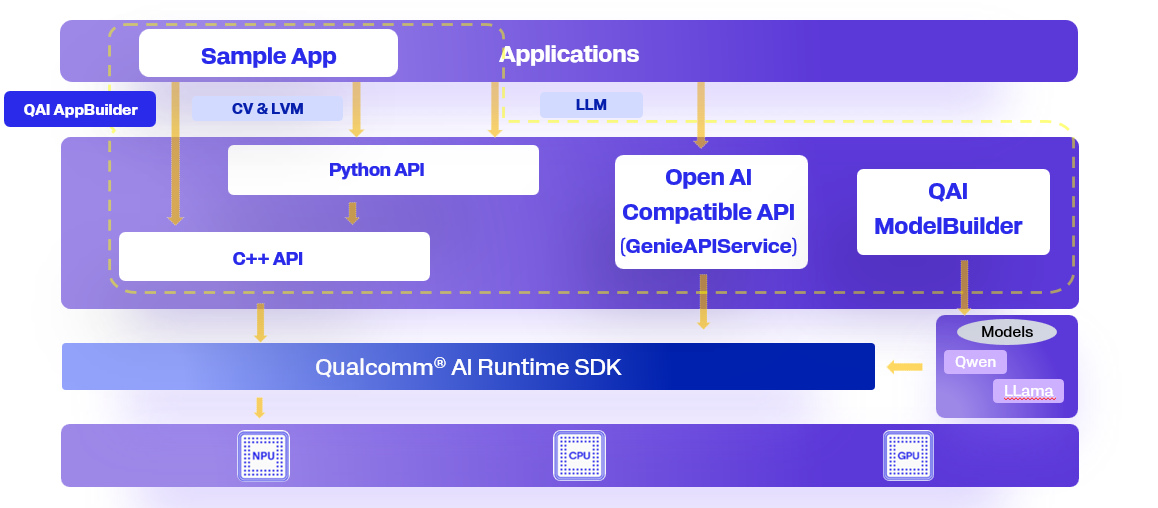
WebUI AI Application
We have developed several WebUI AI applications based on QAI AppBuilder, allowing you to experience them quickly. All these applications run on a local PC, requiring no internet connection and are completely free. You can run WebUI AI applications through the batch file 4.Start_WebUI.bat.
Note: Before trying other functions, we suggest that you try these WebUI AI applications first.
| App | Description |
|---|---|
| ImageRepairApp | An image restoration tool designed to repair old or damaged photographs. |
| StableDiffusionApp | A text-to-image generation tool that creates images based on user input. |
| GenieWebUI | A large language model (LLM) interface that enables interactive conversations. |
OpenAI Compatible API Service (GenieAPIService)
Considering that the current mainstream method for invoking LLMs is based on OpenAI-compatible APIs, we have implemented such interfaces in both C++ and Python. This allows application developers to interact with the local large language model running on NPU in a familiar way.
Many third-party applications that support the OpenAI API can seamlessly switch to the local NPU-based model by simply changing the API endpoint.
We have also implemented client sample code for GenieAPIService in both C++ and Python for developer reference.
- Python based service: Guide to run OpenAI compatible API services developed with Python.
- C++ based service: Guide to run OpenAI compatible API services developed with C++.
Samples
We have a rich set of samples covering multiple categories. All models are sourced from AI Hub and automatically downloaded on first run.
Use the interactive launcher to run any sample without writing code:
cd qai-appbuilder\samples
python run_inference.py              # interactive menu
python run_inference.py --list       # list all available models
python run_inference.py --model whisper_base_en --args "--audio_file input.wav"
| Category | Description | Link |
|---|---|---|
| Audio | TTS (PiperTTS), ASR (Whisper Base/Tiny), Audio Classification (YAMNet) | audio/ |
| Computer Vision | Image classification, object detection, segmentation, depth estimation, pose estimation, face analysis, super-resolution, inpainting | computerVision/ |
| Generative AI | Stable Diffusion v1.5 / v2.1 / v3.5 (text → image) | generativeAI/ |
| Multimodal | OCR (EasyOCR), text embedding (NomicEmbed), CLIP, Chinese→English translation (OpusMT), VLM (Qwen-VL) | multimodal/ |
| WebUI Apps | Gradio-based apps: ImageRepairApp, StableDiffusionApp, GenieWebUI | webui/ |
| Apps | StorySeed (AI story + image → Xiaohongshu), FletUI desktop app | apps/ |
| Genie LLM Service | OpenAI-compatible LLM API service (Python + C++) for Llama, Qwen, Phi, Granite | genie/ |
| Android | GenieChat (LLM/VLM) and SuperResolution Android apps | android/ |
| C++ | C++ inference samples for Real-ESRGAN, BEiT | c++/ |
See samples/README.md for the full guide including environment setup, model download instructions, and run examples.
Tools
1. QAI AppBuilder Launcher
QAI AppBuilder Launcher — enables you to experience the core functionalities of QAI AppBuilder within an hour.
2. DLC2BIN
DLC2BIN — converts the general DLC model format into the BIN format optimized for a specific platform.
3. ONNX2BIN
ONNX2BIN — converts the ONNX model format into the BIN format optimized for a specific platform.
4. ONNXWRAPPER
ONNXWRAPPER — a wrapper to run ONNX inference code with a QNN model, which switches to the QNN runtime automatically.
5. SKILLS
SKILLS includes 3 skills:
- genie_api_service — GenieAPIService technical documentation retrieval
- qai_app_builder — QAI AppBuilder technical documentation retrieval
- qai-runner-skill — QAIRT model conversion & inference on Qualcomm devices
Models
Model Hub
| Hub | Link |
|---|---|
| AI Hub | aihub.qualcomm.com |
| AI Dev Home | aidevhome.com |
LLM Models
| Model | Link |
|---|---|
| Qwen2 7B SSD | Download |
| DeepSeek-R1-Distill-Qwen-7B | Download |
Blog & Documentation
Official Docs
| Guide | Links |
|---|---|
| QAI AppBuilder Guide | English | 中文 |
| GenieAPIService (OpenAI Compatible API) | English | 中文 |
| Qwen2.5-VL-3B On-Device Deployment | English | 中文 |
| QAI AppBuilder WoS PDF | |
| QAI AppBuilder on Linux (QCS6490) | English |
Blog Posts
The following blog posts are in Chinese (中文).
| Title | Link |
|---|---|
| 3分钟上手,在骁龙AI PC上部署DeepSeek | 中文 |
| 本地 OpenAI 兼容 API 服务的配置与部署 | 中文 |
| Qwen2.5-VL-3B 多模态模型端侧部署 | 中文 |
| BGE-Base-Zh-V1.5 端侧使用教程 | 中文 |
| Qwen3-Reranker-0.6B 使用指南 | 中文 |
| Qwen3-embedding-0.6B 使用指南 | 中文 |
| Qwen3-8B-8K 模型端侧部署指南 | 中文 |
| 高通平台大语言模型精选 | 中文 |
| Qwen2 7B SSD 使用教程 | 中文 |
| Qwen2.5 3B 使用教程 | 中文 |
| Genie API Service 配置与使用 | 中文 |
| GenieChat:Genie API Service 安卓应用开发 | 中文 |
| SuperResolutionApp:图片超分 Android 开发示例 | 中文 |
Community Apps
On-device AI apps built by the community on top of QAI AppBuilder — every app
runs locally on the Snapdragon NPU, no internet needed at inference time. Browse
the full gallery (with category filters and a contributor wall) in
CommunityApps/; each app is auto-discovered from its app.json.
Want your app here? See the Community Apps submission guide or post in Discussions → Show & Tell. Add a folder with an
app.json, runpython CommunityApps/build_gallery.py, and your app appears in the gallery, the index table, and the contributor wall.
Third-Party App List
| App | Description |
|---|---|
| stable-diffusion-webui Extension | Stable Diffusion WebUI plugin accelerated by QAIRT |
| Blender ControlNet Plugin | Blender image generation plugin for Snapdragon |
| 无痕修图软件 (Inpainting App) | AI-powered photo inpainting tool |
| 图片超分器 (Super-Resolution Tool) | Image super-resolution upscaler |
| 图片超分应用 (Super-Resolution App) | Super-resolution application |
| 视频超分应用 (Video Super-Resolution App) | Video super-resolution upscaler |
| 图片消除器 (Object Removal Tool) | AI-powered object removal from images |
| 图片搜索应用 (Image Search App) | AI-powered image search application |
QAI AppBuilder Components
There are two ways to use QAI AppBuilder:
1. C++ Library
Download the prebuilt binary package from Releases and link the headers and .lib/.so files into your C++ project:
QAI_AppBuilder-win_arm64-{Qualcomm® AI Runtime SDK version}-Release.zip
2. Python Binding
Install via pip (see Quick Start) or download a specific wheel for your Python version from Releases.
Build
You can use the pre-compiled version directly — download the version you need from Releases. To build other wheel variants, refer to BUILD.md.
License
QAI AppBuilder is licensed under the BSD 3-clause "New" or "Revised" License. Check out the LICENSE for more details.
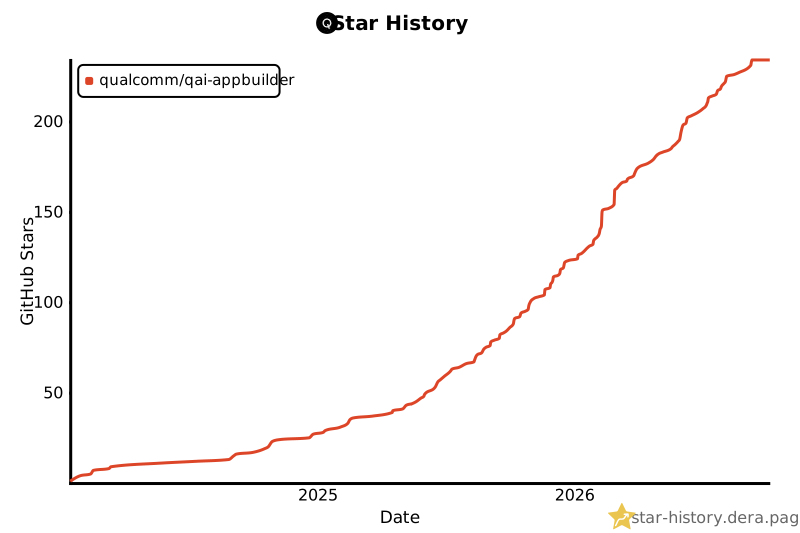
Star History
Disclaimer
This software is provided "as is," without any express or implied warranties. The authors and contributors shall not be held liable for any damages arising from its use. The code may be incomplete or insufficiently tested. Users are solely responsible for evaluating its suitability and assume all associated risks.
Note: Contributions are welcome. Please ensure thorough testing before deploying in critical systems.
1 maintainer

Metadata
1 maintainer
Release files for qai-appbuilder 2.51.40
For a detailed explanation of source distributions (sdists) and built distributions (wheels), please see the package formats documentation.
Built distributions (wheels)
Total release size: 903.0 MB
Release files / qai_appbuilder-2.51.40-cp313-cp313-win_arm64.whl
| Download URL | qai_appbuilder-2.51.40-cp313-cp313-win_arm64.whl |
|---|---|
| Size | 57.3 MB |
| Tags | CPython 3.13 Windows ARM64 |
|
SHA-256 checksum How to use checksums |
87cd344cf94b8ae360da41b9f51cafd3af7fe19e50dddb9d8e06928cf596d141
|
|
BLAKE2b-256 checksum How to use checksums |
90eef5a77d4efa1d4d6cbf6fdddcc00013ac41a98dc1e98263bcf82117a4cf43
|
| Upload date | |
|
Uploaded using Trusted Publishing? What is trusted publishing? |
No |
| Uploaded via |
twine/6.2.0 CPython/3.13.13
|
Release files / qai_appbuilder-2.51.40-cp313-cp313-win_amd64.whl
| Download URL | qai_appbuilder-2.51.40-cp313-cp313-win_amd64.whl |
|---|---|
| Size | 102.1 MB |
| Tags | CPython 3.13 Windows x86-64 |
|
SHA-256 checksum How to use checksums |
05432bc9c12f6dd652e49ab0fb97c23fc6131d5e1e61fc2f81d2b5aa362a3290
|
|
BLAKE2b-256 checksum How to use checksums |
300ed37ccd7d8768e9ccf4853844947addaf5091a6da98aa6382e7cf94dba232
|
| Upload date | |
|
Uploaded using Trusted Publishing? What is trusted publishing? |
No |
| Uploaded via |
twine/6.2.0 CPython/3.13.13
|
Release files / qai_appbuilder-2.51.40-cp313-cp313-manylinux_2_39_aarch64.whl
| Download URL | qai_appbuilder-2.51.40-cp313-cp313-manylinux_2_39_aarch64.whl |
|---|---|
| Size | 85.5 MB |
| Tags | CPython 3.13 Linux glibc 2.39+ ARM64 |
|
SHA-256 checksum How to use checksums |
ef59a7ae33297376c7ad9f877963d0e624db2325e45cc1b3828f425869125fda
|
|
BLAKE2b-256 checksum How to use checksums |
a80cb15ffee81ef20b92a597f0cb1c7b3a78a4dac08bf23434b47bb58907fd98
|
| Upload date | |
|
Uploaded using Trusted Publishing? What is trusted publishing? |
No |
| Uploaded via |
twine/6.2.0 CPython/3.13.13
|
Release files / qai_appbuilder-2.51.40-cp312-cp312-win_arm64.whl
| Download URL | qai_appbuilder-2.51.40-cp312-cp312-win_arm64.whl |
|---|---|
| Size | 57.3 MB |
| Tags | CPython 3.12 Windows ARM64 |
|
SHA-256 checksum How to use checksums |
7abfa4dd05b2ec3df7cd24d22da6fd35d0fef15afba1bc91f7bcbec3ad8bf134
|
|
BLAKE2b-256 checksum How to use checksums |
78a05f14d17be5a56ac0242186b01db25ed40bf84078e0c2c599bd41751eb202
|
| Upload date | |
|
Uploaded using Trusted Publishing? What is trusted publishing? |
No |
| Uploaded via |
twine/6.2.0 CPython/3.13.13
|
Release files / qai_appbuilder-2.51.40-cp312-cp312-win_amd64.whl
| Download URL | qai_appbuilder-2.51.40-cp312-cp312-win_amd64.whl |
|---|---|
| Size | 102.1 MB |
| Tags | CPython 3.12 Windows x86-64 |
|
SHA-256 checksum How to use checksums |
fdcbdac1b312e4d2da3919c4b88843bd6a14964fd18b0f1d4a64c6e472b1ba84
|
|
BLAKE2b-256 checksum How to use checksums |
eda0921f5ef4618c164ffef1a105eca68a537386d73f75b4be7d1ad8403175fc
|
| Upload date | |
|
Uploaded using Trusted Publishing? What is trusted publishing? |
No |
| Uploaded via |
twine/6.2.0 CPython/3.13.13
|
Release files / qai_appbuilder-2.51.40-cp312-cp312-manylinux_2_39_aarch64.whl
| Download URL | qai_appbuilder-2.51.40-cp312-cp312-manylinux_2_39_aarch64.whl |
|---|---|
| Size | 85.5 MB |
| Tags | CPython 3.12 Linux glibc 2.39+ ARM64 |
|
SHA-256 checksum How to use checksums |
397514b48664ac8fc30c3b17672a4bba529f0354b3224b1d83cdc5eb87a68a7f
|
|
BLAKE2b-256 checksum How to use checksums |
b5db8fb95e342be3b6148a6087a9c41d3946c2384ba585fe36d8810bb8497131
|
| Upload date | |
|
Uploaded using Trusted Publishing? What is trusted publishing? |
No |
| Uploaded via |
twine/6.2.0 CPython/3.13.13
|
Release files / qai_appbuilder-2.51.40-cp311-cp311-win_arm64.whl
| Download URL | qai_appbuilder-2.51.40-cp311-cp311-win_arm64.whl |
|---|---|
| Size | 57.3 MB |
| Tags | CPython 3.11 Windows ARM64 |
|
SHA-256 checksum How to use checksums |
9981317000d656d74365ad1bab7a05d3dc7fbad5ad1399a1fa5b9ad8b959c4f8
|
|
BLAKE2b-256 checksum How to use checksums |
6a86a5ab16378ba9e629f99bd270bc9c2a70324e322b3910627af198161d9d9f
|
| Upload date | |
|
Uploaded using Trusted Publishing? What is trusted publishing? |
No |
| Uploaded via |
twine/6.2.0 CPython/3.13.13
|
Release files / qai_appbuilder-2.51.40-cp311-cp311-manylinux_2_39_aarch64.whl
| Download URL | qai_appbuilder-2.51.40-cp311-cp311-manylinux_2_39_aarch64.whl |
|---|---|
| Size | 85.5 MB |
| Tags | CPython 3.11 Linux glibc 2.39+ ARM64 |
|
SHA-256 checksum How to use checksums |
60b1238061cdafc6041980575e219ed802578a3d5f9185eb146463875a51f787
|
|
BLAKE2b-256 checksum How to use checksums |
802977ab69c409cb92f0c9c2cf10ed21c5874227f89656f8b59c278e1e216d71
|
| Upload date | |
|
Uploaded using Trusted Publishing? What is trusted publishing? |
No |
| Uploaded via |
twine/6.2.0 CPython/3.13.13
|
Release files / qai_appbuilder-2.51.40-cp310-cp310-win_amd64.whl
| Download URL | qai_appbuilder-2.51.40-cp310-cp310-win_amd64.whl |
|---|---|
| Size | 102.1 MB |
| Tags | CPython 3.10 Windows x86-64 |
|
SHA-256 checksum How to use checksums |
1daf388ee285bc4cd7d085da8f36eb2d60ca921f22b2b8226aa5f107c4df212a
|
|
BLAKE2b-256 checksum How to use checksums |
7a89f5c1af1098fdcfd3821437929f895dcc005e7c337252e604c0ba1539b68e
|
| Upload date | |
|
Uploaded using Trusted Publishing? What is trusted publishing? |
No |
| Uploaded via |
twine/6.2.0 CPython/3.13.13
|
Release files / qai_appbuilder-2.51.40-cp310-cp310-manylinux_2_39_aarch64.whl
| Download URL | qai_appbuilder-2.51.40-cp310-cp310-manylinux_2_39_aarch64.whl |
|---|---|
| Size | 85.5 MB |
| Tags | CPython 3.10 Linux glibc 2.39+ ARM64 |
|
SHA-256 checksum How to use checksums |
83d533b6ea8ce3d0d36bd37e3922530ae2f80e39ac58f4c39b536cb1888cab73
|
|
BLAKE2b-256 checksum How to use checksums |
bd6a86f47d703f3916e99c5879a6f0c8b54ca4389d328a7a2c46e2eb6cbb525e
|
| Upload date | |
|
Uploaded using Trusted Publishing? What is trusted publishing? |
No |
| Uploaded via |
twine/6.2.0 CPython/3.13.13
|
Release files / qai_appbuilder-2.51.40-cp310-cp310-manylinux_2_35_aarch64.whl
| Download URL | qai_appbuilder-2.51.40-cp310-cp310-manylinux_2_35_aarch64.whl |
|---|---|
| Size | 82.7 MB |
| Tags | CPython 3.10 Linux glibc 2.35+ ARM64 |
|
SHA-256 checksum How to use checksums |
2651c48dd67fab93296265286b10e7a599ff1e2e30c1337909cd8a4aeefc7f48
|
|
BLAKE2b-256 checksum How to use checksums |
1e673bfc54276bbb89f81114955ade939f8191d7cc2a97acc2c802471f50efac
|
| Upload date | |
|
Uploaded using Trusted Publishing? What is trusted publishing? |
No |
| Uploaded via |
twine/6.2.0 CPython/3.13.13
|
Security for qai-appbuilder 2.51.40
Provenance
Provenance describes where a file came from. On PyPI, provenance is shared via attestations, which provide a verifiable record of the build or publishing details. View details, limitations and caveats.
No provenance found
None of the files in this release were uploaded with provenance metadata.
A note on package security
PyPI is a repository for distributing packages, not a service for auditing them. While third-party security researchers and our staff do their best to detect and remove malicious packages, PyPI cannot guarantee the quality, security or suitability of any given package.
To learn more about protecting yourself from malicious actors, visit our package security documentation.














