
Quadkey Bitmask Tiles — cloud-optimized tile index format

Project description
QBTiles
QBTiles (Quadkey Bitmask Tiles) — a spatial data format that encodes existence as a tree structure, reducing ID storage cost to zero.
Documentation | Live Demos | 한국어 문서
Install
# Python — build & write QBT files
pip install qbtiles

# TypeScript/JavaScript — read & query QBT files in the browser
npm install qbtiles
What It Does
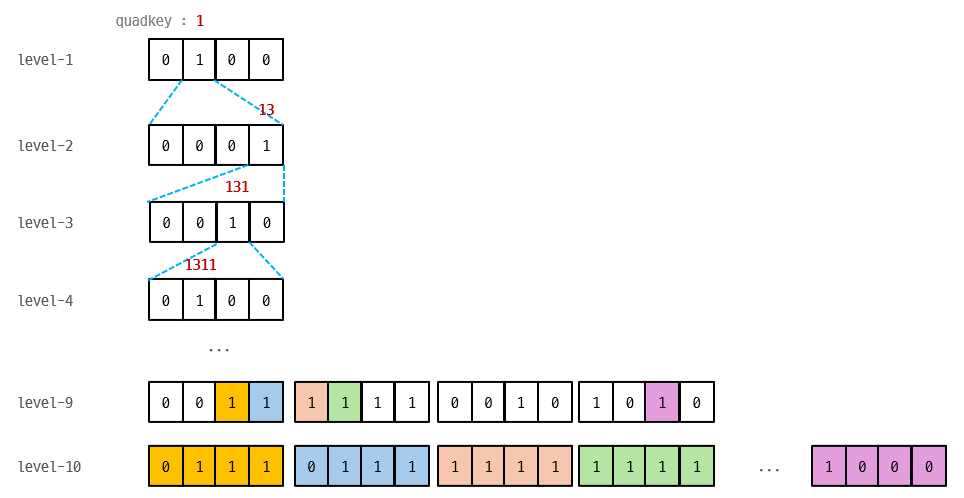
Map tiles and spatial grids are inherently quadtrees. QBTiles encodes cell existence as 4-bit bitmasks in BFS order. The position of each entry is implied by the tree structure — no IDs, no coordinates stored.
Level 1:  [0100]          → only child 1 exists
Level 2:  [0001]          → only child 3 exists
Level 3:  [0010]          → only child 2 exists
Three Modes
| Mode | Flags | Use Case | Access | Comparable to |
|---|---|---|---|---|
| Variable-entry | 0x0 |
Tile archives (MVT, PNG) | Per tile | PMTiles |
| Fixed row | 0x1 |
Raster grids | Per cell (Range Request) | COG (GeoTIFF) |
| Fixed columnar | 0x3 |
Compressed grids | Whole file (gzip) | Parquet |
Benchmarks
Variable-entry — Tile Index (vs PMTiles)
| Dataset | Entries | PMTiles | QBTiles | Reduction |
|---|---|---|---|---|
| adm-korea | 36K | 80.9 KB | 61.3 KB | -24.3% |
| Full OSM | 160M | 300.7 MB | 235.2 MB | -21.8% |
Fixed row — Raster Grid (WorldPop 51M cells, float32)
| Format | Size | Ratio | Per-cell access |
|---|---|---|---|
| FlatGeobuf | 6,001 MB | 29.4x | per feature |
| GeoParquet | 700 MB | 3.4x | full download only |
| GeoTIFF (COG) | 276 MB | 1.4x | 512×512 block |
| QBTiles | 204 MB | 1.0x | single cell |
Fixed columnar — Compressed Grid (Korea 100m, 931K cells × 3 values)
| Format | Size | Per cell |
|---|---|---|
| Parquet (gzip) | 2.9 MB | coordinate scan |
| QBTiles columnar | 1.7 MB | O(log N) quadkey search |
Quick Start
Python — Build QBT Files
import qbtiles as qbt

# Mode 1: Tile archive — from a folder of z/x/y tiles (e.g., tiles/5/27/12.mvt)
qbt.build("korea_tiles.qbt", folder="tiles/")

# Mode 2: Columnar — coordinates + multiple value columns
# coords: list of (x, y) in the target CRS
# columns: dict of column_name → value list (same length as coords)
# cell_size: grid cell size in CRS units (meters for EPSG:5179)
# → zoom, origin, extent are auto-calculated from coords and cell_size
qbt.build("population.qbt.gz",
    coords=list(zip(df["x"], df["y"])),         # [(950000, 1950000), ...]
    columns={"total": totals, "male": males, "female": females},
    cell_size=100, crs=5179)                     # 100m grid, Korean CRS

# Mode 3: Fixed row — coordinates + single value array (for Range Request)
# values: flat list of numbers (one per cell)
# entry_size: bytes per cell (4 for float32)
qbt.build("global_pop.qbt",
    coords=list(zip(lons, lats)),                # [(-73.99, 40.75), ...]
    values=population,                           # [52.3, 41.2, ...]
    cell_size=1000, entry_size=4,                # 1km grid, 4 bytes/cell
    fields=[{"type": qbt.TYPE_FLOAT32, "name": "pop"}])

# GeoTIFF → QBTiles conversion (cell_size, CRS, extent auto-detected)
qbt.build("worldpop.qbt", geotiff="worldpop_2025.tif")

# Bitmask-only — store only cell existence (no values), e.g. land/water mask
qbt.build("landmask.qbt", geotiff="landmask.tif", nodata=0, bitmask_only=True)
TypeScript — Read & Query
import { openQBT } from 'qbtiles';

// openQBT reads the header, detects the mode, and loads data automatically.

// Mode 1: Tile archive — serve MVT/PNG tiles from a single .qbt file
const tiles = await openQBT('korea_tiles.qbt');
const tile = await tiles.getTile(7, 109, 49);  // ArrayBuffer (gzip MVT) | null
tiles.addProtocol(maplibregl, 'qbt');           // one-line MapLibre integration

// Mode 3: Fixed row — per-cell Range Request on a remote file
const grid = await openQBT('https://cdn.example.com/global_pop.qbt');
const cells = await grid.query([126, 35, 128, 37]);  // [west, south, east, north]
// → Array<{ position: [lng, lat], value: number }>

// Mode 2: Columnar — downloads entire file, queries in memory
const pop = await openQBT('population.qbt.gz');
pop.columns!.get('total')!;                     // number[931495] — direct access
const result = await pop.query([126, 35, 128, 37]);
// → Array<{ position: [lng, lat], values: {total: 523, male: 261, female: 262} }>
File Format (v1)
[Header 128B+]  magic, version, flags, zoom, CRS, origin, extent,
                bitmask_length, values_offset, index_hash (SHA-256), field schema
[Bitmask]       gzip-compressed 4-bit nibbles in BFS order
[Values]        row: raw entry_size × leaf_count (Range-requestable)
                columnar: column-by-column (varint + fixed types)
Full spec: format-spec.md
API Reference
Python (pip install qbtiles) — Writer
| Function | Description |
|---|---|
build(output, ...) |
Unified builder — auto-detects mode from folder / columns / values / geotiff. Options: nodata=, bitmask_only=True |
read_qbt_header(path_or_bytes) |
Parse QBT header to dict |
tile_to_quadkey_int64(z, x, y) |
Tile coords → 64-bit quadkey |
Low-level: build_quadtree(), serialize_bitmask(), write_qbt_variable(), write_qbt_fixed(), write_qbt_columnar()
TypeScript/JavaScript (npm install qbtiles) — Reader
| Function / Class | Description |
|---|---|
openQBT(url) → QBT |
Unified loader — auto-detects mode from header flags |
QBT.getTile(z, x, y) |
Fetch tile data via Range Request (variable mode) |
QBT.query(bbox) |
Spatial query — all modes (Range Request or in-memory) |
QBT.columns |
Column values as Map<string, number[]> (columnar mode) |
QBT.addProtocol(maplibregl) |
One-line MapLibre custom protocol (variable mode) |
QBT.toWGS84(x, y) |
CRS conversion via proj4 (built-in for common EPSG codes) |
registerCRS(epsg, proj4Def) |
Register custom CRS definitions |
Low-level: parseQBTHeader(), queryBbox(), mergeRanges(), fetchRanges(), readColumnarValues()
Live Demos
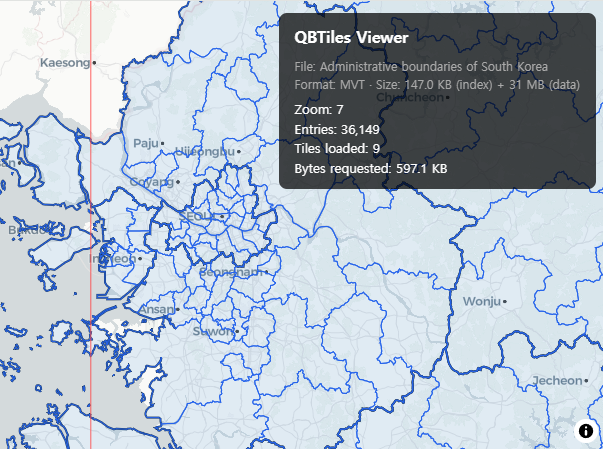
Tile Viewer — Variable-entry (0x0)
MVT vector tiles served via QBTiles index + Range Request. Administrative boundaries of South Korea.
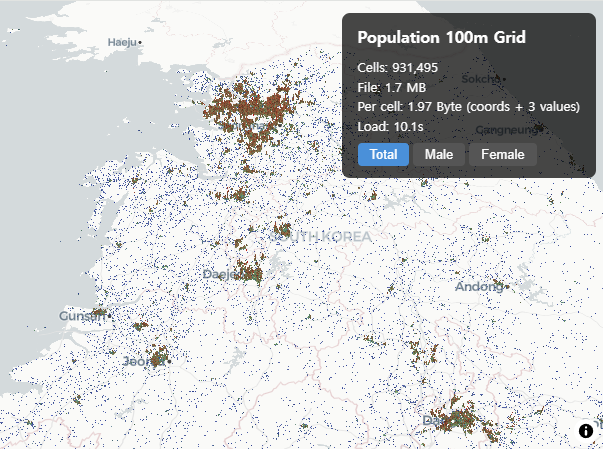
Population Grid — Fixed columnar (0x3)
931K cells in 1.75 MB. Korea 100m population grid with 3 values per cell at 1.97 Byte/cell.
Range Request Comparison — Fixed row (0x1)
Split-screen comparison: QBTiles cell-level vs COG block-level Range Request on WorldPop 1km global population.

File Viewer — All modes
Drag & drop any .qbt or .qbt.gz file to inspect its contents. Supports all three modes with auto-detection.

Related Work
- Sparse Voxel Octree (SVO) — Same bitmask principle in 3D (8-bit masks for octree)
- LOUDS — Succinct tree encoding via BFS bit sequences
- PMTiles — Hilbert curve tile indexing with varint delta encoding
License
MIT


Download files
Download the file for your platform. If you're not sure which to choose, learn more about installing packages.
Source Distribution
Built Distribution
Filter files by name, interpreter, ABI, and platform.
If you're not sure about the file name format, learn more about wheel file names.
Copy a direct link to the current filters
File details
Details for the file qbtiles-0.7.0.tar.gz.
File metadata
- Download URL: qbtiles-0.7.0.tar.gz
- Upload date:
- Size: 27.8 kB
- Tags: Source
- Uploaded using Trusted Publishing? No
- Uploaded via: twine/6.2.0 CPython/3.12.3
File hashes
| Algorithm | Hash digest | |
|---|---|---|
| SHA256 |
50050b3388f0f09694610fe90c2e785ebbf8d90ed89271231f54e786903d5d57
|
|
| MD5 |
192346f55130b6432a40c1fba436401f
|
|
| BLAKE2b-256 |
d54edfe8ba18b05ca4fd0b48b95d7c09f65556e7772418ef0ca3ff6770903d79
|
File details
Details for the file qbtiles-0.7.0-py3-none-any.whl.
File metadata
- Download URL: qbtiles-0.7.0-py3-none-any.whl
- Upload date:
- Size: 20.5 kB
- Tags: Python 3
- Uploaded using Trusted Publishing? No
- Uploaded via: twine/6.2.0 CPython/3.12.3
File hashes
| Algorithm | Hash digest | |
|---|---|---|
| SHA256 |
733c69daf1be96af677abcb75d117a920f7f3a8ab63716c988e464aa7230eb80
|
|
| MD5 |
123647f6c7c26bc7e1a1b4aca5ad9e9f
|
|
| BLAKE2b-256 |
1f28f62fafe61d3b6976ee65825888a0a11d9ef1fca828ca269b680b04e551fa
|






