
qc-use
Test the most important path in your app. Describe it in plain words.



Powered by TypeSafe Jev · The browser runs on your machine · Tests live in your repo
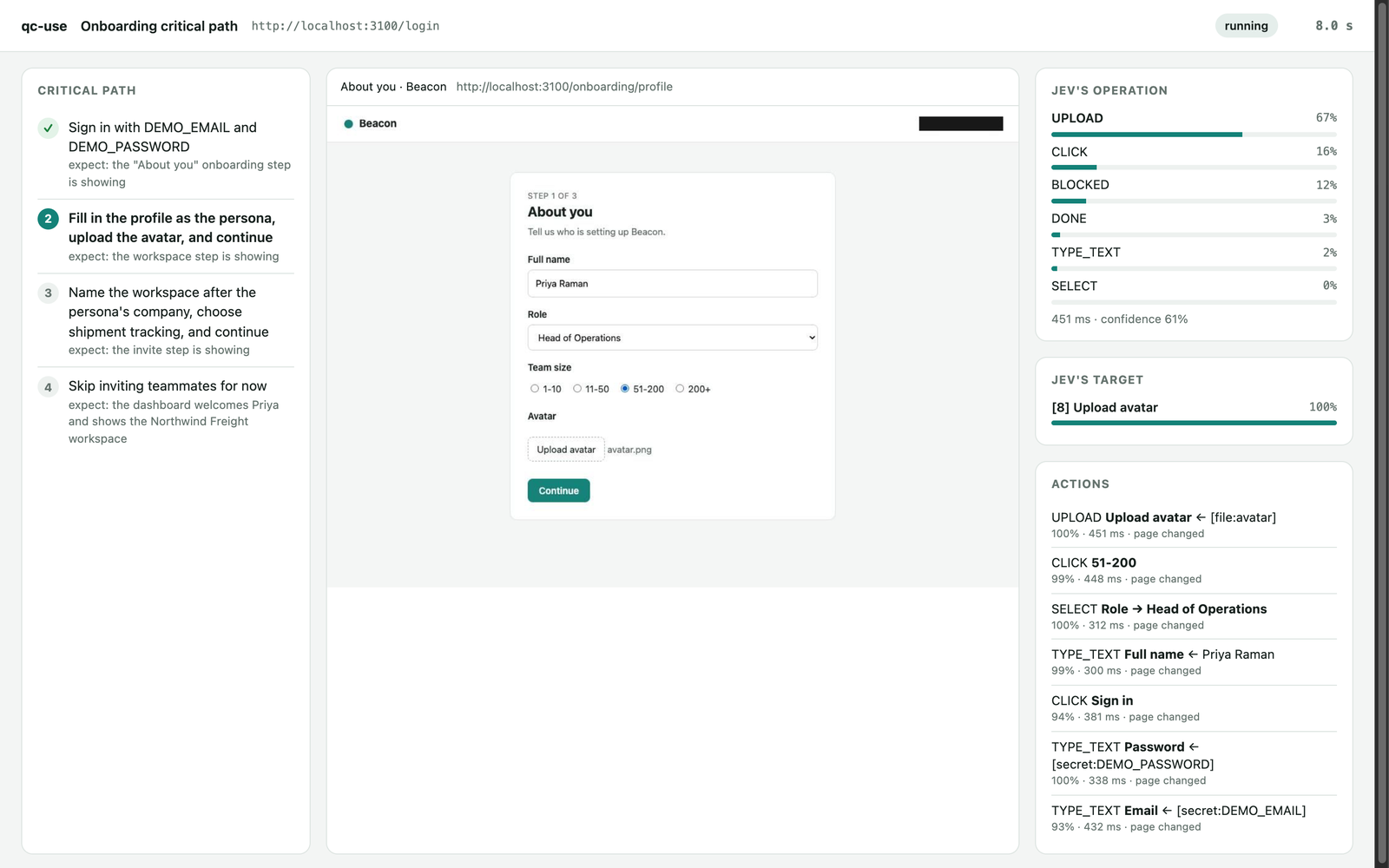
You write a test like a note to a new teammate:
1. Sign in with LOGIN_EMAIL and LOGIN_PASSWORD
   - expect: the onboarding screen is showing
2. Finish onboarding as a Head of Operations at a 50-person company
   - expect: the dashboard shows the new workspace
qc-use opens a private Chrome window and does each step. Then it checks the result. You get a pass or a fail for each step, with the reason and a screenshot.
Install with one prompt
Paste this into your coding agent (Claude Code, Codex, Cursor, Gemini CLI, Copilot, or opencode):
Install qc-use and test our onboarding critical path on localhost:3000.
Setup: run `uv tool install --python 3.12 --upgrade qc-use`, then `qc-use skill install`.
If uv is missing, install it first: https://docs.astral.sh/uv/getting-started/installation/
Then read the output of `qc-use skill print` and follow it. Docs: https://github.com/aadilghani1/qc-use
The agent installs qc-use, finds your app, writes the test file, and shows you the steps. When you agree, it runs the test and explains the report.
qc-use needs one key: a Vercel AI Gateway key. The agent asks you to put it in qa/.env. Do not paste keys into the chat.
Other ways to install:
| Where | Command |
|---|---|
| macOS or Linux terminal | curl -LsSf https://raw.githubusercontent.com/aadilghani1/qc-use/main/install.sh | sh |
| Windows PowerShell | powershell -ExecutionPolicy ByPass -c "irm https://raw.githubusercontent.com/aadilghani1/qc-use/main/install.ps1 | iex" |
| Claude Code plugin | /plugin marketplace add aadilghani1/qc-use, then /plugin install qc-use@qc-use |
| Any agent, with the skills CLI | npx skills add aadilghani1/qc-use |
| uv | uv tool install --python 3.12 qc-use, then qc-use skill install |
The installers install uv when it is missing, then qc-use, then the skill for each coding agent that they find. The plugin and the skills CLI add the skill only. The skill installs the qc-use command on first use.
Try it in one minute
qc-use has a small demo app called Beacon. The demo runs 3 tests against it.
uv tool install --python 3.12 qc-use
export AI_GATEWAY_API_KEY=your-key   # a Vercel AI Gateway key
qc-use demo --watch
You see one result of each kind:
| Test | Outcome | What happens |
|---|---|---|
| Onboarding | ✅ pass | qc-use signs in, fills the profile, uploads an avatar, and reaches the dashboard. |
| Invite a teammate | ❌ fail | The demo server returns HTTP 500. qc-use catches the bug and shows the evidence. |
| Delete the workspace | ✋ needs approval | qc-use stops before it deletes data and asks a person. |
The whole demo costs less than $0.001. On 2026-09-22 it took 52 seconds and cost $0.0003.
Why qc-use
- Plain words, not code. You write no selectors and no scripts. When the UI changes, you usually do not need to change the test.
- Jev chooses. It does not write. On each page, qc-use makes a list of the elements. Jev chooses the next action and one element from that list. Jev cannot invent a selector or run code.
- Proof, not claims. After each step, qc-use reads the page again and checks your expectation. A "done" from the model is not enough.
- Secrets stay on your machine. A test file contains secret names only. Code types the values. Reports hide them. Screenshots are masked or omitted when masking cannot be checked.
- Safe by default. qc-use checks links and page addresses against your allowed sites. Its gate checks chosen actions for destructive changes, payments, and messages.
- Measured runs. Each report includes elapsed time, model calls, and reported or estimated cost. Unknown pricing stops further model requests.
Write a test
A test file is Markdown. The settings go between the --- lines. The steps go below.
---
url: http://localhost:3000/login
secrets: [LOGIN_EMAIL, LOGIN_PASSWORD]
persona:
  role: Head of Operations
  company_size: 51-200
rate:
  onboarding_ease: [confusing, effortful, okay, smooth, effortless]
---
# Onboarding critical path

A new user signs in for the first time and finishes onboarding.

1. Sign in with LOGIN_EMAIL and LOGIN_PASSWORD
   - expect: the first onboarding screen is showing
2. Complete the profile as the persona and continue
   - expect: the workspace step is showing
3. Create a workspace and finish onboarding
   - expect: the dashboard shows the new workspace
   - check: url contains /dashboard
| Part | What it does |
|---|---|
url |
The page where the test starts. Use localhost, a staging site, or a preview site. |
secrets |
Names of private values. Put the values in qa/.env or in your environment. |
persona |
Facts about the user that qc-use acts as. qc-use uses them to fill forms. |
rate |
Optional. Jev rates the whole run on these levels, from worst to best. |
| Numbered lines | The steps. Each step says what to do. |
expect: |
What the page must show when the step works. Jev checks it on a fresh read of the page. |
check: |
An exact check by code: url contains X, url matches REGEX, title contains X, text contains X, or text does not contain X. |
Run qc-use init to create a qa/ folder with an example. The full format is in docs/test-files.md.
More detail for test authors:
- Use
mode: observefor read-only steps andaction:for specific required input. - Exact text checks use viewport text. Use
document contains Xfor off-screen document text. verify_timeoutsets the polling window without replaying input.- Use
action: Reload the pageandaction: Go back in browser historyto check persistence and navigation. Both pass through the gate.
docs/test-files.md covers manual authentication, repeatable accounts, ratings, cost evidence, and report schema version 2.
Run a test
Your coding agent reads the project, starts the local app, and writes the requested critical path. The CLI runs that test file. It does not generate tests from a prompt by itself. Review the generated steps and use a disposable test account.
qc-use init                             # create qa/ with an example test and qa/.env
qc-use validate qa/onboarding.md --json # offline; no Chrome or model calls
qc-use doctor qa/onboarding.md --json   # check setup and the start URL
qc-use run qa/onboarding.md             # run one test
qc-use run qa/onboarding.md --watch     # also open the live view
qc-use run qa/*.md --repeat 3           # requires repeat_safe: true and repeatable test accounts
qc-use run qa/login.md --base-url https://staging.example.test  # same path, another origin
qc-use run qa/*.md --headless --junit qa-results/junit.xml --summary qa-results/summary.md  # CI outputs
qc-use report qa-results/<run-id>       # reopen saved step evidence; Ctrl+C closes it
qc-use skill status                     # find outdated installed instructions
For manual OTP or OAuth sign-in, use a dedicated profile in an interactive terminal:
qc-use run qa/onboarding.md --manual-auth --profile /tmp/qc-use-login --watch
Each run writes a folder in qa-results/:
report.md: the result for people, with a screenshot of each step.report.json: the result for programs and coding agents. Runqc-use schema reportto see its format.trace.json: every decision that Jev made, for debugging.
The exit code tells your agent or your CI what happened:
| Exit code | Outcome | Meaning |
|---|---|---|
| 0 | pass | Every step works. |
| 1 | fail | An expectation or an exact check is false. The app probably has a bug. |
| 2 | inconclusive or blocked | qc-use is not sure, or it cannot continue. The report says why. |
| 3 | needs approval | The next action can break a never-do rule. A person must allow it. |
| 4 | setup error | The test file, a secret, a key, or the URL is not ready. Nothing ran. |
Live view and saved evidence
--headless hides Chrome. --watch opens a separate, read-only live inspector, also when Chrome is headless.
qc-use demo --watch shows both. BROWSER=true stops the inspector from opening automatically. Use the printed local URL instead.
A missing image includes a reason. Opaque regions can be hidden to protect secrets.
Saved views show the recorded step screenshots and checks. They are not a video or an interactive app session.
The source hash in qc-use --version identifies the installed build. After an upgrade, run qc-use skill install to refresh the agent instructions.
Run in CI
Use the GitHub Action to run your critical paths on each pull request or on a schedule:
- uses: aadilghani1/qc-use@v0.3.0
  env:
    AI_GATEWAY_API_KEY: ${{ secrets.AI_GATEWAY_API_KEY }}
  with:
    tests: qa/*.md
    base-url: https://staging.example.com
The job summary shows one row for each test. JUnit XML shows one test case for each step. The run folders are uploaded as an artifact.
A schedule trigger runs the paths every hour or every day, and GitHub sends an email when a run fails. Matrix jobs run tests in parallel. See docs/ci.md.
How it works
  read the page ──► list of elements ──► Jev chooses the action and the element ──► code does the action
        ▲                                                                                   │
        └──────────────────────── read the page again ◄─────────────────────────────────────┘

  when the step is done: read the page again ──► check each expectation ──► pass, fail, or inconclusive
- qc-use starts Chrome with a new, empty profile.
- For each step, qc-use reads the page and makes a list of the elements on it.
- qc-use sends Jev one request. It asks which action is next, and which element to use for each possible action.
- Code does the action on the element that Jev chose. For a text field, the text helper writes the value. For a secret, code types the value.
- When Jev says that the step is done, qc-use reads the page again. Jev checks each expectation in a separate question. Code checks each exact check.
- The step passes only if every check passes. Then the next step starts.
qc-use is built on jev-ultrafast by Browser Use. More detail is in docs/how-it-works.md.
Safety
- Secrets: no model sees a secret value. Password fields accept secrets only. qc-use hides declared values in model input, reports, traces, live output, and supported screenshots. It omits images when masking cannot be checked.
- Allowed sites: qc-use checks links before clicking and checks page addresses after reads, including verification. Background requests are not filtered.
- No production by accident: qc-use refuses URLs that look like production, unless you set
allow_production: true. - Never-do rules: before each click, fill, dropdown choice, or upload, the gate asks Jev if the action can break a rule. The default rules forbid deleting data, making a payment, and sending a message to a real person. You can add your own rules. If a rule can break, qc-use stops and asks a person.
- Provider availability: preflight checks Jev before Chrome starts. A refused key or model is a setup error (exit 4). Transient failures retry for at most 45 seconds per request.
Provider outages retain a blocked result and a distinct
provider_issuein the report. Preflight cannot guarantee later availability. - Limits: each step has an action limit, each run has a cost limit, and qc-use does not retry uncertain input to hide a failure. Unknown pricing stops further model calls.
The gate is a seatbelt, not a sandbox. Use test accounts and test data. Details are in docs/safety.md.
What qc-use cannot do yet
qc-use reports these cases as blocked and gives the reason:
- Controls inside iframes, such as many payment forms and captchas.
- Sign-in with Google, GitHub, or other pop-up windows, and new tabs.
- Codes sent by email or SMS.
prompt()dialogs, canvas apps, and shadow DOM.
Ratings are Jev's judgment from the evidence of the run. They are not measurements.
Setup
qc-use needs Chrome, uv, and one key.
| Setting | Default | Meaning |
|---|---|---|
AI_GATEWAY_API_KEY |
none | A Vercel AI Gateway key. One key runs Jev and the text helper. |
JEV_PROVIDER |
gateway |
Set typesafe to call TypeSafe directly with TYPESAFE_API_KEY. |
TEXT_MODEL |
inception/mercury-2.5 |
The model that writes text for text fields. |
TEXT_MODEL_BASE_URL |
AI Gateway | Any OpenAI-compatible endpoint. Set TEXT_MODEL_API_KEY for other providers. |
QC_USE_CHROME |
found automatically | The path of Chrome or Chromium. |
Put these values in qa/.env (qc-use keeps it out of git) or in your environment. Run qc-use doctor to check everything. The full guide is in install.md.
How qc-use compares
| qc-use | Browser Use qa-use | Browser Use /qa plugin |
|
|---|---|---|---|
| Where the browser runs | Your machine. Localhost works. | Browser Use Cloud | Browser Use Cloud, with a tunnel for localhost |
| How a result is decided | Checks on a fresh page after each step, plus exact checks by code | The agent's own report at the end | The agent's own 1 to 5 score |
| Secrets | Named in the test, typed by code, masked in every output | No secret store. Credentials go in the step text. | No secret store |
| Where tests live | Markdown files in your repo | A database behind a web dashboard | Your prompt |
| Schedules and alerts | Your CI: the GitHub Action, JUnit, and exit codes | Built-in schedules and email | None |
| Setup | One prompt, or uv tool install qc-use |
Docker Compose and a Browser Use key | A Claude Code or Codex plugin |
Choose qa-use for a shared web dashboard of cloud-run suites. Choose qc-use to prove a critical path, step by step, on any machine and in CI.
Related: jevqa explores an app on its own to find unknown bugs. jev-ultrafast drives a browser with Jev. qc-use is built on it.
Contribute
We welcome issues and pull requests. Read CONTRIBUTING.md to start. The tests run offline and do not call any paid API.
Good first contributions:
- Support one more surface from the list above, such as same-origin iframes.
- Add a test file for a common flow, such as sign up or checkout, to
examples/. - Make an error message clearer.
Report security problems privately. See SECURITY.md.
Credits and license
MIT license. See LICENSE.
The browser engine is adapted from jev-ultrafast by Browser Use, also MIT. NOTICE lists the adapted files. qc-use uses browser-harness to talk to Chrome, and TypeSafe Jev through the AI Gateway TypeSafe API to make every choice.
If qc-use helps you, please star the repo. It helps other people find it.
1 maintainer

Metadata
1 maintainer
Release files for qc-use 0.3.0
For a detailed explanation of source distributions (sdists) and built distributions (wheels), please see the package formats documentation.
Source distribution (sdist)
| File | Size | Uploaded | |
|---|---|---|---|
| qc_use-0.3.0.tar.gz | 475.0 kB | Details |
Built distribution (wheel)
| File | Interpreter | ABI | Platform | Reset |
|---|---|---|---|---|
| qc_use-0.3.0-py3-none-any.whl | Python 3 | none | any | Details |
Total release size: 567.9 kB
Release files / qc_use-0.3.0.tar.gz
| Download URL | qc_use-0.3.0.tar.gz |
|---|---|
| Size | 475.0 kB |
| Tags | Source |
|
SHA-256 checksum How to use checksums |
1d7c0d2373accec143a695ad13be578564982ffbea108b6ca405c0588ab0ba03
|
|
BLAKE2b-256 checksum How to use checksums |
8bd8aa8e5af5fa5218c8ff18cc0fa778ebc6f34c87719eb86c33856868f514c1
|
| Upload date | |
|
Uploaded using Trusted Publishing? What is trusted publishing? |
Yes |
| Uploaded via |
twine/7.0.0 CPython/3.13.14
|
Provenance
Provenance describes where a file came from. On PyPI, provenance is shared via attestations, which provide a verifiable record of the build or publishing details. View details, limitations and caveats.


PyPI Publish Attestation
PyPI verified that this artifact, at this checksum, originated from the publisher listed below.
Signed by GitHub Actions, verified by PyPI on Sep 22, 2026.
Transparency logRelease files / qc_use-0.3.0-py3-none-any.whl
| Download URL | qc_use-0.3.0-py3-none-any.whl |
|---|---|
| Size | 92.9 kB |
| Tags | Python 3 |
|
SHA-256 checksum How to use checksums |
7bc8b28072d97ba34f001dac0479dd5995d9604e9d2b06b75f03e408c6d93cb9
|
|
BLAKE2b-256 checksum How to use checksums |
cb19e044517d715dad860161a71547f5a8f40acb7b95e4acdbf3699ade4eb399
|
| Upload date | |
|
Uploaded using Trusted Publishing? What is trusted publishing? |
Yes |
| Uploaded via |
twine/7.0.0 CPython/3.13.14
|
Provenance
Provenance describes where a file came from. On PyPI, provenance is shared via attestations, which provide a verifiable record of the build or publishing details. View details, limitations and caveats.
PyPI Publish Attestation
PyPI verified that this artifact, at this checksum, originated from the publisher listed below.
Signed by GitHub Actions, verified by PyPI on Sep 22, 2026.
Transparency log












