
Quantum Chemistry Data





Elegant and intuitive data structures for quantum chemistry, featuring seamless Jupyter Notebook visualizations.
qcdata works in harmony with a suite of other quantum chemistry tools for fast, structured, and interoperable quantum chemistry.
The QC Suite of Programs
The QC Suite works in harmony to provide fast, structured, and interoperable quantum chemistry tools.
- qcconst - Physical constants, conversion factors, and a periodic table with clear source information for every value.
- qcdata - Elegant and intuitive data structures for quantum chemistry, featuring seamless Jupyter Notebook visualizations. Documentation
- qcinf - Cheminformatics algorithms and structure utilities using standardized qcdata data structures.
- qccodec - A package for translating between standardized qcdata data structures and native QC program inputs and outputs.
- qccompute - A package for operating quantum chemistry programs using standardized qcdata data structures. Compatible with
TeraChem,psi4,QChem,NWChem,ORCA,Molpro,geomeTRICand many more. - BigChem - A distributed application for running quantum chemistry calculations at scale across clusters of computers or the cloud. Bring multi-node scaling to your favorite quantum chemistry program.
ChemCloud- A web application and associated Python client for exposing a BigChem cluster securely over the internet.
Installation
python -m pip install qcdata
Quickstart
qcdata is built around a simple mental model: Input objects define quantum chemistry calculations, a ProgramOutput object captures each execution, and Data objects hold the structured output values.
All qcdata objects can be serialized and saved to disk by calling .save("filename.json") and loaded from disk by calling .open("filename.json"). qcdata supports json, yaml, and toml file formats. Binary data will be automatically base64 encoded and decoded when saving and loading.
Input Objects
ProgramInput - Core input object for a single QC calculation.
from qcdata import Structure, ProgramInput
# xyz files or saved Structure objects can be opened from disk
caffeine = Structure.open("caffeine.xyz")
# Define the program input
prog_input = ProgramInput(
    program="terachem",
    structure=caffeine,
    calctype="energy",
    model={"method": "hf", "basis": "sto-3g"},
    keywords={"purify": "no", "restricted": False},
    extras={"comment": "This is a comment"}, # Anything extra not in the schema
)
# Binary or other files used as input can be added
prog_input.add_file("wfn.dat")
prog_input.keywords["initial_guess"] = "wfn.dat"

# Save the input to disk in json, yaml, or toml format
prog_input.save("input.json")

# Open the input from disk
prog_input = ProgramInput.open("input.json")
Structure objects can be opened from and saved as xyz files or saved to disk as .json, .yaml, or .toml formats by changing the extension of the file. For .xyz files precision can be controlled by passing the precision argument to the save method.
caffeine = Structure.open("caffeine.xyz")
caffeine.save("caffeine2.json", precision=6)
caffeine.save("caffeine.toml")
ProgramSpec - Recursive specifications for nested calculations.
ProgramInput.subprograms contains recursive ProgramSpec objects for workflows that require multiple calculations. For example, a geometry optimization workflow might use geomeTRIC to power the optimization and use terachem to compute the energies and gradients.
from qcdata import Structure, ProgramInput, ProgramSpec
# xyz files or saved Structure objects can be opened from disk
caffeine = Structure.open("caffeine.xyz")
# Define the program input
prog_input = ProgramInput(
    program="geometric",
    structure=caffeine,
    calctype="optimization",
    keywords={"maxiter": 250},
    subprograms=[
        ProgramSpec(
            program="terachem",
            calctype="gradient",
            model={"method": "wb97x-d3", "basis": "def2-svp"},
            keywords={"convthre": 1e-6},
        ),
    ],
    extras={"comment": "This is a comment"}, # Anything extra not in the schema
)
ProgramSpec can contain further subprograms, each with its own program, calculation type, optional Model, keywords, files, command line arguments, and extras. Sibling calculation types must be unique. Use prog_input.get_subprogram(CalcType.gradient) (after importing CalcType) to retrieve an immediate child; a missing child raises ValueError. Orchestration programs can omit model. ProgramSpec is not a top-level input until bound to structures as ProgramInput.
ProgramInput.structure is the primary/start/reference structure; structures holds additional complete structures by role, such as structures={"product": product_structure}.
FileInput - Input object for a calculation using native file formats.
qcdata also supports the native file formats of each QC program with a FileInput object. Assume you have a directory like this with your input files for psi4:
psi4/
    input.dat
    geometry.xyz
    wfn.dat
You can collect these native files and any associated command line arguments needed to specify a calculation into a FileInput object like this:
from qcdata import FileInput
psi4_input = FileInput.from_directory(
    "psi4", program="psi4", cmdline_args=["-n", "4"]
)

# All input files will be loaded into the `files` attribute
psi4_input.files
# {'input.dat': '...', 'geometry.xyz': '...', 'wfn.dat': '...'}

# Files can be dumped to a directory for a calculation
psi4_input.save_files("psi4")
Modifying Input Objects
Models have frozen attributes. Treat contained dictionaries, lists, and NumPy arrays as read-only too: direct container mutation is unsupported, although Python does not block it. An object may already be referenced by a saved execution or another calculation.
To make a change, dump to ordinary Python values, edit them, and validate a new model. Built-in containers and scientific array fields in the dump are independent of the original. Arbitrary custom objects stored in extras are outside this guarantee. Existing helpers such as add_file(), add_files(), and add_identifiers() are explicit mutation exceptions.
# Cast to a dictionary and modify
new_input_dict = prog_input.model_dump()
new_input_dict["keywords"]["maxiter"] = 300
# Instantiate a new object
new_prog_input = ProgramInput.model_validate(new_input_dict)
Saved package version
Every model exposes a read-only qcdata_version, automatically included in JSON, YAML, and TOML, including nested objects. It identifies the installed qcdata package that last wrote the representation, not a formal schema version or the calculation producer's version. Researchers can inspect it before choosing which qcdata version to install.
Opening a file accepts its saved stamp; saving it again writes the currently installed version. Files without a stamp remain readable. XYZ exports include qcdata_version=... in each structure's comment line. QCSchema exports omit this qcdata-specific metadata.
By default, save() and json_dumps() use exclude_unset=True for compact files: fields omitted during construction are excluded, while explicitly supplied values are retained even if they equal their defaults. The computed qcdata_version stamp is still included. Pass exclude_unset=False to include unset/default-valued fields. save() also omits None values by default. A full model_dump() followed by reconstruction marks the dumped fields as explicitly set, so this workflow may produce larger files.
ProgramOutput
Every result payload inherits from FileData and requires Provenance(program=..., program_version=...); the version may be unknown. Program identity stays with the data when saved independently. Files remains a generic file container without provenance.
Every ProgramOutput has an execution object, defaulting to ExecutionInfo() when runtime details are unknown; output.execution.wall_time then returns None.
from qcdata import ExecutionInfo, ProgramInput, ProgramOutput, Provenance, SinglePointData

data = SinglePointData(
    energy=-75.0,
    provenance=Provenance(program="terachem", program_version="1.9"),
)
output = ProgramOutput(
    input_data=ProgramInput(
        program="terachem", calctype="energy", structure=caffeine,
        model={"method": "hf", "basis": "sto-3g"},
    ),
    success=True,
    results=data,
    execution=ExecutionInfo(wall_time=12.5, scratch_dir="/tmp/calculation"),
)
data.save("data.json")  # Includes program identity and version
Calculation values are stored in a ProgramOutput object. ProgramOutput contains parsed data, files, logs, and additional execution details. A ProgramOutput object has the following attributes:
output.input_data # Input data used for the calculation
output.input_data.program # Requested executor
output.results.provenance.program # Program that actually produced the result
output.success # Whether the calculation succeeded or failed
output.results # All structured data from the calculation
output.results.files # Any files returned by the calculation
output.logs # Logs from the calculation
output.plogs # Shortcut to print the logs in human readable format
output.results.provenance # Producer identity, saved with the data
output.execution # Required execution information
output.execution.wall_time # Seconds, or None when unknown
output.extras # Any extra information not in the schema
The .results type follows the input on both success and failure: FileInput produces only FileData, while a ProgramInput produces SinglePointData, OptimizationData, ConformerSearchData, or ScanData according to its calculation type. Failed calculations retain that scientific type even when no values are available. Available attributes for each data type can be found by calling dir() on the object.
dir(results.results)
Program outputs can be saved to disk in json, yaml, or toml format by calling .save("filename.{json/yaml/toml}") and loaded from disk by calling .open("filename.{json/yaml/toml}").
✨ Visualization ✨
Visualize all your results with a single line of code!
First install the visualization module:
python -m pip install qcdata[view]
or if your shell requires '' around arguments with brackets:
python -m pip install 'qcdata[view]'
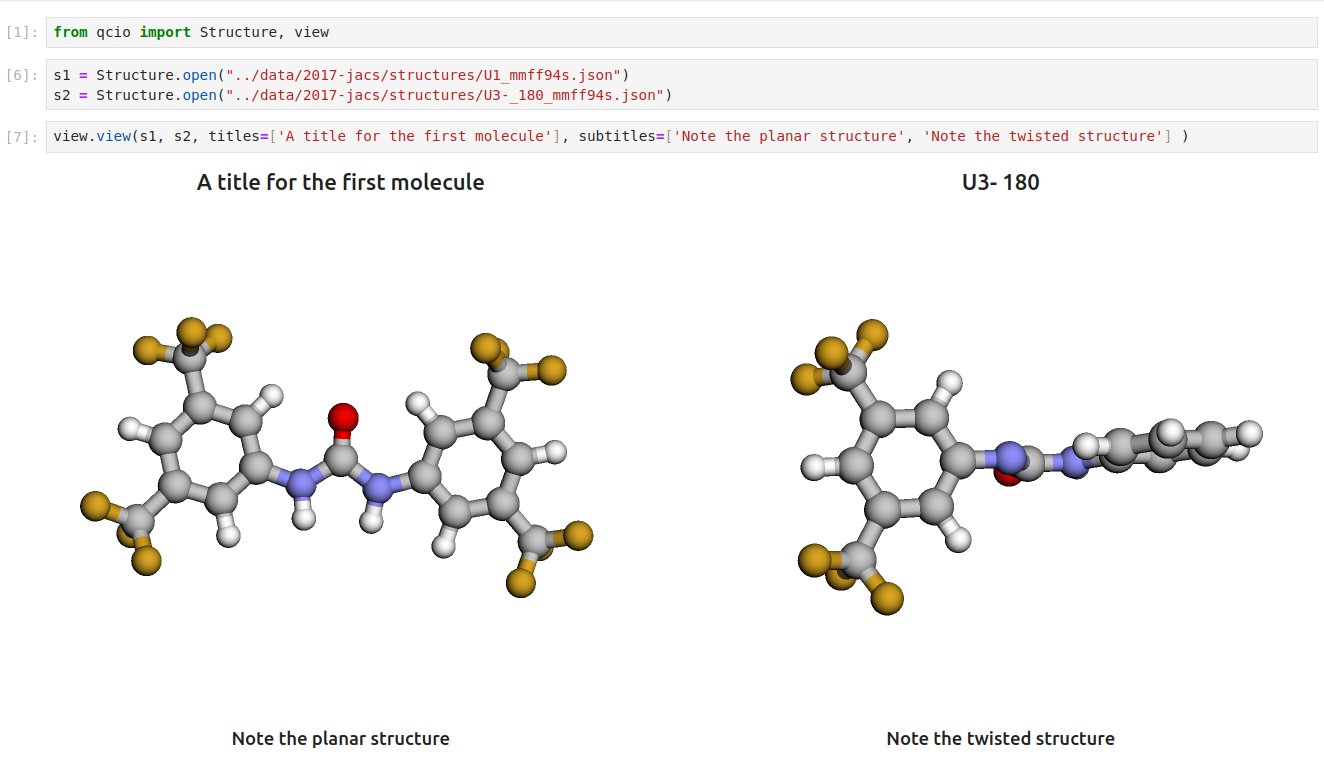
Then in a Jupyter notebook import the qcdata view module and call view.view(...) passing it one or any number of qcdata objects you want to visualize, including Structure objects or any ProgramOutput object. You may also pass an array of titles and/or subtitles to add additional information to the molecular structure display. If no titles are passed qcdata will look for Structure identifiers such as a name or SMILES to label the Structure.
Seamless visualizations for ProgramOutput objects make results analysis easy!

Single point calculations display their results in a table.

If you want to use the HTML generated by the viewer to build your own dashboards use the functions inside of qcdata.view.py that begin with the word generate_ to create HTML you can insert into any dashboard.
Development
To get started with all development dependencies:
uv sync --all-groups
Support
If you have any issues with qcdata or would like to request a feature, please open an issue.
1 maintainer

Metadata
1 maintainer
Release files for qcdata 0.20.0
For a detailed explanation of source distributions (sdists) and built distributions (wheels), please see the package formats documentation.
Source distribution (sdist)
| File | Size | Uploaded | |
|---|---|---|---|
| qcdata-0.20.0.tar.gz | 1.5 MB | Details |
Built distribution (wheel)
| File | Interpreter | ABI | Platform | Reset |
|---|---|---|---|---|
| qcdata-0.20.0-py3-none-any.whl | Python 3 | none | any | Details |
Total release size: 1.6 MB
Release files / qcdata-0.20.0.tar.gz
| Download URL | qcdata-0.20.0.tar.gz |
|---|---|
| Size | 1.5 MB |
| Tags | Source |
|
SHA-256 checksum How to use checksums |
a0e72ef3e0d0bc7f0983fad5d73321511b7b22e28a0a8eaec9724069ec738d88
|
|
BLAKE2b-256 checksum How to use checksums |
ce3798c499bc17935661583f9483586277b31890323c8d359bb5f090c357d8f9
|
| Upload date | |
|
Uploaded using Trusted Publishing? What is trusted publishing? |
Yes |
| Uploaded via |
twine/7.0.0 CPython/3.13.14
|
Provenance
Provenance describes where a file came from. On PyPI, provenance is shared via attestations, which provide a verifiable record of the build or publishing details. View details, limitations and caveats.


PyPI Publish Attestation
PyPI verified that this artifact, at this checksum, originated from the publisher listed below.
Signed by GitHub Actions, verified by PyPI on Oct 14, 2026.
Transparency logRelease files / qcdata-0.20.0-py3-none-any.whl
| Download URL | qcdata-0.20.0-py3-none-any.whl |
|---|---|
| Size | 38.4 kB |
| Tags | Python 3 |
|
SHA-256 checksum How to use checksums |
7e49d8c2bd2dd07728077f4f72510c0f4cb0a11c87d035d10007ad3353c5c68d
|
|
BLAKE2b-256 checksum How to use checksums |
bd1761bdbfaac79632f7f02422ea954c7217ce5c047243361520175fa1276177
|
| Upload date | |
|
Uploaded using Trusted Publishing? What is trusted publishing? |
Yes |
| Uploaded via |
twine/7.0.0 CPython/3.13.14
|
Provenance
Provenance describes where a file came from. On PyPI, provenance is shared via attestations, which provide a verifiable record of the build or publishing details. View details, limitations and caveats.
PyPI Publish Attestation
PyPI verified that this artifact, at this checksum, originated from the publisher listed below.
Signed by GitHub Actions, verified by PyPI on Oct 14, 2026.
Transparency log













