
qdu
English | 日本語
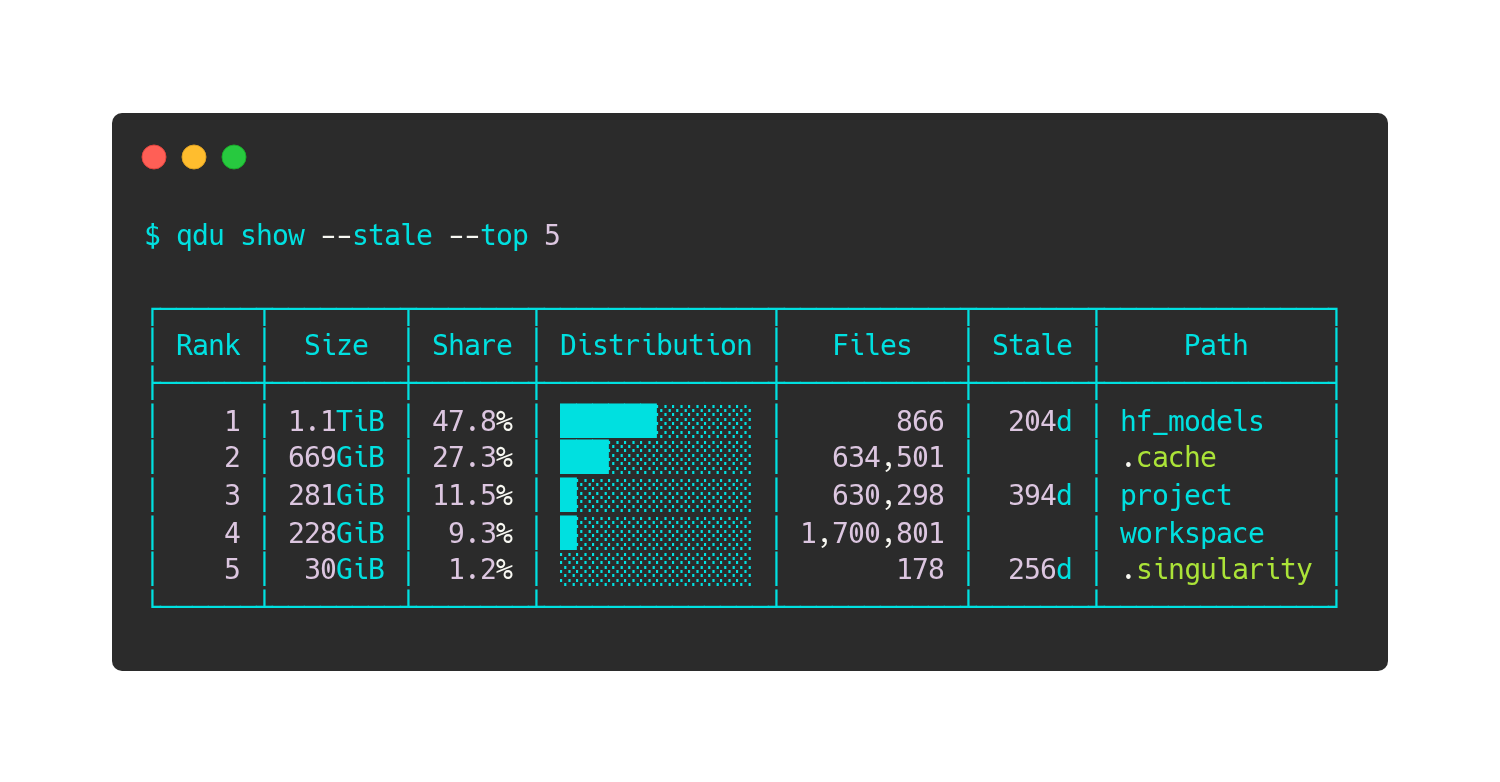
qdu (quick du) records directory usage as snapshots, so you can inspect rankings and changes without rescanning a large tree for every query. It is a single executable written in Rust that scans directories in parallel.
qdu snapshot   # record the current state
qdu show       # display the largest directories
qdu diff       # display changes since the previous snapshot
It does not require sudo. It scans what the current user can read; a directory the user may not read is recorded, listed by qdu errors, and left out of the totals.
Features
- Persistent directory-usage snapshots and ranked diffs
- Parallel scanning, which pays off most on NFS and other network storage
- Allocated-size, apparent-size, file-count, and inode analysis
- The history of a directory across snapshots, with its growth per week and when it would fill the capacity limit or the disk
- Snapshots named by position, age, date, or label, such as
qdu diff --from 30d - Optional owner statistics and large-file candidates
- Staleness annotations and operational capacity limits
- Named profiles for multiple scan roots
- Explicit one-filesystem or cross-filesystem scanning
- Human-readable tables plus TSV and JSON output with a fixed layout for scripts
- Scan progress on terminals and the disk space used by each snapshot
- Verification, repair, retention, and automatic gzip compaction
Requirements
- Linux or macOS on x86_64 or arm64
- Nothing else at run time: qdu is one self-contained executable
Only qdu browse requires the optional fzf executable.
Install
qdu is published on PyPI as a package that installs the executable. With uv, try it without installing anything:
uvx qdu --help
To keep it, for example for scheduled snapshots, install it as a tool. pipx and pip work the same way:
uv tool install qdu    # or: pipx install qdu, or: python3 -m pip install --user qdu
qdu --version
Without Python, download the executable for your platform from the latest release:
mkdir -p "$HOME/.local/bin"
curl -fL https://github.com/Onely7/qdu/releases/latest/download/qdu-x86_64-unknown-linux-gnu.tar.gz \
  | tar -xz -C "$HOME/.local/bin" qdu
export PATH="$HOME/.local/bin:$PATH"
qdu --version
| Archive | Platform |
|---|---|
qdu-x86_64-unknown-linux-gnu, qdu-aarch64-unknown-linux-gnu |
Linux with glibc 2.17 or later, which covers most distributions |
qdu-x86_64-unknown-linux-musl, qdu-aarch64-unknown-linux-musl |
Linux without glibc, such as Alpine. These are static, and musl's memory allocator is slower under many threads, so prefer the glibc build where it runs |
qdu-x86_64-apple-darwin, qdu-aarch64-apple-darwin |
macOS on Intel and on Apple silicon |
SHA256SUMS in the release holds the checksums of the archives. To build from source instead, see Getting started.
First use
With no profile or path option, qdu uses the default profile and scans your home directory. The first snapshot of a new profile keeps the directory and the settings it was given, so later snapshots need no options:
qdu snapshot --path /data/my-project --with-users   # or just: qdu snapshot
qdu show --max-depth 2 --top 30                     # or: qdu -L 2 -n 30

# Take another snapshot later, then compare complete snapshots.
qdu snapshot
qdu diff --growth-only

# Take a snapshot every Monday at 03:15 with cron.
qdu schedule --install
Install qdu with uv tool install or another method above before qdu schedule: cron needs an executable that stays in place, and the copy that uvx runs lives in uv's cache.
Snapshots contain measurements and paths, not file contents.
Profiles
Use profiles to keep scan roots, retention, and analysis options separate:
qdu profile set project-data --path /data/my-project
qdu snapshot --profile project-data
qdu show --profile project-data
Profile names may contain ASCII letters, digits, ., _, and -, up to 64 characters. A name that is neither configured nor has snapshots is refused with the closest known name, so a typo does not scan your home directory.
For autofs, NFS, or another layout in which child directories are separate filesystems, opt in explicitly:
qdu profile set shared-home \
  --path /home \
  --cross-filesystems \
  --with-users
Common analysis
# What is inside one directory, and how it changed in the last month
qdu show data/models
qdu diff data/models --from 30d

# How a directory grew, and when the disk or the capacity limit would fill
qdu history data

# Stale areas and files
qdu show --stale-only 90d --max-depth 4 --top 100
qdu files --stale-only 90d --top 30

# Capacity policy
qdu show --capacity-limit 2TiB
qdu check --capacity-limit 2TiB

# Files and inodes
qdu files --top 30
qdu show --metric inodes --max-depth 3 --top 30

# Keep a snapshot as a reference point
qdu label before-cleanup
qdu diff --from @before-cleanup
Storage
Configuration:
${XDG_CONFIG_HOME:-$HOME/.config}/qdu/config.ini
Snapshot state:
${XDG_STATE_HOME:-$HOME/.local/state}/qdu/profiles/<profile>/
qdu validates profile path components and indexed snapshot basenames before filesystem operations. SQLite values are bound parameters, and query metrics are selected from fixed allow lists.
Documentation
| Document | Purpose |
|---|---|
| Documentation index | Find the appropriate guide |
| Getting started | Installation and first workflow |
| Snapshots and scanning | Permissions, exclusions, mounts, NFS, and autofs |
| Analysis guide | Rankings, diffs, history, users, files, inodes, and staleness |
| Configuration and storage | Profiles, XDG files, and snapshot state |
| Operations | Verification, repair, labels, compaction, checks, and exit codes |
| Troubleshooting | Common failures and diagnostics |
| Command reference | Commands, snapshot selectors, and output formats |
| Development | Tests, quality checks, CI, security, and layout |
| Weekly snapshots with tmux | Scheduling without cron |
Run qdu --help or qdu <command> --help for the authoritative options accepted by the installed version.
1 maintainer

Metadata
1 maintainer
Release files for qdu 0.1.0
For a detailed explanation of source distributions (sdists) and built distributions (wheels), please see the package formats documentation.
Source distribution (sdist)
| File | Size | Uploaded | Provenance | Actions |
|---|---|---|---|---|
| qdu-0.1.0.tar.gz | 128.5 kB | With provenance | Details for qdu-0.1.0.tar.gz |
Built distributions (wheels)
| File | Actions Reset | |||
|---|---|---|---|---|
| qdu-0.1.0-py3-none-musllinux_1_2_x86_64.whl | Python 3 | none | Linux musl 1.2+ x86-64 | Details for qdu-0.1.0-py3-none-musllinux_1_2_x86_64.whl |
| qdu-0.1.0-py3-none-musllinux_1_2_aarch64.whl | Python 3 | none | Linux musl 1.2+ ARM64 | Details for qdu-0.1.0-py3-none-musllinux_1_2_aarch64.whl |
| qdu-0.1.0-py3-none-manylinux2014_x86_64.manylinux_2_17_x86_64.whl | Python 3 | none | Linux glibc 2.17+ x86-64 | Details for qdu-0.1.0-py3-none-manylinux2014_x86_64.manylinux_2_17_x86_64.whl |
| qdu-0.1.0-py3-none-manylinux2014_aarch64.manylinux_2_17_aarch64.whl | Python 3 | none | Linux glibc 2.17+ ARM64 | Details for qdu-0.1.0-py3-none-manylinux2014_aarch64.manylinux_2_17_aarch64.whl |
| qdu-0.1.0-py3-none-macosx_11_0_arm64.whl | Python 3 | none | macOS 11.0+ ARM64 | Details for qdu-0.1.0-py3-none-macosx_11_0_arm64.whl |
| qdu-0.1.0-py3-none-macosx_10_12_x86_64.whl | Python 3 | none | macOS 10.12+ x86-64 | Details for qdu-0.1.0-py3-none-macosx_10_12_x86_64.whl |
Total release size: 15.9 MB
Release files / qdu-0.1.0.tar.gz
| Download URL | qdu-0.1.0.tar.gz |
|---|---|
| Size | 128.5 kB |
| Tags | Source |
|
SHA-256 checksum How to use checksums |
91cf972c380649e8c79d177cbb423e5cf494eeadf93553d0b94490defb456200
|
|
BLAKE2b-256 checksum How to use checksums |
f2e60aca5497e5b8ac4092386fcf9ac7725a89c29981e26f1ebf550e62837213
|
| Upload date | |
|
Uploaded using Trusted Publishing? What is trusted publishing? |
Yes |
| Uploaded via |
twine/7.0.0 CPython/3.13.16
|
Provenance
Provenance describes where a file came from. On PyPI, provenance is shared via attestations, which provide a verifiable record of the build or publishing details. View details, limitations and caveats.


PyPI Publish Attestation
PyPI verified that this artifact, at this checksum, originated from the publisher listed below.
Signed by GitHub Actions, verified by PyPI on Nov 6, 2026.
Transparency logRelease files / qdu-0.1.0-py3-none-musllinux_1_2_x86_64.whl
| Download URL | qdu-0.1.0-py3-none-musllinux_1_2_x86_64.whl |
|---|---|
| Size | 2.8 MB |
| Tags | Linux musl 1.2+ x86-64 Python 3 |
|
SHA-256 checksum How to use checksums |
0002637d125ca0ae3a602c5337056f0dded6b6c667d273687185554dbcd42602
|
|
BLAKE2b-256 checksum How to use checksums |
dc5593b3172ddecee24939a493652beb0c5b17238ab304dffddef89e27a8de72
|
| Upload date | |
|
Uploaded using Trusted Publishing? What is trusted publishing? |
Yes |
| Uploaded via |
twine/7.0.0 CPython/3.13.16
|
Provenance
Provenance describes where a file came from. On PyPI, provenance is shared via attestations, which provide a verifiable record of the build or publishing details. View details, limitations and caveats.
PyPI Publish Attestation
PyPI verified that this artifact, at this checksum, originated from the publisher listed below.
Signed by GitHub Actions, verified by PyPI on Nov 6, 2026.
Transparency logRelease files / qdu-0.1.0-py3-none-musllinux_1_2_aarch64.whl
| Download URL | qdu-0.1.0-py3-none-musllinux_1_2_aarch64.whl |
|---|---|
| Size | 2.7 MB |
| Tags | Linux musl 1.2+ ARM64 Python 3 |
|
SHA-256 checksum How to use checksums |
dbcc278df6f8d64f6dc35ab61fa37dff2466be8a62dd6544dd9bb60743f073d4
|
|
BLAKE2b-256 checksum How to use checksums |
109c1949f8cfbebf8c65d9fde03afe17875a29acaff0197cc8654157d79bb95a
|
| Upload date | |
|
Uploaded using Trusted Publishing? What is trusted publishing? |
Yes |
| Uploaded via |
twine/7.0.0 CPython/3.13.16
|
Provenance
Provenance describes where a file came from. On PyPI, provenance is shared via attestations, which provide a verifiable record of the build or publishing details. View details, limitations and caveats.
PyPI Publish Attestation
PyPI verified that this artifact, at this checksum, originated from the publisher listed below.
Signed by GitHub Actions, verified by PyPI on Nov 6, 2026.
Transparency logRelease files / qdu-0.1.0-py3-none-manylinux2014_x86_64.manylinux_2_17_x86_64.whl
| Download URL | qdu-0.1.0-py3-none-manylinux2014_x86_64.manylinux_2_17_x86_64.whl |
|---|---|
| Size | 2.7 MB |
| Tags | Linux glibc 2.17+ x86-64 Python 3 |
|
SHA-256 checksum How to use checksums |
2c4b64d8d2154e529d3a54a25470f05f54e32c4d244e25cade603cf11c68a15c
|
|
BLAKE2b-256 checksum How to use checksums |
aac6f09eea9319221648f066c156ad61518854726e42b57fe6d57812a3972992
|
| Upload date | |
|
Uploaded using Trusted Publishing? What is trusted publishing? |
Yes |
| Uploaded via |
twine/7.0.0 CPython/3.13.16
|
Provenance
Provenance describes where a file came from. On PyPI, provenance is shared via attestations, which provide a verifiable record of the build or publishing details. View details, limitations and caveats.
PyPI Publish Attestation
PyPI verified that this artifact, at this checksum, originated from the publisher listed below.
Signed by GitHub Actions, verified by PyPI on Nov 6, 2026.
Transparency logRelease files / qdu-0.1.0-py3-none-manylinux2014_aarch64.manylinux_2_17_aarch64.whl
| Download URL | qdu-0.1.0-py3-none-manylinux2014_aarch64.manylinux_2_17_aarch64.whl |
|---|---|
| Size | 2.5 MB |
| Tags | Linux glibc 2.17+ ARM64 Python 3 |
|
SHA-256 checksum How to use checksums |
fe2eed63d0f633bacdef8e766ec2dcae7e5b9c8b0a26b64a3f0282b7f713edb8
|
|
BLAKE2b-256 checksum How to use checksums |
d16e9771f3f31ab4c6a10a93366e24bb2edf0e0dacb8140939c44abc4af4e8ac
|
| Upload date | |
|
Uploaded using Trusted Publishing? What is trusted publishing? |
Yes |
| Uploaded via |
twine/7.0.0 CPython/3.13.16
|
Provenance
Provenance describes where a file came from. On PyPI, provenance is shared via attestations, which provide a verifiable record of the build or publishing details. View details, limitations and caveats.
PyPI Publish Attestation
PyPI verified that this artifact, at this checksum, originated from the publisher listed below.
Signed by GitHub Actions, verified by PyPI on Nov 6, 2026.
Transparency logRelease files / qdu-0.1.0-py3-none-macosx_11_0_arm64.whl
| Download URL | qdu-0.1.0-py3-none-macosx_11_0_arm64.whl |
|---|---|
| Size | 2.5 MB |
| Tags | Python 3 macOS 11.0+ ARM64 |
|
SHA-256 checksum How to use checksums |
a8911d29df26e2223eefb3a9cb68e0e049fcc7f71983ae8684b6c60870140704
|
|
BLAKE2b-256 checksum How to use checksums |
9380abf01d0d2eacb963c4955048a4ad481b870ae20d6b22e5ef017cb6d70f3e
|
| Upload date | |
|
Uploaded using Trusted Publishing? What is trusted publishing? |
Yes |
| Uploaded via |
twine/7.0.0 CPython/3.13.16
|
Provenance
Provenance describes where a file came from. On PyPI, provenance is shared via attestations, which provide a verifiable record of the build or publishing details. View details, limitations and caveats.
PyPI Publish Attestation
PyPI verified that this artifact, at this checksum, originated from the publisher listed below.
Signed by GitHub Actions, verified by PyPI on Nov 6, 2026.
Transparency logRelease files / qdu-0.1.0-py3-none-macosx_10_12_x86_64.whl
| Download URL | qdu-0.1.0-py3-none-macosx_10_12_x86_64.whl |
|---|---|
| Size | 2.6 MB |
| Tags | Python 3 macOS 10.12+ x86-64 |
|
SHA-256 checksum How to use checksums |
a14361309d00338d86d6d790bda3ce061c3917f930110896c8381e86b5202cbf
|
|
BLAKE2b-256 checksum How to use checksums |
5cd1a942c0fdad23bb569fdd192a698e50d7f28e82ffb4d54bd8e0251689465e
|
| Upload date | |
|
Uploaded using Trusted Publishing? What is trusted publishing? |
Yes |
| Uploaded via |
twine/7.0.0 CPython/3.13.16
|
Provenance
Provenance describes where a file came from. On PyPI, provenance is shared via attestations, which provide a verifiable record of the build or publishing details. View details, limitations and caveats.
PyPI Publish Attestation
PyPI verified that this artifact, at this checksum, originated from the publisher listed below.
Signed by GitHub Actions, verified by PyPI on Nov 6, 2026.
Transparency logSecurity for qdu 0.1.0
Provenance
Provenance describes where a file came from. On PyPI, provenance is shared via attestations, which provide a verifiable record of the build or publishing details. View details, limitations and caveats.
Full provenance
All 7 files in this release have been uploaded with provenance metadata.
Attestation for qdu-0.1.0.tar.gz
PyPI Publish Attestation
PyPI verified that this artifact, at this checksum, originated from the publisher listed below.
Signed by GitHub Actions, verified by PyPI on Nov 6, 2026.
Transparency logA note on package security
PyPI is a repository for distributing packages, not a service for auditing them. While third-party security researchers and our staff do their best to detect and remove malicious packages, PyPI cannot guarantee the quality, security or suitability of any given package.
To learn more about protecting yourself from malicious actors, visit our package security documentation.













