
qfetch
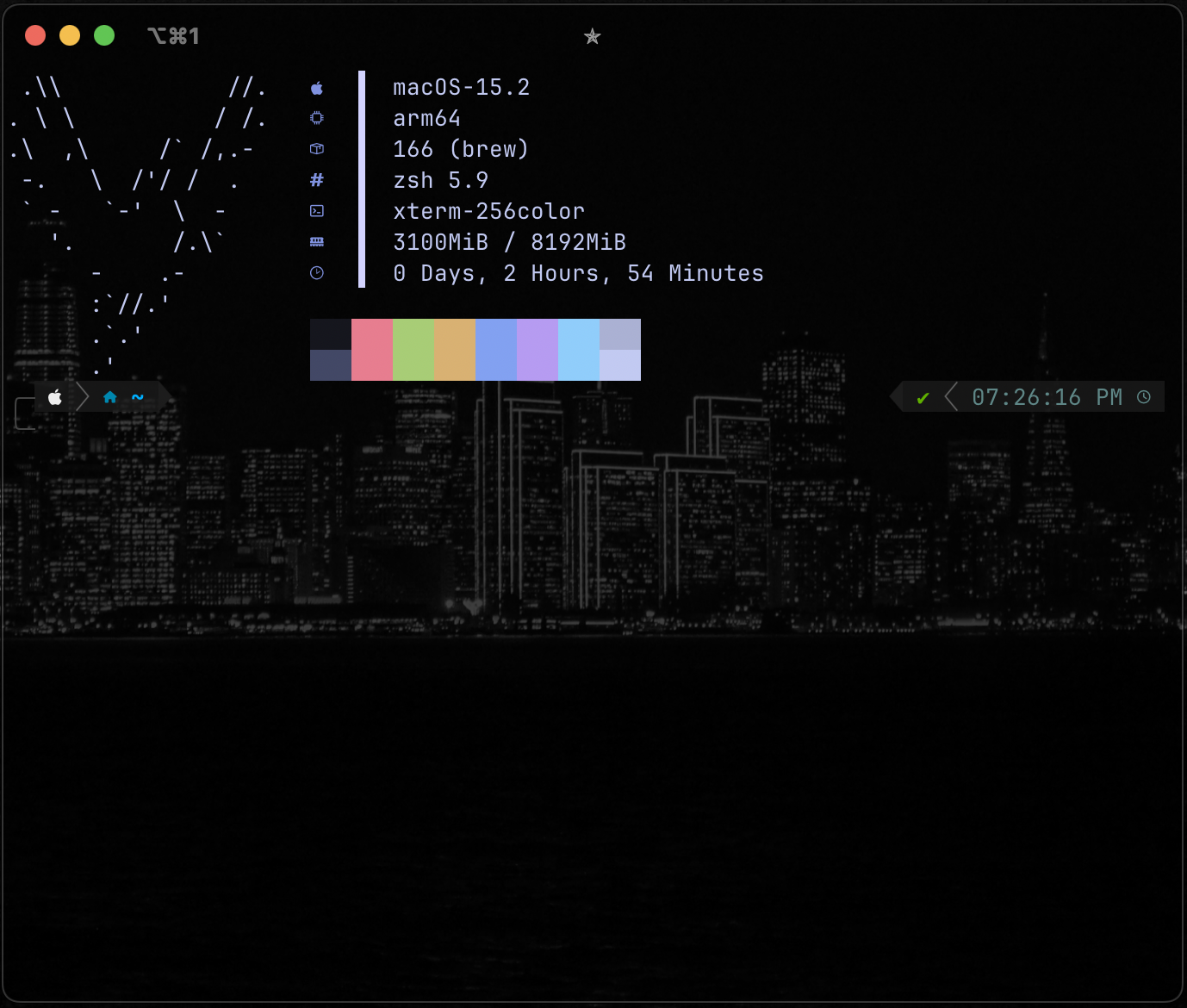
qfetch is a simple, no-fuss CLI tool written in Python that gives you a clean snapshot of your system info on Linux and macOS. It shows details like your OS, architecture, packages, shell version, terminal type, memory usage, uptime, and even throws in some fun ASCII art for good measure. It’s designed to be straightforward and looks good right out of the box.
Designed & Tested for Ubuntu, Debian, and MacOS. More operating systems and distributions will be added in the near future.
Installation
qfetch was designed specifically for terminals with NerdFonts which you can download at nerdfonts.com and add to your terminal using these instructions. Afterwards install and run using the following commands...
pip install qfetch-py
qfetch
Usage
usage: qfetch [-h]
                 [--art <Playboy-Bunny, Tux, Phoenix, Robot, Random-Art>]
                 [--sys-info <sys_info_default, sys_info_no_nerd_font>]

options:
  -h, --help            show this help message and exit
  --art, -a <Playboy-Bunny, Tux, Phoenix, Robot, Random-Art>
                        select the Ascii Art you want qfetch to use.
  --sys-info, -s <sys_info_default, sys_info_no_nerd_font>
                        select how you want qfetch to present your sysinfo
e.g.
qfetch -a Tux
qfetch -s sys_info_no_nerd_font
License
qfetch, a simple, no-fuss System Information CLI tool written in Python Copyright (C) 2025 qvipin
This program is free software: you can redistribute it and/or modify it under the terms of the GNU General Public License as published by the Free Software Foundation, either version 3 of the License, or (at your option) any later version.
This program is distributed in the hope that it will be useful, but WITHOUT ANY WARRANTY; without even the implied warranty of MERCHANTABILITY or FITNESS FOR A PARTICULAR PURPOSE. See the GNU General Public License for more details.
You should have received a copy of the GNU General Public License along with this program. If not, see https://www.gnu.org/licenses/.
1 maintainer

Metadata
1 maintainer
Release files for qfetch-py 1.0.0
For a detailed explanation of source distributions (sdists) and built distributions (wheels), please see the package formats documentation.
Source distribution (sdist)
| File | Size | Uploaded | |
|---|---|---|---|
| qfetch_py-1.0.0.tar.gz | 17.7 kB | Details |
Built distribution (wheel)
| File | Interpreter | ABI | Platform | Reset |
|---|---|---|---|---|
| qfetch_py-1.0.0-py3-none-any.whl | Python 3 | none | any | Details |
Total release size: 36.9 kB
Release files / qfetch_py-1.0.0.tar.gz
| Download URL | qfetch_py-1.0.0.tar.gz |
|---|---|
| Size | 17.7 kB |
| Tags | Source |
|
SHA-256 checksum How to use checksums |
e6f95433198c95ab7d04be1c8434299b72359408163de4fe50e8233bc1294c7f
|
|
BLAKE2b-256 checksum How to use checksums |
29b0521489f1b8872d7a0af34556f463da8f3427ac04729731072dfb541582a7
|
| Upload date | |
|
Uploaded using Trusted Publishing? What is trusted publishing? |
No |
| Uploaded via |
twine/6.1.0 CPython/3.13.1
|
Release files / qfetch_py-1.0.0-py3-none-any.whl
| Download URL | qfetch_py-1.0.0-py3-none-any.whl |
|---|---|
| Size | 19.2 kB |
| Tags | Python 3 |
|
SHA-256 checksum How to use checksums |
e5aee686d417db4fcb78d9af759f86aa0c412a0125d8c06d01862d252fd9ad61
|
|
BLAKE2b-256 checksum How to use checksums |
e197d8dcc3510cd85e59d7e9bc3ebb5e47aeeb2c4e5e180c75f58f141456b0eb
|
| Upload date | |
|
Uploaded using Trusted Publishing? What is trusted publishing? |
No |
| Uploaded via |
twine/6.1.0 CPython/3.13.1
|













