
Qiju · 起居

Your coding agent forgot. Qiju kept the record.
Local-first, structured session records that let Claude Code, Codex, Kiro, Cursor, and future agents continue from verifiable development history.





Installation · How to Use · Common Scenarios · In Depth · 中文
Qiju is your secretary. You are the boss — you run the projects and make the calls; say what's worth keeping: history, handoffs, where the docs live. Qiju never copies what's already in your files — the code says what the project is; Qiju records how it grew from nothing into something great. Ask later, and Qiju remembers everything — no matter which agent you are using.
What Qiju can do:
- One sentence becomes a record — say "record the handoff" and a structured record (title, tags, next steps, the full story) is written for you.
- Answers like it was there — "what did we do yesterday?", "why didn't we use xyz?" — ask in plain words, get back the actual record, not a guess.
- Memory across projects — search this project, another project by name, or everything you have ever recorded; a feature you built last month is one question away from being reused.
- Finds the gold —
/qiju-reviewturns last week's records into concrete improvements for the next round of development.
The trait that matters most: your records outlive everything — the session, the compacted context window, even the agent vendor. They are plain local files on your machine: no cloud, no embeddings, no lock-in.
Across platforms: one record store, every agent. Qiju installs the same three skills into Claude Code, Codex, Kiro, and Cursor — record in one, ask in another, and nothing is lost when you switch.
[!NOTE] Curious about the design, the record format, the storage architecture, and the current status? Read Qiju in depth.
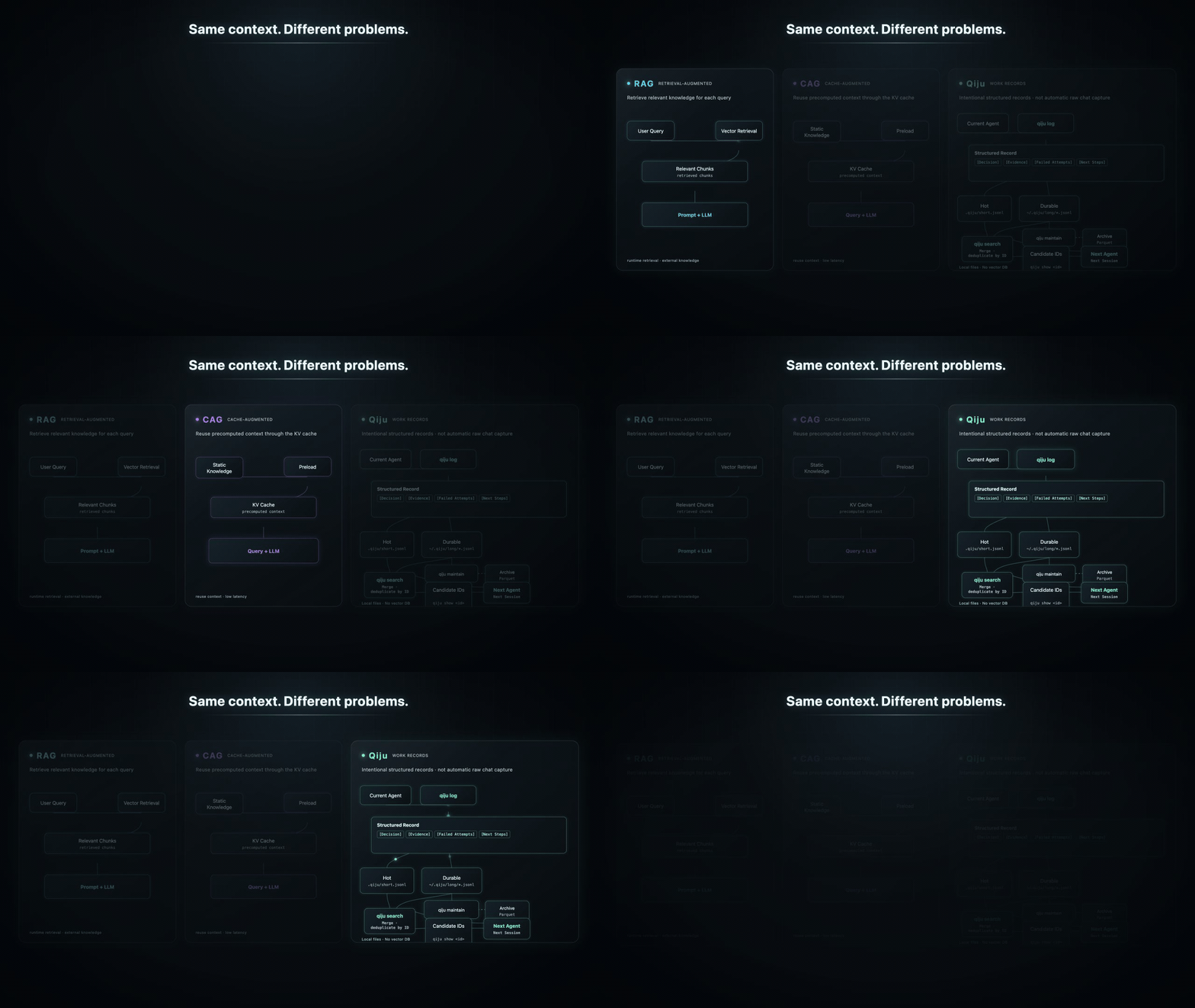
RAG, CAG, or Qiju?
RAG fetches context when you ask. CAG carries it in the prompt. Qiju keeps a verifiable record of what happened across sessions, projects, and agents.
Try the demo
Two minutes, nothing to install — a simulated session where Claude Code writes the record and Codex picks it up:
▶ Play the interactive demo · 中文版演示
Installation
uv tool install qiju
qiju --version
For pipx/pip installs and the source install, see Qiju in depth.
Start with project
Run qiju init from the root of each project you want to record:
cd /path/to/your/project
qiju init --host claude,codex,kiro
What it sets up, --host all, and user-level defaults: see
Qiju in depth.
Update Qiju
uv tool upgrade qiju
Installed with pipx or pip? See Qiju in depth.
Update projects
The CLI upgrade does not rewrite the skill files already installed in your projects. One command brings every registered project up to date:
qiju update --dry-run   # preview what would change
qiju update             # refresh skills in all registered projects
qiju update is registry-first. If you have older Qiju projects that were
initialized before the registry existed, run qiju update --scan-projects once
to discover them and backfill the registry. Your records are never touched by an
update — only the skill files are refreshed.
How to use
/qiju-log — tell it what to record
Say what you want kept, the way you would tell a person:
/qiju-log handoff record
/qiju-log sum up our discussion
/qiju-log record that we will do xyz tomorrow
The agent turns your words into a structured record — title, tags, search terms, next steps, and a full Markdown body — and verifies it landed in the store.
[!TIP] Treat Qiju as your secretary: just tell it what you want to record, and Qiju will do it for you.
/qiju-search — just ask
Anything that was recorded, you can get back by asking:
/qiju-search what did we do yesterday?
/qiju-search why did we use (or not use) xyz?
/qiju-search I remember we developed this feature in my project Y — what are the related files?
Search works within the current project, across a project named in your question,
or across all your projects; a record id (qiju show '<uuid>:1') retrieves one
exact record.
[!TIP] Qiju is your secretary — if it was recorded, just ask. You can even ask:
/qiju-search I want to build project X, it is about Y — what existing features in my projects can be reused?
/qiju-review — find the gold mine in your records
A powerful skill: it reads your recent project and global records, extracts the mistakes, lessons, and repeated friction hiding in them, and proposes concrete improvements to how you work next. It only recommends — it does not edit any files unless you ask.
/qiju-review read the last 7 days of records — anything we can optimize in the
following development?
Common scenarios
The fastest way to get value from Qiju is to make two moments a habit: the end of a session and the start of the next one.
| Moment | What you say to the agent |
|---|---|
| Ending a working session | /qiju-log Record what we did today, what we decided, and what's next. |
| Starting the next morning | /qiju-search What did we do yesterday, and what's still pending? |
| Switching agents mid-task | In Codex: $qiju-search token refresh decision — same record store, different host. |
| Before retrying something | /qiju-search Did we already try caching the auth token? What happened? |
| After a release | /qiju-log Record: released 0.6.1 to PyPI, all gates green, skills refreshed in all projects. |
| Recording a decision | /qiju-log Record the decision: keep 0.5.9, monitor record quality; R1/R2 rejected. |
| Weekly self-improvement | /qiju-review What lessons from this week should change how we work? |
| Following up on a recorded change | I just updated skill X — check record <uuid>:1, then test skill X in this project. |
Contributing
Qiju is small on purpose, but the handoff problem is large. Useful contributions include broken host workflows, real handoff cases, Linux verification, docs clarity, and tests for record durability.
Try Qiju on one real coding session. Switch agents, search the record, and tell us where the handoff still breaks — in an issue, or on Discord.
License
Licensed under the Apache License 2.0. Copyright 2026 Jason Shen.
1 maintainer

Download files
Download the file for your platform. If you're not sure which to choose, learn more about installing packages.
Source Distribution
Built Distribution
Filter files by name, interpreter, ABI, and platform.
If you're not sure about the file name format, learn more about wheel file names.
Copy a direct link to the current filters
File details
Details for the file qiju-0.6.1.tar.gz.
File metadata
- Download URL: qiju-0.6.1.tar.gz
- Upload date:
- Size: 53.8 kB
- Tags: Source
- Uploaded using Trusted Publishing? No
- Uploaded via:
uv/0.7.20
File hashes
| Algorithm | Hash digest | |
|---|---|---|
| SHA256 |
ba55981805a00c17d5e0108df36c8a5843140718044f45f47d70aca682c768a1
|
|
| MD5 |
04408543ed96f498284a34ad7d767712
|
|
| BLAKE2b-256 |
0df32e06267f6c254e337e6145e5bb8c92c5ac8740bf21fbdce601207f4c9b2b
|
File details
Details for the file qiju-0.6.1-py3-none-any.whl.
File metadata
- Download URL: qiju-0.6.1-py3-none-any.whl
- Upload date:
- Size: 64.3 kB
- Tags: Python 3
- Uploaded using Trusted Publishing? No
- Uploaded via:
uv/0.7.20
File hashes
| Algorithm | Hash digest | |
|---|---|---|
| SHA256 |
e172d71ea8cae20acb1189a62b0f681a148ebad47cbc5e809e34de5446c2e981
|
|
| MD5 |
1f3c22ce44906e926be1923025bd8a0a
|
|
| BLAKE2b-256 |
017a3b925cd4d56896b1c610262de20dc0d7422cdaabd49879f5d2e013cbe9fc
|







