
AI Autocomplete JupyterLab extension for Qiskit Code Assistant (Beta)
Verified details
These details have been verified by PyPIProject links
Owner
GitHub Statistics
Maintainers

Project description
Qiskit Code Assistant (Beta)
The Qiskit Code Assistant is a beta release, subject to change.
Write and optimize Qiskit code with a generative AI code assistant.
Increase quantum computing developer productivity and learn best practices for Qiskit and IBM Quantum Platform services with Qiskit Code Assistant!
Make programming quantum computers even easier with Qiskit Code Assistant, a generative AI code assistant. Trained with millions of text tokens from Qiskit SDK v2.x, years of Qiskit code examples, and IBM Quantum features, Qiskit Code Assistant accelerates your quantum development workflow by offering LLM-generated suggestions based on Mistral-Small-3.2-24B-Instruct-2506 that incorporate the latest features and functionalities from Qiskit and IBM Quantum.
Qiskit is the open-source quantum SDK preferred by 69% of respondents to the Unitary Fund's Open Source Software Survey, with nearly 600,000 registered users to date. Now you can get the performance and stability of the Qiskit SDK with the added efficiency of Qiskit Code Assistant to streamline your workflow and optimize your quantum computing programs.
Features
- Code Generation: Accelerate Qiskit code generation by leveraging generative AI based on the
mistral-small-3.2-24b-qiskitmodel - Smart Prompts: Use abstract and specific prompts to generate recommendations
- Code Review: Manage code changes by reviewing, accepting, and rejecting suggestions
- Code Migration: Automatically migrate legacy Qiskit code to newer versions with single-cell or full-notebook support
- Python Support: Works with Python code files and Jupyter notebooks
Learn the best ways to use Qiskit and IBM Quantum Platform services
Improve your Qiskit code by reviewing, browsing, and accepting model-generated code suggestions.
Use abstract prompts to get started
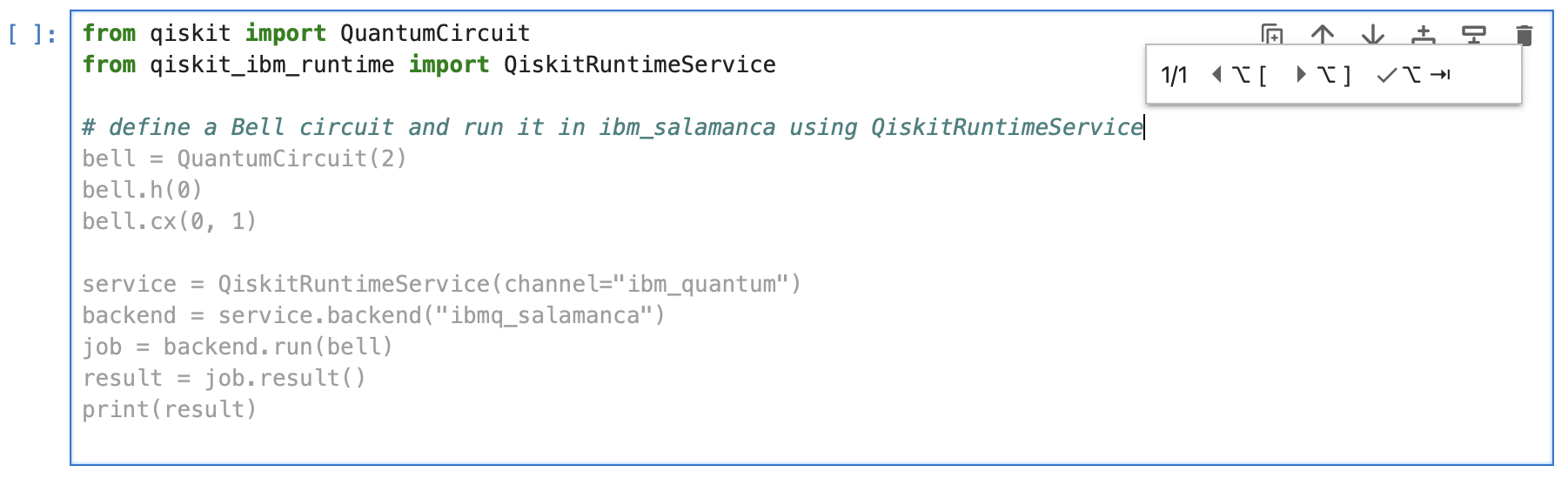
Provide abstract prompts to Qiskit Code Assistant using #comments. Type Alt ., Alt \ or Tab following a #comment to obtain syntactically correct and contextually relevant content (up to 60 tokens) suited to your desired task.
Use specific prompts for streamlined code completion
Use Alt ., Alt \ or Tab with code to obtain specific model-generated suggestions for code completion based on semantic analysis of source code. Review code recommendations before accepting.
Get started
You can use Qiskit Code Assistant in two ways:
Option 1: IBM Quantum Cloud (Recommended)
Requires an IBM Quantum Premium Plan account for the best experience.
Obtain your IBM Quantum Platform API token
Open the IBM Quantum Platform in your browser and log in with your IBM Quantum Cloud account. After logging in, an IBM Quantum API token is displayed on the upper right side of the web page.
Set the API token in the JupyterLab extension
When you first open Jupyterlab in a new window or tab you may see that the status bar is highlighted orange, this shows that the service is not reachable.

If you click the status bar or try to run the completer a dialog will display asking for your API token, paste the token copied above here.
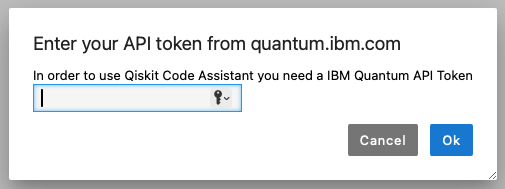
You can also search for "Qiskit" in the command palette (Alt Shift C) to enter or
update your API token.
In addition if the enviroment variable QISKIT_IBM_TOKEN is set or the Qiskit
configuration file ~/.qiskit/qiskit-ibm.json exists then the API token will be
populated at application start. If an API token is entered via the extension it will be
stored in ~/.qiskit/qiskit-ibm.json under a new config named qiskit-code-assistant
Accept the model disclaimer/EULA
By default, the model you will use is mistral-small-3.2-24b-qiskit. It will appear in the Model Picker in the bottom of the status bar.
The first time you use the mistral-small-3.2-24b-qiskit model, a model disclaimer/EULA will appear with information about the model and links to documentation and the model's license. It will also list some restrictions that you should be aware of when using the model, including a restriction against using proprietary code. Clicking Accept will enable the new model during code generation.
Managing Multiple Credentials
If you have multiple IBM Quantum credentials configured in your ~/.qiskit/qiskit-ibm.json file (e.g., for different environments like production and development), the extension will automatically prompt you to select which credential to use when it starts. You can choose to select one from the file, enter a token manually, or dismiss the prompt to use automatic selection. See docs/credential_selection.md for detailed instructions.
Option 2: Local Setup (For Non-Premium Users)
If you don't have an IBM Quantum Premium Plan account, you can run the Qiskit Code Assistant entirely on your local machine using open-source models.
Quick Setup (One Command)
bash <(curl -fsSL https://raw.githubusercontent.com/Qiskit/qiskit-code-assistant-jupyterlab/main/setup_local.sh)
Or if you cloned the repository:
bash setup_local.sh
For automated/CI setups, use non-interactive mode:
bash setup_local.sh --non-interactive
# Or: bash setup_local.sh -y
What the script does
- Detects and uses
uvfor faster installations (if available) - Checks and optionally installs JupyterLab (if needed)
- Always upgrades the extension to the latest version
- Installs and configures Ollama (local LLM server)
- Downloads the Qwen2.5-Coder 14B model optimized for Qiskit (~9GB)
- Configures optimal model parameters
- Sets up JupyterLab extension automatically
Requirements
- Operating System: macOS, Linux, or Windows (via Git Bash or WSL)
- Python: 3.8+ with pip installed
- RAM: 16GB+ recommended (8GB+ for lighter models)
- Disk Space: ~5-20GB depending on model size
Available Models
The setup script supports multiple models. By default, it uses Qwen2.5-Coder 14B which offers the best quality for code generation.
| Model | Size | Quality | RAM Required |
|---|---|---|---|
| Qwen2.5-Coder 14B (Default) | ~9GB | Best for code | 16GB+ |
| Mistral Small 24B | ~15GB | Most recent | 24GB+ |
| Granite 3.3 8B | ~5GB | Lightweight | 8GB+ |
All models are trained on Qiskit 2.0+ and optimized for quantum computing code assistance.
For detailed instructions, see the Local Setup Guide.
Using the Extension
Generate code suggestions
Once you've accepted the model disclaimer/EULA, you can open a new file and start typing. If you type Alt ., some faded text should appear with model-generated suggestions.
Review and accept/reject code suggestions
Type Alt Tab or Alt END to accept the model-generated suggestion, or type Esc to cancel/reject the model-generated suggestion.
Using the Inline Completer
The inline completer can be triggered using the following key strokes.
Alt .orAlt \will run the completer at the current cursor locationAlt [andAlt ]can be used to cycle through the list of suggestions if there are more than oneAlt TaborAlt ENDwill "accept" the suggested code and insert it at the current cursor location
In addition, once the completer runs you can use the buttons on the inline completer widget to cycle or accept
Using the Code Completer
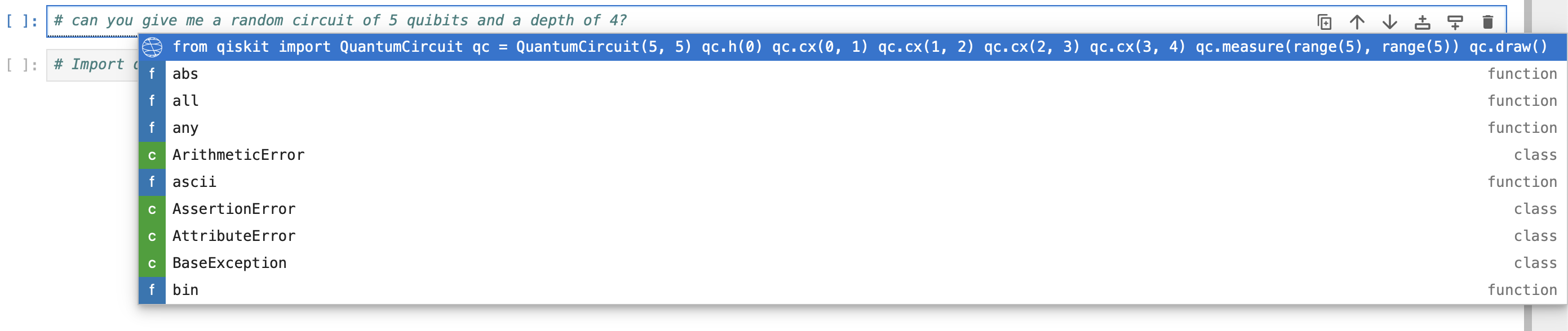
Jupyterlab also includes a traditional completer than displays suggestion in a context
menu rather than inline. This completer can be triggered using Tab to run and display
the context menu.
The context menu will include suggestions from the default completer in addition to the Qiskit Code Assistant suggestions. The context menu also sanitizes and trims the suggestions, making it less useful for see the code suggestion before inserting it.
Jupyterlab Settings
There are a few settings we recommend to edit in your user settings.
-
Inline Completer
showWidgetcan be set toalwaysin order to always show the inline completer widget to cycle through and select a completion item -
Code Completion
providerTimeoutcan be increased, our suggested value is15000or 15 seconds. This is 1 second by default and the Qiskit Code Assistant API rarely returns within 1 second. This setting only apply the the standard completer that is invoked withTab, the inline completer has a default of 15 seconds. -
If you want to change the instance of the Qiskit Code Assistant Service that the extension should use you can edit the Qiskit Code Assistant setting
serviceUrl. This can also be set to any service exposing LLMs using OpenAI-compatible API endpoints. -
Keyboard shortcuts can be changed by searching for
completerin the Keyboard Shortcuts settings and adding new shortcuts for the relevant commands. -
Telemetry can be disabled by unchecking the
enableTelemetrysetting.NOTE: The telemetry does not collect your code nor the suggested code completions. What is collected is whether a code suggestion was accepted or dismissed.
-
Response streaming can be disabled by editing the
enableStreamingsetting.
Code Migration
The extension includes a code migration feature to help modernize your Qiskit code:
Migrate a Single Cell
- Click the ✨ sparkle button in a code cell's toolbar
- Confirm the migration in the dialog
- The cell content will be automatically updated with migrated code
Migrate Entire Notebook
- Click the ✨ sparkle button in the notebook toolbar (next to the cell type dropdown)
- Confirm to migrate all code cells in your notebook
- Markdown cells are preserved unchanged
Key Benefits
- Automatic Detection: Identifies code that needs migration to newer Qiskit versions
- API Updates: Modernizes deprecated APIs and patterns
- Streaming Support: See migration progress in real-time when streaming is enabled
- Safe Operations: Always asks for confirmation before making changes
Note: The migration feature is still under development and its gated to a few set of testers. When it's fully released, it will be open for any user which is part of a IBM Quantum Premium plan.
Terms of use
- End User License Agreement (EULA) acceptance required before starting to use the model
- Terms of use: https://quantum.ibm.com/terms
- Privacy policy: https://quantum.ibm.com/terms/privacy
- Cloud Services Agreement https://www.ibm.com/support/customer/csol/terms/?id=Z126-6304&cc=us&lc=en
- IBM Cloud Service Description https://www.ibm.com/support/customer/csol/terms/?id=i126-6605&lc=en
Project details
Verified details
These details have been verified by PyPIProject links
Owner
GitHub Statistics
Maintainers
Release history Release notifications | RSS feed


Download files
Download the file for your platform. If you're not sure which to choose, learn more about installing packages.
Source Distribution
Built Distribution
Filter files by name, interpreter, ABI, and platform.
If you're not sure about the file name format, learn more about wheel file names.
Copy a direct link to the current filters
File details
Details for the file qiskit_code_assistant_jupyterlab-0.11.0.tar.gz.
File metadata
- Download URL: qiskit_code_assistant_jupyterlab-0.11.0.tar.gz
- Upload date:
- Size: 781.5 kB
- Tags: Source
- Uploaded using Trusted Publishing? Yes
- Uploaded via: twine/6.1.0 CPython/3.13.7
File hashes
| Algorithm | Hash digest | |
|---|---|---|
| SHA256 |
927f92d4d819a5924e8d29f78b28b25dc19ec3bbe1ef8e8b3bdb772f8690b9d2
|
|
| MD5 |
e0fd9f381003d39b240c0d4fae302827
|
|
| BLAKE2b-256 |
ce710309eed6b37b20519234d72d7edd88bf5bf2c8595ec87f652950e80d7ecd
|
Provenance
The following attestation bundles were made for qiskit_code_assistant_jupyterlab-0.11.0.tar.gz:
Publisher:
publish-release.yml on Qiskit/qiskit-code-assistant-jupyterlab
-
Statement:
-
Statement type:
https://in-toto.io/Statement/v1 -
Predicate type:
https://docs.pypi.org/attestations/publish/v1 -
Subject name:
qiskit_code_assistant_jupyterlab-0.11.0.tar.gz -
Subject digest:
927f92d4d819a5924e8d29f78b28b25dc19ec3bbe1ef8e8b3bdb772f8690b9d2 - Sigstore transparency entry: 955003282
- Sigstore integration time:
-
Permalink:
Qiskit/qiskit-code-assistant-jupyterlab@eee81a639fd32c074f92bb4ddad38f22325c1efa -
Branch / Tag:
refs/heads/main - Owner: https://github.com/Qiskit
-
Access:
public
-
Token Issuer:
https://token.actions.githubusercontent.com -
Runner Environment:
github-hosted -
Publication workflow:
publish-release.yml@eee81a639fd32c074f92bb4ddad38f22325c1efa -
Trigger Event:
workflow_dispatch
-
Statement type:
File details
Details for the file qiskit_code_assistant_jupyterlab-0.11.0-py3-none-any.whl.
File metadata
- Download URL: qiskit_code_assistant_jupyterlab-0.11.0-py3-none-any.whl
- Upload date:
- Size: 50.4 kB
- Tags: Python 3
- Uploaded using Trusted Publishing? Yes
- Uploaded via: twine/6.1.0 CPython/3.13.7
File hashes
| Algorithm | Hash digest | |
|---|---|---|
| SHA256 |
609b246ce668c192266d37773f8df08473cbbd84e50e2bed6c0e35f5b1efd978
|
|
| MD5 |
ecf97f91fe6920bb6656f59f731ac578
|
|
| BLAKE2b-256 |
28593263398b9b7c38b7852c52251ae1f66f5818e2ac9cd225195e7f034f6efb
|
Provenance
The following attestation bundles were made for qiskit_code_assistant_jupyterlab-0.11.0-py3-none-any.whl:
Publisher:
publish-release.yml on Qiskit/qiskit-code-assistant-jupyterlab
-
Statement:
-
Statement type:
https://in-toto.io/Statement/v1 -
Predicate type:
https://docs.pypi.org/attestations/publish/v1 -
Subject name:
qiskit_code_assistant_jupyterlab-0.11.0-py3-none-any.whl -
Subject digest:
609b246ce668c192266d37773f8df08473cbbd84e50e2bed6c0e35f5b1efd978 - Sigstore transparency entry: 955003293
- Sigstore integration time:
-
Permalink:
Qiskit/qiskit-code-assistant-jupyterlab@eee81a639fd32c074f92bb4ddad38f22325c1efa -
Branch / Tag:
refs/heads/main - Owner: https://github.com/Qiskit
-
Access:
public
-
Token Issuer:
https://token.actions.githubusercontent.com -
Runner Environment:
github-hosted -
Publication workflow:
publish-release.yml@eee81a639fd32c074f92bb4ddad38f22325c1efa -
Trigger Event:
workflow_dispatch
-
Statement type:






