
📅 QJalaliCalendarWidget
A modern, fully RTL-ready Jalali (Persian) calendar widget for PySide6
ویجت تقویم جلالی حرفهای و قابل شخصیسازی برای PySide6





✨ Quick Preview
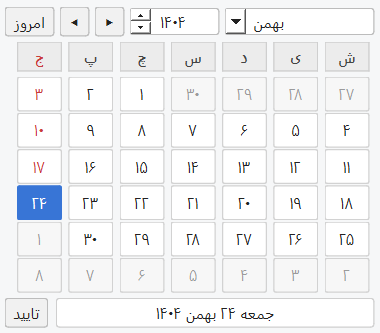
❓ Why QJalaliCalendarWidget? | چرا این پروژه؟
🇬🇧 English
Qt does not provide a built-in Jalali (Persian) calendar widget.
Developers often need to implement custom solutions from scratch.
QJalaliCalendarWidget fills this gap by providing a modern, customizable, and production-ready Jalali calendar component for PySide6 applications.
🇮🇷 فارسی
پروژه QJalaliCalendarWidget این خلأ را با ارائه یک ویجت تقویم جلالی مدرن، قابل شخصیسازی و آماده استفاده در محیطهای واقعی (Production) برای PySide6 برطرف میکند.
🔄 Compared to QCalendarWidget | مقایسه با QCalendarWidget
🇬🇧 English
While Qt provides QCalendarWidget, it is primarily designed for the Gregorian calendar and lacks native Jalali (Persian) support.
QJalaliCalendarWidget is not just a visual modification — it is built with a fully Jalali-based internal logic and tailored specifically for Persian applications.
Key differences:
- ✅ Fully Jalali-based date system (not a conversion layer)
- ✅ Native RTL layout design
- ✅ Persian digit rendering support
- ✅ Integrated with
jdatetime - ✅ Customizable month & weekday names
- ✅ Designed specifically for Persian user experience
🇮🇷 فارسی
اگرچه Qt ویجتی به نام QCalendarWidget ارائه میدهد، اما این ویجت بر پایه تقویم میلادی طراحی شده و پشتیبانی بومی از
تقویم جلالی (شمسی) ندارد.
ویجت QJalaliCalendarWidget صرفاً یک تغییر ظاهری نیست؛ بلکه بر پایه منطق داخلی کاملاً جلالی توسعه داده شده و بهطور ویژه برای اپلیکیشنهای فارسی طراحی شده است.
تفاوتهای کلیدی:
- ✅ سیستم تاریخ کاملاً جلالی (نه صرفاً تبدیل از میلادی)
- ✅ طراحی بومی راستبهچپ (RTL)
- ✅ پشتیبانی از نمایش اعداد فارسی
- ✅ یکپارچه با
jdatetime - ✅ امکان شخصیسازی نام ماهها و روزهای هفته
- ✅ طراحی شده با تمرکز بر تجربه کاربری فارسی
🌟 Features | ویژگیها
🇬🇧 English
- ✅ Jalali (Persian) calendar support\
- ✅ Built with PySide6
- ✅ Right-to-left (RTL) layout support
- ✅ Customizable theme colors
- ✅ Persian / English digit modes
- ✅ Keyboard navigation
- ✅ Date range restriction (min/max)
- ✅ Custom month & weekday names
- ✅ Qt-style signals compatible with QCalendarWidget
- ✅ Modern UI design
🇮🇷 فارسی
- ✅ پشتیبانی کامل از تقویم جلالی (شمسی)
- ✅ توسعه داده شده با PySide6
- ✅ پشتیبانی کامل از راستبهچپ (RTL)
- ✅ قابلیت شخصیسازی رنگها (تم)
- ✅ نمایش اعداد فارسی یا انگلیسی
- ✅ ناوبری با کیبورد
- ✅ محدودسازی بازه تاریخ (حداقل/حداکثر)
- ✅ امکان تغییر نام ماهها و روزهای هفته
- ✅ سیگنالهای مشابه QCalendarWidget
- ✅ طراحی مدرن و تمیز
📦 Installation | نصب
pip install qjalalicalendarwidget
🚀 Basic Usage | مثال استفاده
import sys
from PySide6.QtWidgets import QApplication

from qjalalicalendarwidget import QJalaliCalendarWidget

app = QApplication(sys.argv)


def on_date_confirmed(selected_date):
    print(selected_date.strftime("%Y/%m/%d"))
    app.quit()


def move_to_center(calendar):
    from PySide6.QtGui import QGuiApplication

    calendar.adjustSize()

    # --- Center of Screen ---
    screen = QGuiApplication.primaryScreen()
    screen_geometry = screen.availableGeometry()

    calendar.resize(calendar.sizeHint())
    x = (screen_geometry.width() - calendar.width()) // 2
    y = (screen_geometry.height() - calendar.height()) // 2

    calendar.move(x, y)


calendar = QJalaliCalendarWidget()
calendar.confirmed.connect(on_date_confirmed)

move_to_center(calendar)
calendar.show()

sys.exit(app.exec())
🎨 Customization | شخصیسازی
Change Digit Mode | تغییر حالت اعداد
calendar.setDigitMode("fa")  # Persian digits
calendar.setDigitMode("en")  # English digits
Set Date Range | تعیین بازه تاریخ
import jdatetime

calendar.setMinimumDate(jdatetime.date(1403, 1, 1))
calendar.setMaximumDate(jdatetime.date(1404, 12, 29))
Customize Theme Colors | تغییر رنگها
calendar.setThemeColors(
    selected_bg="#2e7d32",
    selected_fg="#ffffff",
    today_bg="#e8f5e9",
    friday_fg="#d32f2f"
)
⌨ Keyboard Navigation | ناوبری با کیبورد
| Key | Action |
|---|---|
| ← → | Previous / Next day |
| ↑ ↓ | Previous / Next week |
| PageUp / PageDown | Previous / Next month |
| Shift + PageUp/PageDown | Previous / Next year |
| Home / End | First / Last day of month |
| Enter | Confirm selection |
🔔 Signals | سیگنالها
calendar.selectionChanged.connect(...)
calendar.activated.connect(...)
calendar.currentPageChanged.connect(...)
calendar.confirmed.connect(...)
calendar.dateSelected.connect(...)
📋 Requirements | پیشنیازها
- Python >= 3.11
- PySide6 >= 6.6
- jdatetime >= 4.1
📄 License | مجوز
MIT License
🤝 Contributing | مشارکت
Pull requests are welcome.
For major changes, please open an issue first.
از پیشنهادها و مشارکت شما استقبال میشود.
🔗 Links
- GitHub: https://github.com/reza-rezvani2052/QJalaliCalendarWidget
- PyPI: https://pypi.org/project/qjalalicalendarwidget/
⭐ Support
If you find this project useful, consider giving it a ⭐ on GitHub.
1 maintainer

Release files for qjalalicalendarwidget 0.2.3
For a detailed explanation of source distributions (sdists) and built distributions (wheels), please see the package formats documentation.
Source distribution (sdist)
| File | Size | Uploaded | |
|---|---|---|---|
| qjalalicalendarwidget-0.2.3.tar.gz | 14.6 kB | Details |
Built distribution (wheel)
| File | Interpreter | ABI | Platform | Reset |
|---|---|---|---|---|
| qjalalicalendarwidget-0.2.3-py3-none-any.whl | Python 3 | none | any | Details |
Total release size: 25.9 kB
Release files / qjalalicalendarwidget-0.2.3.tar.gz
| Download URL | qjalalicalendarwidget-0.2.3.tar.gz |
|---|---|
| Size | 14.6 kB |
| Tags | Source |
|
SHA-256 checksum How to use checksums |
059ef1e314acbb2050eca4fb069eb61e68007f63eb3cfc16229786e9e0c67f17
|
|
BLAKE2b-256 checksum How to use checksums |
2de1d6fbc4babdf91c49761e1b24e2fdf2b1bbdcd63095b22282bacff8e25771
|
| Upload date | |
|
Uploaded using Trusted Publishing? What is trusted publishing? |
No |
| Uploaded via |
twine/6.2.0 CPython/3.11.9
|
Release files / qjalalicalendarwidget-0.2.3-py3-none-any.whl
| Download URL | qjalalicalendarwidget-0.2.3-py3-none-any.whl |
|---|---|
| Size | 11.3 kB |
| Tags | Python 3 |
|
SHA-256 checksum How to use checksums |
ea7d7adbd31c597ed5ab3538444275afb8352fc434a049a0a4ee738d4afc1cd4
|
|
BLAKE2b-256 checksum How to use checksums |
70513453f09fc4f8920914d887e0e3567ff4989b47ae7cdefeb76b4793423393
|
| Upload date | |
|
Uploaded using Trusted Publishing? What is trusted publishing? |
No |
| Uploaded via |
twine/6.2.0 CPython/3.11.9
|














