
QK — Quick Kit
A multi-OS CLI Swiss army knife for daily computer tasks. One command, nine modules.



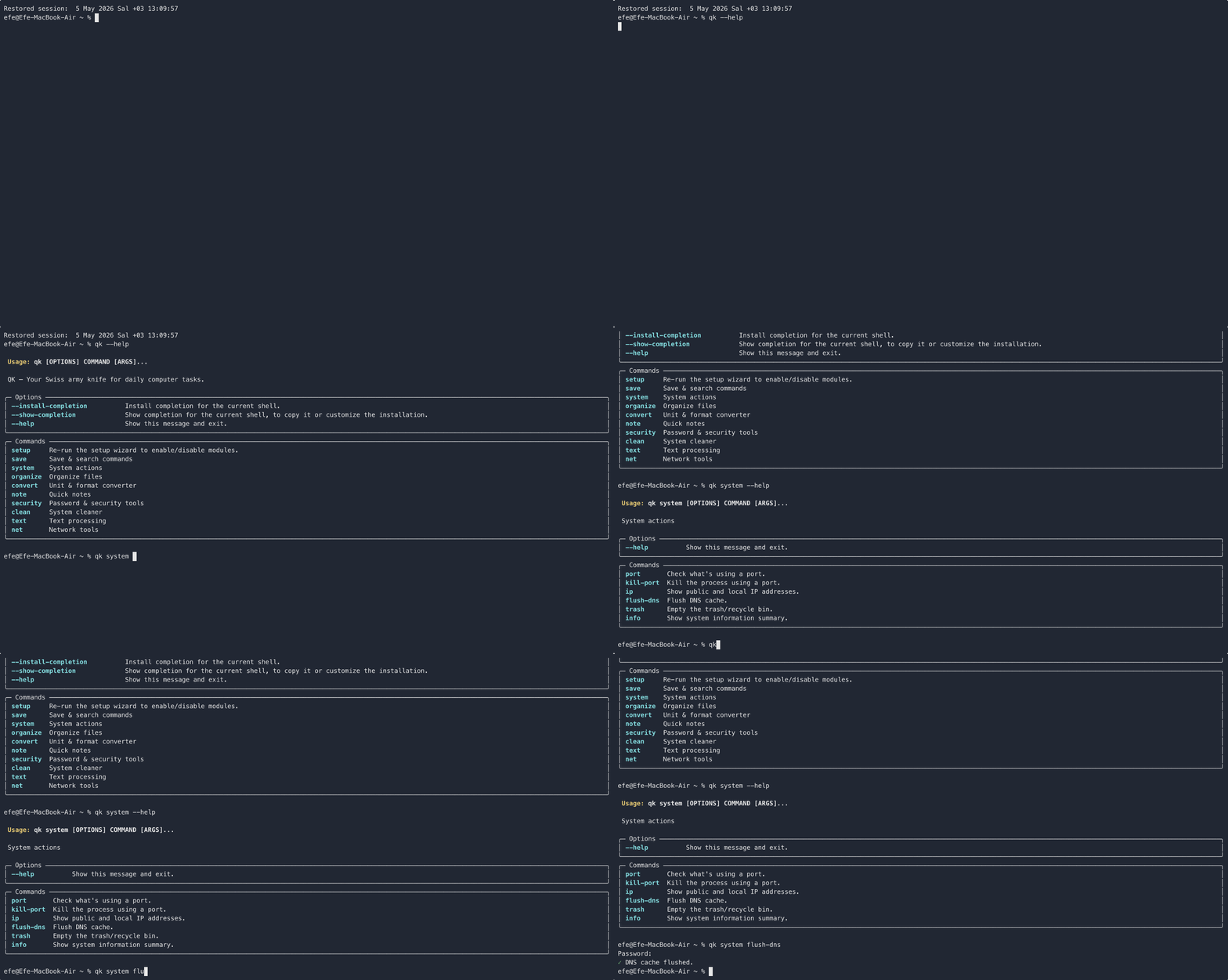
Install
pip install qk-tool
qk --version
First Run
On first run, QK launches a setup wizard where you pick which modules to enable:
$ qk
🔧 QK Setup — Welcome!
Select which modules to enable...
Re-run anytime with qk setup.
Modules
save — Command Saver
qk save add "list containers" "docker ps -a" --tag docker
qk save list --tag docker
qk save search "container"
qk save copy <id>
qk save remove <id>
system — System Actions
qk system port 8080
qk system kill-port 8080
qk system ip
qk system flush-dns
qk system trash
qk system info
organize — File Organizer
qk organize run ~/Downloads --dry
qk organize run ~/Downloads
qk organize list-rules
qk organize add-rule .pdf Documents
qk organize remove-rule <id>
convert — Converter
qk convert unit 100 kg lb
qk convert color "#ff5733"
qk convert base64 "hello world"
qk convert base64 "aGVsbG8=" --decode
qk convert json-fmt '{"a":1}'
qk convert json-fmt '{"a": 1}' --mini
note — Quick Notes
qk note add "meeting at 3pm" --tag work
qk note list --tag work
qk note search "meeting"
qk note remove <id>
qk note export
security — Password & Security
qk security pass
qk security pass --length 24 --symbols
qk security hash "some text"
qk security hash-file document.pdf
qk security checksum file.txt <expected-hash>
clean — System Cleaner
qk clean temp --dry
qk clean temp
qk clean big ~/Documents --top 20
qk clean duplicates ~/Photos --dry
text — Text Processing
qk text count file.txt
qk text case "helloWorld" --to snake
qk text case "hello_world" --to camel
qk text case "hello world" --to kebab
qk text lorem 3
qk text regex "\d+" file.txt
net — Network Tools
qk net speed
qk net ip
qk net dns google.com
qk net ping google.com --count 5
qk net check github.com
Data
All data is stored locally in ~/.qk/ as human-readable JSON files. No cloud, no tracking, no database.
~/.qk/
├── config.json
├── saves.json
├── notes.json
└── organize_rules.json
License
MIT
1 maintainer

Metadata
1 maintainer
Release files for qk-tool 0.1.1
For a detailed explanation of source distributions (sdists) and built distributions (wheels), please see the package formats documentation.
Source distribution (sdist)
| File | Size | Uploaded | |
|---|---|---|---|
| qk_tool-0.1.1.tar.gz | 17.8 kB | Details |
Built distribution (wheel)
| File | Interpreter | ABI | Platform | Reset |
|---|---|---|---|---|
| qk_tool-0.1.1-py3-none-any.whl | Python 3 | none | any | Details |
Total release size: 37.2 kB
Release files / qk_tool-0.1.1.tar.gz
| Download URL | qk_tool-0.1.1.tar.gz |
|---|---|
| Size | 17.8 kB |
| Tags | Source |
|
SHA-256 checksum How to use checksums |
cbf00e4c9c4047e1cd9016c5528ac6a7b81731f042d95a408ba001b9e629baed
|
|
BLAKE2b-256 checksum How to use checksums |
65357f1f15d99b7d012818af71a1219a5d9fc26c0dea86d53183d9386d538184
|
| Upload date | |
|
Uploaded using Trusted Publishing? What is trusted publishing? |
No |
| Uploaded via |
twine/6.2.0 CPython/3.13.13
|
Release files / qk_tool-0.1.1-py3-none-any.whl
| Download URL | qk_tool-0.1.1-py3-none-any.whl |
|---|---|
| Size | 19.5 kB |
| Tags | Python 3 |
|
SHA-256 checksum How to use checksums |
7c0df39cdac56af803e431c27d936dcac0df1489be56c660dd73460b271a786d
|
|
BLAKE2b-256 checksum How to use checksums |
171f67c14d2c3159f9993d455f5d3a715ede4db5e07560c58f14713ac98c7ec2
|
| Upload date | |
|
Uploaded using Trusted Publishing? What is trusted publishing? |
No |
| Uploaded via |
twine/6.2.0 CPython/3.13.13
|














