
qlib-sync


Website: randyy179.github.io/qlib-sync
One command to install and keep current a local Qlib China A-share dataset, and an MCP server so AI assistants can read it.
pip install qlib-sync
qlib-sync cn update
Or without installing anything first: uvx qlib-sync cn update.

That installs the daily community release from
chenditc/investment_data into
~/.qlib/qlib_data/cn_data, the location Qlib reads by default. Run the same command again
any time; when the data is already current it finishes in about a second.
Why not just wget and tar?
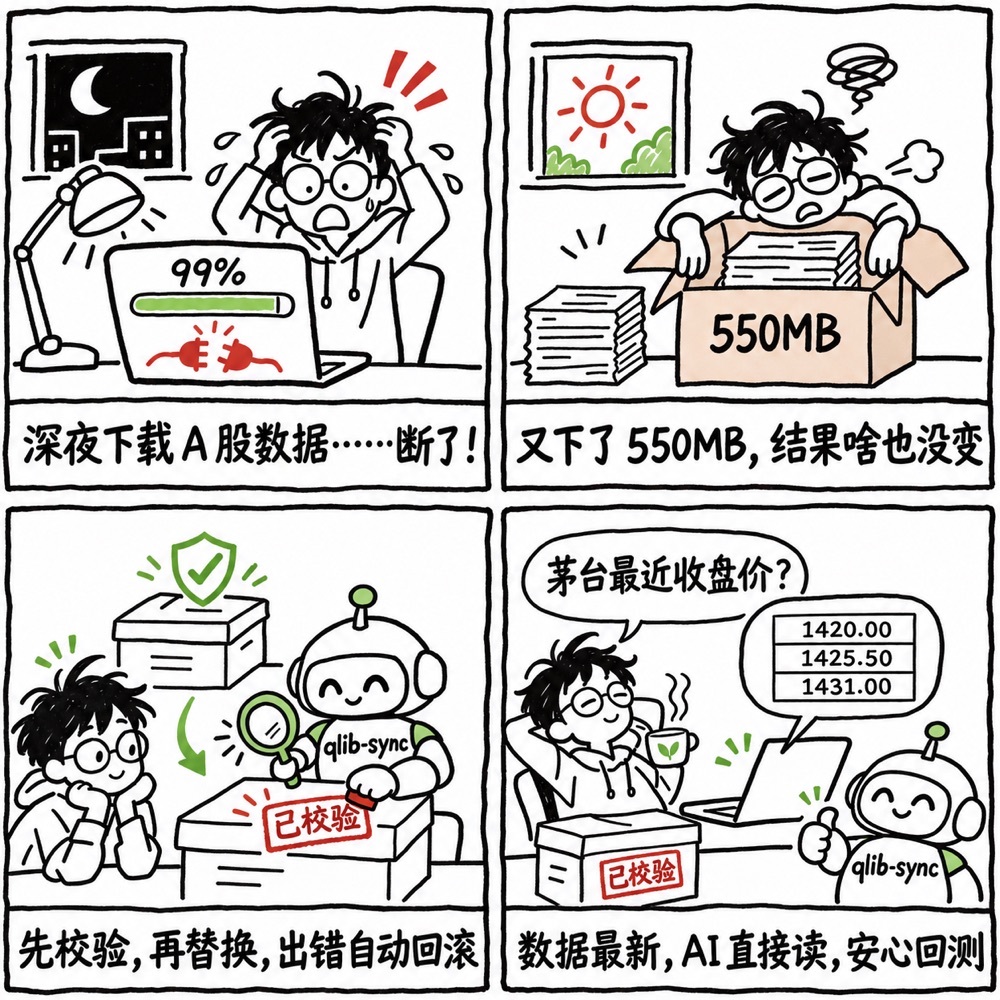
Qlib's README points A-share users to the community release with a wget and tar one-liner.
That works until it doesn't:
- An interrupted or truncated download extracts into a half-written dataset, or fails after the old one has already been overwritten.
- Upstream republishes releases. In November 2026 a data error was found and corrected (investment_data#163) and releases were republished under the same date. A date check alone never sees the fix.
- Every check downloads 550 MB, even when nothing changed.
The investment_data README itself describes a careful manual process: download the release
manifest, check the archive with its validate_archive.py, then extract. qlib-sync runs the
same checks automatically on every update and adds what a manual process cannot: it skips the
download when nothing changed, extracts beside the live data and swaps it in with rollback
(rather than extracting on top of the existing folder), and picks up republished releases.
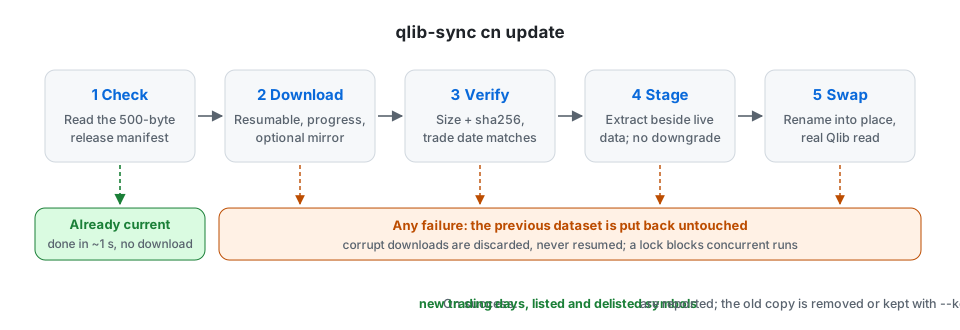
qlib-sync treats the dataset like a production system:
| Step | What happens |
|---|---|
| Check | Reads the release's 500-byte manifest. Already current: done, nothing downloaded. |
| Download | Resumes interrupted downloads; shows progress; optional mirror for slow links to GitHub. |
| Verify | Size and sha256 from the manifest; the same release checks as upstream's validate_archive.py (every index pool and the future calendar reach the manifest's dates, release marked publishable); archive paths and links are checked before extraction. |
| Stage | Extracts next to the active dataset; refuses downgrades. |
| Swap | Renames the new dataset into place, then runs a real Qlib read. |
| Roll back | Any failure after the swap moves the previous dataset back. |
| Report | New trading days, newly listed and delisted symbols. |
The checks catch broken, truncated, or tampered packages. They cannot catch wrong values inside a
correctly published release (like the one in #163); for that, keep a rollback copy with
--keep-backup.
Commands
qlib-sync status                  # every local Qlib dataset at a glance
qlib-sync cn status               # local date, pools, and whether a newer release exists
qlib-sync cn update               # install or update (add --json for machine-readable output)
qlib-sync cn health-check         # structure checks plus a real Qlib read
qlib-sync cn restore --list       # rollback backups; restore --yes switches back
Useful options for cn update:
| Option | Effect |
|---|---|
--data-dir PATH |
Install somewhere other than ~/.qlib/qlib_data/cn_data |
--mirror URL |
Download through a prefix-style GitHub proxy such as https://ghfast.top (or set QLIB_SYNC_MIRROR) |
--keep-backup |
Keep the previous dataset for one rollback |
--protect FILE |
Carry a custom stock pool in instruments/ across updates (repeatable) |
--force |
Reinstall even when the dates match |
The update replaces the whole cn_data folder. Anything you added there is lost unless you
pass it with --protect.
Mirrors
From mainland China, GitHub downloads can be slow or fail. Pass a mirror and qlib-sync downloads the package through it while still reading the manifest from GitHub directly when it can, so the checksum does not depend on the mirror. Mirrors are third-party services; qlib-sync does not endorse any of them.
Python
from qlib_sync import update_cn, status_cn, health_check_cn

result = update_cn()                 # raises qlib_sync.UpdateError on failure; data unchanged
print("\n".join(result.summary_lines()))
print(result.new_trading_days, result.added_symbols)
Use it from your AI assistant
qlib-sync includes an MCP server, the open standard most AI
tools use to call local tools. Any MCP client that can start a local command works, whichever
model it runs: Claude, GPT, Gemini, DeepSeek, Qwen, Kimi, GLM, or a local model. The server
runs on your machine and reads the dataset there; there is no service to host and nothing
leaves your computer. It is listed in the MCP Registry
as io.github.randyy179/qlib-sync.
Every client needs the same two things: the command uvx and the arguments qlib-sync mcp.
| Client | How to add qlib-sync |
|---|---|
| Claude Desktop | Download qlib-sync.mcpb from the latest release and open it |
| Claude Code | claude mcp add qlib-sync -- uvx qlib-sync mcp |
| OpenAI Codex CLI | codex mcp add qlib-sync -- uvx qlib-sync mcp |
| Cursor | The JSON below, in ~/.cursor/mcp.json |
| Gemini CLI | The JSON below, in ~/.gemini/settings.json |
| Qwen Code | The JSON below, in ~/.qwen/settings.json |
| Tencent CodeBuddy, ByteDance Trae, Alibaba Tongyi Lingma | MCP settings, add a server manually, paste the JSON below |
| Cherry Studio | Settings, MCP servers, add: type STDIO, command uvx, arguments qlib-sync and mcp on separate lines |
| VS Code (Copilot agent mode) | .vscode/mcp.json: { "servers": { "qlib-sync": { "type": "stdio", "command": "uvx", "args": ["qlib-sync", "mcp"] } } } |
{ "mcpServers": { "qlib-sync": { "command": "uvx", "args": ["qlib-sync", "mcp"] } } }
Menu names and file locations change between versions; check your client's MCP documentation if a path above has moved. Tested with Claude Code and OpenAI Codex CLI.
Web chat apps such as ChatGPT connect only to remote MCP servers over the internet, so they cannot start this local server.
Set QLIB_SYNC_DATA_DIR to use a dataset outside ~/.qlib/qlib_data/cn_data, and
QLIB_SYNC_MIRROR to download through a mirror.
| Tool | Does |
|---|---|
cn_status |
Local latest date, pools, and whether an update is available |
cn_update |
Install or update (safe to call: failures restore the previous data) |
cn_health_check |
Structure checks plus a real Qlib read |
cn_get_prices |
Daily bars for up to 20 symbols; real traded prices by default, adjusted on request |
cn_list_pool |
Members of csi300, csi500, and other pools on a date |
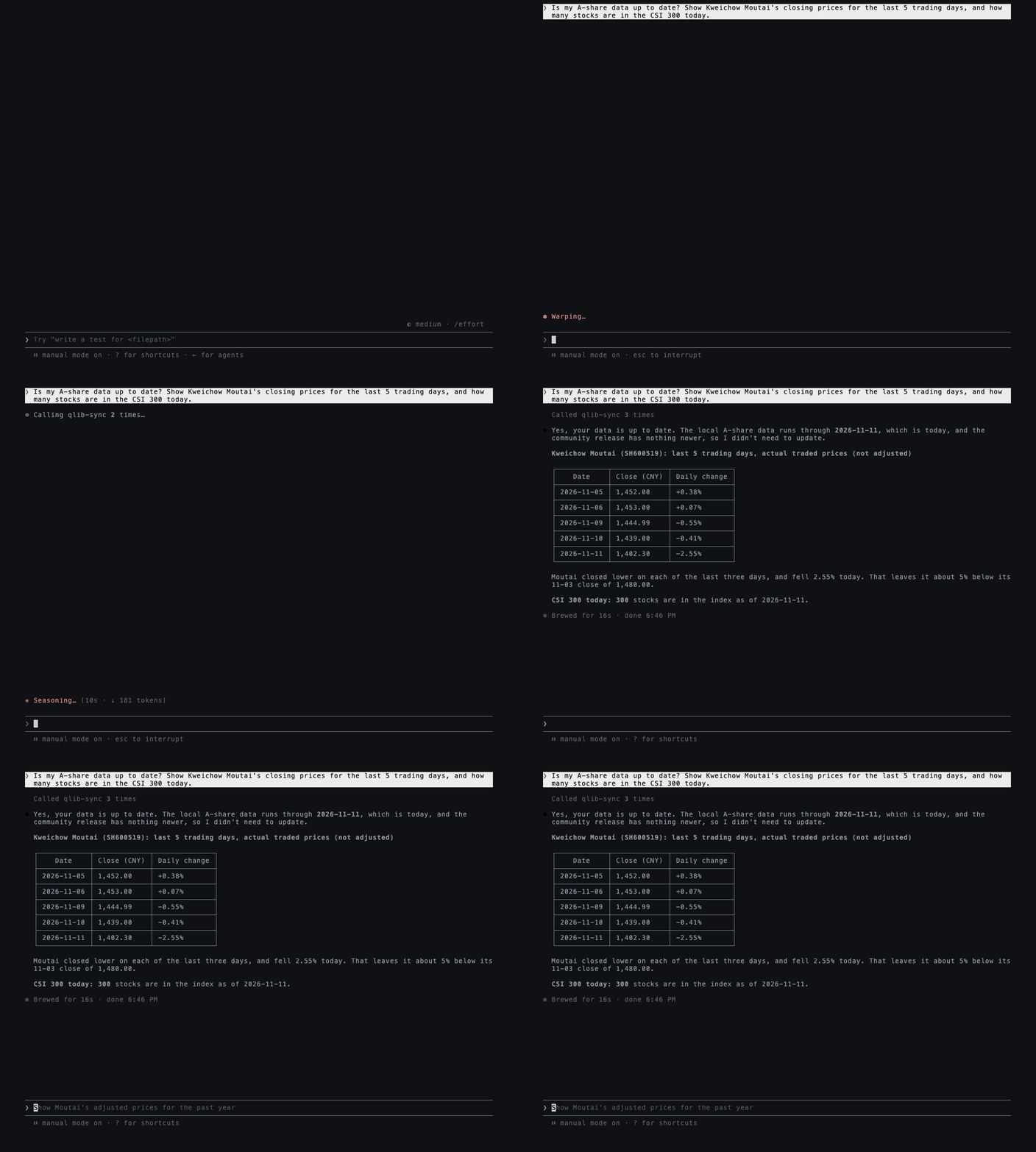
Then ask things like "Is my A-share data current? What did Moutai close at over the last
week?" Symbols accept 600519, SH600519, or 600519.SH.
skills/qlib-sync/SKILL.md teaches an assistant when to update,
how to read each failure, and the price conventions. It uses the open SKILL.md format that
Claude, Codex, and other agents load from their skills folder; any assistant can also simply
be pointed at the file.
Daily updates
A run that finds nothing new costs one small request, so schedule it daily. See docs/scheduling.md for cron and launchd examples.
Data and credits
All data comes from chenditc/investment_data
(Apache-2.0). qlib-sync only downloads the public release; it does not host or redistribute
data. Prices follow Qlib's convention: $close is adjusted and the real price is
$close / $factor.
qlib-sync is an independent project, not affiliated with Microsoft or the Qlib team.
Supported: macOS and Linux, Python 3.10 to 3.12 (pyqlib does not publish wheels for newer
versions yet; uvx picks a compatible Python automatically).
Development
uv venv && uv pip install -e ".[dev]"
.venv/bin/python -m pytest
License
MIT
1 maintainer

Metadata
1 maintainer
Release files for qlib-sync 0.1.0
For a detailed explanation of source distributions (sdists) and built distributions (wheels), please see the package formats documentation.
Source distribution (sdist)
| File | Size | Uploaded | Provenance | Actions |
|---|---|---|---|---|
| qlib_sync-0.1.0.tar.gz | 43.0 kB | With provenance | Details for qlib_sync-0.1.0.tar.gz |
Built distribution (wheel)
| File | Interpreter | ABI | Platform | Actions Reset |
|---|---|---|---|---|
| qlib_sync-0.1.0-py3-none-any.whl | Python 3 | none | any | Details for qlib_sync-0.1.0-py3-none-any.whl |
Total release size: 71.0 kB
Release files / qlib_sync-0.1.0.tar.gz
| Download URL | qlib_sync-0.1.0.tar.gz |
|---|---|
| Size | 43.0 kB |
| Tags | Source |
|
SHA-256 checksum How to use checksums |
33fd81b1d3236d4925e2239b862763e6e4af61c75e2dd2bbcff700dfdbf9d19a
|
|
BLAKE2b-256 checksum How to use checksums |
29a0775875a3a5fbea0843160c56cec98ac062febd79bb8f3c2ce78cd8ff17ce
|
| Upload date | |
|
Uploaded using Trusted Publishing? What is trusted publishing? |
Yes |
| Uploaded via |
twine/7.0.0 CPython/3.13.16
|
Provenance
Provenance describes where a file came from. On PyPI, provenance is shared via attestations, which provide a verifiable record of the build or publishing details. View details, limitations and caveats.


PyPI Publish Attestation
PyPI verified that this artifact, at this checksum, originated from the publisher listed below.
Signed by GitHub Actions, verified by PyPI on Nov 12, 2026.
Transparency logRelease files / qlib_sync-0.1.0-py3-none-any.whl
| Download URL | qlib_sync-0.1.0-py3-none-any.whl |
|---|---|
| Size | 28.1 kB |
| Tags | Python 3 |
|
SHA-256 checksum How to use checksums |
7bd9637b6c7108b4ad394f69d43a60d85b415873ea5c9947754f38a8e481f1b3
|
|
BLAKE2b-256 checksum How to use checksums |
59496662912f86a0b803640fe3466e47022706beb98052dafdda352c1dba3309
|
| Upload date | |
|
Uploaded using Trusted Publishing? What is trusted publishing? |
Yes |
| Uploaded via |
twine/7.0.0 CPython/3.13.16
|
Provenance
Provenance describes where a file came from. On PyPI, provenance is shared via attestations, which provide a verifiable record of the build or publishing details. View details, limitations and caveats.
PyPI Publish Attestation
PyPI verified that this artifact, at this checksum, originated from the publisher listed below.
Signed by GitHub Actions, verified by PyPI on Nov 12, 2026.
Transparency logSecurity for qlib-sync 0.1.0
Provenance
Provenance describes where a file came from. On PyPI, provenance is shared via attestations, which provide a verifiable record of the build or publishing details. View details, limitations and caveats.
Full provenance
Both files in this release have been uploaded with provenance metadata.
Attestation for qlib_sync-0.1.0.tar.gz
PyPI Publish Attestation
PyPI verified that this artifact, at this checksum, originated from the publisher listed below.
Signed by GitHub Actions, verified by PyPI on Nov 12, 2026.
Transparency logA note on package security
PyPI is a repository for distributing packages, not a service for auditing them. While third-party security researchers and our staff do their best to detect and remove malicious packages, PyPI cannot guarantee the quality, security or suitability of any given package.
To learn more about protecting yourself from malicious actors, visit our package security documentation.














