
QLineage CLI
Local SQL + dbt lineage for Snowflake and Redshift. No warehouse connection required.
QLineage CLI answers a simple question while you are working locally:
What feeds this SQL model, and how does the query get there?
It parses SQL locally with SQLGlot and can use dbt's target/manifest.json + compiled SQL when available. The package installs as qlineage-cli and the command is qlineage.
Install
Once published to PyPI:
uv tool install qlineage-cli
or:
pipx install qlineage-cli
For development / GitHub installs:
uv tool install git+https://github.com/MarkPhamm/qlineage_cli.git
Quick start
qlineage models/marts/fct_orders.sql --dialect snowflake
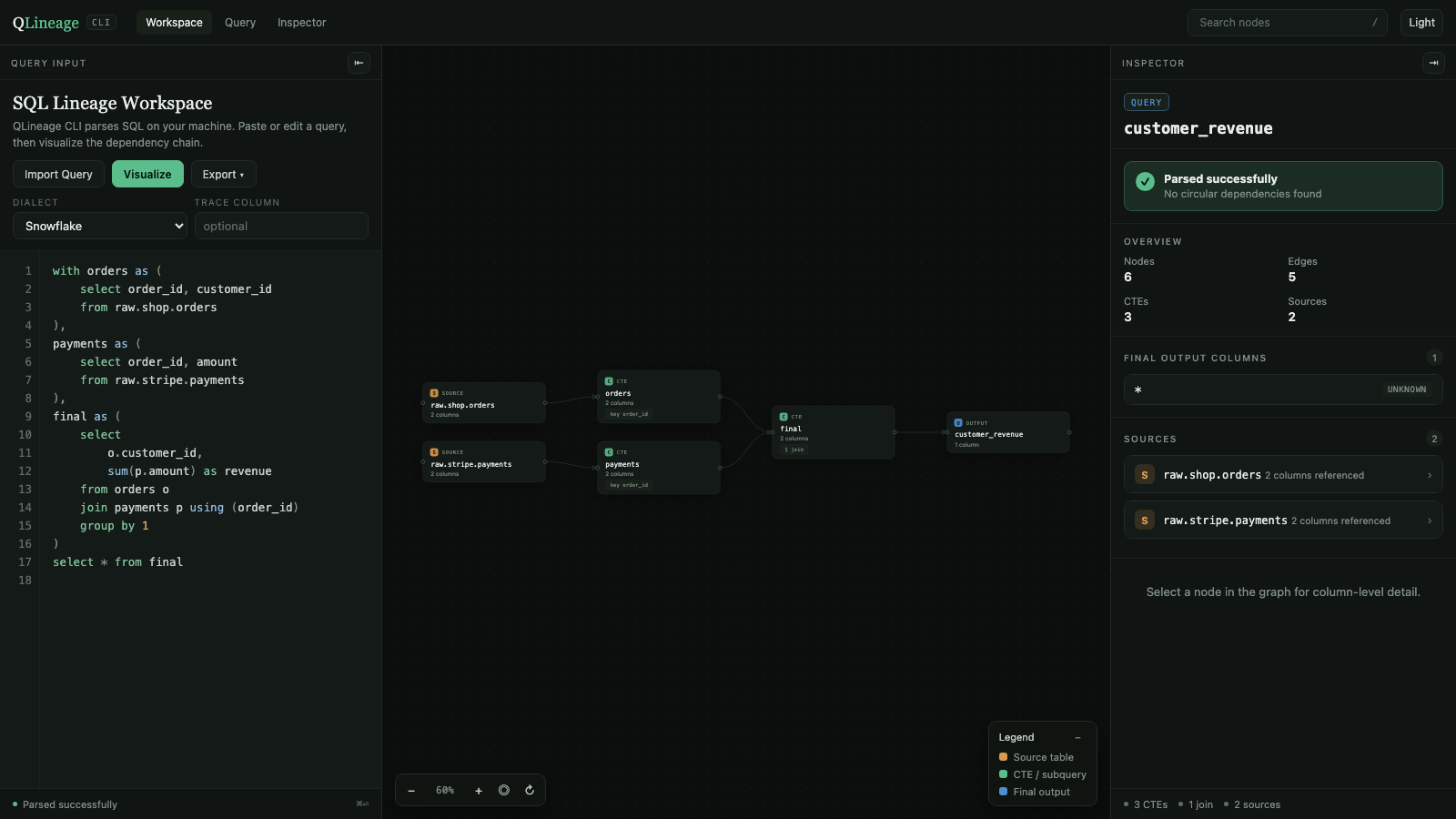
That parses the SQL and opens the workspace in your browser, backed by a local server on 127.0.0.1 so you can keep editing the query and press Visualize to rebuild the graph. Press Ctrl-C in the terminal to stop it.
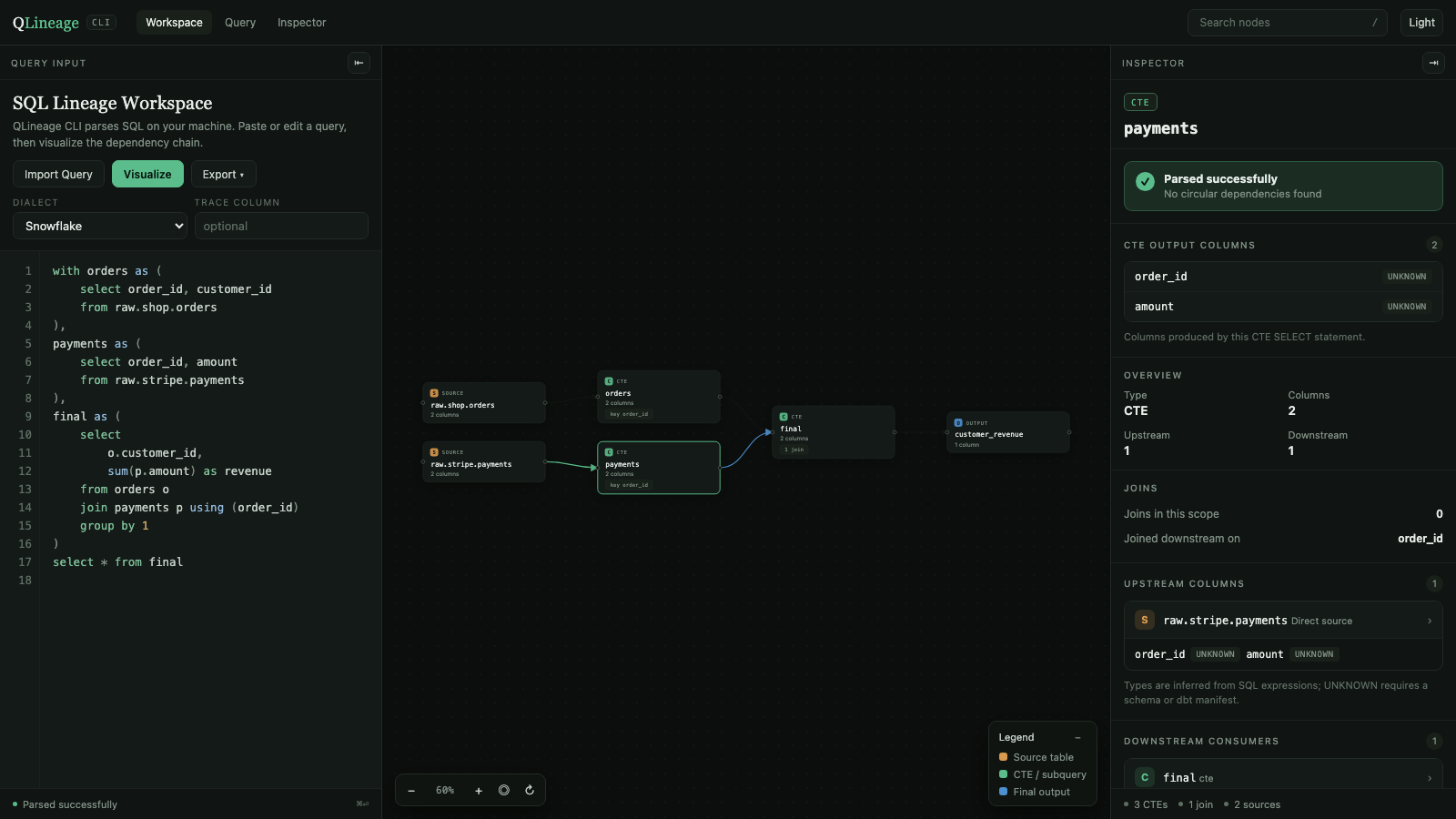
Select any node to inspect its columns, types, joins, and SQL:
To print a tree in the terminal instead:
qlineage models/marts/fct_orders.sql --format tree
fct_customer_revenue
├── orders
│   └── ref:stg_orders
└── payments
    └── source:stripe.payments
Raw SQL works too:
qlineage query.sql --dialect redshift
dbt-aware mode
If a target/manifest.json exists in the project, QLineage CLI auto-discovers it.
When the SQL file matches a dbt model, it prefers the model's compiled SQL and maps physical relations back to friendly dbt names where possible.
dbt compile
qlineage models/marts/fct_customer_revenue.sql
To show the recursive dbt DAG instead of the internal SQL/CTE graph:
qlineage models/marts/fct_customer_revenue.sql --dbt-graph
or select a model directly:
qlineage --model fct_customer_revenue --dbt-graph
Column lineage
qlineage models/marts/fct_customer_revenue.sql --column revenue
Column lineage uses SQLGlot's lineage engine. It is strongest when dbt compiled SQL is available and columns are explicitly selected.
Export
JSON:
qlineage query.sql --format json
Mermaid:
qlineage query.sql --format mermaid
HTML is the default output. Piping or --no-open writes a self-contained static snapshot instead of starting the workspace server; the snapshot renders the same page but cannot re-analyze edited SQL. From inside the workspace you can also export the graph as SVG, PNG, or JSON.
qlineage query.sql
qlineage query.sql --no-open > lineage.html
qlineage query.sql --port 9000
Example:
flowchart TD
  fct_customer_revenue --> orders
  fct_customer_revenue --> payments
  orders --> stg_orders
  payments --> stripe_payments
Local workspace
Passing a SQL file opens the workspace with that query loaded. To start from a blank page instead:
qlineage ui
qlineage ui --port 8765 --dialect snowflake --no-open
Either way, parsing happens in Python on localhost; nothing is sent to a warehouse.
Query panel. Paste or import SQL with syntax highlighting and line numbers, pick a dialect, optionally name a column to trace, then choose Visualize. Editing the query and visualizing again rebuilds the graph in place.
The output node is named after the file or dbt model you opened, but only while the query still matches that file. Once you edit it, the name comes from the SQL itself: the target of a create table ... as or insert into, or final output for a plain SELECT.
Canvas. Drag nodes to rearrange them, drag the background to pan, and zoom with the controls or Cmd/Ctrl + scroll. Each node card shows its kind, name, column count, and either its join count or the key it is joined on downstream.
Inspector. Selecting a node shows parse status, its output columns with inferred types, an overview of upstream and downstream counts, join details, the exact columns consumed from each upstream relation, downstream consumers, and the SQL that produced that node.
Layout. Drag either panel edge to resize it, double-click an edge to reset it, or use the header tabs and the arrow buttons to hide a panel entirely. The theme toggle switches between dark and light.
Keyboard shortcuts
| Shortcut | Action |
|---|---|
Cmd/Ctrl + Enter |
Visualize the current query |
/ |
Focus the node search box |
Enter in search |
Select the first matching node |
Esc |
Clear the selection and close menus |
Command reference
qlineage [SQL_FILE] [options]
qlineage ui [options]
qlineage [SQL_FILE]
| Option | Default | Description |
|---|---|---|
--dialect snowflake|redshift |
snowflake |
SQL dialect used for parsing |
--format html|tree|json|mermaid |
html |
html opens the workspace; the rest print to the terminal |
--column COLUMN |
none | Trace a single output column through the query |
--model MODEL |
none | dbt model name or unique id; usable without a SQL file |
--manifest PATH |
auto-discovered | Path to a dbt target/manifest.json |
--dbt-graph |
off | Show the recursive dbt model/source DAG instead of CTE lineage |
--depth N |
unlimited | Maximum depth for --dbt-graph |
--no-dbt |
off | Skip dbt manifest auto-discovery |
--no-open |
off | Write a static HTML snapshot to stdout instead of serving |
--port N |
8765 |
Workspace port; falls back to a free port if taken |
qlineage ui
| Option | Default | Description |
|---|---|---|
--port N |
8765 |
Port to listen on |
--dialect snowflake|redshift |
snowflake |
Default dialect in the page |
--no-open |
off | Start the server without opening a browser |
Why local-first?
- no Snowflake credentials
- no Redshift credentials
- no SQL sent to a hosted service
- useful inside an editor, terminal, CI job, or PR workflow
- dbt metadata is already available locally after compile/build
Current scope
Supported
- Snowflake SQL
- Redshift SQL
- CTE/table-level lineage
- dbt
ref()/source()fallback parsing - dbt
manifest.jsonauto-discovery - compiled dbt SQL when available
- recursive dbt model/source lineage
- single-output-column lineage
- per-node output columns with types inferred from SQL expressions
- join detection and join keys per node
- terminal, JSON, Mermaid, and HTML output
- local browser workspace with resizable panes, a highlighted SQL editor, and a column inspector
- SVG, PNG, and JSON export from the workspace
Not yet
- schema-aware
SELECT *expansion from a live warehouse - macros that require executing arbitrary Jinja when no compiled SQL exists
- semantic layer / exposures / metrics
Those are good candidates for later releases.
Development
git clone https://github.com/MarkPhamm/qlineage_cli.git
cd qlineage_cli
python -m venv .venv
source .venv/bin/activate
pip install -e '.[dev]'
pytest
ruff check .
Try the included example:
qlineage examples/sql/customer_revenue.sql --dialect snowflake
qlineage examples/dbt/models/fct_customer_revenue.sql --dialect snowflake
qlineage ui --no-open
Release to PyPI
The repository includes a Trusted Publishing GitHub Actions workflow. After creating the qlineage-cli project on PyPI and configuring GitHub as a trusted publisher, publishing a GitHub Release will build and publish the package.
Screenshots in this README live in docs/ and are regenerated from examples/sql/customer_revenue.sql.
License
MIT
1 maintainer

Metadata
1 maintainer
Release files for qlineage-cli 0.2.0
For a detailed explanation of source distributions (sdists) and built distributions (wheels), please see the package formats documentation.
Source distribution (sdist)
| File | Size | Uploaded | Provenance | |
|---|---|---|---|---|
| qlineage_cli-0.2.0.tar.gz | 351.3 kB | With provenance | Details |
Built distribution (wheel)
| File | Interpreter | ABI | Platform | Reset |
|---|---|---|---|---|
| qlineage_cli-0.2.0-py3-none-any.whl | Python 3 | none | any | Details |
Total release size: 385.7 kB
Release files / qlineage_cli-0.2.0.tar.gz
| Download URL | qlineage_cli-0.2.0.tar.gz |
|---|---|
| Size | 351.3 kB |
| Tags | Source |
|
SHA-256 checksum How to use checksums |
8f5b0e4879c4e4d26aab7b0ef4a0bef000b2b6fc41ef157a55df6dd73c0a00af
|
|
BLAKE2b-256 checksum How to use checksums |
7aba86c76b1027f1b9325d16239df15bcbc1acfceb6122584438c4cecca8b1a0
|
| Upload date | |
|
Uploaded using Trusted Publishing? What is trusted publishing? |
Yes |
| Uploaded via |
twine/7.0.0 CPython/3.13.14
|
Provenance
Provenance describes where a file came from. On PyPI, provenance is shared via attestations, which provide a verifiable record of the build or publishing details. View details, limitations and caveats.


PyPI Publish Attestation
PyPI verified that this artifact, at this checksum, originated from the publisher listed below.
Signed by GitHub Actions, verified by PyPI on Sep 2, 2026.
Transparency logRelease files / qlineage_cli-0.2.0-py3-none-any.whl
| Download URL | qlineage_cli-0.2.0-py3-none-any.whl |
|---|---|
| Size | 34.3 kB |
| Tags | Python 3 |
|
SHA-256 checksum How to use checksums |
fc9a5e95417cbd49d9cc8ab01d1b03ea487100e2159a7879d0a7d1db7651f082
|
|
BLAKE2b-256 checksum How to use checksums |
9647a1b1f7046da8f1d2eac305cb3edbc5aa9a1d754341111e0e484232040b6c
|
| Upload date | |
|
Uploaded using Trusted Publishing? What is trusted publishing? |
Yes |
| Uploaded via |
twine/7.0.0 CPython/3.13.14
|
Provenance
Provenance describes where a file came from. On PyPI, provenance is shared via attestations, which provide a verifiable record of the build or publishing details. View details, limitations and caveats.
PyPI Publish Attestation
PyPI verified that this artifact, at this checksum, originated from the publisher listed below.
Signed by GitHub Actions, verified by PyPI on Sep 2, 2026.
Transparency logSecurity for qlineage-cli 0.2.0
Provenance
Provenance describes where a file came from. On PyPI, provenance is shared via attestations, which provide a verifiable record of the build or publishing details. View details, limitations and caveats.
Full provenance
All 2 files in this release have been uploaded with provenance metadata.
Attestation for qlineage_cli-0.2.0.tar.gz
PyPI Publish Attestation
PyPI verified that this artifact, at this checksum, originated from the publisher listed below.
Signed by GitHub Actions, verified by PyPI on Sep 2, 2026.
Transparency logA note on package security
PyPI is a repository for distributing packages, not a service for auditing them. While third-party security researchers and our staff do their best to detect and remove malicious packages, PyPI cannot guarantee the quality, security or suitability of any given package.














