
QnA Builder






Introduction
QnA Builder is a simple, no-code way to build chatbots in Python. It provides a similarity-based conversational dialog engine, QnA Bot, which makes it easy to generate automated responses to input questions according to a set of known conversations, i.e., question-answer pairs, stored in a knowledge base. QnA Bot relies on a collection of question-answer pairs to generate answers for new inputs.
Install
The easiest way to install the qna-builder is by using pip:
pip install qna-builder
This library is shipped as an all-in-one module implementation with minimalistic dependencies and requirements.
Getting started
A QnA Bot can be set up and used in four simple steps:
- Import
QnABotclass
from qnabuilder import QnABot
- Initialize a bot
bot = QnABot()
- Fit the bot engine to a knowledge base
bot.fit(kb="knowledge_base.json")
- Generate answers
bot.answer("Hey. What's up?")
"All good. What's up with you?"
Algorithms
Currently, QnA Bot engine supports the following algorithms for similarity-based answer generation:
- TF-IDF Vectorization (
'tfidf') - Murmurhash3 Vectorization (
'murmurhash') - Count Vectorization (
'count')
Supported similarity metrics are as follows:
- Cosine similarity (
'cosine') - Euclidean distance (
'euclidean') - Manhattan distance (
'manhattan')
Knowledge base editor
By calling run_editor() method of QnAKnowledgeBase class, the knowledge base editor window will open up in
your web browser and allows you to edit your knowledge base by adding, removing, or modifying questions/answers.
from qnabuilder import QnAKnowledgeBase

kb = QnAKnowledgeBase('my_knowledge_base.json')
kb.run_editor()
Here, you can see a screenshot of the knowledge base editor:
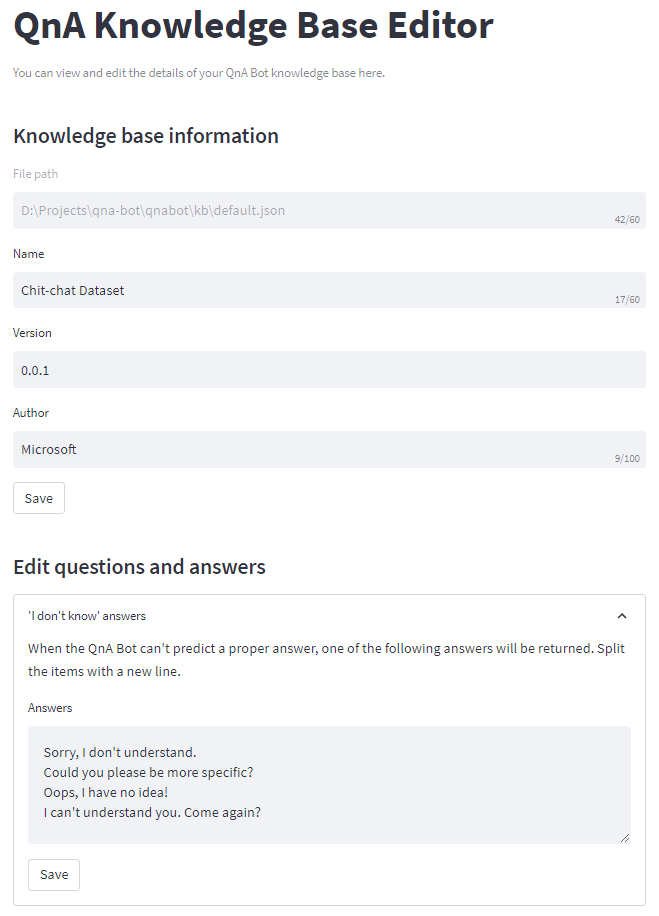
Note that you need to install the optional requirement streamlit to be able to use the knowledge base editor.
Tests
To run the tests, install development requirements:
pip install -r requirements_dev.txt
Then, run pytest:
pytest
1 maintainer

Metadata
1 maintainer
Release files for qna-builder 0.1.3
For a detailed explanation of source distributions (sdists) and built distributions (wheels), please see the package formats documentation.
Source distribution (sdist)
| File | Size | Uploaded | Provenance | |
|---|---|---|---|---|
| qna-builder-0.1.3.tar.gz | 6.3 kB | Without provenance | Details |
Built distribution (wheel)
| File | Interpreter | ABI | Platform | Reset |
|---|---|---|---|---|
| qna_builder-0.1.3-py3-none-any.whl | Python 3 | none | any | Details |
Total release size: 12.8 kB
Release files / qna-builder-0.1.3.tar.gz
| Download URL | qna-builder-0.1.3.tar.gz |
|---|---|
| Size | 6.3 kB |
| Tags | Source |
|
SHA-256 checksum How to use checksums |
a5c1c5429a54b91dd24ec85c2463a8cf8cabebd6fba3ec0f634fb1b3747b9ad9
|
|
BLAKE2b-256 checksum How to use checksums |
15f6439bf873040b39bcdc353ab621c6b5e5527f190edbfa0bf8485602688b45
|
| Upload date | |
|
Uploaded using Trusted Publishing? What is trusted publishing? |
No |
| Uploaded via |
twine/4.0.2 CPython/3.9.17
|
Release files / qna_builder-0.1.3-py3-none-any.whl
| Download URL | qna_builder-0.1.3-py3-none-any.whl |
|---|---|
| Size | 6.5 kB |
| Tags | Python 3 |
|
SHA-256 checksum How to use checksums |
617c039298ddf47759a8c7f657c077938348f518f2b3f7f9c58c6f302c0229b0
|
|
BLAKE2b-256 checksum How to use checksums |
9037c48a0fe15f5fe3a54c5d95c4156dc7b86f18252a5dd22af56058e6446665
|
| Upload date | |
|
Uploaded using Trusted Publishing? What is trusted publishing? |
No |
| Uploaded via |
twine/4.0.2 CPython/3.9.17
|
Security for qna-builder 0.1.3
Provenance
Provenance describes where a file came from. On PyPI, provenance is shared via attestations, which provide a verifiable record of the build or publishing details. View details, limitations and caveats.
No provenance found
None of the files in this release were uploaded with provenance metadata.
A note on package security
PyPI is a repository for distributing packages, not a service for auditing them. While third-party security researchers and our staff do their best to detect and remove malicious packages, PyPI cannot guarantee the quality, security or suitability of any given package.














