
Quantum Resource Estimation Format

Project description
QREF
Quantum Resource Estimation Format (QREF) is an open format for representing quantum algorithms, optimized for usage in quantum resource estimation (QRE).
QREF comprises:
- Definition of data format, formalized as a JSON schema.
- A Python library for validation of quantum programs written in QREF format using Pydantic.
- Rudimentary visualization tool
qref-render.
Installation
Using QREF data format does not require installation - you can easily write quantum programs in YAML or JSON.
To install QREF Python package, run pip install qref.
Alternatively, you can clone this repository and build it from source:
# Clone QREF repo (you can use HTTP link as well)
git clone git@github.com:PsiQ/qref.git
cd qref
pip install .
QREF format
QREF format represents quantum programs as a hierarchical directed acyclic graphs (DAGs). That's a mouthful, so let us unpack what it means:
- hierarchical: each node can contain subgraphs, i.e. routines can be nested inside larger routines.
- directed: information flow is unidirectional, and the direction is unambiguous.
- acyclic: meaning there are no loops.
Consider the following hierarchical DAG of a hypothetical quantum program:
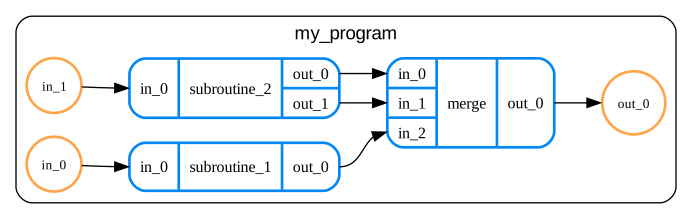
It can be succinctly written in QREF format as:
version: v1
program:
  name: my_algorithm
  ports:
  - direction: input
    name: in_0
    size: 2
  - direction: input
    name: in_1
    size: 2
  - direction: output
    name: out_0
    size: 4
  children:
  - name: subroutine_1
    ports:
    - direction: input
      name: in_0
      size: 2
    - direction: output
      name: out_0
      size: 3
  - name: subroutine_2
    ports:
    - direction: input
      name: in_0
      size: 2
    - direction: output
      name: out_0
      size: 1
    - direction: output
      name: out_1
      size: 1
  - name: merge
    ports:
    - direction: input
      name: in_0
      size: 1
    - direction: input
      name: in_1
      size: 1
    - direction: input
      name: in_2
      size: 2
    - direction: output
      name: out_0
      size: 4
  connections:
  - source: in_0
    target: subroutine_1.in_0
  - source: in_1
    target: subroutine_2.in_0
  - source: subroutine_1.out_0
    target: merge.in_2
  - source: subroutine_2.out_0
    target: merge.in_0
  - source: subroutine_2.out_1
    target: merge.in_1
  - source: merge.out_0
    target: out_0
For full description of QREF format, check our docs.
Using QREF package
Using JSON schema for validating data in QREF format
JSON schema for QREF format can be obtained by calling generate_program_schema function.
Such schema can be then used for validating user's input, e.g. using jsonschema package:
from jsonschema import validate
from qref import generate_program_schema

# Hypothetical function loading your data as native Python dictionary.
data = load_some_program()
schema = generate_program_schema()

# This will raise if there are some validation errors.
validate(schema, data)
Validation using Pydantic models
If you are familiar with Pydantic, you might find it easier to work with QREF Pydantic
models instead of interacting with JSON schema directly. In the example below, we create
an instance of SchemaV1 model from validated data stored in QREF format:
from qref import SchemaV1

data = load_some_program()

# This will raise if data is not valid
program = SchemaV1.model_validate(data)
Development
In order to install development environment or build documentation locally, please refer to Development Guide.
Documentation
Documentation for qref can be found here.
To run docs locally install it with docs option: pip install ".[docs]" (or poetry install --with docs) and then run mkdocs serve.
Release history Release notifications | RSS feed


Download files
Download the file for your platform. If you're not sure which to choose, learn more about installing packages.
Source Distribution
Built Distribution
Filter files by name, interpreter, ABI, and platform.
If you're not sure about the file name format, learn more about wheel file names.
Copy a direct link to the current filters
File details
Details for the file qref-0.2.0.tar.gz.
File metadata
- Download URL: qref-0.2.0.tar.gz
- Upload date:
- Size: 10.2 kB
- Tags: Source
- Uploaded using Trusted Publishing? No
- Uploaded via: twine/5.1.0 CPython/3.11.9
File hashes
| Algorithm | Hash digest | |
|---|---|---|
| SHA256 |
b745f2b002565e51ede5eb91586208ee13a98af7e381dddca17d5e0c043796a8
|
|
| MD5 |
f38fe4faa58b231d555526d1e9693c53
|
|
| BLAKE2b-256 |
57daf72f74af6f2b92932cd60e665b0bde0805e0fb85dfe7aeb4dee12af7acbd
|
File details
Details for the file qref-0.2.0-py3-none-any.whl.
File metadata
- Download URL: qref-0.2.0-py3-none-any.whl
- Upload date:
- Size: 12.9 kB
- Tags: Python 3
- Uploaded using Trusted Publishing? No
- Uploaded via: twine/5.1.0 CPython/3.11.9
File hashes
| Algorithm | Hash digest | |
|---|---|---|
| SHA256 |
b736247248e80dc7d6509d682b00562e0e23b7fead5370985f0740da9a0b74cd
|
|
| MD5 |
529799f18a8de54a3d8d9a616b290642
|
|
| BLAKE2b-256 |
c4214e07386164e913c400b117c01f94ba72fe7cef6ae1b5fd38ec3d3c133d44
|






