









QRPorter — Local Wi‑Fi QR File Transfer
A lightweight desktop + web utility for moving files between a mobile device and a Desktop PC over the local network. Scan a QR code to send or receive files directly on the LAN—no cloud, no cables, no mobile app and no accounts.
Why QRPorter
- Simple: one‑click “Send to mobile” or “Get from mobile” for quick transfers.
- Private: traffic stays on the local network; nothing is uploaded to third‑party servers.
- Cross‑device: works with modern mobile browsers (iOS/Android) and Windows, Linux & MacOS desktop.
Features
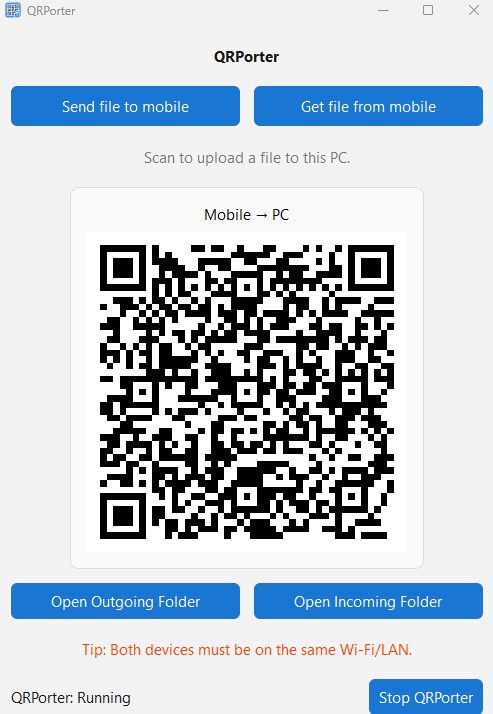
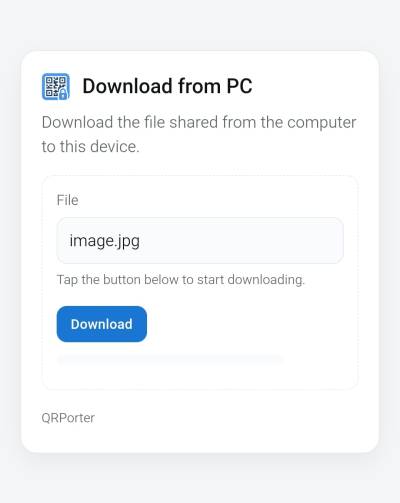
- PC → Mobile: Select the file & generate a QR code; scan to download the selected file on your mobile.
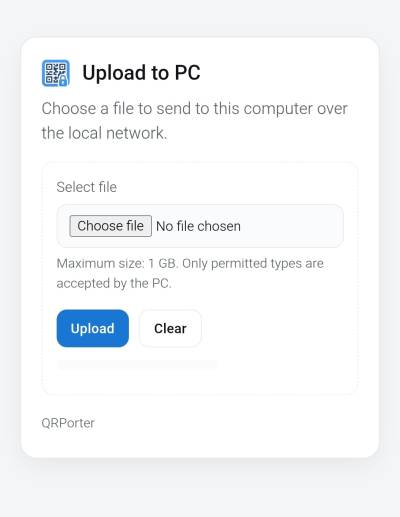
- Mobile → PC: Generate the QR code, visit the upload page from the QR on mobile; send a file back to the PC.
- One‑time session tokens and basic rate limiting for local safety.
- Send/Receive multiple files at once.
Screenshots
Installation
You can install QRPorter directly from PyPI:
pip install qrporter
Requirements Python 3.12+ Works on Windows, macOS, and Linux
Running the App After installation, you can start QRPorter from the terminal:
qrporter
Requirements
- Windows 11 (tested), Linux, MacOS
- Python 3.12+ with pip
- Same Wi‑Fi/LAN for both PC and phone
Required Python packages (minimum versions):
- Flask>=3.1.2
- PySide6>=6.6.1
- qrcode>=8.2
- Werkzeug>=3.1.3
- Pillow>=11.0.0
- platformdirs>=4.0.0
Setup on Windows 11
- Install Python
- Download and install Python 3.12+ (ensure “Add Python to PATH” is checked).
- Verify:
python --version
pip --version
- Clone the repository
git clone https://github.com/manikandancode/qrporter.git
cd qrporter
- Create and activate a virtual environment
python -m venv venv
venv\Scripts\activate
- Install dependencies
- If you have a requirements.txt:
pip install -r requirements.txt - Or install individually with minimum versions:
pip install "Flask>=3.1.2" "PySide6>=6.6.1" "qrcode>=8.2" "Werkzeug>=3.1.3" "Pillow>=11.0.0" "platformdirs>=4.0.0"
- Run the desktop app
- If the project provides a launcher:
python run.py
How to Use
- Send file to mobile (PC → Mobile):
- Click “Send file to mobile.”
- Pick a file (or multiple); a QR code appears.
- Scan the QR with the phone camera/browser to download.
- Get file from mobile (Mobile → PC):
- Click “Get file from mobile.”
- Scan the QR displayed on the phone.
- Choose a file (or multiple) on the phone and upload it; the PC saves it locally.
Default folders (auto‑created):
- Outgoing:
shared/ - Incoming:
received/
Use the “Open Outgoing/Incoming Folder” buttons in the UI to open these locations.
Tips & Troubleshooting
- Phone can’t open the link:
- Ensure PC and phone are on the same Wi‑Fi; avoid guest/isolated networks.
- Allow Python in Windows Defender Firewall for Private networks.
- Very slow uploads:
- Keep the phone screen on and the browser in the foreground (backgrounding throttles).
- Prefer 5 GHz Wi‑Fi and short distance to the access point.
- Save to an SSD when possible.
- URL shows a tuple like
('192.168.x.x', 52546):
- Ensure the app uses only
getsockname()[0](IP string) when forming URLs and restart the app.
- File size limit:
- 1GG per transper.
Project Rationale
QRPorter focuses on frictionless, local‑only transfers for everyday workflows—moving screenshots, media, or documents between PC and phone—without cloud services, cables, drivers, or mobile app installs on mobile.
License
This project is licensed under the MIT License. See the LICENSE file for details.
1 maintainer

Metadata
1 maintainer
Release files for qrporter 3.0.0
For a detailed explanation of source distributions (sdists) and built distributions (wheels), please see the package formats documentation.
Source distribution (sdist)
| File | Size | Uploaded | Provenance | |
|---|---|---|---|---|
| qrporter-3.0.0.tar.gz | 204.8 kB | Without provenance | Details |
Built distribution (wheel)
| File | Interpreter | ABI | Platform | Reset |
|---|---|---|---|---|
| qrporter-3.0.0-py3-none-any.whl | Python 3 | none | any | Details |
Total release size: 408.7 kB
Release files / qrporter-3.0.0.tar.gz
| Download URL | qrporter-3.0.0.tar.gz |
|---|---|
| Size | 204.8 kB |
| Tags | Source |
|
SHA-256 checksum How to use checksums |
9c6c60c7f0752aca6cff55611f339ec2017300bcc2ca3fb2255912c0ca04c95f
|
|
BLAKE2b-256 checksum How to use checksums |
dc9ceff3200a6ce2de68b4118c7a7f0dbb21965f486ae28d4ac0276c0046d08e
|
| Upload date | |
|
Uploaded using Trusted Publishing? What is trusted publishing? |
No |
| Uploaded via |
twine/6.2.0 CPython/3.13.3
|
Release files / qrporter-3.0.0-py3-none-any.whl
| Download URL | qrporter-3.0.0-py3-none-any.whl |
|---|---|
| Size | 203.9 kB |
| Tags | Python 3 |
|
SHA-256 checksum How to use checksums |
4b3345ac3b5644ddfc808c431ead29917feb0e80c66ae43c92e6af00e7ed6cab
|
|
BLAKE2b-256 checksum How to use checksums |
dedb275c94c2af4ffbbe73d54e09ced84ada6b4d1fa1a4501e155c835f73f85f
|
| Upload date | |
|
Uploaded using Trusted Publishing? What is trusted publishing? |
No |
| Uploaded via |
twine/6.2.0 CPython/3.13.3
|
Security for qrporter 3.0.0
Provenance
Provenance describes where a file came from. On PyPI, provenance is shared via attestations, which provide a verifiable record of the build or publishing details. View details, limitations and caveats.
No provenance found
None of the files in this release were uploaded with provenance metadata.
A note on package security
PyPI is a repository for distributing packages, not a service for auditing them. While third-party security researchers and our staff do their best to detect and remove malicious packages, PyPI cannot guarantee the quality, security or suitability of any given package.














