
qsengine
A state-vector quantum simulator for Python. You build circuits in Python; a Rust core runs them on every CPU core or on any GPU, and hands back the results.
pip install qsengine
import qsengine

qc = qsengine.QuantumCircuit(2)
qc.h(0)
qc.cx(0, 1)

print(qc.run(shots=1000, seed=1))   # {'00': 513, '11': 487}
Documentation and guides: qsengine.kaiwave.dev
Why qsengine
- Fast where it counts. Small circuits run on the CPU with almost no per-call overhead; from 14 qubits up, the GPU takes over. On a 22-qubit benchmark qsengine's GPU backend is about 5 times faster than Qiskit Aer.
- Any GPU, nothing to install. The GPU backend uses wgpu, so it runs on NVIDIA, AMD, Intel and Apple GPUs through Vulkan, DirectX 12 or Metal. No CUDA, no vendor toolkit.
- Works everywhere. Without a usable GPU the same code runs on the CPU, in full 64-bit precision.
- Small, plain API. One class, nineteen gates plus any 2x2 unitary, mid-circuit measurement with classically controlled gates, and four ways to get a result: counts, probabilities, amplitudes and Pauli expectation values. Mistakes raise a normal Python
ValueErroron the line that made them. - Built to learn with. The website walks from bra-ket notation to a complete Deutsch-Jozsa run, and every example on it is real qsengine output.
Install
pip install qsengine
One wheel per platform covers CPython 3.9 and newer on Windows, macOS and Linux. A GPU is optional.
Using it
A circuit has a fixed number of qubits, all starting in |0⟩. Gate methods record gates; nothing runs until you ask for a result.
import qsengine

qc = qsengine.QuantumCircuit(3)
qc.h(0)
qc.cx(0, 1)
qc.cx(1, 2)

print(qc)                   # text drawing, one wire per qubit
qc.run(shots=1000)          # measurement counts: {'000': ..., '111': ...}
qc.probabilities()          # probabilities of all 8 basis states, computed, not sampled (NumPy array)
qc.statevector()            # complex amplitudes, computed, not sampled (NumPy array)
qc.expectation("ZZI")       # expectation value of a Pauli string: 1.0
Measuring part-way
Give the circuit classical bits, measure into them at any point, and make later gates depend on them. Teleportation in full:
qc = qsengine.QuantumCircuit(3, 3)  # 3 qubits, 3 classical bits
qc.x(0)                             # the state to teleport: |1>
qc.h(1)
qc.cx(1, 2)
qc.cx(0, 1)
qc.h(0)
qc.measure([0, 1], [0, 1])
with qc.if_test(1, 1):              # if classical bit 1 is 1
    qc.x(2)
with qc.if_test(0, 1):
    qc.z(2)
qc.measure(2, 2)
print(qc.run(shots=1000, seed=1))   # bit 2 (leftmost) is 1 in every shot
qc.reset(q) puts a qubit back to |0⟩ so it can be reused. When a circuit measures, run() counts the classical bits instead of the qubits.
| Gates | Methods |
|---|---|
| Single qubit | x, y, z, h, s, sdg, t, tdg |
| Angles (radians) | rx(q, theta), ry(q, theta), rz(q, theta), p(q, lam), u(q, theta, phi, lam) |
| Two qubit | cx(control, target), cz(control, target), cp(control, target, lam), crz(control, target, theta), swap(q1, q2) |
| Three qubit | ccx(control1, control2, target) |
| Any 2x2 unitary | unitary(matrix, target, controls=[]) |
| Measurement | measure(qubit, clbit), reset(qubit), with if_test(clbits, value): |
Bitstrings put qubit 0 on the right, the same convention as Qiskit. Pass seed to run() for repeatable counts.
Choosing a backend
Every method that runs a circuit takes backend="auto" (the default), "cpu" or "gpu".
| CPU | GPU | auto | |
|---|---|---|---|
| Precision | 64-bit | 32-bit (within about 1e-5 of the CPU for a few hundred gates; error grows with circuit depth) | 64-bit below 14 qubits, 32-bit from 14 |
| Runs on | every CPU core | any NVIDIA, AMD, Intel or Apple GPU | whichever is faster |
| Without a GPU | works | raises RuntimeError |
falls back to the CPU |
With the default "auto", statevector(), probabilities() and expectation() switch from 64-bit to 32-bit results at 14 qubits on a machine with a GPU. Pass backend="cpu" when you need full 64-bit precision at every size, for example in a study that compares results across register sizes.
The full API, every error message and a guide to each topic are in the documentation.
Performance
Each run simulates 5 layers of (H on every qubit, RZ on every qubit, CNOT chain) and samples 1000 shots. Best of at least three runs on a Ryzen 5 5500 with a Radeon RX 6600, Windows 10, Qiskit Aer 0.18.2.
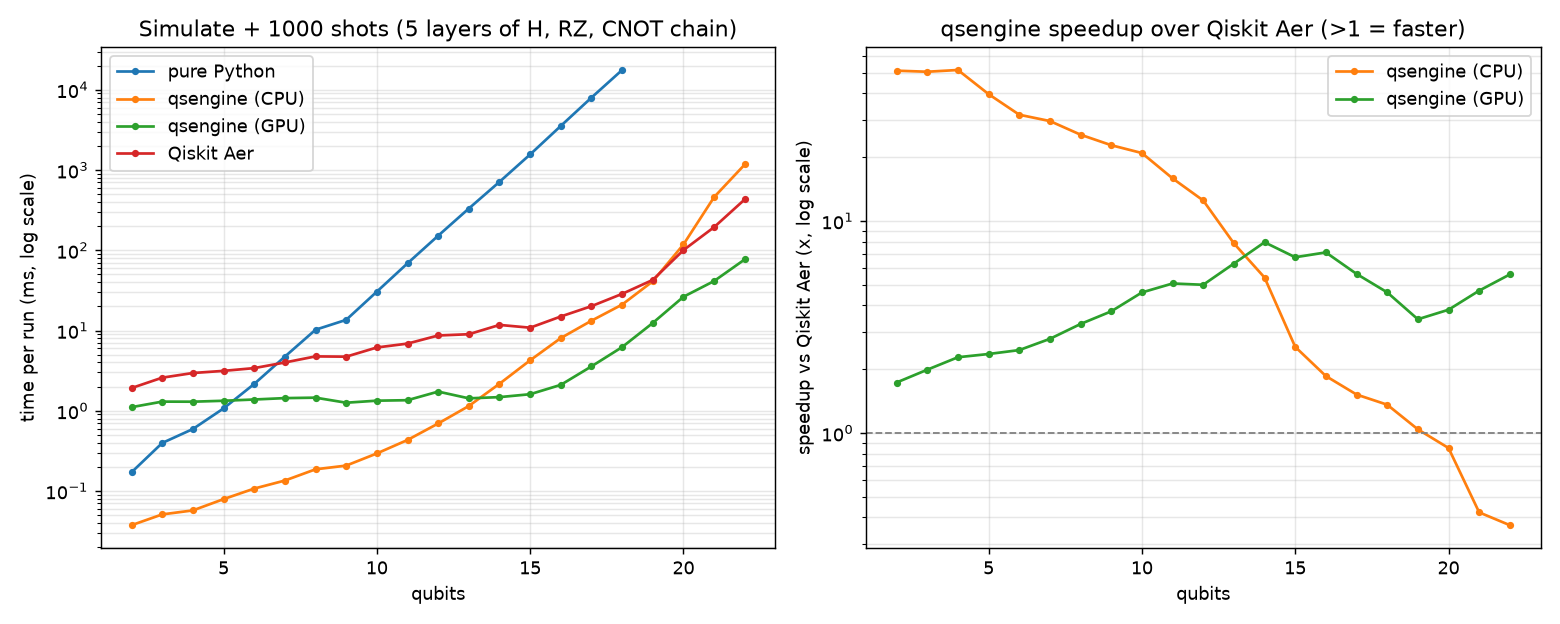
| Qubits | Pure Python | qsengine CPU | qsengine GPU | Qiskit Aer |
|---|---|---|---|---|
| 6 | 2.2 ms | 0.11 ms | 1.4 ms | 3.4 ms |
| 10 | 31 ms | 0.29 ms | 1.3 ms | 6.1 ms |
| 14 | 713 ms | 2.2 ms | 1.5 ms | 11.7 ms |
| 18 | 17.7 s | 21 ms | 6.2 ms | 29 ms |
| 22 | not run | 1.17 s | 77 ms | 431 ms |
Below 14 qubits the CPU backend is 8 to 50 times faster than Aer; from 14 qubits the GPU backend is 3 to 8 times faster. The CPU backend stays ahead of Aer up to 19 qubits and falls behind from 20. At 20 qubits a 64-bit state vector is 16 MiB, the size of this CPU's L3 cache, and the CPU backend's time per extra qubit jumps from about 2× to 3–4×, so the likely cause is the state no longer fitting in cache. These are one machine's numbers: reproduce them with benchmarks/benchmark.py.
Read the comparison with these caveats:
- The qsengine GPU backend computes in 32-bit floats; Aer ran in its default 64-bit precision. Aer's
precision="single"option would be the like-for-like comparison. - Below about 14 qubits Aer's time is mostly its fixed per-call cost (about 2 ms to submit a job and build its result), so the speedups there measure call overhead more than simulation.
- There is one benchmark circuit. qsengine merges the H and RZ on each qubit into one pass over the state, which suits this circuit; other circuits may compare differently.
Limitations
A register holds at most 30 qubits (16 GiB of memory) and 64 classical bits. A circuit that measures part-way is simulated once per shot, so it costs shots times as much as one that only measures at the end. Exact results (statevector(), probabilities(), expectation()) need a circuit that does not measure or reset before a later gate.
On the GPU (backend="gpu", or "auto" from 20 qubits for circuits that measure part-way), each mid-circuit measurement renormalises the state using a 32-bit sum. The small error adds up over many measurements in one shot; use backend="cpu" when that matters.
Building from source
You need a recent Rust toolchain (tested with 1.88) and Python 3.9 or newer.
git clone https://github.com/kaiwave/qsengine
cd qsengine
python -m venv .venv
source .venv/bin/activate       # Windows: .venv\Scripts\activate
pip install maturin pytest numpy
maturin develop --release       # build and install into the venv
Tests:
cargo test --release            # Rust tests (GPU tests skip without a GPU)
pytest                          # Python tests, checked against a NumPy reference
See CONTRIBUTING.md for how the pieces fit together and how to add a gate.
To build without the GPU backend, use cargo build --no-default-features for Rust.
The website lives in site/ (Next.js, static export, maths rendered with KaTeX at build time):
cd site
npm install
npm run dev                     # local preview
npm run build                   # static site in site/out/
Docs pages are Markdown (site/app/docs/**/page.mdx) with $maths$, tables and fenced code; <Output printed="..." /> shows what a snippet prints. To add a page, create its page.mdx and list it in DOCS in site/app/content.js, which drives the sidebar and the previous/next links.
Project layout
src/                Rust core: all simulation
  engine.rs           CPU backend (64-bit, multithreaded with Rayon)
  gpu.rs              GPU backend (wgpu compute shaders in shaders/)
  circuit.rs          QuantumCircuit: records operations, fuses gates, runs them
  pauli.rs            Pauli-string expectation values
  python.rs           PyO3 bindings, built as qsengine._core
python/qsengine/    The Python package: wraps _core, adds the drawer and if_test, type hints
tests/              Python tests against NumPy
benchmarks/         Benchmark script, results and plot
site/               Documentation and learning website
docs/RUST_GUIDE.md  A guide to every Rust feature the engine uses
Licence
1 maintainer

Metadata
1 maintainer
Release files for qsengine 1.1.1
For a detailed explanation of source distributions (sdists) and built distributions (wheels), please see the package formats documentation.
Source distribution (sdist)
| File | Size | Uploaded | Provenance | Actions |
|---|---|---|---|---|
| qsengine-1.1.1.tar.gz | 55.8 kB | With provenance | Details for qsengine-1.1.1.tar.gz |
Built distributions (wheels)
| File | Actions Reset | |||
|---|---|---|---|---|
| qsengine-1.1.1-cp39-abi3-win_amd64.whl | CPython 3.9 | abi3 | Windows x86-64 | Details for qsengine-1.1.1-cp39-abi3-win_amd64.whl |
| qsengine-1.1.1-cp39-abi3-manylinux2014_x86_64.manylinux_2_17_x86_64.whl | CPython 3.9 | abi3 | Linux glibc 2.17+ x86-64 | Details for qsengine-1.1.1-cp39-abi3-manylinux2014_x86_64.manylinux_2_17_x86_64.whl |
| qsengine-1.1.1-cp39-abi3-manylinux2014_aarch64.manylinux_2_17_aarch64.whl | CPython 3.9 | abi3 | Linux glibc 2.17+ ARM64 | Details for qsengine-1.1.1-cp39-abi3-manylinux2014_aarch64.manylinux_2_17_aarch64.whl |
| qsengine-1.1.1-cp39-abi3-macosx_11_0_arm64.whl | CPython 3.9 | abi3 | macOS 11.0+ ARM64 | Details for qsengine-1.1.1-cp39-abi3-macosx_11_0_arm64.whl |
| qsengine-1.1.1-cp39-abi3-macosx_10_12_x86_64.whl | CPython 3.9 | abi3 | macOS 10.12+ x86-64 | Details for qsengine-1.1.1-cp39-abi3-macosx_10_12_x86_64.whl |
Total release size: 9.3 MB
Release files / qsengine-1.1.1.tar.gz
| Download URL | qsengine-1.1.1.tar.gz |
|---|---|
| Size | 55.8 kB |
| Tags | Source |
|
SHA-256 checksum How to use checksums |
c458b7c68a27587f854ec2616c5204fca5dc7c30964d98a3564ca54ae519794f
|
|
BLAKE2b-256 checksum How to use checksums |
60ffd8eb86b0db6cd7373d2cf64985852fe5dc3a8b2ddf00d4a9826a92567125
|
| Upload date | |
|
Uploaded using Trusted Publishing? What is trusted publishing? |
Yes |
| Uploaded via |
twine/7.0.0 CPython/3.13.16
|
Provenance
Provenance describes where a file came from. On PyPI, provenance is shared via attestations, which provide a verifiable record of the build or publishing details. View details, limitations and caveats.


PyPI Publish Attestation
PyPI verified that this artifact, at this checksum, originated from the publisher listed below.
Signed by GitHub Actions, verified by PyPI on Nov 7, 2026.
Transparency logRelease files / qsengine-1.1.1-cp39-abi3-win_amd64.whl
| Download URL | qsengine-1.1.1-cp39-abi3-win_amd64.whl |
|---|---|
| Size | 2.1 MB |
| Tags | CPython 3.9 Windows x86-64 abi3 |
|
SHA-256 checksum How to use checksums |
85ac7ed1a42f051237eebaf1da71411966d013286f873334b76df069653d95e3
|
|
BLAKE2b-256 checksum How to use checksums |
faa097e3ee491a426d8ee1edb8efc6bf33a9fed3e97acaf459f2702201a686b0
|
| Upload date | |
|
Uploaded using Trusted Publishing? What is trusted publishing? |
Yes |
| Uploaded via |
twine/7.0.0 CPython/3.13.16
|
Provenance
Provenance describes where a file came from. On PyPI, provenance is shared via attestations, which provide a verifiable record of the build or publishing details. View details, limitations and caveats.
PyPI Publish Attestation
PyPI verified that this artifact, at this checksum, originated from the publisher listed below.
Signed by GitHub Actions, verified by PyPI on Nov 7, 2026.
Transparency logRelease files / qsengine-1.1.1-cp39-abi3-manylinux2014_x86_64.manylinux_2_17_x86_64.whl
| Download URL | qsengine-1.1.1-cp39-abi3-manylinux2014_x86_64.manylinux_2_17_x86_64.whl |
|---|---|
| Size | 2.0 MB |
| Tags | CPython 3.9 Linux glibc 2.17+ x86-64 abi3 |
|
SHA-256 checksum How to use checksums |
cfd132a5754579519891992226022e924620a25597760178ecffa138093d7191
|
|
BLAKE2b-256 checksum How to use checksums |
14211ac5065cea3585f52a1fe0aab2b3431b58cd456240e1f9e5f9b998e2eaed
|
| Upload date | |
|
Uploaded using Trusted Publishing? What is trusted publishing? |
Yes |
| Uploaded via |
twine/7.0.0 CPython/3.13.16
|
Provenance
Provenance describes where a file came from. On PyPI, provenance is shared via attestations, which provide a verifiable record of the build or publishing details. View details, limitations and caveats.
PyPI Publish Attestation
PyPI verified that this artifact, at this checksum, originated from the publisher listed below.
Signed by GitHub Actions, verified by PyPI on Nov 7, 2026.
Transparency logRelease files / qsengine-1.1.1-cp39-abi3-manylinux2014_aarch64.manylinux_2_17_aarch64.whl
| Download URL | qsengine-1.1.1-cp39-abi3-manylinux2014_aarch64.manylinux_2_17_aarch64.whl |
|---|---|
| Size | 2.0 MB |
| Tags | CPython 3.9 Linux glibc 2.17+ ARM64 abi3 |
|
SHA-256 checksum How to use checksums |
2b2034a912ae883904511865211ff9f0758ec7f3e78994607424603bcc3b9b66
|
|
BLAKE2b-256 checksum How to use checksums |
1767e133176edbad87017e7187fa45f8b8fa167aebbadf8cd5cbfd3688e89a3d
|
| Upload date | |
|
Uploaded using Trusted Publishing? What is trusted publishing? |
Yes |
| Uploaded via |
twine/7.0.0 CPython/3.13.16
|
Provenance
Provenance describes where a file came from. On PyPI, provenance is shared via attestations, which provide a verifiable record of the build or publishing details. View details, limitations and caveats.
PyPI Publish Attestation
PyPI verified that this artifact, at this checksum, originated from the publisher listed below.
Signed by GitHub Actions, verified by PyPI on Nov 7, 2026.
Transparency logRelease files / qsengine-1.1.1-cp39-abi3-macosx_11_0_arm64.whl
| Download URL | qsengine-1.1.1-cp39-abi3-macosx_11_0_arm64.whl |
|---|---|
| Size | 1.5 MB |
| Tags | CPython 3.9 abi3 macOS 11.0+ ARM64 |
|
SHA-256 checksum How to use checksums |
e9f5fd3481efd3ec04106bb2d3bf470300792d628778d7eb0939a6c3b05defb8
|
|
BLAKE2b-256 checksum How to use checksums |
a85fe5b665c4b98fe3cb5210e05d76cbe51490db7331bdfd92615eb62d9cb20f
|
| Upload date | |
|
Uploaded using Trusted Publishing? What is trusted publishing? |
Yes |
| Uploaded via |
twine/7.0.0 CPython/3.13.16
|
Provenance
Provenance describes where a file came from. On PyPI, provenance is shared via attestations, which provide a verifiable record of the build or publishing details. View details, limitations and caveats.
PyPI Publish Attestation
PyPI verified that this artifact, at this checksum, originated from the publisher listed below.
Signed by GitHub Actions, verified by PyPI on Nov 7, 2026.
Transparency logRelease files / qsengine-1.1.1-cp39-abi3-macosx_10_12_x86_64.whl
| Download URL | qsengine-1.1.1-cp39-abi3-macosx_10_12_x86_64.whl |
|---|---|
| Size | 1.6 MB |
| Tags | CPython 3.9 abi3 macOS 10.12+ x86-64 |
|
SHA-256 checksum How to use checksums |
f9a1d22405bf441d74bcd963a775eb56fbb33f78fc5365d4f92ec3e04146e99d
|
|
BLAKE2b-256 checksum How to use checksums |
10942bdbfcc6544b6a4d4b0a49686c6be7d85e8e706939f088f49e70a1bddfb1
|
| Upload date | |
|
Uploaded using Trusted Publishing? What is trusted publishing? |
Yes |
| Uploaded via |
twine/7.0.0 CPython/3.13.16
|
Provenance
Provenance describes where a file came from. On PyPI, provenance is shared via attestations, which provide a verifiable record of the build or publishing details. View details, limitations and caveats.
PyPI Publish Attestation
PyPI verified that this artifact, at this checksum, originated from the publisher listed below.
Signed by GitHub Actions, verified by PyPI on Nov 7, 2026.
Transparency logSecurity for qsengine 1.1.1
Provenance
Provenance describes where a file came from. On PyPI, provenance is shared via attestations, which provide a verifiable record of the build or publishing details. View details, limitations and caveats.
Full provenance
All 6 files in this release have been uploaded with provenance metadata.
Attestation for qsengine-1.1.1.tar.gz
PyPI Publish Attestation
PyPI verified that this artifact, at this checksum, originated from the publisher listed below.
Signed by GitHub Actions, verified by PyPI on Nov 7, 2026.
Transparency logA note on package security
PyPI is a repository for distributing packages, not a service for auditing them. While third-party security researchers and our staff do their best to detect and remove malicious packages, PyPI cannot guarantee the quality, security or suitability of any given package.
To learn more about protecting yourself from malicious actors, visit our package security documentation.














