
qt-show-dialog


Easily show a dialog window for miscellaneous purposes (features).
The initial use case is to show instructions in manual steps in tests.
Uses Qt 6 and Qt for Python, aka PySide, which includes Qt Designer, a WYSIWYG UI editor.
Getting started
Documentation: https://joaonc.github.io/show_dialog
Installation
pip install qt-show-dialog
It can be used as a package or in the CLI with the show_dialog command.
Can also be used as an executable app with no dependencies (ie, no need for Python or a virtual environment).
Example
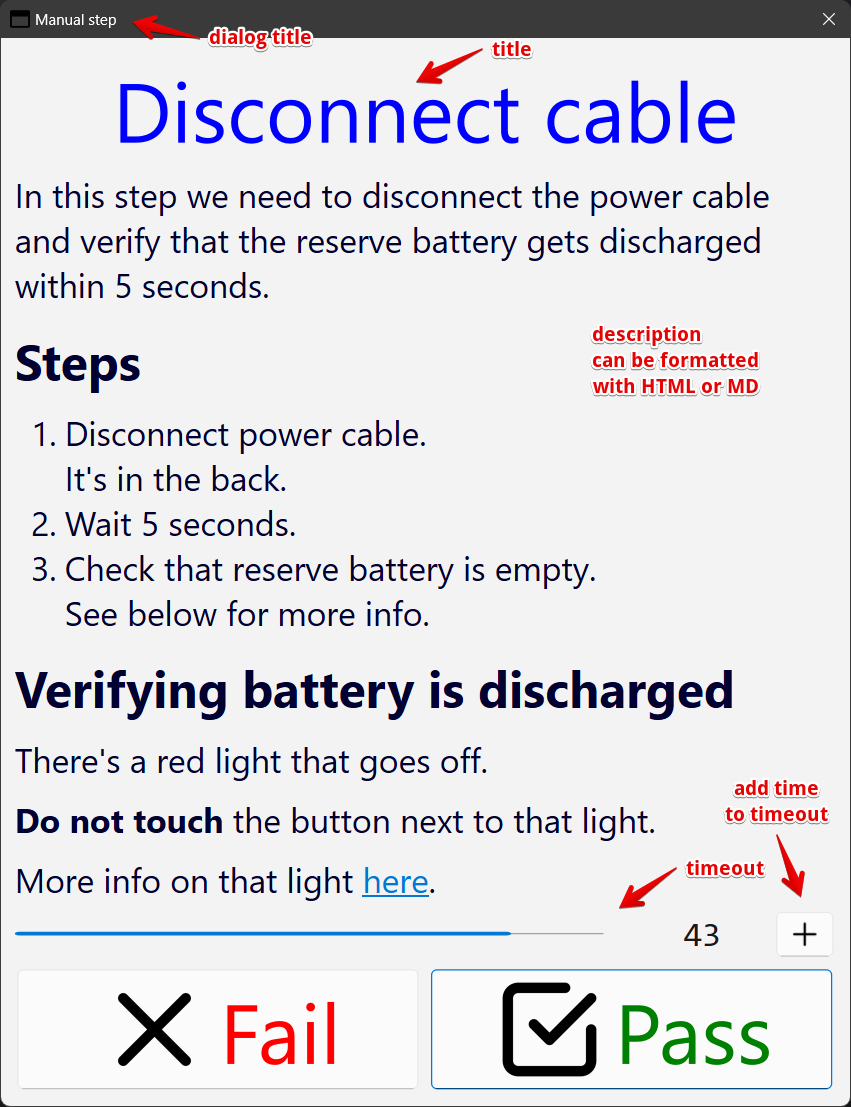
Inputs that generated the dialog 👆
dialog_title: Manual step
title: Disconnect cable
description: |
    In this step we need to disconnect the power cable
    and verify that the reserve battery gets discharged
    within 5 seconds.

    ## Steps
    1. Disconnect power cable.
       It's in the back.
    2. Wait 5 seconds.
    3. Check that reserve battery is empty.
       See below for more info.

    ## Verifying battery is discharged
    There's a red light that goes off.

    **Do not touch** the button next to that light.

    More info on that light [here](#some-path).
description_md: true
timeout: 20
More info in documentation here.
1 maintainer

Release files for qt-show-dialog 0.10.0
For a detailed explanation of source distributions (sdists) and built distributions (wheels), please see the package formats documentation.
Source distribution (sdist)
| File | Size | Uploaded | |
|---|---|---|---|
| qt_show_dialog-0.10.0.tar.gz | 61.1 kB | Details |
Built distribution (wheel)
| File | Interpreter | ABI | Platform | Reset |
|---|---|---|---|---|
| qt_show_dialog-0.10.0-py3-none-any.whl | Python 3 | none | any | Details |
Total release size: 127.2 kB
Release files / qt_show_dialog-0.10.0.tar.gz
| Download URL | qt_show_dialog-0.10.0.tar.gz |
|---|---|
| Size | 61.1 kB |
| Tags | Source |
|
SHA-256 checksum How to use checksums |
b35f03fbe8fd2bca15f8b382c6c72b70121366b4de80b4092a898951b3aae552
|
|
BLAKE2b-256 checksum How to use checksums |
0ef9af71cea1e4b12ffbabff0299e327eaefa110bc354eeb0b11b5cc19308c18
|
| Upload date | |
|
Uploaded using Trusted Publishing? What is trusted publishing? |
No |
| Uploaded via |
uv/0.10.9 {"installer":{"name":"uv","version":"0.10.9","subcommand":["publish"]},"python":null,"implementation":{"name":null,"version":null},"distro":null,"system":{"name":null,"release":null},"cpu":null,"openssl_version":null,"setuptools_version":null,"rustc_version":null,"ci":null}
|
Release files / qt_show_dialog-0.10.0-py3-none-any.whl
| Download URL | qt_show_dialog-0.10.0-py3-none-any.whl |
|---|---|
| Size | 66.1 kB |
| Tags | Python 3 |
|
SHA-256 checksum How to use checksums |
666e7c92333cc5c789303824104dd62caccd83919ddf64c2602723e511d2563b
|
|
BLAKE2b-256 checksum How to use checksums |
14a96a964c556028e6fb96891f298c92a313c20a40c76d61b79aa71259df0476
|
| Upload date | |
|
Uploaded using Trusted Publishing? What is trusted publishing? |
No |
| Uploaded via |
uv/0.10.9 {"installer":{"name":"uv","version":"0.10.9","subcommand":["publish"]},"python":null,"implementation":{"name":null,"version":null},"distro":null,"system":{"name":null,"release":null},"cpu":null,"openssl_version":null,"setuptools_version":null,"rustc_version":null,"ci":null}
|














