
qtop








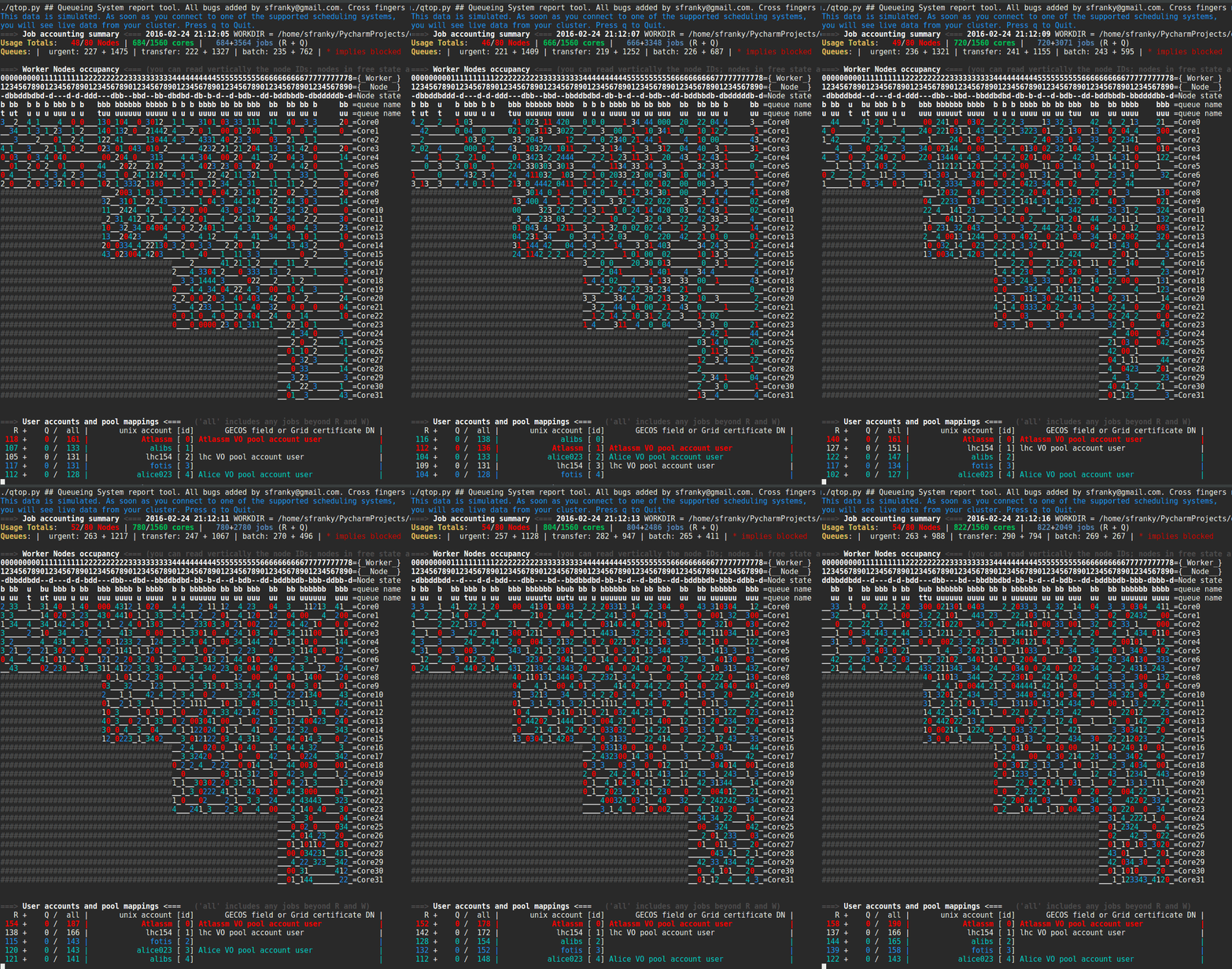
qtop is a scheduler-independent observability layer for HPC clusters, with an extremely fast terminal interface. It is a portable, dependency-light cluster observability and scheduler debugging tool for Slurm, PBS, SGE and OAR - and even more, with your contributed plugin effort.
See your whole cluster in one terminal. Capture it. Replay it. Compare it.
Why qtop?
Schedulers expose a great deal of information, but their native commands rarely provide one concise view of jobs, queues, nodes, states, and core occupancy. qtop turns scheduler output into a consistent terminal dashboard that is useful during daily operations and incident analysis.
- See cluster utilization, queues, users, node states, and per-core job placement.
- Use the same interface across Slurm, PBS/Torque, SGE, and OAR.
- Filter, sort, highlight, transpose, and navigate large worker-node matrices interactively.
- Capture scheduler output for bug reports or offline investigation.
- Replay recent frames to understand scheduling changes over time.
- Export normalized cluster data as JSON.
- Run without a resident service, database, or heavy runtime dependency stack.
Quick start
See the Quickstart guide for a short walkthrough from the demo to live monitoring, saved traces and support snapshots.
Clone the repository and launch the built-in demo:
git clone https://github.com/qtop/qtop.git
cd qtop
./qtop -b demo -FGTw
On a scheduler host, qtop can normally discover the available scheduler:
./qtop -w
Select it explicitly when needed:
./qtop -b slurm -w
./qtop -b pbs -w
./qtop -b sge -w
./qtop -b oar -w
The optional value after -w is the refresh interval in seconds. For example, -w 10 refreshes every ten seconds; without a value, watch mode refreshes every two seconds.
Run ./qtop --help for the complete command-line reference. While watch mode is active, press ? for the interactive key map.
Installation
From source
git clone https://github.com/qtop/qtop.git
cd qtop
./qtop --version
To install a checkout instead of running it directly, use a virtual environment
and python -m pip install .. Python 3.6-3.8 use a legacy-compatible build
backend; modern Python uses the metadata in pyproject.toml.
From PyPI
python3 -m pip install --user qtop
$HOME/.local/bin/qtop --version
PyPI currently serves qtop's legacy 2016 release. Until the next release is
published, install from source for current Slurm support and recent fixes. A
system-wide or virtual-environment installation can omit --user.
Capture, inspect, and replay
Read scheduler traces from a directory instead of invoking live commands:
./qtop -b slurm -s /path/to/slurm-traces
Create a support sample containing qtop output, logs, and scheduler traces
(use -L -A -e for a reproducible anonymized state snapshot):
./qtop -L
Reproduce an anonymized support archive with qtop --load-sample archive.tar.
This restores parsed state and presentation without contacting the scheduler.
Replay automatically captured frames from a specific time:
./qtop -R 1823
Export the normalized cluster state to a JSON file in the configured save directory:
./qtop -E
-E keeps the terminal view on stdout. See the
capture and export guide for
filenames, a real JSON example, archive contents and anonymization limits.
See the full documentation for trace filenames, configuration, filtering, replay formats, anonymization, and scheduler-specific notes.
How it works
qtop separates scheduler-specific collection and parsing from a common cluster-state model and terminal presentation:
- A scheduler plugin collects live command output or reads saved traces.
- The plugin normalizes jobs, nodes, and queues into a shared cluster state.
- qtop renders that state in a fast terminal view or exports it for other tools.
This design keeps the core scheduler-independent and makes support for another batch system a bounded plugin contribution.
See the architecture diagram and source map for the module relationships and the paths through collection, rendering, capture and replay.
Compatibility
qtop targets Python 3 and Linux-based HPC environments. Its CI matrix covers modern Python versions and retains a dependency-light compatibility lane for older enterprise distributions commonly found on clusters.
Terminal monitoring is the primary interface.
Maintainers and contributors can run make ci-deps once and make pre-pr
in a Linux x86-64 CPython 3.12 virtual environment to reproduce the local PR
gates, including coverage, type checks, and both parser fuzzers. See
CONTRIBUTING.md for other platforms and Python 3.6 checks.
Documentation and community
- User documentation and tutorial
- Contributing guide
- Maintenance roles, review routing and escalation
- Code of conduct
- Security policy
- OpenSSF metadata, badge preparation and future integrations
- Issue tracker
Bug reports with captured scheduler samples are especially valuable. New scheduler plugins, sample fixtures, documentation improvements, and portability fixes are welcome.
Python port by Sotiris Fragkiskos. Original Bash version by Fotis Georgatos. Additional authors: Evangelos Papadopoulos and Nicola Trozzi.
License: MIT.
2 maintainers


Metadata
2 maintainers
Release files for qtop 0.9.20261031
For a detailed explanation of source distributions (sdists) and built distributions (wheels), please see the package formats documentation.
Source distribution (sdist)
| File | Size | Uploaded | Provenance | Actions |
|---|---|---|---|---|
| qtop-0.9.20261031.tar.gz | 1.2 MB | With provenance | Details for qtop-0.9.20261031.tar.gz |
Built distribution (wheel)
| File | Interpreter | ABI | Platform | Actions Reset |
|---|---|---|---|---|
| qtop-0.9.20261031-py3-none-any.whl | Python 3 | none | any | Details for qtop-0.9.20261031-py3-none-any.whl |
Total release size: 2.1 MB
Release files / qtop-0.9.20261031.tar.gz
| Download URL | qtop-0.9.20261031.tar.gz |
|---|---|
| Size | 1.2 MB |
| Tags | Source |
|
SHA-256 checksum How to use checksums |
2b7d8f4cb404d04dd459b1038ccfc985385332a31249a4eecb6dcd1a88c0fab6
|
|
BLAKE2b-256 checksum How to use checksums |
038f53d634dd8dabe4eb29091a9767f6e3b022e51d9abb35100c5ac4cc3c3aee
|
| Upload date | |
|
Uploaded using Trusted Publishing? What is trusted publishing? |
Yes |
| Uploaded via |
twine/7.0.0 CPython/3.13.14
|
Provenance
Provenance describes where a file came from. On PyPI, provenance is shared via attestations, which provide a verifiable record of the build or publishing details. View details, limitations and caveats.


PyPI Publish Attestation
PyPI verified that this artifact, at this checksum, originated from the publisher listed below.
Signed by GitHub Actions, verified by PyPI on Nov 18, 2026.
Transparency logRelease files / qtop-0.9.20261031-py3-none-any.whl
| Download URL | qtop-0.9.20261031-py3-none-any.whl |
|---|---|
| Size | 864.7 kB |
| Tags | Python 3 |
|
SHA-256 checksum How to use checksums |
48cc5b5bcf0def2d304f7b33d2af05f6ee0b8a3ea65b33ca62cfdb2b4b198c16
|
|
BLAKE2b-256 checksum How to use checksums |
7c026501c31bb63f7efe9490c9594fc340b7957ded4491cb9cfb58a4e24ec589
|
| Upload date | |
|
Uploaded using Trusted Publishing? What is trusted publishing? |
Yes |
| Uploaded via |
twine/7.0.0 CPython/3.13.14
|
Provenance
Provenance describes where a file came from. On PyPI, provenance is shared via attestations, which provide a verifiable record of the build or publishing details. View details, limitations and caveats.
PyPI Publish Attestation
PyPI verified that this artifact, at this checksum, originated from the publisher listed below.
Signed by GitHub Actions, verified by PyPI on Nov 18, 2026.
Transparency logSecurity for qtop 0.9.20261031
Provenance
Provenance describes where a file came from. On PyPI, provenance is shared via attestations, which provide a verifiable record of the build or publishing details. View details, limitations and caveats.
Full provenance
Both files in this release have been uploaded with provenance metadata.
Attestation for qtop-0.9.20261031.tar.gz
PyPI Publish Attestation
PyPI verified that this artifact, at this checksum, originated from the publisher listed below.
Signed by GitHub Actions, verified by PyPI on Nov 18, 2026.
Transparency logA note on package security
PyPI is a repository for distributing packages, not a service for auditing them. While third-party security researchers and our staff do their best to detect and remove malicious packages, PyPI cannot guarantee the quality, security or suitability of any given package.
To learn more about protecting yourself from malicious actors, visit our package security documentation.














