
QT Py Datalogger
qtpy-datalogger -- A remote control and data acquisition system using the Adafruit QT Py S3 and CircuitPython
Documentation
Available at downtothewire.io/qtpy-datalogger/welcome
Status



Structure
graph LR
    AP(🛜 Access Point)
    App(🐍 App)
    MQTT(📨 MQTT)
    QTPy(🐍 QT Py S3)

    subgraph "🌐 Network"
        AP
    end

    subgraph "💻 PC Host"
        App<-.->MQTT
        MQTT<-.->AP
    end

    subgraph "🧪 Test Zone"
        AP<-.->|🛜 WiFi|QTPy
    end
The PC host controls and communicates with any number of sensor nodes on the wireless network.
Preview in 90 seconds
- Connect your QT Py device with USB
- (Optional) Back up its
code.pyfile
- (Optional) Back up its
- Preview the program in a deletable Python virtual environment
# Create and enter a new Python virtual environment
mkdir qtpy-preview
cd qtpy-preview
python -m venv --upgrade-deps .venv
.\.venv\Scripts\activate.ps1

# Install
pip install qtpy-datalogger

# Show the package help
qtpy-datalogger --help

# Search for devices
qtpy-datalogger connect --discover-only

# Install the sensor node runtime the device
qtpy-datalogger equip

# Open a serial connection, use Ctrl-] to quit
qtpy-datalogger connect

qtpycmd get_apps

qtpycmd stats

qtpycmd read A0 A1 A2 A3

# Ctrl-] to quit
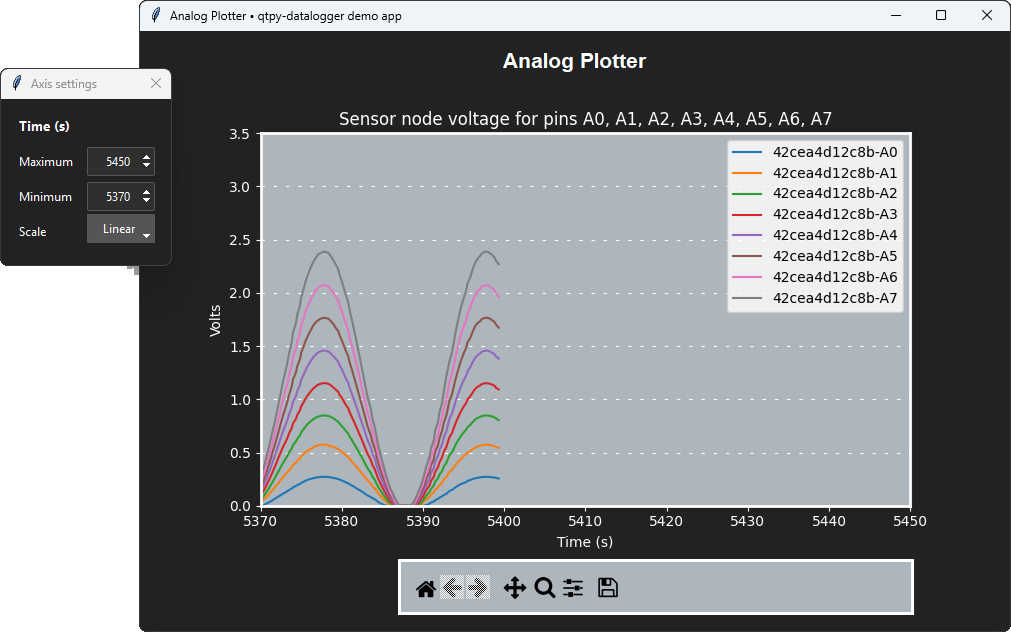
- Plot data in the Analog Plotter demo GUI app
- Optionally, delete the folder
qtpy-previewwhen you are done
Note: This preview does not demonstrate MQTT communication over WiFi
In order to communicate on the WiFi network, the QT Py sensor node must also have
- an MQTT broker
- WiFi credentials
Visit the MQTT setup page for more details if you want to try the demo apps over the network.
Gallery
In addition to the command line tools, the qtpy-datalogger package includes these GUI apps.
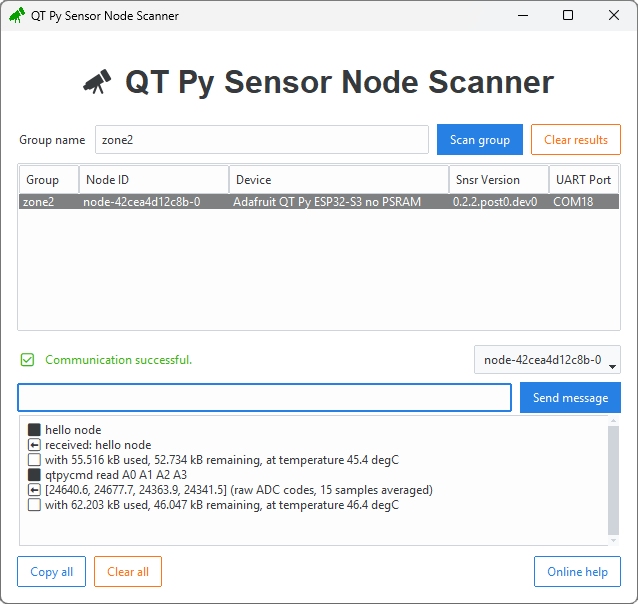
Scanner
qtpy-datalogger run scanner
Scan for nodes by group. Select a node to send it messages.
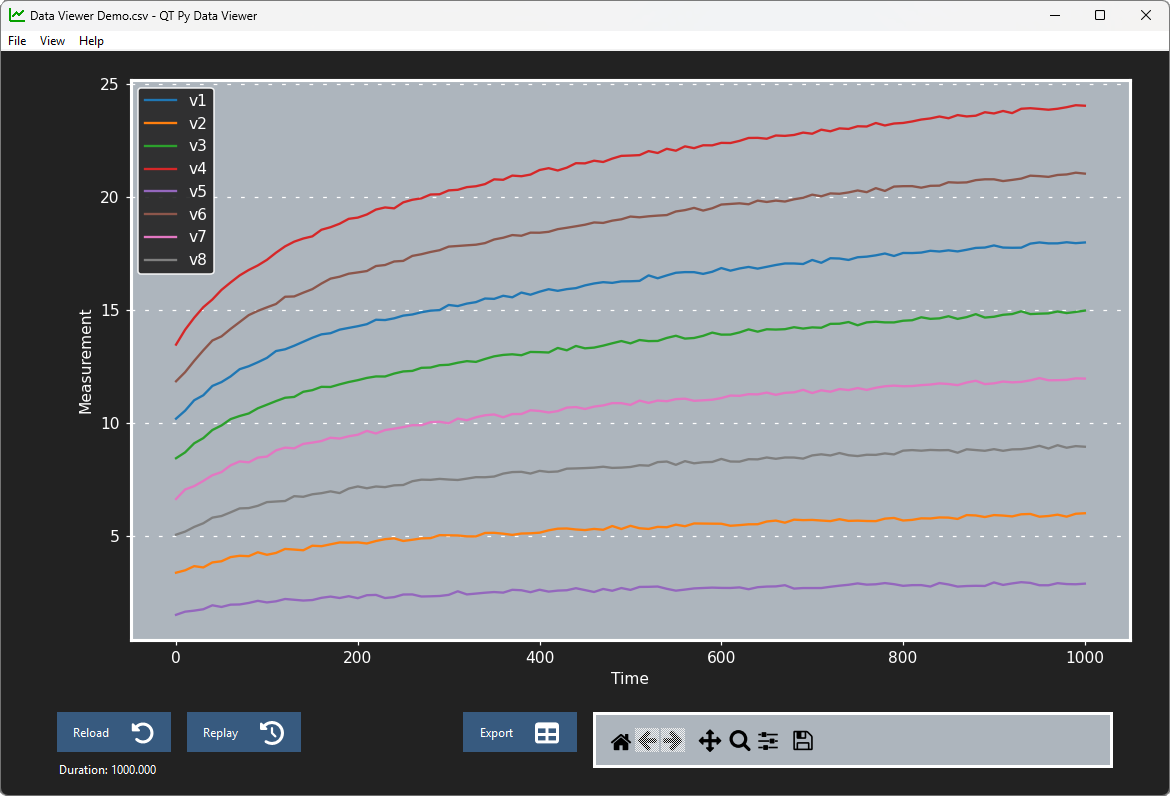
Data Viewer
qtpy-datalogger run data-viewer
Open a CSV file for time series data.
CSV format
- Series data are in columns
- Series names are in the first row
- The time axis is in the first column
- ISO timestamps and floating point values both accepted
Time,Sensor 1,Sensor 2
0.0,1.284,2.713
0.22,1.302,5.536
...
Supported systems
Supported Python versions
- Host
- Python 3.11
- Python 3.12
- Python 3.13
- Python 3.14
- Node
- CircuitPython 9.x
- CircuitPython 10.x
Supported host platforms
- Windows
Supported connection types
- Serial / UART
- Network / MQTT
Entry points
- Host program:
qtpy_datalogger/console.py - QT Py program:
qtpy_datalogger/sensor_node/code.py
Questions and help
Please go to the Welcome page for questions and help.
Contributing
This project manages its Python package with uv.
The environment setup instructions are on the Develop page.
The design documentation is in the wiki under the Design Doc pages.
Legacy system
This project replaces a legacy system that uses Python and JeeNodes.
See the summary and source code in the docs/legacy folder for details.
1 maintainer

Metadata
1 maintainer
Release files for qtpy-datalogger 1.0.16
For a detailed explanation of source distributions (sdists) and built distributions (wheels), please see the package formats documentation.
Source distribution (sdist)
| File | Size | Uploaded | |
|---|---|---|---|
| qtpy_datalogger-1.0.16.tar.gz | 85.1 kB | Details |
Built distribution (wheel)
| File | Interpreter | ABI | Platform | Reset |
|---|---|---|---|---|
| qtpy_datalogger-1.0.16-py3-none-any.whl | Python 3 | none | any | Details |
Total release size: 185.4 kB
Release files / qtpy_datalogger-1.0.16.tar.gz
| Download URL | qtpy_datalogger-1.0.16.tar.gz |
|---|---|
| Size | 85.1 kB |
| Tags | Source |
|
SHA-256 checksum How to use checksums |
c4fa632667e87959dc66f9b3b1c4045606aecaa4e16615e846097879b044977c
|
|
BLAKE2b-256 checksum How to use checksums |
154b689417ea36c92f43682833803b0663ce490e0ba8d473b413f3fb5ed34146
|
| Upload date | |
|
Uploaded using Trusted Publishing? What is trusted publishing? |
Yes |
| Uploaded via |
twine/7.0.0 CPython/3.13.14
|
Provenance
Provenance describes where a file came from. On PyPI, provenance is shared via attestations, which provide a verifiable record of the build or publishing details. View details, limitations and caveats.


PyPI Publish Attestation
PyPI verified that this artifact, at this checksum, originated from the publisher listed below.
Signed by GitHub Actions, verified by PyPI on Sep 18, 2026.
Transparency logRelease files / qtpy_datalogger-1.0.16-py3-none-any.whl
| Download URL | qtpy_datalogger-1.0.16-py3-none-any.whl |
|---|---|
| Size | 100.3 kB |
| Tags | Python 3 |
|
SHA-256 checksum How to use checksums |
8d22376dba89e9b90578e296e5446576f917bc3bc5252cc078caa11a8a7fb377
|
|
BLAKE2b-256 checksum How to use checksums |
95cedf8c5856966a6336cd0bf2330de4e4a5184da4085bf5420e682ba7c6b476
|
| Upload date | |
|
Uploaded using Trusted Publishing? What is trusted publishing? |
Yes |
| Uploaded via |
twine/7.0.0 CPython/3.13.14
|
Provenance
Provenance describes where a file came from. On PyPI, provenance is shared via attestations, which provide a verifiable record of the build or publishing details. View details, limitations and caveats.
PyPI Publish Attestation
PyPI verified that this artifact, at this checksum, originated from the publisher listed below.
Signed by GitHub Actions, verified by PyPI on Sep 18, 2026.
Transparency log













