
- Name:
Quackamollie Core
- Package name:
quackamollie-core
- Description:
Core of the Quackamollie Telegram personal chat bot
- Version:
- 0.1
- Main page:
https://gitlab.com/forge_of_absurd_ducks/quackamollie/lib/quackamollie_core
- PyPI package:
- Docker Image:
registry.gitlab.com/forge_of_absurd_ducks/quackamollie/lib/quackamollie_core:0.1
- Documentation:
https://quackamollie-core-forge-of-absurd-ducks-quackamo-49d876569a9ad7.gitlab.io
- Build Status:
- Master:
- Dev:




Project description
Quackamollie is a Telegram chat bot developed in Python using the library aiogram to serve LLM models running locally using Ollama.
This package is the core of the Quackamollie project. It contains:
a command line interface which automatically discover addons declared as entrypoints
the main commands, filters and callbacks for interacting with Quackamollie through Telegram
SQLAlchemy ORM connectors and models to interact with a PostgreSQL database for Quackamollie
Alembic configuration to automatically migrate the PostgreSQL database
a Docker Compose configuration file to run a PostgreSQL database
meta-classes for models and model managers
auto-discovery of models, model managers and CLI subcommands using entrypoints
To install Quackamollie easily with model managers and models, we kindly invite you to refer to the Quackamollie main project page which includes tutorials to deploy Quackamollie using Docker Compose.
This documentation mainly contains details destined to developers of the Quackamollie project. These information can also be useful for developers who want to run Quackamollie locally without using Docker.
About Quackamollie
This project aims to provide a Telegram chat bot for personal use and running on local desktop.
What this project is:
a Telegram chat bot that you have to run on your own
a project aiming for personal use and/or use with friends or family
a project developed by currently one author and offered as an open source project by a non-profit association named the Forge of Absurd Ducks
What this project is NOT:
it is NOT a platform with servers aiming to provide service to a large number of users
it is NOT a commercial project
Requirements
Virtual environment
Setup a virtual environment in python 3.10
make venv
# or
python3 -m venv venv
Activate the environment
source venv/bin/activateIf you want to deactivate the environment
deactivateTests
Tests requirements
Install test requirements
make devtools
# or
pip install tox
Run pytest
Run the tests
toxRun lint
Run the lintage
tox -e lintDocumentation
To auto-generate the documentation configuration
tox -e gendocsTo generate the documentation in Html
tox -e docsAn automatically generated version of this project documentation can be found here
N.B.: This automatically generated documentation of the Quackamollie core project is still laking a lot of things. Sorry for the inconvenience.
Install
Install the application from sources
make install
# or
pip install .
Or install it from distribution
pip install dist/quackamollie-core-0.1.tar.gzOr install it from wheel
pip install dist/quackamollie-core-0.1.whlOr install it from PyPi repository
pip install quackamollie-core  # latest
# or
pip install "quackamollie-core==0.1"
Docker
To build the application docker
docker build --network=host -t quackamollie_core:0.1 .The official Docker image of this project is available at: registry.gitlab.com/forge_of_absurd_ducks/quackamollie/lib/quackamollie_core
You can pull the image of the current release:
docker pull registry.gitlab.com/forge_of_absurd_ducks/quackamollie/lib/quackamollie_core:latest  # or dev
# or
docker pull registry.gitlab.com/forge_of_absurd_ducks/quackamollie/lib/quackamollie_core:0.1
Docker-compose
To run database using docker-compose, you must first set environment variables:
QUACKAMOLLIE_DB_HOST: typically 0.0.0.0
QUACKAMOLLIE_DB_PORT: typically 5432
QUACKAMOLLIE_DB_NAME: typically quackamollie
QUACKAMOLLIE_DB_USERNAME: typically quackamollie
QUACKAMOLLIE_DB_PASSWORD: choose a strong admin password
Then you can run:
docker compose up
# or to detach
docker compose up -d

# if you need to run it with sudo don't forget to add the -E option to pass the environment variables you've set
sudo -E docker compose up
Database migration
Quackamollie provides a wrapper for the alembic command which initializes the database info the same way they are initialized at runtime. You can call alembic by using instead quackamollie db alembic. For example:
quackamollie db alembic --helpWe recommend you to use a configuration file using one of the examples provided in config/examples/ and to change variables to match the ones used when calling docker compose up.
To create schema revision if the database changes:
quackamollie -c config/config.yml db alembic revision --autogenerate -m "A new change."You can then inspect the migration code (in python) with:
cat migrations/versions/*Also inspect the resultant SQL code with:
quackamollie -c config/config.yml db alembic upgrade --sql +1Finally, you can apply the migration with:
quackamollie -c config/config.yml db alembic upgrade +1  # If you want to jump from 1
quackamollie -c config/config.yml db alembic upgrade head  # If you want to go all the way to head
If you now connect to pgcli, you can test that the new table exists:
make dbtools
pgcli -U ${QUACKAMOLLIE_DB_USERNAME} -h ${QUACKAMOLLIE_DB_HOST} -p ${QUACKAMOLLIE_DB_PORT} ${QUACKAMOLLIE_DB_NAME}
# and then on the pgcli console:
\dt
# and again on the pgcli console:
SELECT * FROM users;
alembic downgrade -1
quackamollie -c config/config.yml db alembic downgrade -1You can also migrate using the docker image from our official docker registry.
docker run --rm --name quackamollie-migration \
--network host \
--mount type=bind,source="$(pwd)"/config/config.yml,target=/config/config.yml,readonly \
registry.gitlab.com/forge_of_absurd_ducks/quackamollie/lib/quackamollie_core:0.1 \
-vvvv -c /config/config.yml db alembic upgrade head

# if you need to run it with sudo don't forget to add the -E option to pass the environment variables you've set
sudo -E docker run --rm --name quackamollie-migration \
--network host \
--mount type=bind,source="$(pwd)"/config/config.yml,target=/config/config.yml,readonly \
registry.gitlab.com/forge_of_absurd_ducks/quackamollie/lib/quackamollie_core:0.1 \
-vvvv -c /config/config.yml db alembic upgrade head
To do the same using docker-compose, please refer to the quackamollie main repository.
Running the project
Quackamollie-core provides a command tool line named quackamollie. You can find examples of configuration files in the folder config/examples.
quackamollie -vvvv -c config/config.yml servePictures and demonstration videos will be included in the documentation in future releases.
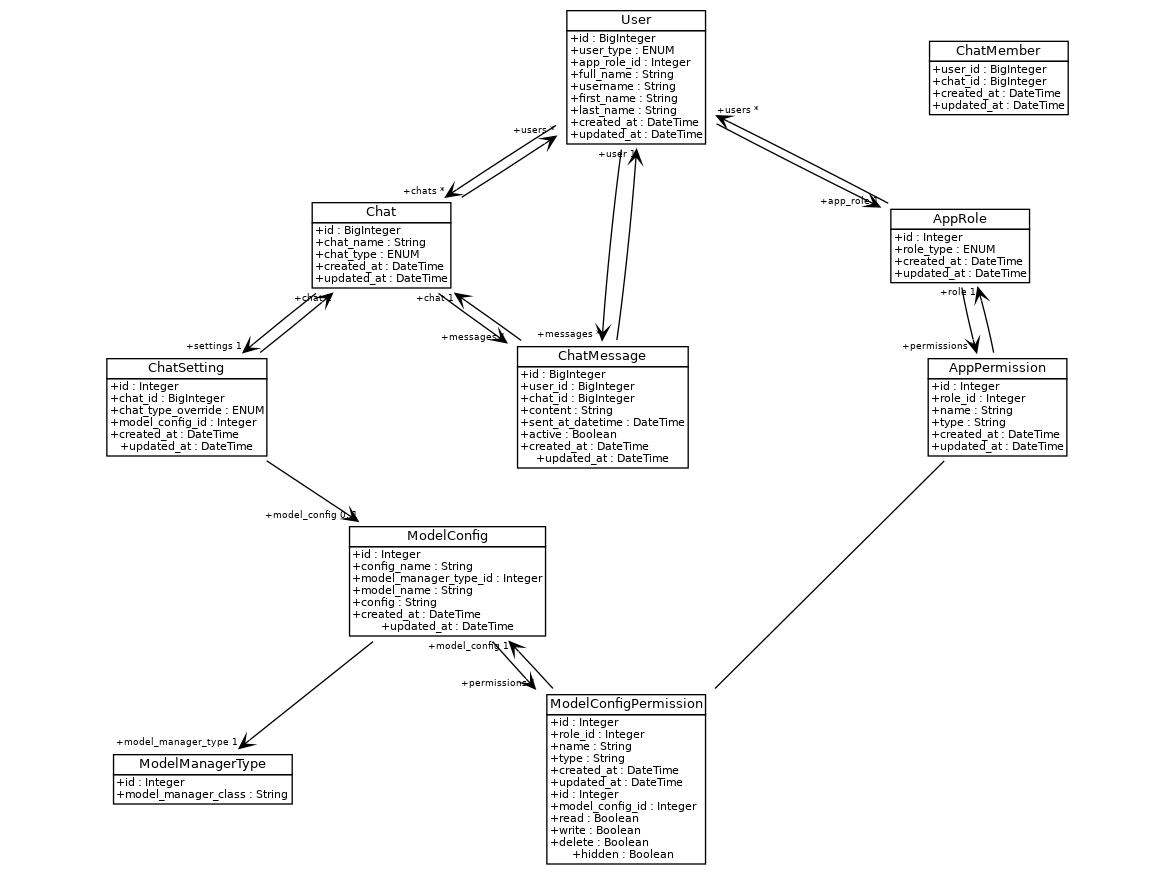
Database
This is the latest schema of the database, generated automatically by the plugin quackamollie-devtools (can be installed using pip install quackamollie-devtools):
Contributing
Currently, the project is still in early stages. It lacks several base features we expect to implement in the versions 0.2 and 0.3, for example RAG capabilities will be added in version 0.2.
For this reason, we do NOT accept yet issues asking for new features. However, you can report bugs or assimilated problems you may encounter and we will do our best to fix them.
If you want to report a bug of quackamollie-core, please open an issue in the Gitlab ticket management section of this project
For more details on the general contributing mindset of this project, please refer to CONTRIBUTING.md.
Credits
Section in writing, sorry for the inconvenience.
2 maintainers


Metadata
2 maintainers
Release files for quackamollie-core 0.1
For a detailed explanation of source distributions (sdists) and built distributions (wheels), please see the package formats documentation.
Source distribution (sdist)
| File | Size | Uploaded | |
|---|---|---|---|
| quackamollie_core-0.1.tar.gz | 69.4 kB | Details |
Built distribution (wheel)
| File | Interpreter | ABI | Platform | Reset |
|---|---|---|---|---|
| quackamollie_core-0.1-py3-none-any.whl | Python 3 | none | any | Details |
Total release size: 140.4 kB
Release files / quackamollie_core-0.1.tar.gz
| Download URL | quackamollie_core-0.1.tar.gz |
|---|---|
| Size | 69.4 kB |
| Tags | Source |
|
SHA-256 checksum How to use checksums |
fc84f842e71aba18a6e389d92ec4efb972d175138a781ffe29e191a705f75132
|
|
BLAKE2b-256 checksum How to use checksums |
56866fbf39ead0b9aede1f1c483f3577aaabb31e740d5b183aa81a7e1fe6493c
|
| Upload date | |
|
Uploaded using Trusted Publishing? What is trusted publishing? |
No |
| Uploaded via |
twine/5.1.1 CPython/3.10.15
|
Release files / quackamollie_core-0.1-py3-none-any.whl
| Download URL | quackamollie_core-0.1-py3-none-any.whl |
|---|---|
| Size | 71.1 kB |
| Tags | Python 3 |
|
SHA-256 checksum How to use checksums |
d8c7d53575dc57ab157f62f311f9e44d45ec5b04a086e99e3ce902604a2e960e
|
|
BLAKE2b-256 checksum How to use checksums |
6dd370bdbb8388dee3cb55aacead4cfc6a868b63321957dd021fbfbf567db344
|
| Upload date | |
|
Uploaded using Trusted Publishing? What is trusted publishing? |
No |
| Uploaded via |
twine/5.1.1 CPython/3.10.15
|














