
Qualtrics toolkit




Turn Qualtrics exports into useful tables, offline reports, and Power BI models.
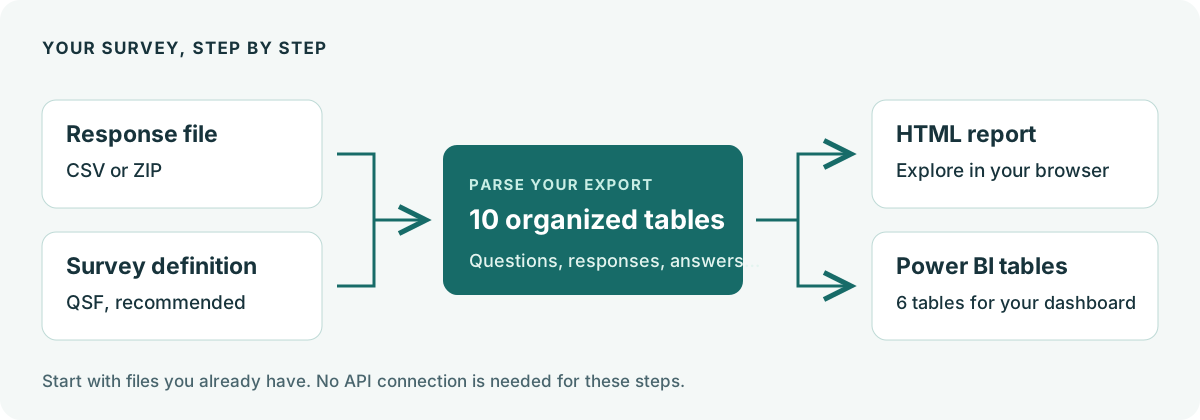
Use the typed Python SDK or command-line tools to work with the Qualtrics API, or start with a CSV or ZIP you already have. Parsing and reporting work locally without an API token.
Documentation · First report · Report demo · Flow demo
Features
| Capability | What you can do |
|---|---|
| Prepare survey data | Parse CSV/ZIP exports with optional QSF definitions. Preserve question fields, choices, recodes, and response properties; write JSON, CSV, or Parquet tables. |
| Explore offline reports | Browse dashboard charts, question-specific visualizations, searchable written answers, individual responses, and a codebook in one HTML file. |
| Understand survey flow | Explore the configured flow map and try hypothetical paths with an interactive “what if” walkthrough. |
| Analyze comments | Use dedicated text-answer tables with original answer IDs and the language recorded on each response. |
| Build Power BI models | Export six analysis tables as Parquet files or one SQLite database, with relationship guides and interactive DBML diagrams. |
| Automate API workflows | Access surveys, definitions, flows, and response imports/exports through Python or the CLI. Export with retries, visible progress, and configurable survey concurrency. |
You can also combine multiple surveys into one entity collection and report.
Try your first report
With uv and Git installed, clone the repository and run the included example. It uses fictional responses and needs no Qualtrics account.
git clone https://github.com/Luanee/qualtrics.git
cd qualtrics
uv sync --locked --extra cli --extra ui
uv run --extra cli --extra ui qualtrics build docs/assets/examples/feedback.csv \
  --qsf docs/assets/examples/feedback.qsf \
  --output data/first-report/entities \
  --format csv
uv run --extra cli --extra ui qualtrics report \
  --folder data/first-report/entities \
  --output data/first-report/report.html
Open data/first-report/report.html in your browser. The first-report tutorial explains the results; parse your own export when you are ready.
Use it in a Python project
In your own project, install the base package:
uv add qualtrics
The base package includes the SDK, parsing, analytics, and JSON/CSV data functions. Add cli for commands, ui for HTML reports, or parquet for Parquet files. Command-line reports need qualtrics[cli,ui]; SQLite output needs no extra dependency.
See installation options and the Python reference for examples, including QualtricsClient, parse_survey, and render_report.
Find what you need
- Commands and configuration: CLI reference · API credentials
- Data and relationships: Output tables · Entity and Power BI models
- Help and development: Troubleshooting · Contributor guide · Release notes
The report workflow was inspired by the Qualtrics Report Generator.
1 maintainer

Metadata
1 maintainer
Release files for qualtrics 0.4.1
For a detailed explanation of source distributions (sdists) and built distributions (wheels), please see the package formats documentation.
Source distribution (sdist)
| File | Size | Uploaded | |
|---|---|---|---|
| qualtrics-0.4.1.tar.gz | 115.0 kB | Details |
Built distribution (wheel)
| File | Interpreter | ABI | Platform | Reset |
|---|---|---|---|---|
| qualtrics-0.4.1-py3-none-any.whl | Python 3 | none | any | Details |
Total release size: 282.1 kB
Release files / qualtrics-0.4.1.tar.gz
| Download URL | qualtrics-0.4.1.tar.gz |
|---|---|
| Size | 115.0 kB |
| Tags | Source |
|
SHA-256 checksum How to use checksums |
8f7193642491fff9735e3e607049007fe839ec57dab86036fb36f268f766d42b
|
|
BLAKE2b-256 checksum How to use checksums |
4d320c42e2a0a0e38ada4ba316c4fa6fe8d7c74388f130e088af78dac56e11b9
|
| Upload date | |
|
Uploaded using Trusted Publishing? What is trusted publishing? |
Yes |
| Uploaded via |
twine/7.0.0 CPython/3.13.14
|
Provenance
Provenance describes where a file came from. On PyPI, provenance is shared via attestations, which provide a verifiable record of the build or publishing details. View details, limitations and caveats.


PyPI Publish Attestation
PyPI verified that this artifact, at this checksum, originated from the publisher listed below.
Signed by GitHub Actions, verified by PyPI on Sep 13, 2026.
Transparency logRelease files / qualtrics-0.4.1-py3-none-any.whl
| Download URL | qualtrics-0.4.1-py3-none-any.whl |
|---|---|
| Size | 167.1 kB |
| Tags | Python 3 |
|
SHA-256 checksum How to use checksums |
88ece3aee495ad03ebf9141889aaf8f5750f0f3d8d7781e20b660562f0d7647c
|
|
BLAKE2b-256 checksum How to use checksums |
a8d0bbd4d844d907d7b907745e04849cfc82092d520b9afedd62b06148a59013
|
| Upload date | |
|
Uploaded using Trusted Publishing? What is trusted publishing? |
Yes |
| Uploaded via |
twine/7.0.0 CPython/3.13.14
|
Provenance
Provenance describes where a file came from. On PyPI, provenance is shared via attestations, which provide a verifiable record of the build or publishing details. View details, limitations and caveats.
PyPI Publish Attestation
PyPI verified that this artifact, at this checksum, originated from the publisher listed below.
Signed by GitHub Actions, verified by PyPI on Sep 13, 2026.
Transparency log













