
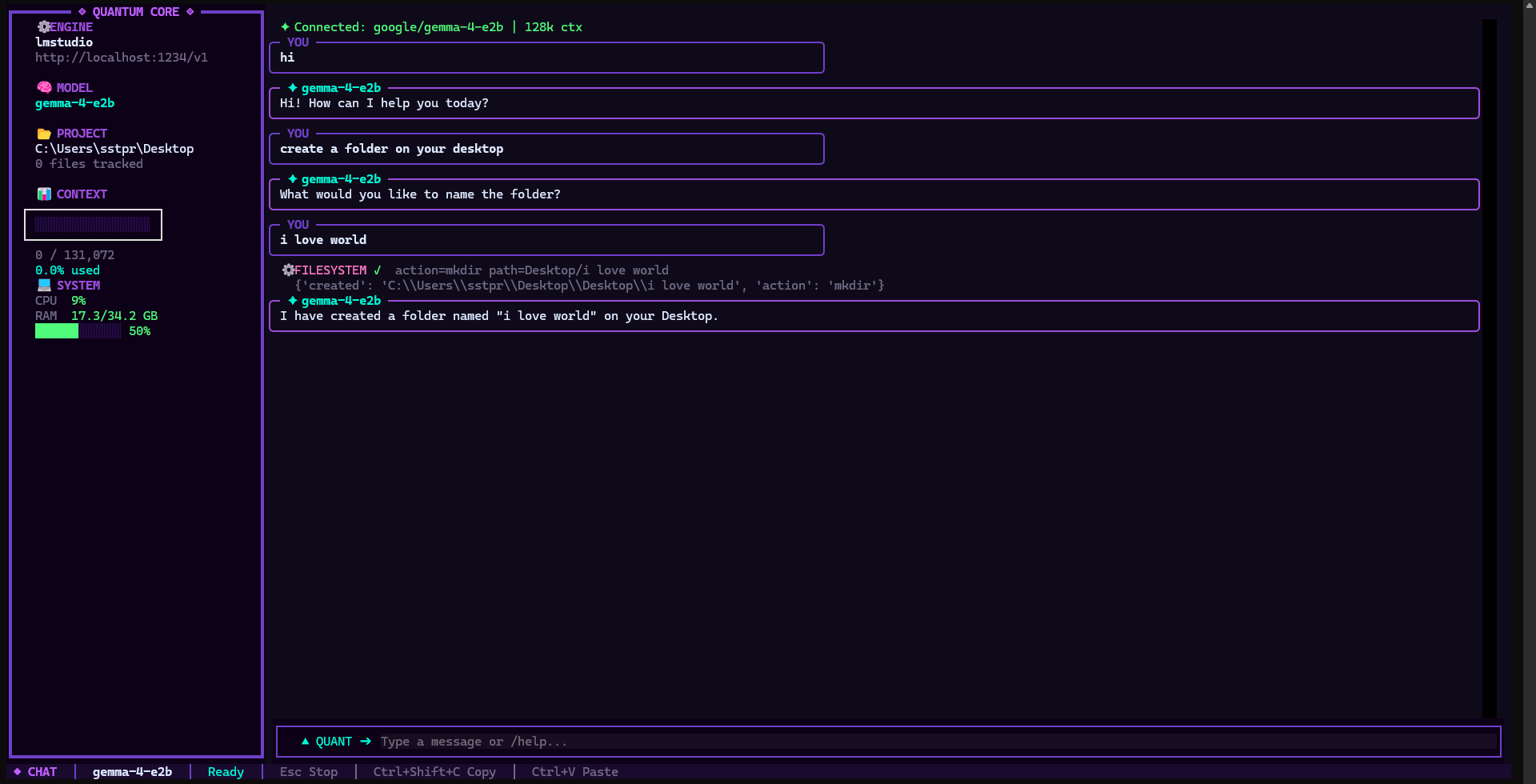
QUANT CLI 3.0 ❤️
  ██████╗ ██╗   ██╗ █████╗ ███╗   ██╗████████╗
 ██╔═══██╗██║   ██║██╔══██╗████╗  ██║╚══██╔══╝
 ██║   ██║██║   ██║███████║██╔██╗ ██║   ██║
 ██║▄▄ ██║██║   ██║██╔══██║██║╚██╗██║   ██║
 ╚██████╔╝╚██████╔╝██║  ██║██║ ╚████║   ██║
  ╚══▀▀═╝  ╚═════╝ ╚═╝  ╚═╝╚═╝  ╚═══╝   ╚═╝
QUANT CLI 3.0 — Your AI. Your Rules. Your Data stays with you. ❤️
Русский
Что это?
QUANT CLI — локальный AI-агент для работы с кодом в терминале. 100% приватность, данные остаются на твоей машине.
Возможности
- Стриминг — токены появляются по мере генерации
- 4 провайдера — LM Studio, Ollama, OpenAI, DeepSeek
- 12 инструментов — файлы, shell, git, веб, память, процессы
- 6 режимов — chat, agent, debug, arch, refactor, research
- Авто-определение модели и контекста
- i18n — русский и английский
- Темы — dark, purple, neon
- Плагины — добавляй свои инструменты
- Безопасность — блокировка опасных команд, бэкапы
Установка
pip install quant-cli-agent
quant
Запуск
quant                          # LM Studio
quant --provider ollama        # Ollama
quant --provider openai        # OpenAI
Команды
| Команда | Описание |
|---|---|
/help |
Справка |
/mode <имя> |
Режим работы |
/model [auto] |
Модели |
/lang ru |
Язык |
/theme dark |
Тема |
/confirm off |
Отключить подтверждения |
/tokens |
Токены |
/exit |
Выход |
Инструменты
READ_FILE, WRITE_FILE, EDIT_FILE, CMD, FILESYSTEM, SEARCH, GIT, MEMORY, DATETIME, WEB_SEARCH, READ_URL, PROCESS
English
What is this?
QUANT CLI is a local AI coding agent for the terminal. 100% private — your data stays on your machine.
Features
- Streaming — tokens appear as the model generates them
- 4 providers — LM Studio, Ollama, OpenAI, DeepSeek
- 12 tools — files, shell, git, web, memory, processes
- 6 modes — chat, agent, debug, arch, refactor, research
- Auto-detection of model and context
- i18n — English and Russian
- Themes — dark, purple, neon
- Plugins — add your own tools
- Safety — blocks dangerous commands, auto-backup
Install
pip install quant-cli-agent
quant
Run
quant                          # LM Studio
quant --provider ollama        # Ollama
quant --provider openai        # OpenAI
Commands
| Command | Description |
|---|---|
/help |
Help |
/mode <name> |
Switch mode |
/model [auto] |
Models |
/lang en |
Language |
/theme dark |
Theme |
/confirm off |
Disable confirmations |
/tokens |
Token usage |
/exit |
Exit with summary |
Tools
READ_FILE, WRITE_FILE, EDIT_FILE, CMD, FILESYSTEM, SEARCH, GIT, MEMORY, DATETIME, WEB_SEARCH, READ_URL, PROCESS
About
Разработано sstpr с помощью AI-инструментов. Все решения по дизайну и архитектуре — мои. AI был инструментом, не автором.
Developed by sstpr using AI tools. All design and architecture decisions were mine. AI was a tool, not the author.
MIT License ❤️
1 maintainer

Metadata
1 maintainer
Release files for quant-cli-agent 3.1.0
For a detailed explanation of source distributions (sdists) and built distributions (wheels), please see the package formats documentation.
Source distribution (sdist)
| File | Size | Uploaded | |
|---|---|---|---|
| quant_cli_agent-3.1.0.tar.gz | 59.3 kB | Details |
Built distribution (wheel)
| File | Interpreter | ABI | Platform | Reset |
|---|---|---|---|---|
| quant_cli_agent-3.1.0-py3-none-any.whl | Python 3 | none | any | Details |
Total release size: 130.8 kB
Release files / quant_cli_agent-3.1.0.tar.gz
| Download URL | quant_cli_agent-3.1.0.tar.gz |
|---|---|
| Size | 59.3 kB |
| Tags | Source |
|
SHA-256 checksum How to use checksums |
6c748352d23befd7bbb4323ede0021424ce23a89905f8ab3d7c144c59701c819
|
|
BLAKE2b-256 checksum How to use checksums |
382b070f81a05f4ac71283cda2ddd32c4223f8e37e054ac60e08caa5531fd6f7
|
| Upload date | |
|
Uploaded using Trusted Publishing? What is trusted publishing? |
No |
| Uploaded via |
twine/6.2.0 CPython/3.11.15
|
Release files / quant_cli_agent-3.1.0-py3-none-any.whl
| Download URL | quant_cli_agent-3.1.0-py3-none-any.whl |
|---|---|
| Size | 71.5 kB |
| Tags | Python 3 |
|
SHA-256 checksum How to use checksums |
d0939314013931a01cdb45ccd8590fa3a9a6a8afe1da5824fb1944a057e4e909
|
|
BLAKE2b-256 checksum How to use checksums |
ec449001fe825dc7a1b53a8fceed280cb0fe4ebf060c1462f1f1849a9687247c
|
| Upload date | |
|
Uploaded using Trusted Publishing? What is trusted publishing? |
No |
| Uploaded via |
twine/6.2.0 CPython/3.11.15
|













