
Quantclean 🧹
"Make it cleaner, make it leaner"
Already used by several people working in the quant and finance industries, Quantclean is the all-in-one tool that will help you to reformat your dataset and clean it.
Quantclean is a program that reformats every financial dataset to US Equity TradeBar (Quantconnect format)
We all faced the problem of reformating or data to a standard. Manual data cleaning is clearly boring and take time. Quantclean is here to help you and to make you life easier as a quant.
Works great with datas from Quandl, Algoseek, Alpha Vantage, yfinance, and many other more...
Few things you may want to know before getting started 🍉
-
Even if you don't have an open, close, volume, high, low, date column, quantclean will create a blank column for it. No problem!
-
The dataframe generated will look like this if you have a date and time column (or if both are on the same column):
| Date | Open | High | Low | Close | Volume |
|---|---|---|---|---|---|
| 20131001 09:00 | 6448000 | 6448000 | 6448000 | 6448000 | 90 |
- Date - String date "YYYYMMDD HH:MM" in the timezone of the data format.
- Open - Deci-cents Open Price for TradeBar.
- High - Deci-cents High Price for TradeBar.
- Low - Deci-cents Low Price for TradeBar.
- Close - Deci-cents Close Price for TradeBar.
- Volume - Number of shares traded in this TradeBar.
- You can also get something like that if use the
sweeper_dashfunction instead ofsweeper
| Date | Open | High | Low | Close | Volume |
|---|---|---|---|---|---|
| 2013-10-01 09:00:00 | 6448000 | 6448000 | 6448000 | 6448000 | 90 |
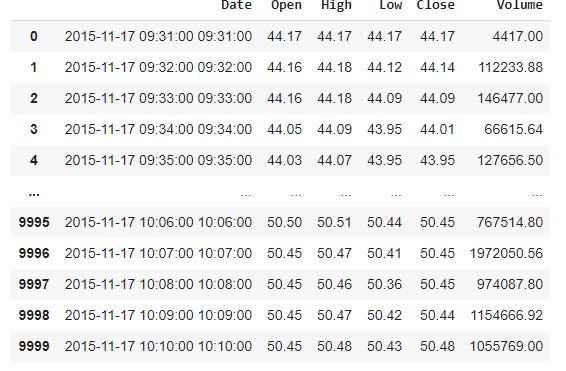
As you can see, the date format is YYYY-MM-DD and no more YYYYMMDD.
- If you just have a date column (e.g : something like YYYY-MM-DD), it will look like this:
| Date | Open | High | Low | Close | Volume |
|---|---|---|---|---|---|
| 20131001 | 6448000 | 6448000 | 6448000 | 6448000 | 90 |
You can also use the sweeper_dash function here.
How to use it? 🚀
First, download the quantclean.py file in the folder where you are working
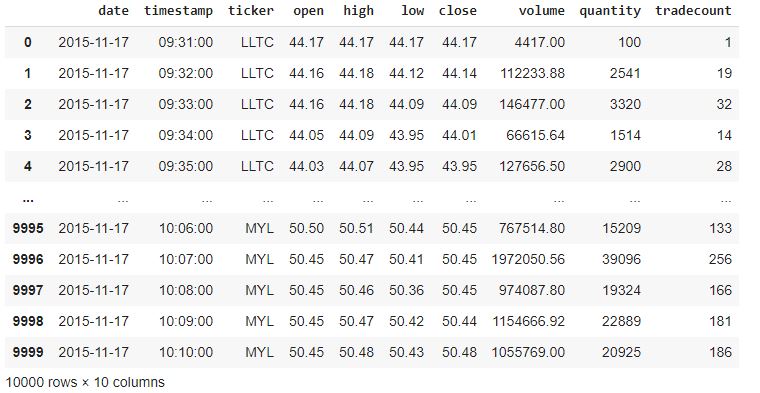
Note : I took this data from Quandl, your dataset doesn't have to look like this one necessarily, quantclean adapts to your dataset as well as possible
from quantclean import sweeper

df = pd.read_csv('AS-N100.csv')
df
_df = sweeper(df)
_df
Output:
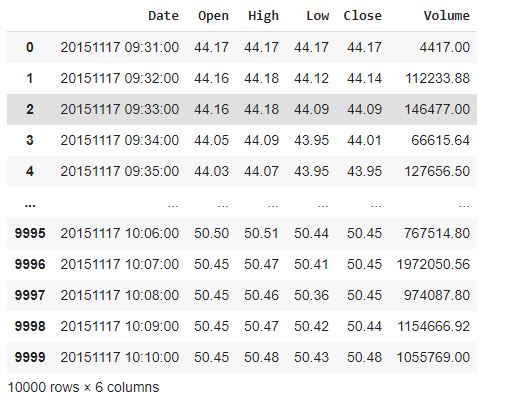
Now, you may not be happy of this date colum which is presented in the YYYYMMDD format and maybe be prefer YYYY-MM-DD.
In that case do :
df_dash = sweeper_dash(df)
df_dash
Output:
Contribution
If you have some suggestions or improvements don't hesitate to create an issue or make a pull request. Any help is welcome!
1 maintainer

Metadata
1 maintainer
Release files for quantclean 0.0.2
For a detailed explanation of source distributions (sdists) and built distributions (wheels), please see the package formats documentation.
Source distribution (sdist)
| File | Size | Uploaded | Provenance | |
|---|---|---|---|---|
| quantclean-0.0.2.tar.gz | 3.4 kB | Without provenance | Details |
Built distribution (wheel)
| File | Interpreter | ABI | Platform | Reset |
|---|---|---|---|---|
| quantclean-0.0.2-py3-none-any.whl | Python 3 | none | any | Details |
Total release size: 6.9 kB
Release files / quantclean-0.0.2.tar.gz
| Download URL | quantclean-0.0.2.tar.gz |
|---|---|
| Size | 3.4 kB |
| Tags | Source |
|
SHA-256 checksum How to use checksums |
3ca5effe7c30b8487943526754ad9620dbadf9fd55e5273636fe77d49f4eaabd
|
|
BLAKE2b-256 checksum How to use checksums |
8afc2ee747c3d93a8d67418bbc0fa894e68c4bf1f990622a67d637e55a6de1f8
|
| Upload date | |
|
Uploaded using Trusted Publishing? What is trusted publishing? |
No |
| Uploaded via |
twine/3.4.1 importlib_metadata/4.0.1 pkginfo/1.7.0 requests/2.25.1 requests-toolbelt/0.9.1 tqdm/4.60.0 CPython/3.7.1
|
Release files / quantclean-0.0.2-py3-none-any.whl
| Download URL | quantclean-0.0.2-py3-none-any.whl |
|---|---|
| Size | 3.5 kB |
| Tags | Python 3 |
|
SHA-256 checksum How to use checksums |
34004ed1f9592de48f604c281e47ca6d388895eb36c9c80a4711039eb4032ffb
|
|
BLAKE2b-256 checksum How to use checksums |
c431c3285116ab67bb60bbabf91b395fad93d1c74804a9d0701bcd9530c40b9e
|
| Upload date | |
|
Uploaded using Trusted Publishing? What is trusted publishing? |
No |
| Uploaded via |
twine/3.4.1 importlib_metadata/4.0.1 pkginfo/1.7.0 requests/2.25.1 requests-toolbelt/0.9.1 tqdm/4.60.0 CPython/3.7.1
|
Security for quantclean 0.0.2
Provenance
Provenance describes where a file came from. On PyPI, provenance is shared via attestations, which provide a verifiable record of the build or publishing details. View details, limitations and caveats.
No provenance found
None of the files in this release were uploaded with provenance metadata.
A note on package security
PyPI is a repository for distributing packages, not a service for auditing them. While third-party security researchers and our staff do their best to detect and remove malicious packages, PyPI cannot guarantee the quality, security or suitability of any given package.
To learn more about protecting yourself from malicious actors, visit our package security documentation.














