
MCP server for QuantData options market data — GEX/DEX/CEX/VEX walls, net drift, max pain, IV rank, and more

Project description
QuantData MCP Server



THIS IS AN UNOFFICIAL MCP SERVER I AM NOT AFFILIATED WITH QUANTDATA IN ANY WAY
MCP server that gives AI agents (Claude Code, Claude Desktop, etc.) access to real-time and historical options market data from QuantData.
📖 New to this? Start with the Getting Started Guide for a step-by-step walkthrough.
Supports any optionable ticker — SPX, SPY, QQQ, AAPL, TSLA, and more. Not just 0DTE.
Available data: GEX/DEX/CEX/VEX exposure walls, exposure term structure, net drift, max pain, IV rank, trade side statistics, open interest, net flow, consolidated order flow, contract OHLCV, and contract statistics.
Documentation: see GETTING_STARTED.md for a click-by-click walkthrough.
Quick Start
1. Install
You need Python 3.11+ installed. Check with python3 --version.
- Mac:
brew install python(or download from python.org) - Windows: Download from python.org (check "Add to PATH" during install)
Then install the package directly from GitHub (recommended today):
# With pip
pip install git+https://github.com/zzulanas/quantdata-mcp.git

# With uv (faster)
uv pip install git+https://github.com/zzulanas/quantdata-mcp.git
Don't have uv? Install it with
curl -LsSf https://astral.sh/uv/install.sh | sh(Mac/Linux) orirm https://astral.sh/uv/install.ps1 | iex(Windows). It's a faster alternative to pip.
PyPI: once published,
pip install quantdata-mcp(oruv pip install quantdata-mcp) will work out of the box. Until then, use the GitHub install above.
2. Get Your Credentials
You need two values from your QuantData account. Open your browser:
- Go to v3.quantdata.us and log in
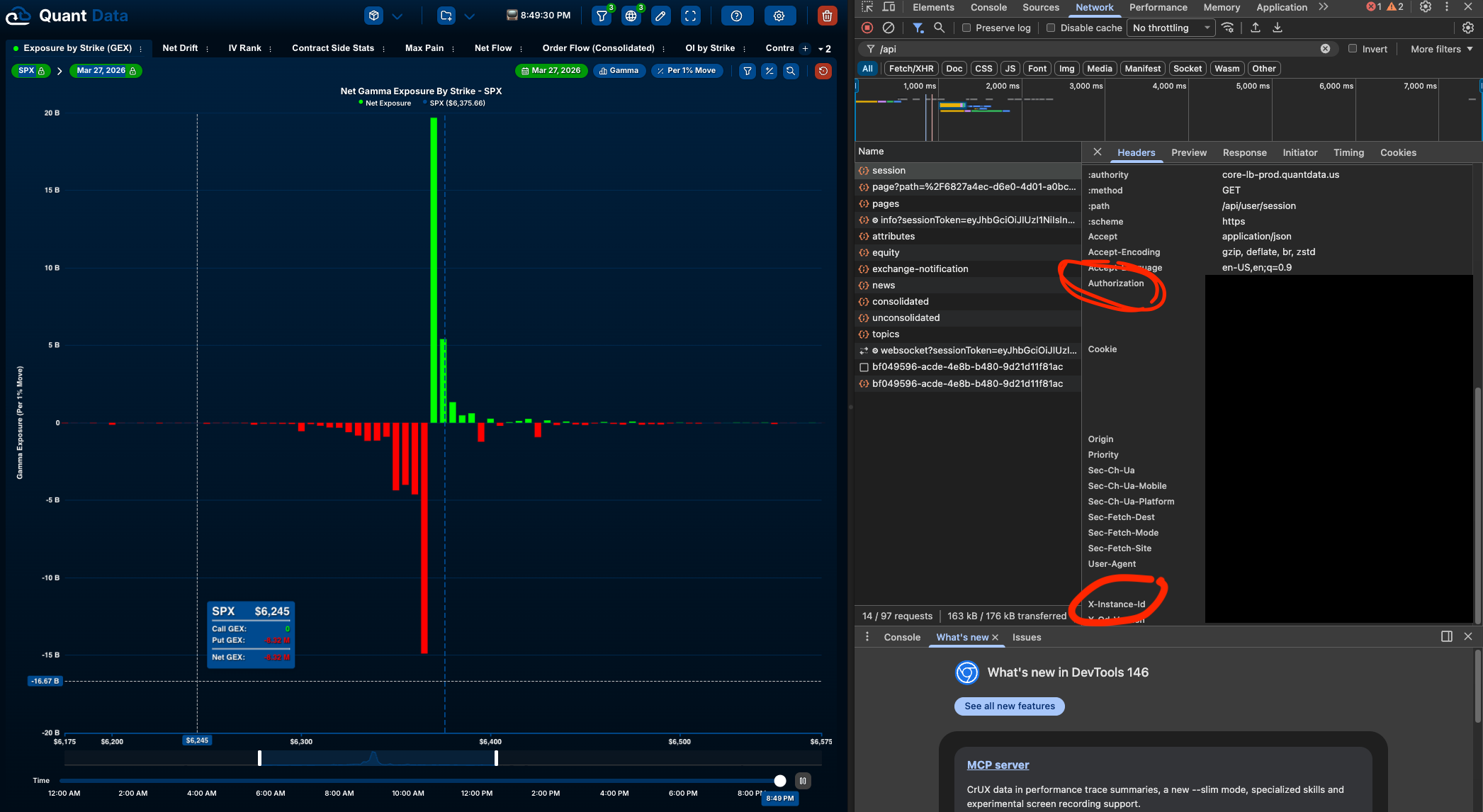
- Open DevTools (F12 or right-click → Inspect) → Network tab
- Refresh the page
- Click on any chart or page on QuantData — you'll see API requests appear
- Click any request to
core-lb-prod.quantdata.us, or filter by /api in the top - In the Request Headers, find and copy:
authorization— your auth token (starts witheyJ...)x-instance-id— your instance ID (a UUID likexxxxxxxx-xxxx-xxxx-xxxx-xxxxxxxxxxxx)
Should look like these:
3. Run Setup
quantdata-mcp setup \
  --auth-token "eyJhbGci..." \
  --instance-id "xxxxxxxx-xxxx-xxxx-xxxx-xxxxxxxxxxxx"
This creates a dedicated page on your QuantData account with 11 data tools and saves your config to ~/.quantdata-mcp/config.json.
4. Add to Claude
Claude Code
Add to your project's .mcp.json (or global ~/.claude/mcp.json):
{
  "mcpServers": {
    "quantdata": {
      "command": "quantdata-mcp",
      "args": ["serve"]
    }
  }
}
Restart Claude Code. You should see quantdata in your MCP servers.
Claude Desktop
Add to your Claude Desktop config file:
- Mac:
~/Library/Application Support/Claude/claude_desktop_config.json - Windows:
%APPDATA%\Claude\claude_desktop_config.json
{
  "mcpServers": {
    "quantdata": {
      "command": "quantdata-mcp",
      "args": ["serve"]
    }
  }
}
Note:
quantdata-mcpmust be on your system PATH. If it's not found, use the full path:which quantdata-mcp # find the path{ "command": "/Users/you/.local/bin/quantdata-mcp", "args": ["serve"] }Or use
uvxto run without worrying about PATH:{ "command": "uvx", "args": ["--from", "git+https://github.com/zzulanas/quantdata-mcp.git", "quantdata-mcp", "serve"] }
Restart Claude Desktop. The QuantData tools will appear in your tool list.
Available Tools
Market Overview
| Tool | Description |
|---|---|
qd_get_market_snapshot |
Full overview: GEX + DEX walls, drift, max pain, trade stats |
qd_set_page_date |
Switch ticker, session date, and/or expiration for analysis |
Exposure (Greeks)
| Tool | Description | Key Settings |
|---|---|---|
qd_get_exposure_by_strike |
GEX/DEX/CEX/VEX wall data by strike | greek_type, representation_mode (per 1%, per $1, raw), is_net, time_minutes |
qd_get_exposure_by_expiration |
Greek exposure term structure across expirations | greek_type, representation_mode, is_net, strikes filter |
Premium Flow
| Tool | Description | Key Settings |
|---|---|---|
qd_get_net_drift |
Cumulative call vs put premium flow | aggregation (1min–1hr), moneyness, strikes filter |
qd_get_net_flow |
Call/put premium flow over time | aggregation, data_mode (premium/volume), moneyness, trade_side, strikes |
Order Flow & Trade Stats
| Tool | Description | Key Settings |
|---|---|---|
qd_get_order_flow |
Consolidated order flow — individual large trades | contract_type, moneyness, trade_side, min_premium, strikes |
qd_get_trade_side_stats |
Trade aggression: AA/A/M/B/BB breakdown | data_mode, moneyness, strikes |
qd_get_contract_statistics |
Total premium, trade count, volume by call/put | moneyness, trade_side, strikes |
Volatility & Pricing
| Tool | Description | Key Settings |
|---|---|---|
qd_get_iv_rank |
IV rank vs historical range | lookback_period, maturity, contract_type |
qd_get_contract_price |
OHLCV price data for a specific contract | strike (required), contract_type, aggregation |
Open Interest & Max Pain
| Tool | Description |
|---|---|
qd_get_max_pain |
Max pain strike + distance from current price |
qd_get_oi_by_strike |
Open interest distribution with near-ATM filtering |
Common Parameters
All tools accept these parameters for ticker/date control:
| Parameter | Description | Default |
|---|---|---|
ticker |
Any optionable symbol (SPX, SPY, QQQ, AAPL, TSLA, etc.) | SPX |
date |
Session date YYYY-MM-DD | Today |
expiration_date |
Expiration date YYYY-MM-DD | Same as date (0DTE) |
Filter Parameters
Tools that support filtering accept these optional parameters:
| Parameter | Values | Description |
|---|---|---|
moneyness |
OTM, ITM, ATM |
Filter by moneyness (pass a list to combine) |
trade_side |
AA, A, M, B, BB |
Filter by trade aggression |
strikes |
Dollar values, e.g. [5600.0] |
Filter to specific strikes |
contract_type |
CALL, PUT |
Filter to calls or puts only |
min_premium |
Dollar amount, e.g. 50000 |
Minimum premium threshold (order flow only) |
Example Usage
Ask Claude things like:
- "What are the biggest GEX walls right now?"
- "Show me yesterday's DEX walls at 10:30 AM"
- "Pull up the trade side stats — are puts or calls more aggressive today?"
- "Compare the GEX profile at open vs close for last Thursday"
- "Show me AAPL gamma exposure for the April 17 monthly expiration"
- "What's the OTM-only net drift for SPX today?"
- "Show me the order flow — just calls with premium over $50K"
- "Get the OHLCV for the SPX 6600 call today"
- "What's the IV rank with a 30-day lookback?"
- "Show the GEX term structure across all expirations"
Multi-Ticker Support
All tools work with any optionable ticker. Just pass ticker="AAPL" (or whatever symbol).
Important: SPX, SPY, and QQQ have daily expirations (0DTE works by default). For equity options like AAPL or TSLA, you must set expiration_date to a valid expiration (e.g. monthly 3rd Friday) or you'll get empty data.
> Show me TSLA GEX walls for the April 17 monthly
> qd_get_exposure_by_strike(ticker="TSLA", expiration_date="2026-04-17")
Historical Data
All tools support historical analysis. Either pass date= to any tool, or use qd_set_page_date to switch context:
> Set the date to 2026-03-26 and show me the GEX walls at 10:00 AM

> qd_set_page_date(date="2026-03-26")
> qd_get_exposure_by_strike(greek_type="GAMMA", time_minutes=600)
Time scrubbing: time_minutes = minutes from midnight (570 = 9:30 AM, 720 = 12:00 PM, 960 = 4:00 PM).
Note: date must be a valid trading day (not weekends or market holidays).
How It Works
QuantData doesn't have an official API. This server uses reverse-engineered REST endpoints from their web app. Each user has "tools" (chart widgets) on "pages" — the setup command creates a dedicated page with all 11 data types so the MCP server can query them.
Architecture:
Claude --> MCP (stdio) --> quantdata-mcp server --> QuantData REST API
Your credentials and tool IDs are stored locally at ~/.quantdata-mcp/config.json.
Commands
quantdata-mcp setup --auth-token <TOKEN> --instance-id <ID>  # One-time setup
quantdata-mcp serve                                           # Start MCP server (used by Claude)
Requirements
- Python 3.11+
- Active QuantData subscription
Troubleshooting
"Config not found" error: Run quantdata-mcp setup first.
Auth errors (401): Your token expired. Get a new one from the Network tab and re-run setup. Your existing page and tools will be reused:
quantdata-mcp setup --auth-token "NEW_TOKEN" --instance-id "SAME_ID"
Empty data: Make sure you have an active QuantData subscription and the market was open on the date you're querying. For non-index tickers (AAPL, TSLA), make sure you set expiration_date to a valid options expiration.
"No such file or directory" in Claude Desktop: Use the full path to quantdata-mcp (see step 4 above).
Contributing
Contributions are welcome — bug reports, new tools wrapping additional QuantData widgets, formatter improvements, and docs all help. See CONTRIBUTING.md for the dev environment setup, the recipe for adding a new MCP tool, and the conventions to follow when sending a PR.
License
MIT — see LICENSE.


Download files
Download the file for your platform. If you're not sure which to choose, learn more about installing packages.
Source Distribution
Built Distribution
Filter files by name, interpreter, ABI, and platform.
If you're not sure about the file name format, learn more about wheel file names.
Copy a direct link to the current filters
File details
Details for the file quantdata_mcp-0.2.0.tar.gz.
File metadata
- Download URL: quantdata_mcp-0.2.0.tar.gz
- Upload date:
- Size: 37.5 kB
- Tags: Source
- Uploaded using Trusted Publishing? No
- Uploaded via: twine/6.2.0 CPython/3.12.2
File hashes
| Algorithm | Hash digest | |
|---|---|---|
| SHA256 |
e19209161b835828ff897da67e59940e2963b09829795e7a3b3f0209b5b85ef7
|
|
| MD5 |
a066d7d1dc8b7c1690822851477b4428
|
|
| BLAKE2b-256 |
efe2ec58b5479507d5e868c4a0c4ba52081e8561839959970774865655313e4b
|
File details
Details for the file quantdata_mcp-0.2.0-py3-none-any.whl.
File metadata
- Download URL: quantdata_mcp-0.2.0-py3-none-any.whl
- Upload date:
- Size: 36.0 kB
- Tags: Python 3
- Uploaded using Trusted Publishing? No
- Uploaded via: twine/6.2.0 CPython/3.12.2
File hashes
| Algorithm | Hash digest | |
|---|---|---|
| SHA256 |
87d0b39d2e7694f258eeafb9a185541cc9d0468df279f863fd7667ceb4256538
|
|
| MD5 |
595f9ec60c2aefc4a35573855a1889ca
|
|
| BLAKE2b-256 |
38bff65d7afce88ea41c34cdc9b4507ec4560a62cae9388a907a946992b1470f
|






