
quantgap: how much did this quant lose?




quantgap measures how far a quantized model drifts from the original, on your own machine, without running the original.
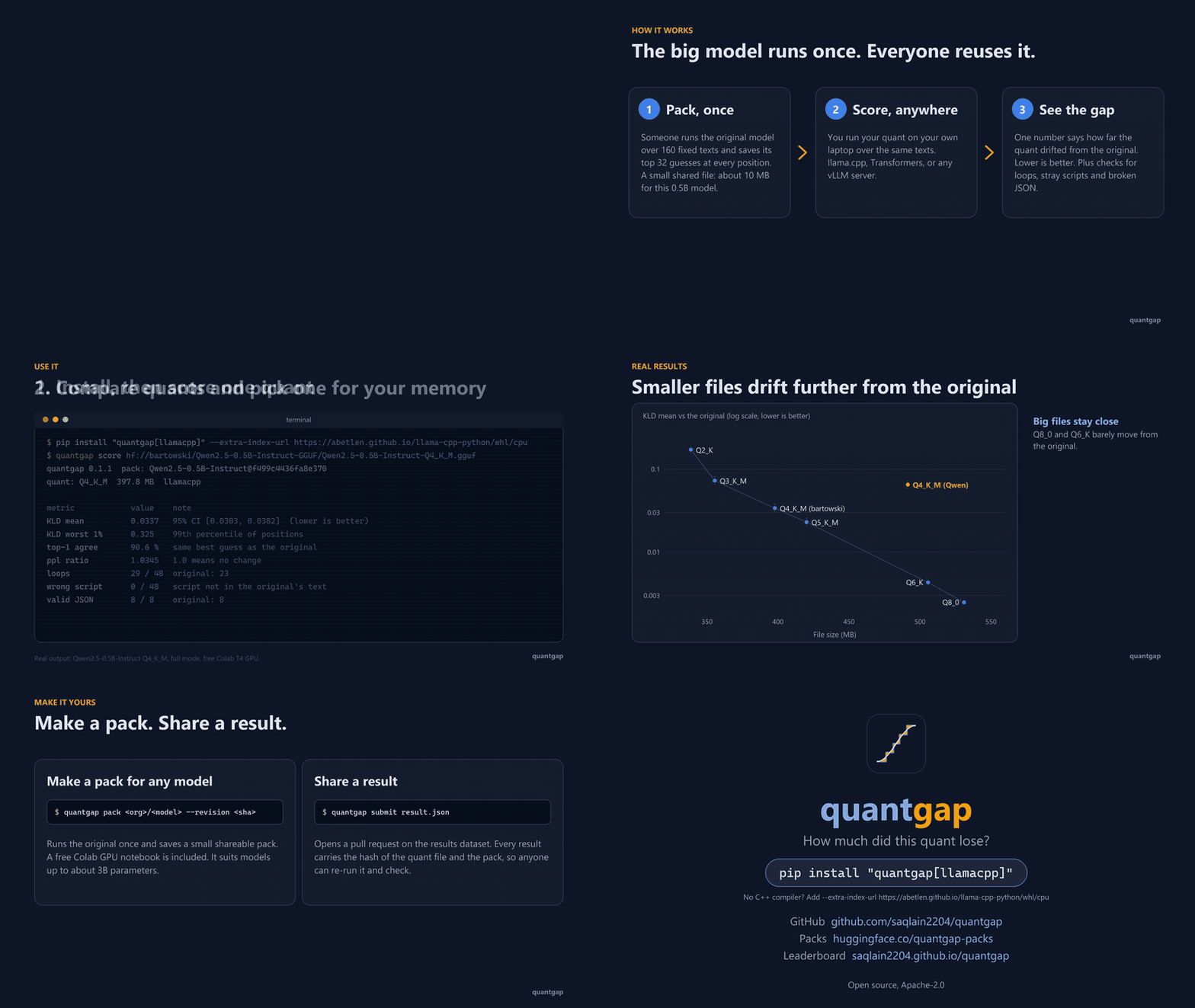
Click for the full 87-second launch video (1080p): what it does, how to use it, real results.
Which quant should I download? Q4_K_M? UD-Q4_K_XL? IQ3_XXS? NVFP4?
People answer that with feelings. quantgap answers it with a number: how much each quant moved away from the real model, measured the same way for every publisher and every format.
Quickstart
pip install "quantgap[llamacpp]" --extra-index-url https://abetlen.github.io/llama-cpp-python/whl/cpu

# how much did this one file lose?
quantgap score hf://<publisher>/<model>-GGUF/<file>.gguf

# score many quants of one model, draw a chart, and get a pick for your memory
quantgap compare --repo <publisher>/<model>-GGUF --glob "*Q4*" --budget 16GB --chart chart.svg
The extra index gives pip a ready-made llama.cpp for Windows and Linux, so you do not need a C++
compiler. macOS: that ready-made file is currently broken, and we have not tested GGUF scoring on a
Mac. If you try it, build llama-cpp-python from source first
(CMAKE_ARGS="-DGGML_METAL=on" pip install llama-cpp-python, needs the Xcode command line tools),
then pip install quantgap, and tell us how it went.
You need a pack for the model (the original's answers on a fixed set of texts, made once and
shared). Pass one with --pack, or let quantgap look one up on the Hub. See
Make a pack for your own model.
Sample result (real, small, one machine)
Model: Qwen/Qwen2.5-0.5B-Instruct (Apache-2.0). Its pack is public at
quantgap-packs/Qwen2.5-0.5B-Instruct,
so quantgap score hf://bartowski/Qwen2.5-0.5B-Instruct-GGUF/Qwen2.5-0.5B-Instruct-Q4_K_M.gguf finds it by itself. The numbers below were measured by quantgap on one
CPU laptop, against a pack made from the original weights. Full table, hashes and settings:
docs/RESULTS.md.
| Publisher | Quant | Size | KLD mean (95% interval) | Worst 1% | Top-1 | PPL ratio | Loops (quant / original) | Wrong script | JSON ok |
|---|---|---|---|---|---|---|---|---|---|
| bartowski | Q8_0 | 531.1 MB | 0.0027 (0.0024 to 0.0031) | 0.027 | 97.1% | 1.003 | 5 / 6 | 0 | 2 / 2 |
| bartowski | Q6_K | 505.7 MB | 0.0069 (0.0057 to 0.0083) | 0.064 | 95.5% | 1.008 | 8 / 6 | 0 | 2 / 2 |
| bartowski | Q5_K_M | 420.1 MB | 0.0241 (0.0190 to 0.0298) | 0.264 | 92.3% | 1.024 | 5 / 6 | 0 | 2 / 2 |
| bartowski | Q4_K_M | 397.8 MB | 0.0389 (0.0316 to 0.0478) | 0.376 | 89.9% | 1.041 | 6 / 6 | 0 | 2 / 2 |
| Qwen | Q4_K_M | 491.4 MB | 0.0787 (0.0627 to 0.0950) | 0.807 | 85.8% | 1.064 | 7 / 6 | 0 | 2 / 2 |
| bartowski | Q3_K_M | 355.5 MB | 0.0828 (0.0672 to 0.1009) | 0.852 | 85.9% | 1.073 | 7 / 6 | 0 | 2 / 2 |
| bartowski | Q2_K | 338.6 MB | 0.2052 (0.1672 to 0.2386) | 2.080 | 77.8% | 1.200 | 9 / 6 | 0 | 2 / 2 |
Quick mode (first 25% of each group, 12 greedy prompts), llama.cpp on CPU, one machine. Lower KLD is better. Loops are counted out of 12 prompts, so differences of one or two are noise.
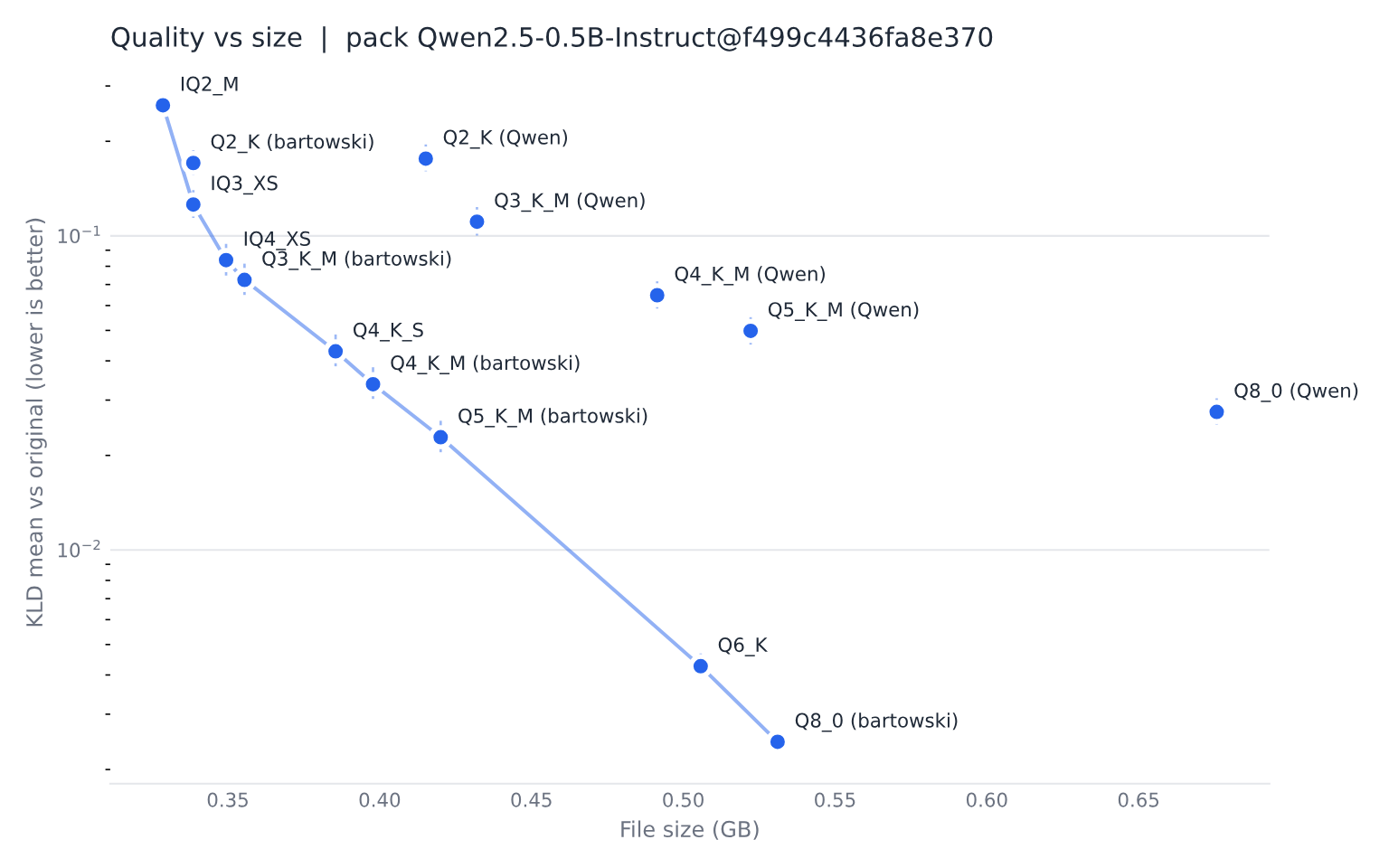
One finding worth a second look: the two files labelled Q4_K_M are not the same quality. The official Qwen file (491 MB) drifted about twice as far (KLD 0.0787) as bartowski's (398 MB, KLD 0.0389), and the intervals do not overlap. We did not investigate why. A label like Q4_K_M names a recipe, not one fixed result, which is the point of measuring.
The numbers fall steadily with file size: Q8_0 and Q6_K stay close to the original, Q4_K_M is a clear step away, and Q2_K has drifted a lot. This is a small model on one machine in quick mode, so treat it as a demonstration of the tool, not a verdict on these quants.
How it works
        (once per model: big machine, Colab, or HF Jobs)
 original model ──► quantgap pack ──► pack (small files) ──► Hugging Face Hub
                                                                  │
        (you, on your own laptop)                                 ▼
 quant file / server ──► backend ──► per-position scores ──► quantgap score ◄── pack
                                                                  │
                                                  table + chart + result JSON
                                                                  │
                                            quantgap submit ──► pull request ──► leaderboard
- Pack (once).
quantgap packruns the full-size model over 160 fixed texts and saves its top 32 next-token guesses at every position. That is about 20 MB, not many GB. Teacher forcing means we feed the same text to both models and compare their guesses at every position. Nobody generates anything, so it is fair and fast. - Score (anyone).
quantgap scoreruns your quant on the same texts on your own machine (llama.cpp, MLX, Transformers, or any vLLM server) and compares. - Share.
quantgap submitsends the result, with the SHA-256 of the quant file and of the pack, so anyone can re-run it and get the same number.
What the numbers mean
Lower KLD is better.
| Number | In plain words |
|---|---|
| KLD mean | One number for how far the quant's next-token probabilities are from the original's. 0 means identical. A 95% interval comes with it. |
| KLD worst 1% | The 99th percentile. A mean can hide rare big failures. This catches them. |
| Top-1 agreement | How often the quant's best guess is the same as the original's. |
| Perplexity ratio | How much more surprised the quant is by real text. 1.0 means no change. |
| Loops | Short greedy generations where the model repeats itself. Shown next to the original's count. |
| Wrong script | A Chinese, Cyrillic, Arabic or Hindi character appears in English, code, math or JSON text where the original had none. |
| Valid JSON | Of 8 prompts that ask for a JSON object, how many parse. Shown next to the original's count. |
Numbers are also given for each group of texts: general, chat, code, math, multilingual (Hindi, Chinese, Spanish, Arabic) and JSON. The maths is explained in plain words in docs/method.md.
What quantgap does not tell you
- It is not a skill benchmark. It measures drift from the original, not how good the model is at your task. Less drift is not always better for you.
- It is not a speed benchmark. Use
llama-benchor llmfit for speed. - The KLD is a lower bound. To keep packs small we keep the original's top 32 guesses and lump everything else into one bucket. That can only make two models look closer, never further apart. It ranks quants well. Its absolute values are a little lower than llama.cpp's full-vocabulary numbers. Compare quantgap numbers with quantgap numbers.
- Ollama is not supported yet. Ollama does not return the model's scores for the input text.
You can score the GGUF file Ollama already downloaded (
ollama show --modelfile NAMEprints its path). - Big models need someone with a big machine. The MVP targets models up to about 32B parameters.
Make a pack for your own model
pip install "quantgap[pack]"
quantgap pack <org>/<model> --revision <full commit sha> --license <license> --push <you>/<name>
Free option: 
You fine-tuned a small model and want to know how much Q4_K_M hurts it? Make a pack for your fine-tune, then score the GGUF against it.
Backends
| Backend | For | Install | Status |
|---|---|---|---|
llamacpp |
GGUF on CPU and CUDA | pip install "quantgap[llamacpp]" --extra-index-url https://abetlen.github.io/llama-cpp-python/whl/cpu |
tested on Windows and Linux with real GGUF files; macOS and Metal not verified |
openai |
any OpenAI-compatible server that returns prompt logprobs (vLLM: NVFP4, AWQ, GPTQ, FP8) | built in, use --base-url |
tested against a fake server that follows the vLLM docs, not a live GPU |
hf |
Transformers, bitsandbytes | pip install "quantgap[hf]" |
tested here (the reference path) |
mlx |
Apple silicon | pip install "quantgap[mlx]" |
written but not run on a Mac yet |
# a vLLM server
quantgap score openai://Qwen2.5-0.5B-Instruct-NVFP4 --base-url http://localhost:8000/v1 --pack <pack>
A server only reports its own top-N tokens, so those results are marked approximate.
Submit a result
The public leaderboard site is built and waiting. It opens when there are full results (a --quick
result cannot be submitted), so yours can be one of the first.
quantgap score ./my-quant.gguf --pack <pack>          # writes quantgap-results/<name>.json
quantgap submit quantgap-results/<name>.json --dry-run # shows exactly what would be sent
export HF_TOKEN=hf_...
quantgap submit quantgap-results/<name>.json           # opens a pull request
--quick results are for a fast first look and cannot be submitted.
Use it in CI
quantgap score --backend openai --base-url "$URL" --model-name "$NAME" --json out.json openai://"$NAME"
python -c "import json,sys; sys.exit(json.load(open('out.json'))['metrics']['kld_mean'] > 0.02)"
Fail the build if your inference engine fork starts to drift.
Commands
quantgap pack MODEL_REPO [--revision SHA] [--k 32] [--device auto|cuda|cpu] [--out DIR] [--push ORG/NAME]
quantgap packs list | show PACK_REF
quantgap score QUANT [--pack PACK_REF] [--backend auto|llamacpp|mlx|openai|hf] [--quick] [--json OUT]
quantgap compare QUANT... | --repo ORG/REPO --glob "*Q4*.gguf" [--budget 16GB] [--chart out.svg]
quantgap submit RESULT.json [--dry-run]
quantgap inspect RESULT.json
quantgap doctor [--selftest]
quantgap doctor tells you which backends are installed and which extra to add.
Comparison with other tools
| Project | What it does | What quantgap adds |
|---|---|---|
llama.cpp llama-perplexity --kl-divergence |
Built-in KLD of a GGUF against a saved logits file from the BF16 model. | You must run the BF16 model yourself and the logits file is huge. quantgap shares small packs, works beyond GGUF, and adds a report. We learned from it: it is the prior art. |
| kld-sweep | Loops llama-perplexity over a folder of GGUFs, with CSV and a chart. |
Same idea, nice and simple. quantgap removes the need for a local BF16 run and adds damage checks and a shared leaderboard. |
| mlx-kld | KLD for MLX and GGUF with a local teacher cache. | quantgap makes the "teacher cache" a shareable pack and covers more backends. |
| GGUF-Tool-Suite | Builds custom mixed quants to a target size. | It makes quants, quantgap judges them. They fit together. |
| quant-fidelity-frontier | Collects numbers that publishers reported. | quantgap measures with one method and records hashes. |
| llmfit | Which models fit your hardware, and how fast. | quantgap is the measured-quality half. |
FAQ
Why are my numbers a bit different from llama.cpp's KLD? quantgap keeps the top 32 guesses and a tail bucket, so it is a lower bound. See docs/faq.md.
Why not Ollama? Ollama does not return the model's scores for the input text, so we cannot compare fairly. Score the GGUF file it downloaded instead.
Is my data sent anywhere? No. quantgap has no telemetry. It only talks to the Hugging Face Hub
(downloads, and uploads you ask for) and to a server you name with --base-url.
Why does it stop with a tokenizer error? The quant must use the same token ids as the pack. quantgap checks and never fixes a mismatch silently.
More in docs/faq.md.
Not yet
- Scoring through Ollama (it does not return the model's scores for the input text).
- Task benchmarks such as MMLU or coding pass rates. quantgap measures drift, not skill.
- Packing models above about 32B parameters (memory limits on free hardware).
- Vision and audio models.
- Speed benchmarks (use
llama-benchor llmfit). - KV-cache quantization effects.
Development
git clone https://github.com/saqlain2204/quantgap && cd quantgap
pip install -e ".[dev]" llama-cpp-python --extra-index-url https://abetlen.github.io/llama-cpp-python/whl/cpu
python scripts/make_tiny_model.py      # tiny model + tiny GGUF for tests (also built by the tests)
python scripts/make_video.py            # re-render docs/launch.mp4 from docs/results (needs ffmpeg)
python -m pytest
python -m ruff check . && python -m ruff format --check .
See CONTRIBUTING.md for how to add a backend and how to submit a pack.
Credits
- llama.cpp and its
--kl-divergencetooling are the prior art this builds on. - kld-sweep and mlx-kld are related work.
- Probe texts come from Wikipedia (CC BY-SA 4.0), Dolly-15k (CC BY-SA 3.0) and GSM8K (MIT). See
SOURCES.md.
License
Code: Apache-2.0. Results dataset: CC BY 4.0. Each pack's dataset card states the license of the original model and that the pack holds model outputs (log probabilities), not weights.
1 maintainer

Metadata
1 maintainer
Release files for quantgap 0.1.1
For a detailed explanation of source distributions (sdists) and built distributions (wheels), please see the package formats documentation.
Source distribution (sdist)
| File | Size | Uploaded | Provenance | Actions |
|---|---|---|---|---|
| quantgap-0.1.1.tar.gz | 5.9 MB | Without provenance | Details for quantgap-0.1.1.tar.gz |
Built distribution (wheel)
| File | Interpreter | ABI | Platform | Actions Reset |
|---|---|---|---|---|
| quantgap-0.1.1-py3-none-any.whl | Python 3 | none | any | Details for quantgap-0.1.1-py3-none-any.whl |
Total release size: 6.1 MB
Release files / quantgap-0.1.1.tar.gz
| Download URL | quantgap-0.1.1.tar.gz |
|---|---|
| Size | 5.9 MB |
| Tags | Source |
|
SHA-256 checksum How to use checksums |
aed6a21fb785e03897d093e572b2b714540178721f0e4e98dd732f73364a5c48
|
|
BLAKE2b-256 checksum How to use checksums |
2f892cdd47ce046ae0d1e5a8fbcfed73398b45c502a342df3aa0417059364483
|
| Upload date | |
|
Uploaded using Trusted Publishing? What is trusted publishing? |
No |
| Uploaded via |
twine/7.0.0 CPython/3.12.7
|
Release files / quantgap-0.1.1-py3-none-any.whl
| Download URL | quantgap-0.1.1-py3-none-any.whl |
|---|---|
| Size | 160.4 kB |
| Tags | Python 3 |
|
SHA-256 checksum How to use checksums |
85d25d1d45f14c77e9ca757bf3ec209c543268bd3c4fa0f4205a721fdd57f66d
|
|
BLAKE2b-256 checksum How to use checksums |
9cb3dd3e74cb603f0258847fe2b6d0b53886ac216e8a4ef2346beb337a40e867
|
| Upload date | |
|
Uploaded using Trusted Publishing? What is trusted publishing? |
No |
| Uploaded via |
twine/7.0.0 CPython/3.12.7
|
Security for quantgap 0.1.1
Provenance
Provenance describes where a file came from. On PyPI, provenance is shared via attestations, which provide a verifiable record of the build or publishing details. View details, limitations and caveats.
No provenance found
None of the files in this release were uploaded with provenance metadata.
A note on package security
PyPI is a repository for distributing packages, not a service for auditing them. While third-party security researchers and our staff do their best to detect and remove malicious packages, PyPI cannot guarantee the quality, security or suitability of any given package.
To learn more about protecting yourself from malicious actors, visit our package security documentation.













