

quantlab-factor-agent









English | 简体中文
quantlab-factor-agent mines daily stock factors with language models, mechanism first. A model states an economic mechanism and writes the factor it implies as KunQuant code. Fixed checks and statistics from quantlab then decide whether the factor is new and adds to the factors you already have. The model only proposes and reviews, and it sees nothing but the training segment.
Documentation · Example configs · Changelog
Status: alpha (0.x). The API, the config format and the run directory's layout may change between minor versions.
How it works
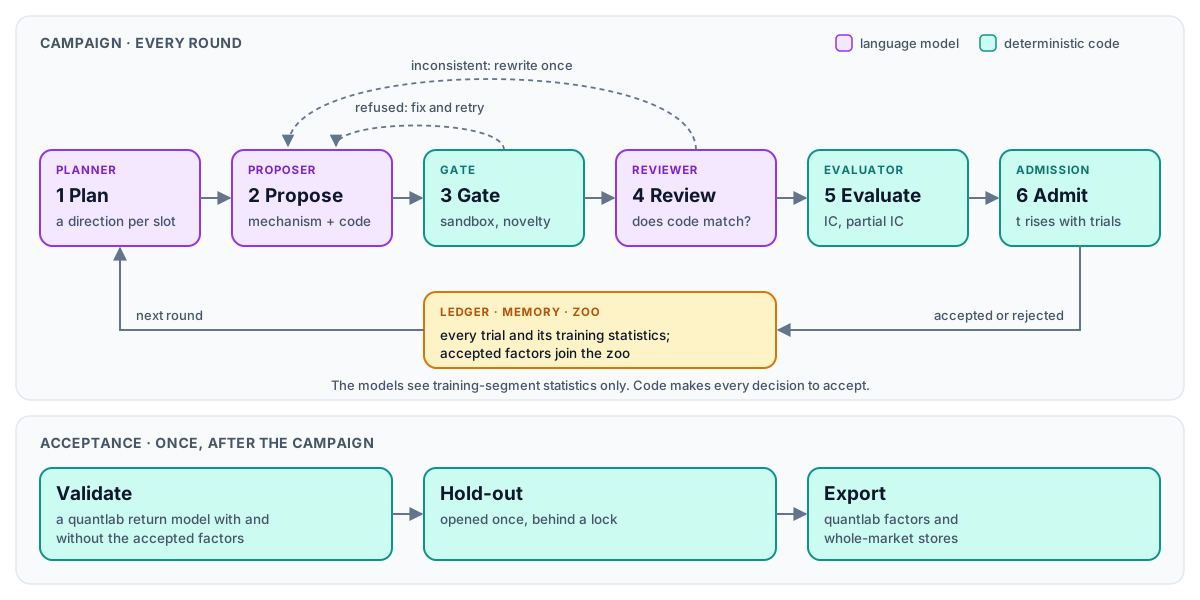
A campaign runs in rounds. The planner picks one research direction per slot, and the
proposer writes a hypothesis, a description and KunQuant code for each. The Gate builds the
code in a sandbox and refuses rewrites of existing factors; the reviewer checks that
hypothesis and code describe the same factor. The Evaluator then scores what is left on the
training segment, and admission accepts or rejects it. After the campaign, Acceptance
trains a quantlab return model with and without the accepted factors, opens the hold-out
once and exports the chosen factors.
- Mechanism first. The Gate compares KunQuant graphs and refuses rewrites, parameter-only variants and large shared subtrees of every reference, known and accepted factor.
- No look-ahead. Prompts carry training-segment statistics only: no return, no date, no validation or hold-out metric. The hold-out opens once, behind a lock.
- Only code accepts. The Evaluator scores candidates on quantlab's whole-market panels, masked to each day's members, and the partial-IC t threshold tightens with every evaluated trial.
- Nothing hard-coded about the market. Fields, operators, prompts, mechanism types and scoring come from the config's files, so a new input family is a new field file.
- Any provider, replayable. Each role picks its backend: OpenAI-compatible endpoints
(DeepSeek, OpenAI, vLLM, ...), Anthropic or Claude Code. Every call is logged, and the
replaybackend reproduces a run byte for byte without a provider. - Resumable.
run()picks up from the run directory after a crash or an exhausted balance.
The diagram below shows how the parts fit together: what the models search, what each judge refuses, how every trial feeds the next round, and where the data the models see ends. How the agent mines factors explains it in full.
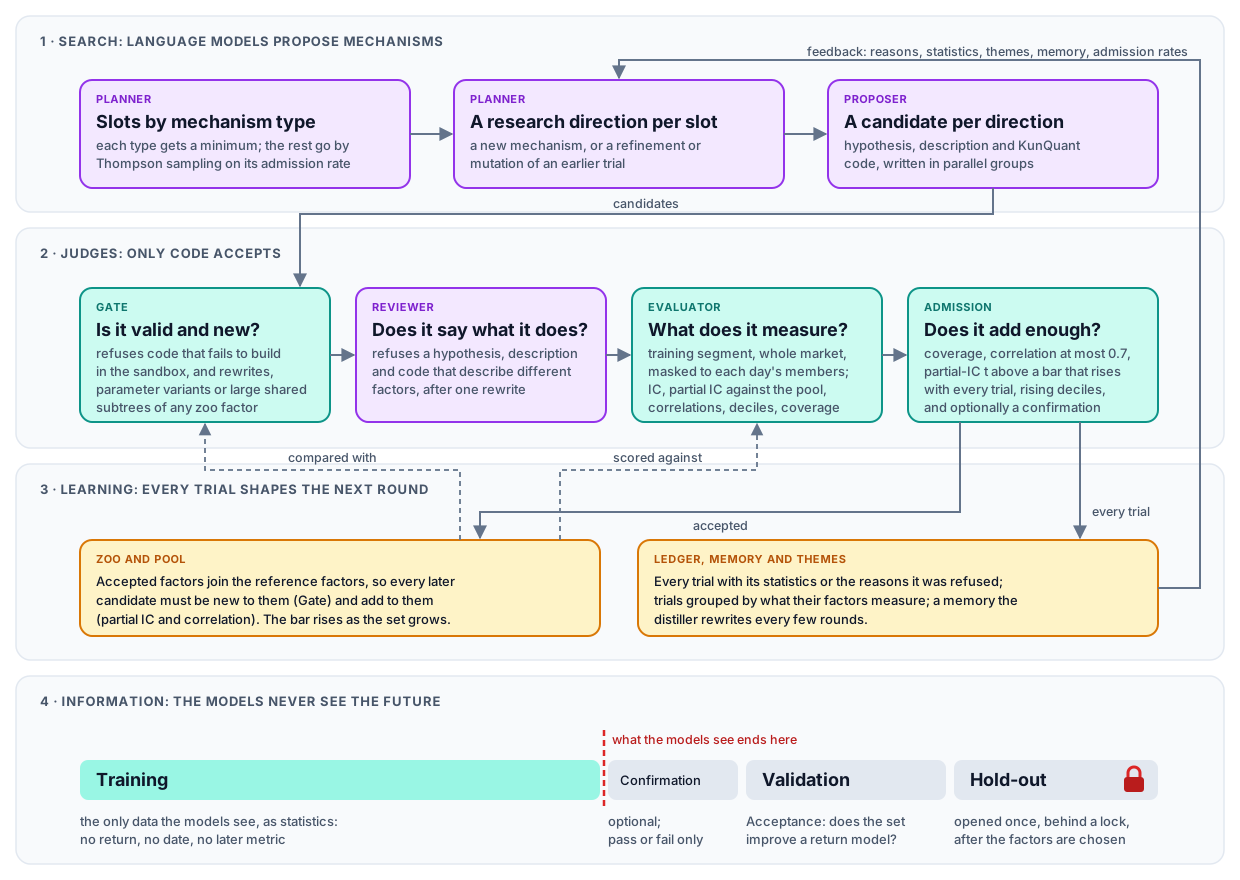
With themes turned on, the planner also reads a map of the directions tried so far; see the direction map.
Install
You need Python 3.13+ and a C++ compiler on the PATH (KunQuant compiles factor graphs to
native code):
pip install "quantlab-factor-agent[web]" # [web] adds the factor-agent-web frontend
To work on the code, or to run the example configs and the offline test suite, install from a checkout with uv, with quantlab's checkout beside it:
git clone https://github.com/ZhaorongDai/quantlab.git
git clone https://github.com/ZhaorongDai/quantlab-factor-agent.git
cd quantlab-factor-agent
uv sync --extra web
uv run pytest -n auto    # offline: no LLM call, a synthetic market
On macOS, xgboost also needs brew install libomp. Keys come from environment variables
only (ANTHROPIC_API_KEY, or the variable a role's api_key_env names), and a config that
holds a key is refused. See installation.
Run a campaign
from factor_agent.acceptance import Acceptance
from factor_agent.campaign import Campaign
from factor_agent.config import CampaignConfig

config = CampaignConfig.from_file("configs/us3000_ret5.yaml")
result = Campaign(config).run()          # resumes when run_dir already holds a state
print(result.stop, len(result.accepted), "accepted of", len(result.records))

report = Acceptance(config).validate()   # baseline vs baseline + accepted, on validation
print(report.markdown())
Point the config's data paths at your own quantlab stores first. A campaign runs for hours,
mostly waiting on the model, and needs no GPU; Acceptance uses CUDA when it is available.
Watch a run in the browser with factor-agent-web (web frontend).
Documentation
- How the agent mines factors: the search, the judges, the learning loop and what the models may see, in one diagram
- First campaign: run one and read its outcome
- Concepts: roles, factor sets, segments, what "accepted" means
- The campaign config: every section, stopping and resuming
- The vocabulary and prompts: what candidates may read and write, and what the models are told
- LLM backends: providers, the LLM log, replay, cost
- Gate, review and evaluation and acceptance: how a factor is judged
Contributing
Bug reports, questions and pull requests are welcome; see CONTRIBUTING.md. Report security problems privately, as SECURITY.md describes.
License
MIT. factor_agent/_max_drawdown.py adapts code from
KunQuant under the
Apache License 2.0.
1 maintainer

Metadata
1 maintainer
Release files for quantlab-factor-agent 0.1.0
For a detailed explanation of source distributions (sdists) and built distributions (wheels), please see the package formats documentation.
Source distribution (sdist)
| File | Size | Uploaded | Provenance | Actions |
|---|---|---|---|---|
| quantlab_factor_agent-0.1.0.tar.gz | 396.5 kB | With provenance | Details for quantlab_factor_agent-0.1.0.tar.gz |
Built distribution (wheel)
| File | Interpreter | ABI | Platform | Actions Reset |
|---|---|---|---|---|
| quantlab_factor_agent-0.1.0-py3-none-any.whl | Python 3 | none | any | Details for quantlab_factor_agent-0.1.0-py3-none-any.whl |
Total release size: 697.6 kB
Release files / quantlab_factor_agent-0.1.0.tar.gz
| Download URL | quantlab_factor_agent-0.1.0.tar.gz |
|---|---|
| Size | 396.5 kB |
| Tags | Source |
|
SHA-256 checksum How to use checksums |
234574265c97df47753091cf00e96f5f4e772dde872fa233244e3d41d385909f
|
|
BLAKE2b-256 checksum How to use checksums |
d5bc458a82810023bbef56d8e912ef91edc3e5ff13236372272e75e13c854028
|
| Upload date | |
|
Uploaded using Trusted Publishing? What is trusted publishing? |
Yes |
| Uploaded via |
twine/7.0.0 CPython/3.13.16
|
Provenance
Provenance describes where a file came from. On PyPI, provenance is shared via attestations, which provide a verifiable record of the build or publishing details. View details, limitations and caveats.


PyPI Publish Attestation
PyPI verified that this artifact, at this checksum, originated from the publisher listed below.
Signed by GitHub Actions, verified by PyPI on Nov 6, 2026.
Transparency logRelease files / quantlab_factor_agent-0.1.0-py3-none-any.whl
| Download URL | quantlab_factor_agent-0.1.0-py3-none-any.whl |
|---|---|
| Size | 301.0 kB |
| Tags | Python 3 |
|
SHA-256 checksum How to use checksums |
3a7f7715f76180b519a94ced1872e9463aa7af12239894a7f8e2d7e57ca5cac8
|
|
BLAKE2b-256 checksum How to use checksums |
a604604714bad1db3c19b14ae761b1c04d784d722f169e09f61b61ca83cd6279
|
| Upload date | |
|
Uploaded using Trusted Publishing? What is trusted publishing? |
Yes |
| Uploaded via |
twine/7.0.0 CPython/3.13.16
|
Provenance
Provenance describes where a file came from. On PyPI, provenance is shared via attestations, which provide a verifiable record of the build or publishing details. View details, limitations and caveats.
PyPI Publish Attestation
PyPI verified that this artifact, at this checksum, originated from the publisher listed below.
Signed by GitHub Actions, verified by PyPI on Nov 6, 2026.
Transparency logSecurity for quantlab-factor-agent 0.1.0
Provenance
Provenance describes where a file came from. On PyPI, provenance is shared via attestations, which provide a verifiable record of the build or publishing details. View details, limitations and caveats.
Full provenance
Both files in this release have been uploaded with provenance metadata.
Attestation for quantlab_factor_agent-0.1.0.tar.gz
PyPI Publish Attestation
PyPI verified that this artifact, at this checksum, originated from the publisher listed below.
Signed by GitHub Actions, verified by PyPI on Nov 6, 2026.
Transparency logA note on package security
PyPI is a repository for distributing packages, not a service for auditing them. While third-party security researchers and our staff do their best to detect and remove malicious packages, PyPI cannot guarantee the quality, security or suitability of any given package.
To learn more about protecting yourself from malicious actors, visit our package security documentation.














