
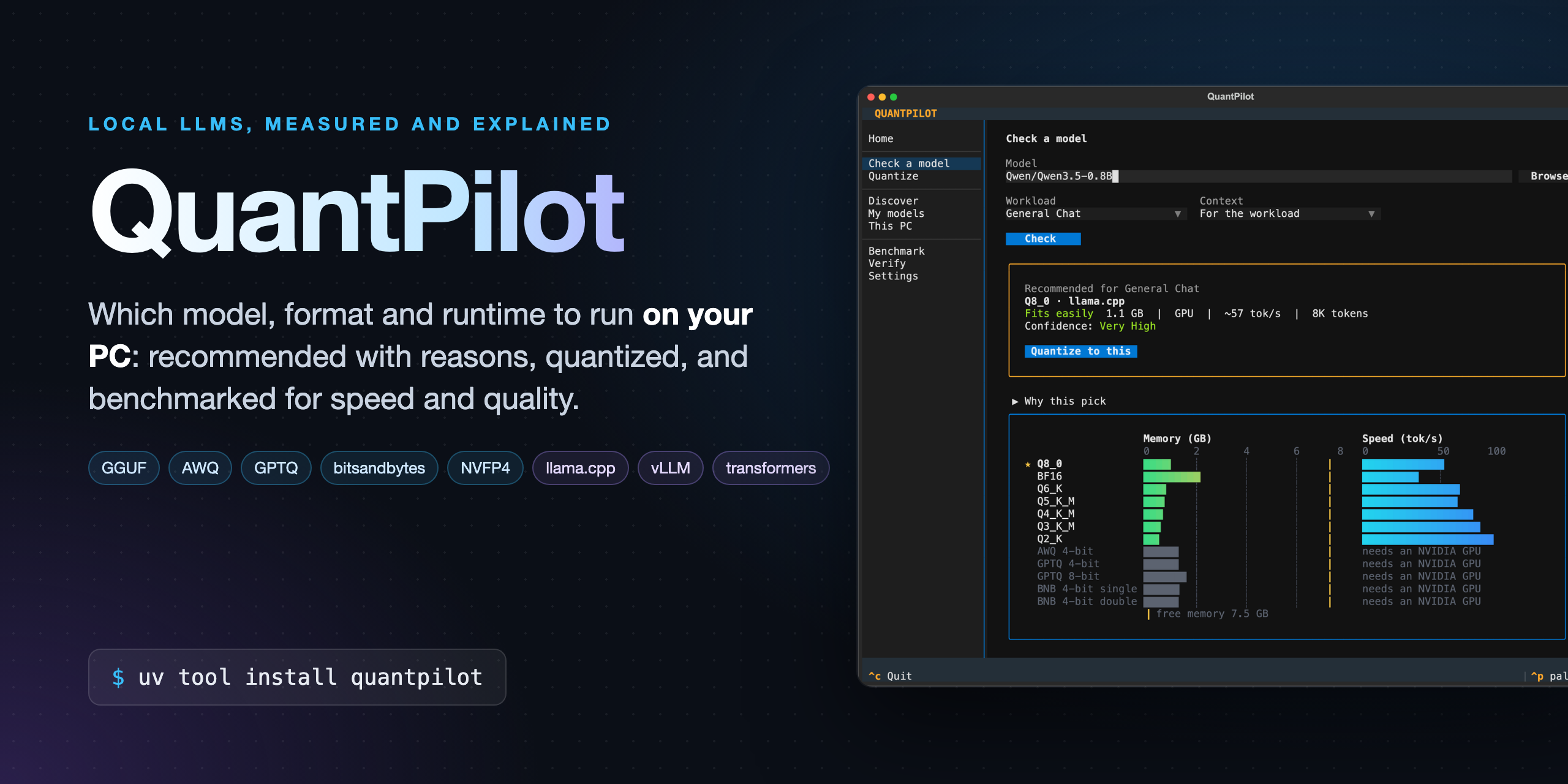





QuantPilot tells you which local LLM to run on your PC, in which format and runtime, and why. It sizes every option from the model's own files, checks it against your free memory, ranks the options for the kind of work you do, and measures speed and quality on your machine instead of guessing. Then it makes the file for you.
- Recommends the model, format (GGUF, AWQ, GPTQ, bitsandbytes, NVFP4), runtime (llama.cpp, vLLM, transformers) and context cache for chat, coding, RAG, agents, reasoning, long context, low latency or throughput, with the reasons and how sure it is.
- Sizes exactly: weights and context memory from
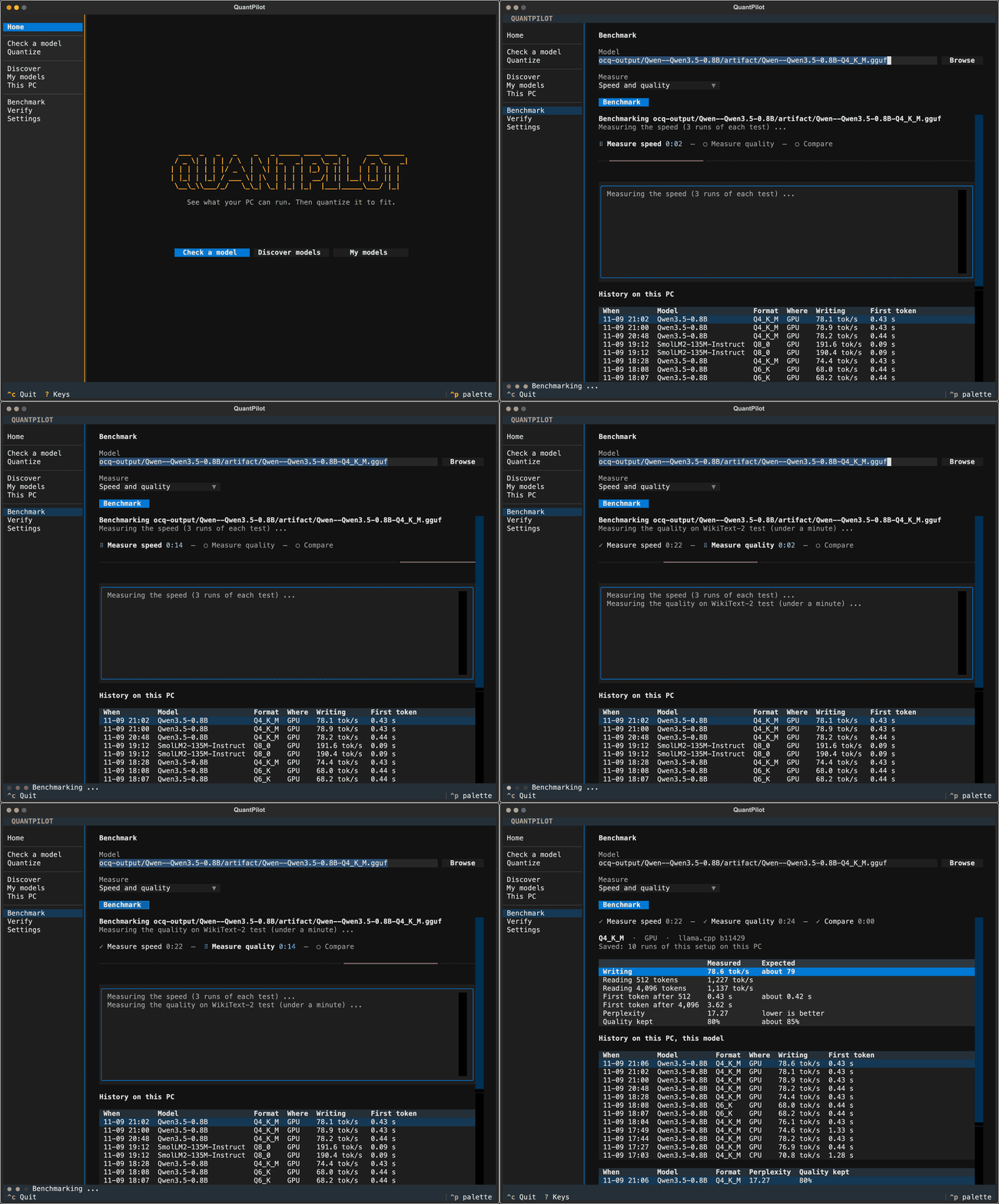
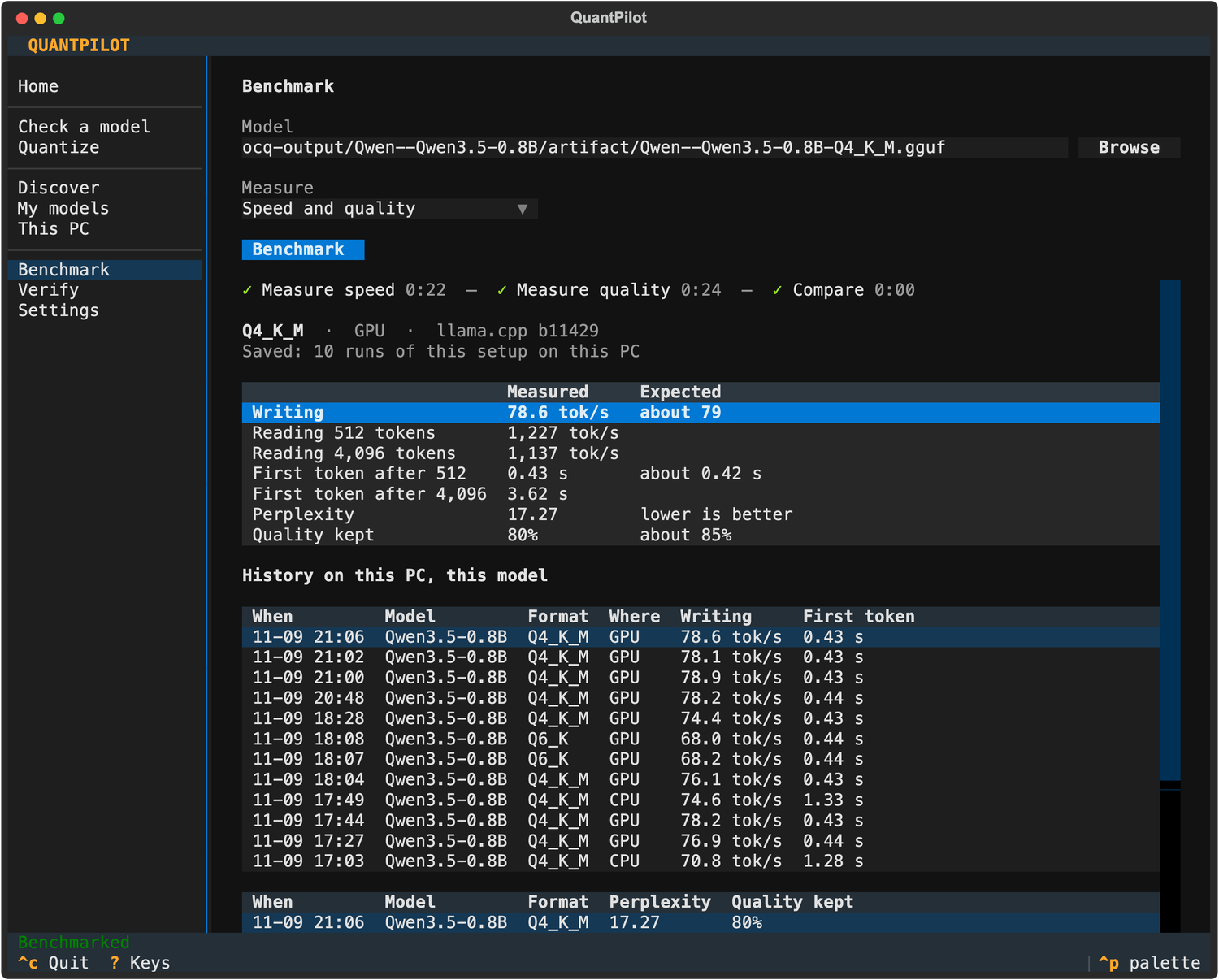
config.jsonand the tensor headers (no download of the weights), checked against llama.cpp's own memory numbers on NVIDIA, Apple Silicon and CPU. - Measures: speed and time to the first token with llama.cpp's benchmark, and quality as perplexity on WikiText-2, compared with the original model. Every result is kept, and the recommendations learn from it.
- Quantizes: one command (or one button) from a Hugging Face model or your own fine-tune to a checked, benchmarked file.
Install
QuantPilot runs with uv on Linux, macOS and Windows, Python 3.10 or newer.
uv tool install quantpilot          # the ocq and quantpilot commands
uvx quantpilot                      # or try it without installing
Each quantization format is an extra, installed when you want it (they bring PyTorch, a large download):
uv tool install "quantpilot[gguf]"                              # GGUF: any PC
uv tool install "quantpilot[gguf,awq,bnb]" --torch-backend auto # NVIDIA: PyTorch for your driver
| Extra | Makes | Needs |
|---|---|---|
gguf |
GGUF for llama.cpp, Ollama, LM Studio (2 to 8 bit) | any PC; llama.cpp is downloaded on first use |
awq, gptq |
AWQ and GPTQ for vLLM | an NVIDIA GPU, Linux or WSL2 |
bnb |
bitsandbytes 4 and 8 bit for transformers | an NVIDIA GPU |
nvfp4 |
NVFP4 for vLLM | an NVIDIA GPU (Blackwell computes it in FP4) |
ocq doctor then says what is ready on your PC and gives the command for anything that is not. The app's This PC page installs the extras with a button. With pip: pip install "quantpilot[gguf]". From the source: git clone https://github.com/glastonvelvarts/QuantPilot && cd QuantPilot && uv sync --extra gguf, then uv run ocq.
Quick start
ocq                                   # the full-screen app: arrow keys and Enter
ocq doctor                            # is everything ready on this PC?
ocq recommend --workload coding       # which model and format to run, and why
ocq feasibility Qwen/Qwen3-8B         # every format of one model on this PC
ocq optimize Qwen/Qwen3-8B -b gguf --gguf-type Q4_K_M --execute
ocq bench ocq-output/Qwen--Qwen3-8B/artifact/Qwen--Qwen3-8B-Q4_K_M.gguf --quality
A model is a Hugging Face id, a folder of your own fine-tune (saved with save_pretrained), a .gguf file, or an Ollama model (ollama:qwen3:8b). ocq models lists the ones already on your PC: Ollama, LM Studio, the Hugging Face cache, your folders.
The app
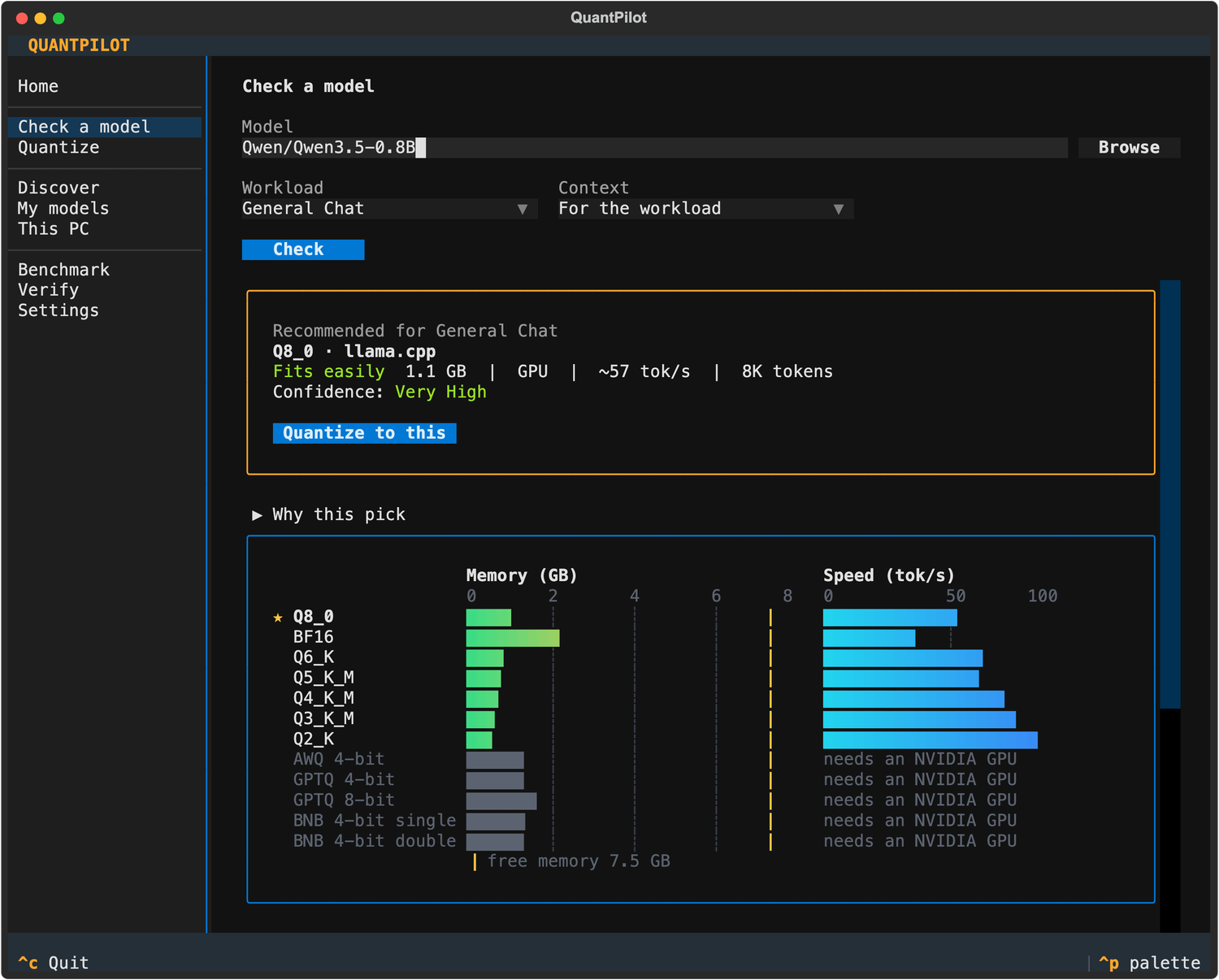
Run ocq for the full-screen app. Check a model gives the pick with its reasons and confidence, and every format's memory, speed and quality side by side. Quantize makes it with live progress. Benchmark measures any model on the PC and keeps the history. Discover ranks models for a kind of work, Settings keeps a Hugging Face token for gated models.
How it decides
| Until measured | Once measured on your PC | |
|---|---|---|
| Memory | Weights and context from the model's files, as each runtime allocates them (llama.cpp, vLLM, transformers), against your free VRAM and RAM | ocq verify compares it with llama.cpp's own numbers |
| Speed | The upper bound your memory bandwidth allows | Learnt from your runs: every quantize and benchmark adds one |
| Time to first token | Not known: said so | Learnt from your runs, by model size |
| Quality | llama.cpp's published loss of each format | Perplexity on WikiText-2 against the original model |
Options that cannot run here are ruled out with the reason. The rest are ranked by the workload's priorities in order (coding: quality, then context, then speed), never by one blended score. Each pick says why it won, what the next options would give and cost, and how sure it is (Low to Very High) with the evidence.
Formats and where they run
| Format | Runs with | Good for |
|---|---|---|
| GGUF (Q2_K to Q8_0) | llama.cpp, Ollama, LM Studio | any PC: CPU, Apple Silicon, NVIDIA, Windows; mixture-of-experts models with experts in RAM |
| AWQ, GPTQ | vLLM, transformers | serving on an NVIDIA GPU (Linux or WSL2) |
| bitsandbytes | transformers | a quick 4 or 8 bit load on an NVIDIA GPU |
| NVFP4 | vLLM | NVIDIA Blackwell (RTX 50xx, B200, GB10) |
| MLX (read, not made) | mlx-lm, LM Studio | Apple Silicon |
Checked against llama.cpp's own numbers on Windows 11 with an RTX 4060 Laptop, Linux (WSL2) with NVIDIA and CPU only, and macOS on Apple Silicon, with GPU and CPU only.
Commands
| Command | |
|---|---|
ocq |
The full-screen app |
doctor |
What is ready on this PC, and the command that fixes what is not |
recommend |
Model, format, runtime and cache type for a kind of work, with reasons and confidence |
models |
The models already on this PC and how each one fits |
inspect |
Every fact about a model, where it came from and how sure it is |
feasibility |
Every format of one model on this PC |
plan, optimize |
What would be made, then --execute to make it, check it and benchmark it |
bench |
Speed and time to the first token; --quality: perplexity and quality kept |
verify |
Load a GGUF in llama.cpp once and compare its memory with QuantPilot's prediction |
history |
This PC's saved benchmarks |
profile, backends |
This PC's hardware, and the quantization tools installed |
For scripts and agents
recommend, bench, models, inspect, feasibility, profile, history and doctor take --json, and Python gets the same data:
from ocq import api

pick = api.recommend(workload="coding")["best"]
print(pick["model"]["id"], pick["format"]["label"], pick["quality"]["kept"])
The shape is versioned and only grows within a version: see docs/api.md.
Learn more
- User guide: every command and option, how memory, speed and quality are worked out, fine-tunes on disk, GPUs, mixture of experts, environment variables
- JSON and Python API
- Contributing and changelog
MIT license.
1 maintainer

Metadata
1 maintainer
Release files for quantpilot 1.5.0
For a detailed explanation of source distributions (sdists) and built distributions (wheels), please see the package formats documentation.
Source distribution (sdist)
| File | Size | Uploaded | Provenance | Actions |
|---|---|---|---|---|
| quantpilot-1.5.0.tar.gz | 754.0 kB | Without provenance | Details for quantpilot-1.5.0.tar.gz |
Built distribution (wheel)
| File | Interpreter | ABI | Platform | Actions Reset |
|---|---|---|---|---|
| quantpilot-1.5.0-py3-none-any.whl | Python 3 | none | any | Details for quantpilot-1.5.0-py3-none-any.whl |
Total release size: 970.0 kB
Release files / quantpilot-1.5.0.tar.gz
| Download URL | quantpilot-1.5.0.tar.gz |
|---|---|
| Size | 754.0 kB |
| Tags | Source |
|
SHA-256 checksum How to use checksums |
7170a77c15e4edeb4dc8de6b1f19acc7463985f35b588033e8af94197298bf74
|
|
BLAKE2b-256 checksum How to use checksums |
4314dfd9cb754ed18d3936b7011afa1af5389c523ed21d289aee2d40fd415d0f
|
| Upload date | |
|
Uploaded using Trusted Publishing? What is trusted publishing? |
Yes |
| Uploaded via |
uv/0.13.7 {"installer":{"name":"uv","version":"0.13.7","subcommand":["publish"]},"python":null,"implementation":{"name":null,"version":null},"distro":{"name":"Ubuntu","version":"24.04","id":"noble","libc":null},"system":{"name":null,"release":null},"cpu":null,"openssl_version":null,"setuptools_version":null,"rustc_version":null,"ci":true}
|
Release files / quantpilot-1.5.0-py3-none-any.whl
| Download URL | quantpilot-1.5.0-py3-none-any.whl |
|---|---|
| Size | 216.0 kB |
| Tags | Python 3 |
|
SHA-256 checksum How to use checksums |
c6e222544e8bc54405ac146365d54cc69d59e0d2b56f077b02110d08295fc503
|
|
BLAKE2b-256 checksum How to use checksums |
859900159e76fa39d95f2a0e4cb57c8a459931ea68547629ad2e42663348ab0d
|
| Upload date | |
|
Uploaded using Trusted Publishing? What is trusted publishing? |
Yes |
| Uploaded via |
uv/0.13.7 {"installer":{"name":"uv","version":"0.13.7","subcommand":["publish"]},"python":null,"implementation":{"name":null,"version":null},"distro":{"name":"Ubuntu","version":"24.04","id":"noble","libc":null},"system":{"name":null,"release":null},"cpu":null,"openssl_version":null,"setuptools_version":null,"rustc_version":null,"ci":true}
|
Security for quantpilot 1.5.0
Provenance
Provenance describes where a file came from. On PyPI, provenance is shared via attestations, which provide a verifiable record of the build or publishing details. View details, limitations and caveats.
No provenance found
None of the files in this release were uploaded with provenance metadata.
A note on package security
PyPI is a repository for distributing packages, not a service for auditing them. While third-party security researchers and our staff do their best to detect and remove malicious packages, PyPI cannot guarantee the quality, security or suitability of any given package.
To learn more about protecting yourself from malicious actors, visit our package security documentation.














