
Quantum Metal (formerly Qiskit Metal) | for quantum device design & analysis

Project description
Quantum Metal (formerly: Qiskit Metal)










Quantum Metal is an open-source framework for engineers and scientists to design superconducting quantum devices with ease.
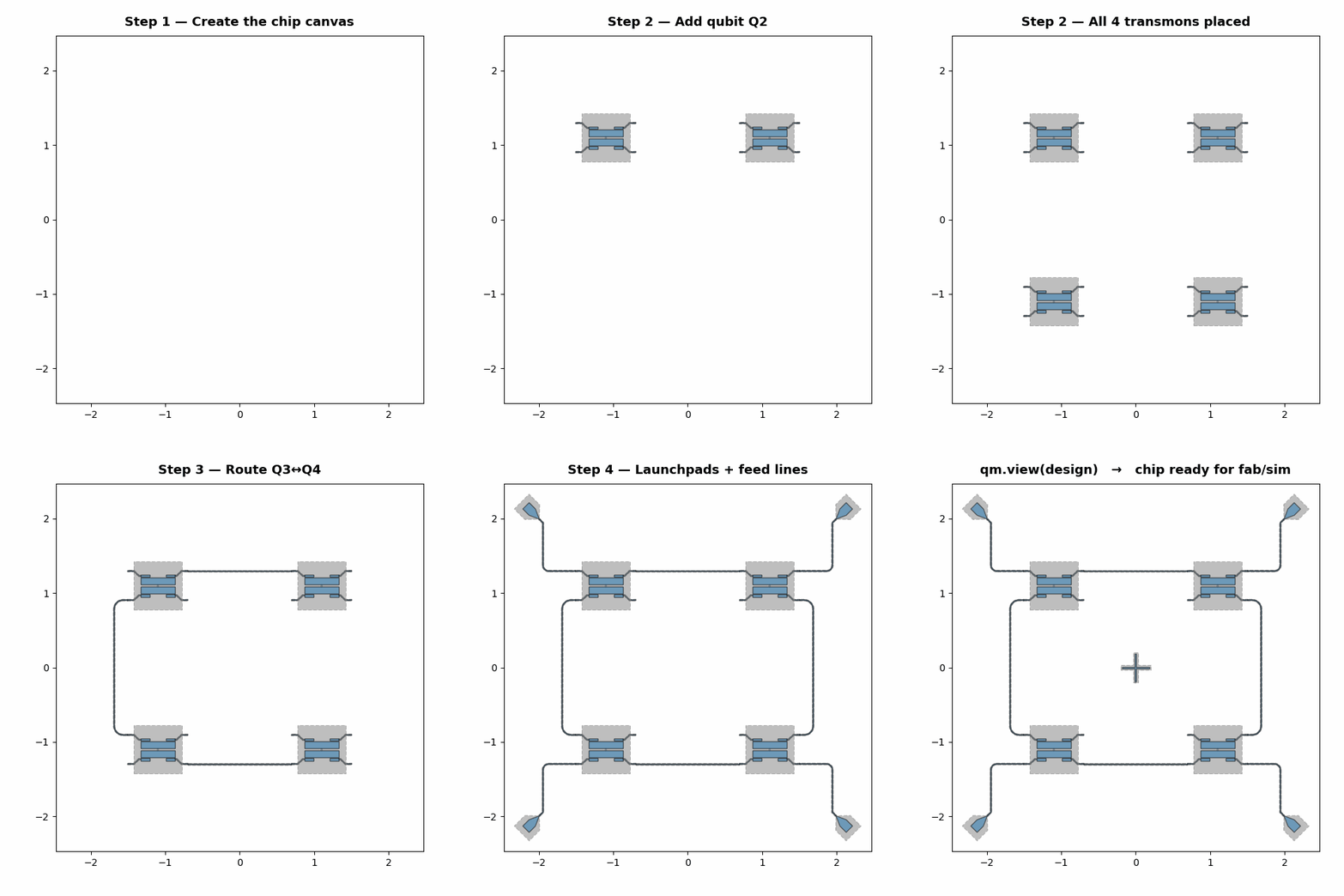
Regenerate this GIF · Full tutorial: 2.21
🚀 Try it now — zero install



One click → working Quantum Metal in your browser in 60 seconds (lite install, no Qt required).
📍 Where we're heading: see ROADMAP.md for the lite-by-default install (v0.7.0, shipped), the AI-orchestration profile, the open FEM stack (gmsh + Elmer + AWS Palace), and the upcoming import-path rename.
Install
pip install quantum-metal             # lite (v0.7.0+ default)
pip install "quantum-metal[full]"     # everything (v0.6.x compatibility)
Pick the install command that matches your workflow:
| What you get | When | |
|---|---|---|
🪶 Lite pip install quantum-metal |
Core API, qm.view(design) headless viewer, GDS export, pure-Python analyses |
AI orchestration, Colab / Binder, cloud Jupyter, CI, any non-interactive workflow |
🖥️ GUI pip install "quantum-metal[gui]" |
+ MetalGUI desktop app (PySide6, qdarkstyle) |
Interactive design work |
🧲 Ansys pip install "quantum-metal[ansys]" |
+ HFSS / Q3D renderers, EPR analyses (pyaedt, pyEPR-quantum) | HFSS / Q3D simulation (Windows + Ansys AEDT license) |
🔺 Open FEM mesher pip install "quantum-metal[mesh]" |
+ gmsh meshing (foundation for Elmer / Palace) | Open-source FEM (no Ansys license). [fem] is a backward-compat alias. |
📦 Full pip install "quantum-metal[full]" |
All of the above | Migrating from v0.6.x, want zero behavior change |
Extras compose: pip install "quantum-metal[gui,ansys]" works.
Feature matrix — what each install gives you
| lite | [gui] |
[ansys] |
[mesh] |
[full] |
|
|---|---|---|---|---|---|
import qiskit_metal |
✅ | ✅ | ✅ | ✅ | ✅ |
qm.view(design) (headless matplotlib) |
✅ | ✅ | ✅ | ✅ | ✅ |
Build designs + components from qlibrary |
✅ | ✅ | ✅ | ✅ | ✅ |
| GDS export | ✅ | ✅ | ✅ | ✅ | ✅ |
LOManalysis, LOM math, capacitance reductions |
✅ | ✅ | ✅ | ✅ | ✅ |
MetalGUI desktop app |
— | ✅ | — | — | ✅ |
| HFSS / Q3D renderers | — | — | ✅ | — | ✅ |
EPR analyses (EigenmodeSim, LumpedElementsSim) |
— | — | ✅ | — | ✅ |
| gmsh mesher (for Elmer / Palace) | — | — | — | ✅ | ✅ |
[fem] is a backward-compatible alias of [mesh] — both install gmsh.
Source install, conda, troubleshooting, and per-persona migration recipes:
docs/installation.rst ·
docs/migration-to-v0.7.0.rst.
CI runs on Python 3.10 / 3.11 / 3.12 across Linux, macOS, and Windows.
Quick Start
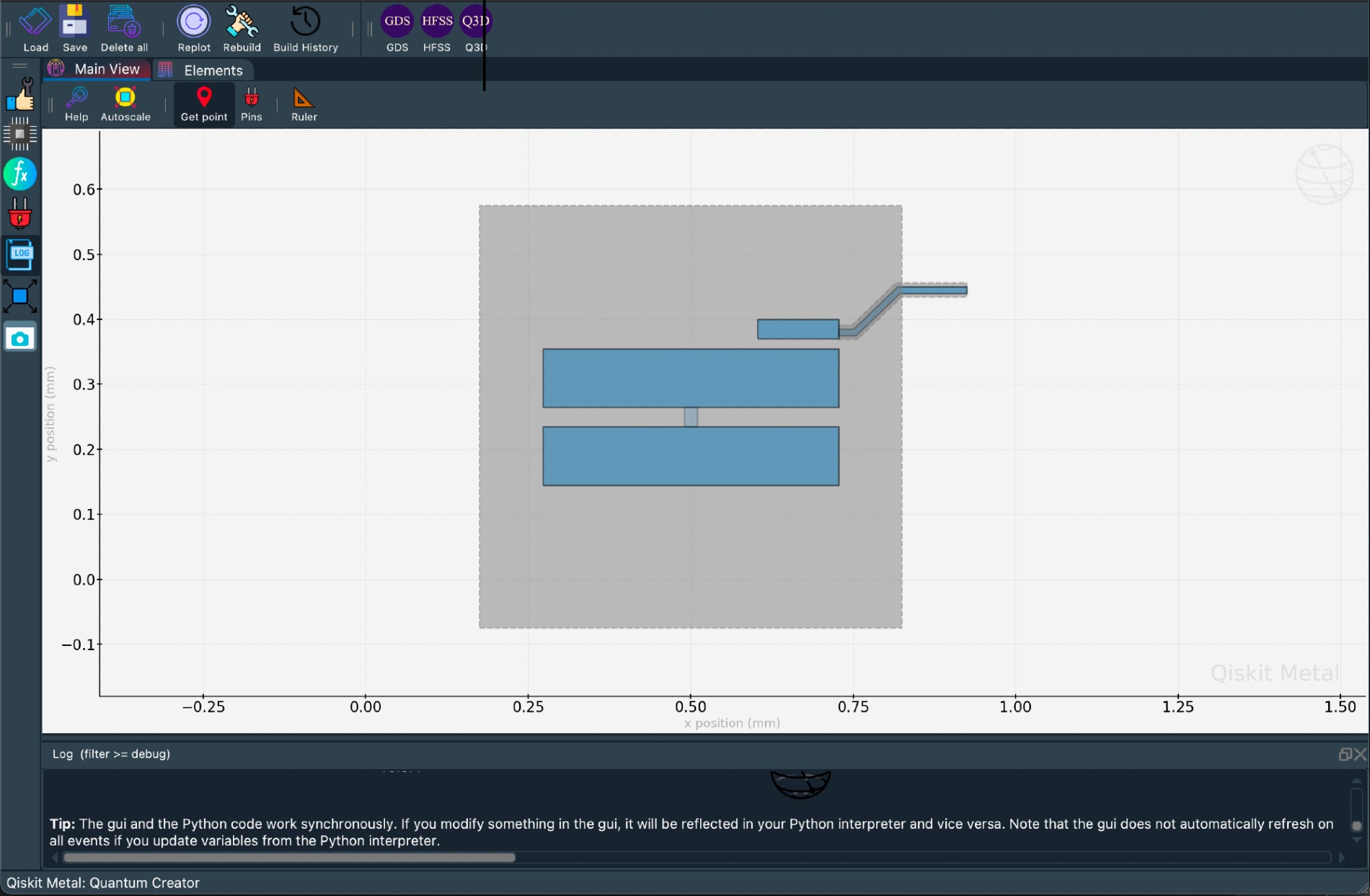
Create your first quantum design in a notebook or script — no Qt required:
import qiskit_metal as qm
from qiskit_metal import designs
from qiskit_metal.qlibrary.qubits.transmon_pocket import TransmonPocket

# Start a planar-chip quantum device design
design = designs.DesignPlanar()
design.chips.main.size.size_x = '11mm'
design.chips.main.size.size_y = '9mm'

# Add a transmon qubit with a connector pad "a"
q1 = TransmonPocket(design, 'Q1', options=dict(
    pos_x='0.5 mm', pos_y='0.25 mm',
    pad_height='90um', pad_width='455um', pad_gap='30um',
    connection_pads=dict(a=dict()),
))

# Render to an inline matplotlib figure — works in Colab, CI, any notebook
fig = qm.view(design)
fig.savefig("my_first_chip.png")
Prefer the interactive desktop GUI?
Install with pip install "quantum-metal[gui]", then replace the qm.view(...)
line with the GUI flow:
from qiskit_metal import MetalGUI

gui = MetalGUI(design)        # launch the interactive editor
gui.rebuild()                 # re-render after edits
gui.edit_component('Q1')      # select for editing
gui.autoscale()
# ... later
gui.main_window.close()
See docs/headless-usage.rst for the full
no-Qt workflow and what to use when.
Next: browse the tutorial notebooks (40+ Jupyter notebooks covering the full API) or the online documentation.
Transition notices
Qiskit Metal → Quantum Metal rebrand (in progress)
- ✅ New project name: Quantum Metal
- ✅ PyPI package:
quantum-metal(current; the oldqiskit-metalpackage stays archived at its pre-v0.5 state) - ✅ Lite-by-default install (v0.7.0)
- 🔜 Repository rename to
quantum-metal— will keep redirects so existing clones and links continue to work - 🔜 Python import path rename (
qiskit_metal→quantum_metal) — target v0.8 or v1.0. Plan to update your imports ahead of that release.
🌐 Ecosystem
Quantum Metal is the open-source chip-design layer for superconducting quantum hardware. A growing community of tools builds on it, extends it with new simulation backends, and plugs into it for quantization and discovery. Full map: docs.../ecosystem.
Built on Quantum Metal
- 🔬 SQuADDS (LFL-Lab @ USC) — validated qubit-design database + parameter interpolation. Published in Quantum journal (Sept 2024).
- 🧲 SQDMetal (SQDLab @ UQ) —
simulation wrapper for
QDesign→ AWS Palace / COMSOL. - 🤖 ML_qubit_design (Fermilab + Northwestern) — ML-based inverse design predicting Quantum Metal parameters from target qubit properties.
- ⚗️ Qiskit-Metal-to-Litho (Onri Jay Benally) — end-to-end design → lithography workflow with headless Colab install scripts, GDS post-processing (PHIDL / GDSTK), EBPG / BEAMER fab prep, and 3D Blender viz. Real fabricated chip examples.
- 🌐 pypalace (Northwestern) — Python toolkit for AWS Palace with Quantum Metal gmsh export.
Solvers Quantum Metal integrates with
AWS Palace (roadmap) ·
Ansys HFSS/Q3D
(via [ansys]) · Elmer FEM (via [mesh]) ·
gmsh (via [mesh]).
Quantization & analysis
Community organization & events
- Quantum Device Workshop (QDW) — annual workshop at UCLA/USC with invited leaders in the field. Recent speakers: Michel Devoret, Andreas Wallraff, Zlatko Minev, Eli Levenson-Falk. Video recordings · Sign for 2026.
- Quantum Device Consortium (QDC) — the community organization stewarding Quantum Metal alongside the tools above. Join the QDC Discord.
Building something on Quantum Metal? Open an issue or ping us on Discord — we'd love to add you to the list.
🌱 From IBM to a Community-Maintained Project
Originally developed at IBM, conceived and led by Dr. Zlatko K. Minev, Quantum Metal has transitioned into a community-driven project supported by universities, research groups, labs, and individual contributors worldwide.
Development continues through the Quantum Device Consortium (QDC), the broader community, and active maintainers — in close collaboration with Zlatko Minev and contributors across QDW/QDC shaping this next chapter.
Acknowledgements for the v0.5+ community release effort and ongoing contributors are tracked in the changelog and the contributors graph.
Community and Support
- 💬 Discord — fastest way to reach maintainers and the broader community. Primary community channel.
- 📺 YouTube video tutorials
- 💻 GitHub Issues — bugs and feature requests
- 🟪 Qiskit Slack
#metal— legacy channel, being phased out in favor of Discord
Contributing
If you'd like to contribute, please read the contribution guidelines and the contributor guide in the docs. This project adheres to the code of conduct. We use GitHub issues for bugs and feature requests.
Architecture
For a high-level walkthrough of the codebase — Core, Renderers, Analyses, GUI,
Utilities — and how they interact, see
README_Architecture.md.
Module-level deep dive:
docs/overview.rst ·
docs/workflow.rst.
Authors and Citation
Quantum Metal is the work of many people who contribute to the project at different levels. The project was conceived and developed by Zlatko Minev at IBM, then co-led with Thomas McConkey, and has since transitioned to community maintenance through the QDC.
If you use Quantum Metal in your research, please cite it — see the BibTeX entry.
Changelog and Release Notes
Release notes for each version are published on the
GitHub releases page.
Developer notes for in-flight releases live in changelog.md.
License
Release history Release notifications | RSS feed


Download files
Download the file for your platform. If you're not sure which to choose, learn more about installing packages.
Source Distribution
Built Distribution
Filter files by name, interpreter, ABI, and platform.
If you're not sure about the file name format, learn more about wheel file names.
Copy a direct link to the current filters
File details
Details for the file quantum_metal-0.7.3.tar.gz.
File metadata
- Download URL: quantum_metal-0.7.3.tar.gz
- Upload date:
- Size: 4.7 MB
- Tags: Source
- Uploaded using Trusted Publishing? No
- Uploaded via: uv/0.9.24 {"installer":{"name":"uv","version":"0.9.24","subcommand":["publish"]},"python":null,"implementation":{"name":null,"version":null},"distro":{"name":"Ubuntu","version":"24.04","id":"noble","libc":null},"system":{"name":null,"release":null},"cpu":null,"openssl_version":null,"setuptools_version":null,"rustc_version":null,"ci":true}
File hashes
| Algorithm | Hash digest | |
|---|---|---|
| SHA256 |
31867d51f943f10eb21e7181ccbb6857d07d39c096b7baca6ae1501ba29df4cb
|
|
| MD5 |
4b976d2f8350209d732cdbca3a54a87c
|
|
| BLAKE2b-256 |
8eb5a47fa10066c4efd17f7a3805d73e94408447f086279a5f7aa072f07234d5
|
File details
Details for the file quantum_metal-0.7.3-py3-none-any.whl.
File metadata
- Download URL: quantum_metal-0.7.3-py3-none-any.whl
- Upload date:
- Size: 5.1 MB
- Tags: Python 3
- Uploaded using Trusted Publishing? No
- Uploaded via: uv/0.9.24 {"installer":{"name":"uv","version":"0.9.24","subcommand":["publish"]},"python":null,"implementation":{"name":null,"version":null},"distro":{"name":"Ubuntu","version":"24.04","id":"noble","libc":null},"system":{"name":null,"release":null},"cpu":null,"openssl_version":null,"setuptools_version":null,"rustc_version":null,"ci":true}
File hashes
| Algorithm | Hash digest | |
|---|---|---|
| SHA256 |
9f37ead68121034b44496030884b5f4dd896c8bf8305705274c5ec17ee3856b4
|
|
| MD5 |
150975e19c0cae6bb68b4c9b10b46721
|
|
| BLAKE2b-256 |
2d159f09413db5d178d91bf216dbb3db92859dfab4e270b53b758a9a2c9305f7
|






